codelaw for VS Code
Diagnostics, quick fixes, fix-on-save and formatting from
codelaw — one linter and formatter for
JavaScript, TypeScript, Python, JSON, YAML, TOML, Markdown, CSS, SCSS and HTML.
The extension holds no lint logic: it starts codelaw lsp and adds commands, so
the editor shows exactly what codelaw check reports
(SR-EDITOR).
Which codelaw runs: codelaw.path, else the workspace's
node_modules/.bin/codelaw, else .venv/bin/codelaw (or beside
python.defaultInterpreterPath), else the binary bundled in this extension's
platform package. The project's own codelaw wins, so the editor agrees with CI.
Commands: Fix all · Format · Explain rule · Restart server · Show output ·
Copy debug info · Refresh the dependency snapshot.
Settings: codelaw.enable, codelaw.path, codelaw.fixOnSave,
codelaw.formatOnSave, codelaw.logLevel, codelaw.trace.server, and the
look's settings below.
How findings look
Three kinds of file, each with its own setting; every one can be squiggles
or badges:
| setting |
covers |
default |
codelaw.view.code |
findings in JavaScript, TypeScript and Python code |
squiggles |
codelaw.view.manifests |
package.json, pyproject.toml, their lockfiles, .nvmrc, .python-version, .tool-versions |
badges |
codelaw.view.markers |
TODO, FIXME, HACK and SKIP comments, skipped tests |
badges |
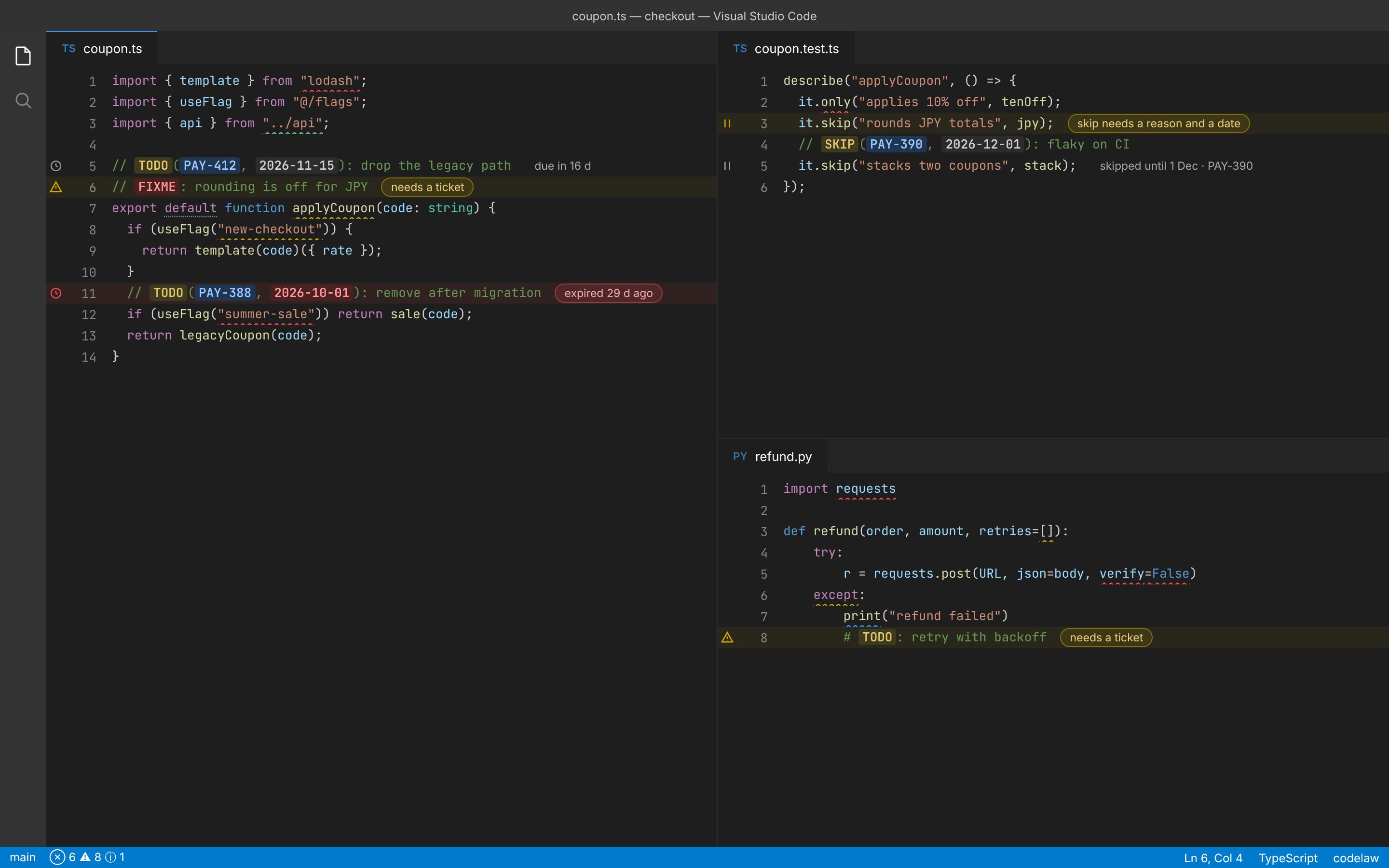
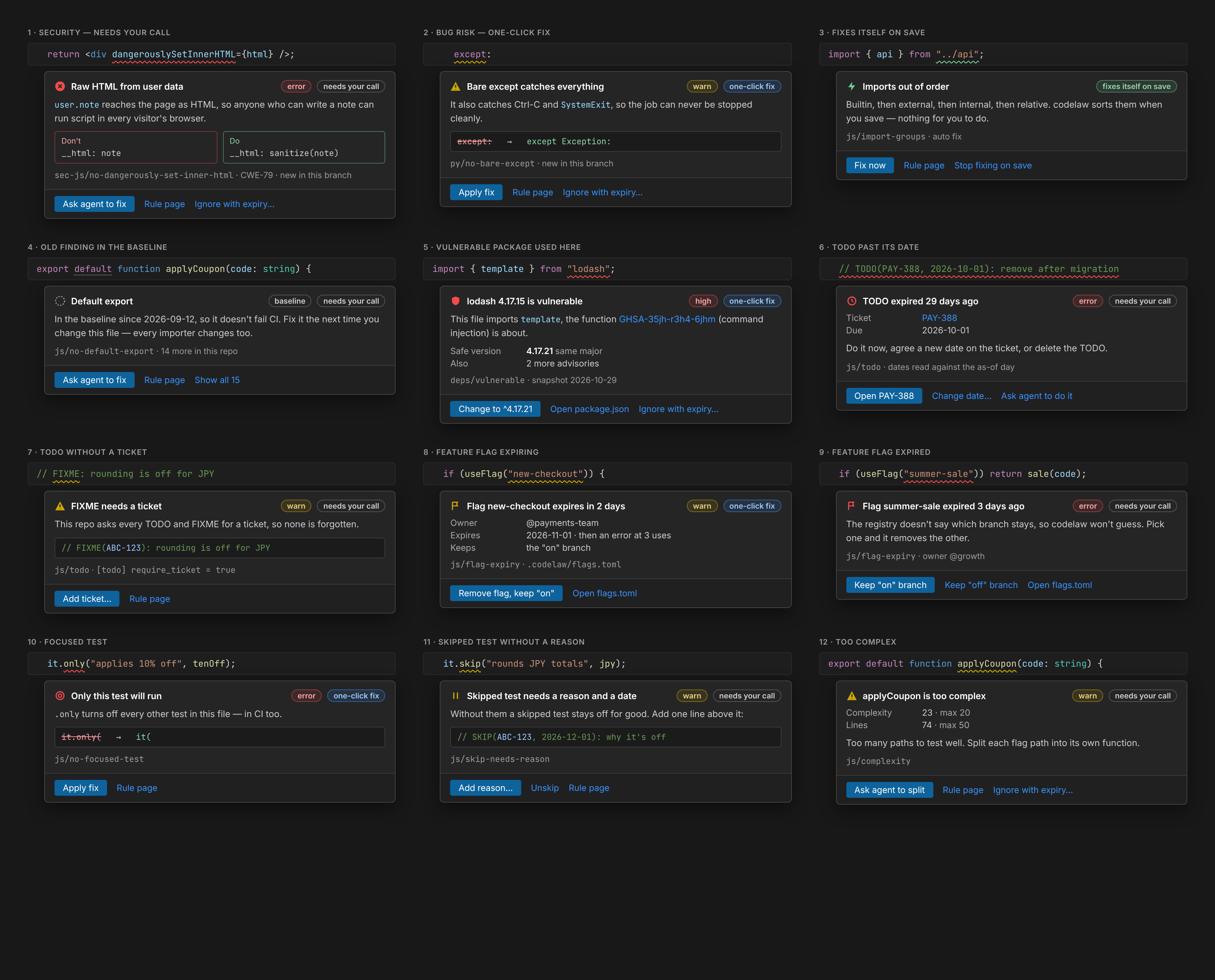
- Code gets a squiggle only — red error, yellow warning, blue info, green
when codelaw fixes it on save, dotted grey when the baseline holds it — and a
card while you hover: what is wrong in plain words, the severity and what
the fix takes, one sentence on why, the fix as before → after or the rule's
Don't/Do, the rule id, and one action (Apply fix, Ask agent to fix, …)
with Rule page and Ignore with expiry….
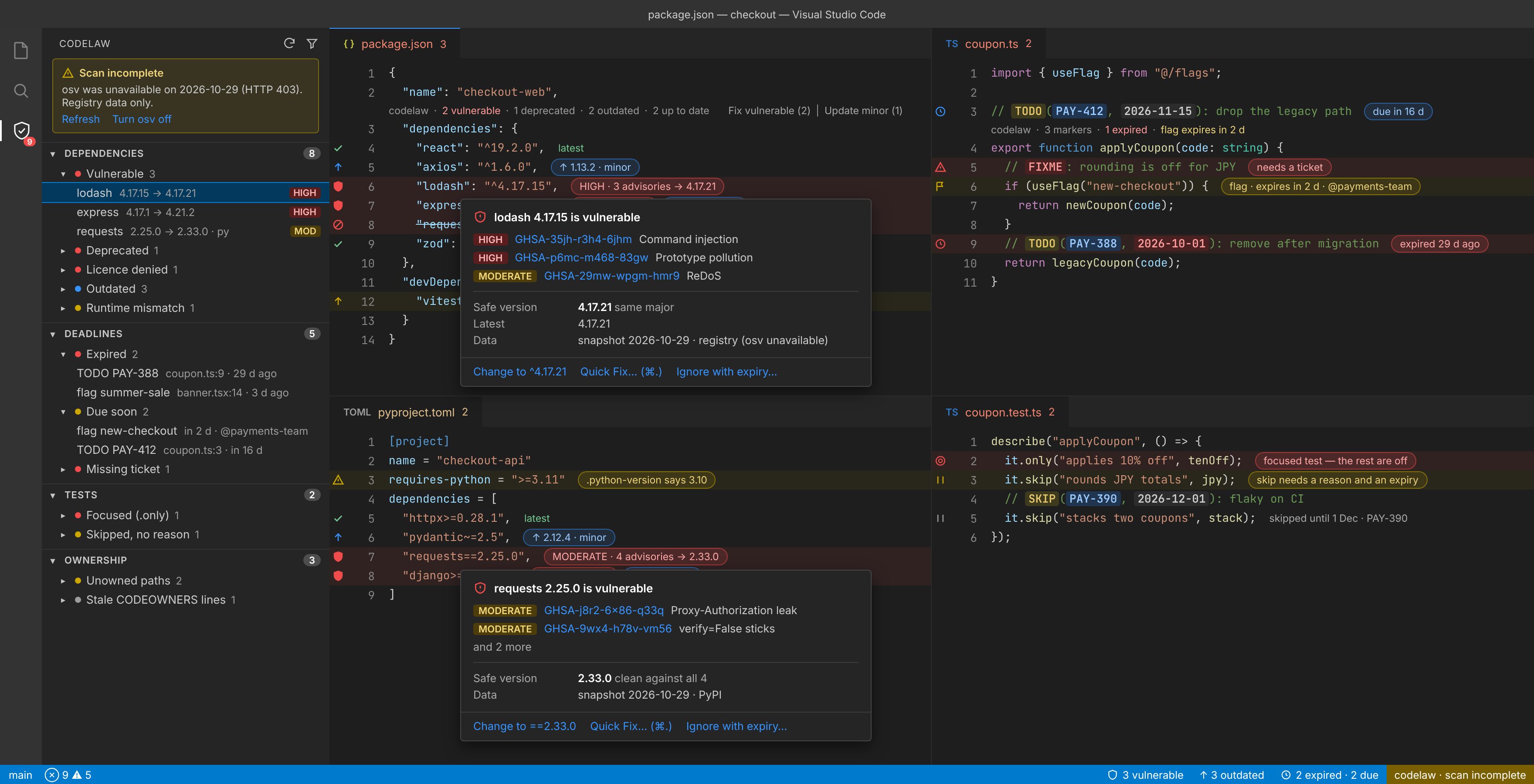
- Manifests get a glyph in the gutter, a tinted line and a badge with words
on each dependency (
HIGH · 3 advisories → 4.17.21, ↑ 1.13.2 · minor,
latest), a summary line with Fix vulnerable and Update minor and patch,
and the same card on hover with the safe version and the advisories.
- Markers get chips on the tag, the ticket and the date, and a badge
(
expired 29 d ago, needs a ticket, skip needs a reason and a date).
- The codelaw sidebar lists Dependencies, Deadlines, Tests and Ownership,
with a banner and Refresh while the dependency scan is incomplete
(
codelaw.sidebar); the status bar counts vulnerable, outdated, expired
and due; tab names take the colour and count of their findings.
codelaw.badges.clean turns the latest badge off.
Colours are theme colours (codelaw.* in Preferences: Color Theme →
workbench.colorCustomizations), so light and high-contrast themes get their
own; a badge always carries words, never colour alone.
The pictures below are the design this extension builds
(docs/design/editor), not screenshots; version numbers in them are
illustrative.
Troubleshooting
- Where the log is: run codelaw: Show output (or click the status-bar item).
It starts with the extension, VS Code and OS versions, every codelaw binary
it tried and why it used the one it did, and the server's version.
- A file shows nothing: the log says why, once per file: no covered
language, excluded, outside
include, or a config that does not load.
- More detail: set
codelaw.logLevel to debug (no restart needed) to add
one line per check with the rule count, diagnostic count and milliseconds.
codelaw.trace.server is the raw protocol, for protocol bugs only.
- Reporting a problem: run codelaw: Copy debug info and paste the result
in an issue. It holds versions,
the binary path, settings and the last 200 log lines; the log never holds
your source text or environment variables.
Developing
npm ci && npm test # compiles and tests the binary lookup, the logging helpers and the findings' look
version is the one version (L6 decision 9): scripts/version.py --set writes
it here and in package-lock.json, and --check fails when either drifts.
scripts/vsix.py build makes the eight platform .vsix files, each with its
bin/codelaw; scripts/vsix.py check checks them. Every link in this file is
absolute: it is the Marketplace and Open VSX page, where a relative link breaks.
| |

