Skip to content
| Marketplace
Sign in
Visual Studio Code>Other>Antigravity PulseNew to Visual Studio Code? Get it now.
Antigravity Pulse

Antigravity Pulse

J. David Garcia

|
6 installs
| (0) | Free
100% local & super lightweight Antigravity quota monitor
Installation
Launch VS Code Quick Open (Ctrl+P), paste the following command, and press enter.
Copied to clipboard
More Info

Antigravity Pulse

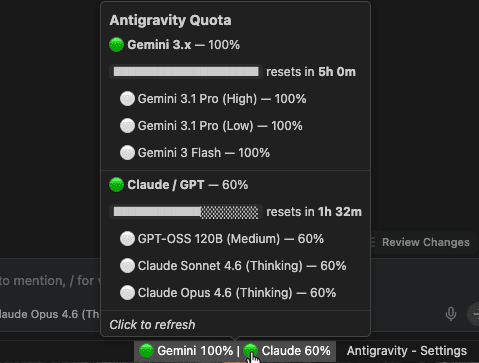
100% local & private. Super lightweight. A 120 KB status bar extension for Antigravity Pro & Ultra users who want to monitor their AI model quota at a glance — without external network calls, OAuth flows, or background overhead.

Antigravity Pulse

Hover for a rich Markdown tooltip with per-pool progress bars, individual model breakdown, and reset timers.


Privacy first

Everything runs 100% on your machine. The extension reads quota data from the Antigravity process already running locally — no requests ever leave localhost.

  • No internet requests — every call stays on 127.0.0.1
  • No Google authentication — no OAuth, no tokens stored, no login required
  • No data sent to any server — your usage patterns stay private
  • No special permissions — no filesystem access, no telemetry

Lightweight

The entire extension is 120 KB unpacked. No bundled webviews, no CSS frameworks, no localization files. Three TypeScript files compiled to plain JavaScript.

  • Activates in milliseconds
  • Polls every 30 seconds with a single local HTTPS POST (~1ms round trip)
  • Zero dependencies beyond the VS Code API

Clear at a glance

Each model pool gets a color-coded health indicator directly in the status bar:

Icon Status Remaining
🟢 Healthy > 50%
🟡 Low 20% – 50%
🔴 Critical < 20%

Per-pool quota tracking

Antigravity groups AI models into independent quota pools, each resetting every ~5 hours:

Label Pool Includes
Gemini Gemini 3.x Gemini 3 Pro (High), Gemini 3 Pro (Low), Gemini 3 Flash
Claude Claude / GPT Claude Sonnet 4.5, Claude Opus 4.5, GPT-OSS 120B
Gemini 2.5 Gemini 2.5 Gemini 2.5 Flash

Each pool's quota is tracked independently — exhausting Claude/GPT does not affect your Gemini quota.

Hover tooltip

Hover over the status bar item for a detailed, formatted breakdown:

  • Per-pool remaining percentage with visual progress bars
  • Time until reset for each pool
  • Individual model quotas when models within a pool differ
  • Clean Markdown formatting, no popup windows

How it works

  1. Process detection — scans for the Antigravity language_server process
  2. Token extraction — reads the CSRF token from the process arguments
  3. Port discovery — finds the correct local API port
  4. Local API call — POST https://127.0.0.1:{port}/.../GetUserStatus — strictly local
  5. Display — groups models by pool, updates the status bar every 30 seconds

Install

  1. Download the .vsix from Releases
  2. Cmd+Shift+P then Extensions: Install from VSIX...
  3. Select the file and reload

Configuration

Setting Default Description
antigravityPulse.pollingInterval 30 Refresh interval in seconds (min: 30)

Requirements

  • Antigravity IDE must be running
  • Pro or Ultra subscription for meaningful quota tracking

GitHub

Source code and releases: codavidgarcia/antigravity-pulse

If you find this useful, consider giving it a ⭐ on GitHub!

License

MIT

  • Contact us
  • Jobs
  • Privacy
  • Manage cookies
  • Terms of use
  • Trademarks
© 2026 Microsoft