
Interactive SQL and PySpark Notebooks | Powered by DuckDB
📝 Table of Contents
🧐 About
DuckLab for VS Code provides data analysis features for SQL, PySpark and Python. It uses DuckDB to process your data locally.
🔥 Features
- Run SQL and Python in the same notebook using same duckdb instance (exposed as
db variable in python)
- Ducklab Spark Kernel allows running pyspark code using
duckdb.experimental.spark module (exposed as spark, a SparkSession instance).
- Import Databricks
.py notebooks and preview in a user-friendly VS Code Notebook window.
- Use any python, venv or conda environment detected by VS Code Python extension.
- Git-friendly Markdown Notebook format. SQL and Python fenced blocks become executable cells; Markdown stays readable in any Markdown editor.
- Breaking change:
.isql notebooks are no longer recognized. Convert -- %% cell headers to Markdown code fences before opening them with Ducklab.
- Ducklab doesn't use
ipynb format which stores cell outputs in the file and pollutes git. It also makes diff in pull requests unreadable.
- Cell magics for convenience.
🏁 Getting Started
Using Ducklab SQL Kernel (no dependencies required)
- Create a
.md file and choose Open With > Ducklab when you want notebook cells. Ordinary Markdown editing and preview remain available.
- Select kernel
SQL Only.
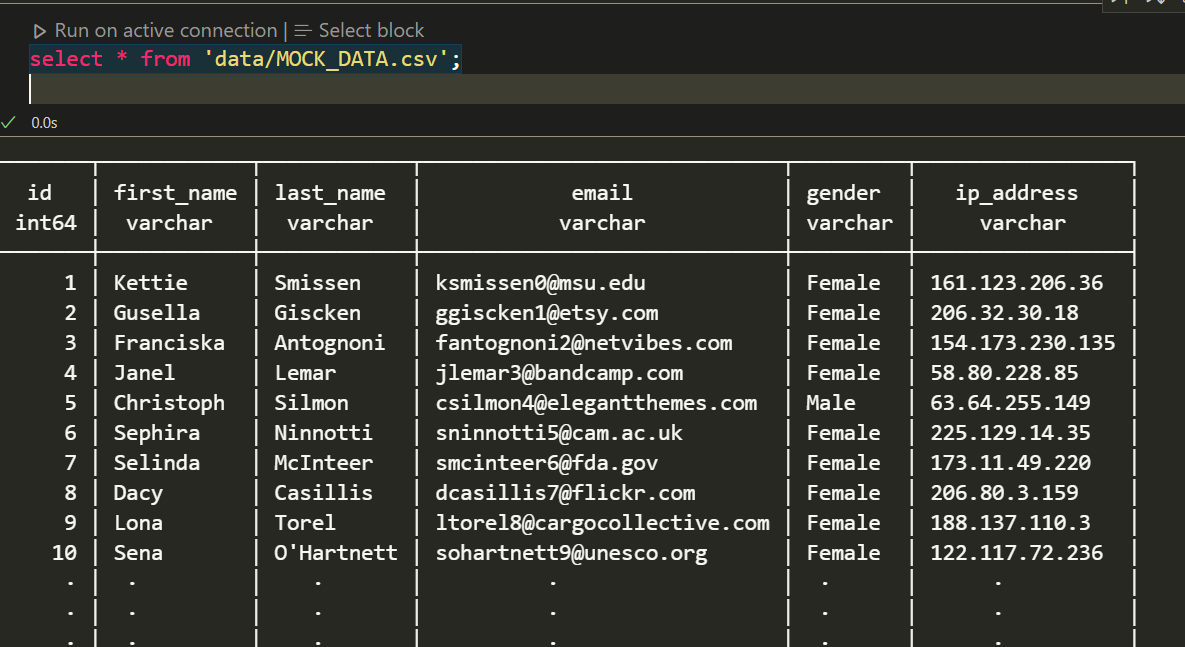
- Add SQL inside a fenced block and run the cell:
select * from 'data/MOCK_DATA.csv';
Use ```sql | name or ```python | name to name a cell. Text between code fences is a Markdown cell. Separate adjacent Markdown cells with <!-- ducklab:cell -->.
The SQL Only kernel stores each notebook's database in ~/.ducklab (the .ducklab directory in your home directory). Ducklab creates this directory automatically when opening the database. Existing databases in the system temporary directory are not migrated automatically.
Default database name
The SQL Only kernel uses ducklab as its default database name. Set ducklab.databaseName in VS Code user or workspace settings to customize it:
{
  "ducklab.databaseName": "ducklab"
}
Close and reopen the notebook after changing this setting. Each notebook keeps its original independent database file and existing data; only its SQL catalog alias changes. Update queries that explicitly qualify tables with the previous database name. Names must start with a letter or underscore and contain only letters, digits, and underscores; memory, system, and temp are reserved (case-insensitive).
The file is attached under the configured alias and selected as the default database, so current_database() returns that name and unqualified tables are stored there. An additional internal memory database appears in database/schema listings. Python/SQL and PySpark/SQL are unchanged.
Unsigned DuckDB extensions
To load a trusted unsigned extension, enable Ducklab: Allow Unsigned Extensions in VS Code User Settings, or add the following to your user settings:
{
  "ducklab.allowUnsignedExtensions": true
}
This setting defaults to false and applies to SQL Only, Python/SQL, and PySpark/SQL kernels. It sets DuckDB's startup option allow_unsigned_extensions, equivalent to the CLI -unsigned flag. Reload the VS Code window after changing it. This is a user-level setting, not a workspace setting.
Unsigned extensions execute native code with your user permissions. Only enable this for extensions you trust. PySpark/SQL uses a configured SparkContext connection when enabled because DuckDB's experimental Spark builder does not apply config() options.
SQL environment variables
Place a .env file next to the .md notebook to provide values for SQL cells. Ducklab expands $NAME and ${NAME} before running SQL in the SQL Only, Python/SQL, and PySpark/SQL kernels. Python cells are not modified. The .env file is re-read for each SQL cell; its values override matching extension process environment variables. If a referenced name is missing from both sources, execution stops and reports the missing name.
For example, copy sample/.env.example to the directory containing your notebook and use:
ATTACH 'host=$PGHOST dbname=$PGDATABASE user=$PGUSER password=$PGPASSWORD' AS duckspm (TYPE postgres);
Keep credentials in .env, which is ignored by Git. Variable values are substituted as SQL text and must be valid in the surrounding SQL syntax.
Large query results
Single-query tabular results use backend pagination in the SQL Only, Python/SQL, and PySpark/SQL kernels. Only the visible page is sent to the interactive table; page navigation, global search, column filters, sorting, row counts, and Explore statistics are evaluated by the kernel. Value-filter suggestions are loaded on demand and capped at 200 per search. CSV export fetches the filtered result in pages. DDL and multi-statement cells keep their existing output behavior.
Using Cell Magics
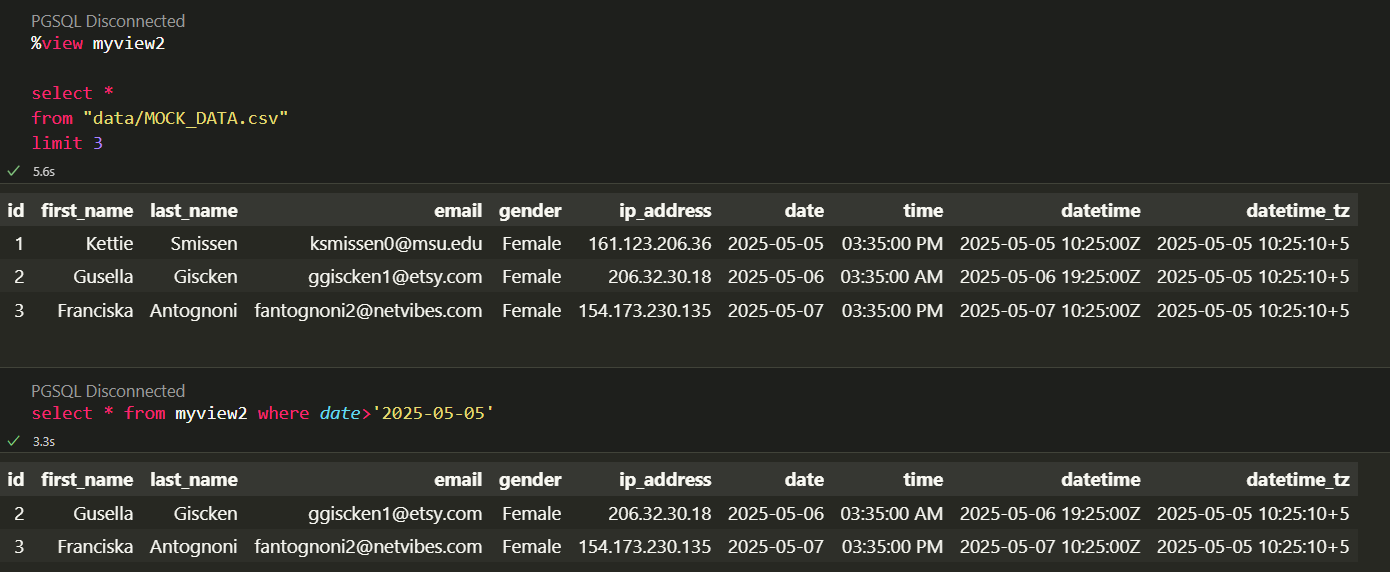
- Use '%view myview' cell magic to create a view from your SELECT query and preview the results.
Using Ducklab Python Kernel
- Make sure python or Anaconda is installed.
- Open a
.md file with Ducklab, or create one.
- Select kernel
Python/SQL
- Click
Python Environment in the notebook toolbar and select an interpreter. The selection panel marks the currently selected interpreter.
ducklab-python kernel will have db variable (duckdb connection) already initialized for you.- Run python or SQL code
Using Ducklab Spark Kernel
- Make sure python or Anaconda is installed.
- Open a
.md file with Ducklab, or create one.
- Select kernel
PySpark/SQL
- Click
Python Environment in the notebook toolbar and select an interpreter.
ducklab-spark kernel will have spark variable (SparkSession) already initialized for you.- Run spark code,
import pandas as pd
from duckdb.experimental.spark.sql.functions import lit, col

pandas_df = pd.DataFrame({
    'age': [34, 45, 23, 56],
    'name': ['Joan', 'Peter', 'John', 'Bob']
})

df = spark.createDataFrame(pandas_df)
df = df.withColumn(
    'location', lit('Seattle')
)
df = df.select(
    col('age'),
    col('location')
)

display(df)
Import Databricks Notebook
- Right click on a Databricks
.py notebook file
- Click
Import Databricks Notebook
💬 Contribute
Contributions are most welcome. There are various ways you can contribute,
Installing extension dependencies
Use pnpm 10.33.3 and run pnpm install --frozen-lockfile from vs-extension. The checked-in pnpm-workspace.yaml approves installation scripts only for @vscode/vsce-sign, keytar, and zeromq, so CI does not require interactive pnpm approve-builds. Review any new dependency build scripts before adding them to this list.
VSIX packages retain only their target operating system's native binaries under extension/build: Darwin packages exclude Linux and Windows binaries, Linux packages exclude Darwin and Windows binaries, and Windows packages exclude Darwin and Linux binaries.
Implement a new feature
- Create an issue and provide your reasoning on why you want to add this feature.
- Discuss your approach and design.
- Implement the feature and submit your PR.
Request a new feature
- Open an issue and provide details about your feature request.
- In case other tools implement that functionality then it will be helpful to share the reference for inspiration and design.
Fix a bug
- If you are resolving an issue, please add fix: # in your PR title (e.g.fix: #3899 update entities encoding/decoding).
- Provide a short description of the bug in your PR and/or link to the issue.
🎉 Acknowledgements
- DuckDb - In-process analytics database



