Skip to content
| Marketplace
Sign in
Visual Studio Code>Programming Languages>CloudairyNew to Visual Studio Code? Get it now.
Cloudairy

Cloudairy

Cloudairy

| (0) | Free
Build, edit, and preview Cloudairy diagrams directly inside Visual Studio Code with an interactive visualization editor.
Installation
Launch VS Code Quick Open (Ctrl+P), paste the following command, and press enter.
Copied to clipboard
More Info

Cloudairy – AI Diagrams & Architecture for VS Code

Version Installs Rating Platform AI Powered

Create diagrams, architecture visuals, and system documentation directly inside Visual Studio Code using Cloudairy.

Cloudairy brings AI-powered diagram generation and visual system design into the developer workflow so you can design systems without leaving your editor.


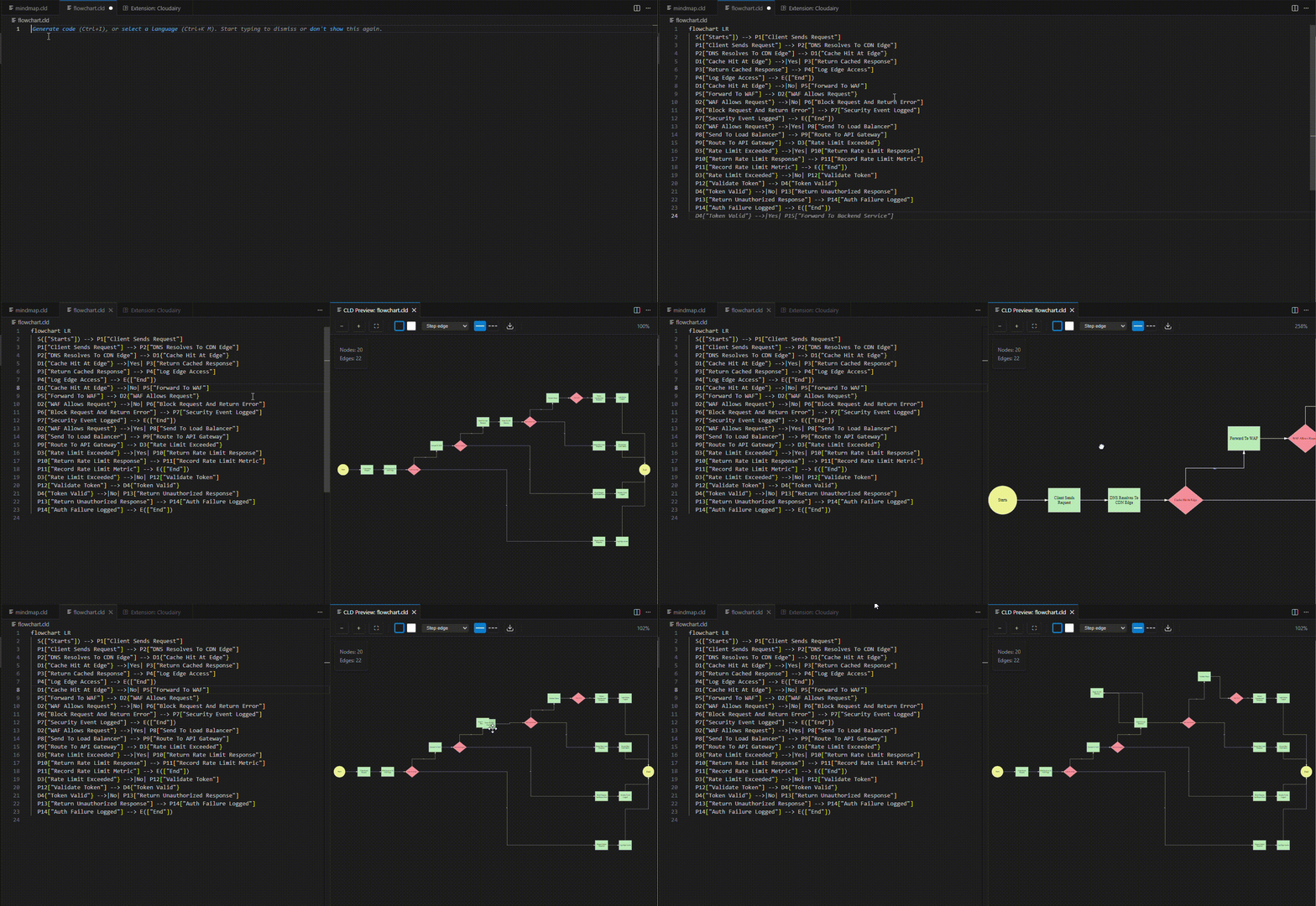
Demo

Cloudairy Demo

Generate architecture diagrams, flowcharts, and system visualizations instantly.


Features

AI Diagram Generation

Generate diagrams using natural language prompts.

Supported diagrams:

  • Flowcharts
  • Sequence diagrams
  • ER diagrams
  • Mind maps
  • System workflows
  • UML diagrams
  • Architecture diagrams

Example prompt:

Create a login authentication flow with validation and database access

Cloudairy generates the diagram automatically.


Cloud Architecture Visualization

Design and visualize cloud infrastructure.

Supported architectures:

  • AWS architecture
  • Azure architecture
  • Kubernetes infrastructure
  • Serverless systems
  • Microservices architecture

Example:

Generate AWS architecture with CloudFront, ALB, ECS services and RDS

Workflow and System Design

Visualize application logic quickly.

Common examples:

  • CI/CD pipelines
  • authentication flows
  • API request flows
  • microservice communication
  • business process workflows

Visual Documentation

Create visual documentation alongside your code.

Export diagrams to Cloudairy workspace where teams can:

  • collaborate
  • refine diagrams
  • present system architecture
  • export diagrams
  • share with teams

Quick Start

  1. Install the Cloudairy VS Code Extension

  2. Open Command Palette

Ctrl + Shift + P
  1. Run
Cloudairy: Generate Diagram
  1. Enter a prompt describing your diagram.

Example:

Create a microservices architecture with API gateway, authentication service and PostgreSQL

Cloudairy generates the diagram instantly.


Example Prompts

Cloud Architecture

Generate AWS architecture with API Gateway, Lambda, DynamoDB and S3

Microservices Architecture

Create microservices architecture with gateway, auth service, user service and PostgreSQL

Flowchart

Create a user login workflow with validation and authentication

Sequence Diagram

Generate payment processing sequence diagram between frontend, API and payment gateway

ER Diagram

Generate ER diagram for users, orders, products and payments

Commands

Command Description
Cloudairy: Generate Diagram Generate diagrams using AI
Cloudairy: Generate Architecture Diagram Generate cloud architecture diagrams
Cloudairy: Generate Flowchart Generate workflow diagrams
Cloudairy: Generate Sequence Diagram Generate sequence diagrams
Cloudairy: Export to Cloudairy Workspace Export diagrams to Cloudairy

Supported Diagram Types

Cloudairy supports:

  • Flowcharts
  • Cloud architecture diagrams
  • Sequence diagrams
  • Entity relationship diagrams
  • Mind maps
  • Workflow diagrams
  • System design diagrams

Using the Extension

Install Extension

  1. Open VS Code
  2. Go to Extensions
  3. Search Cloudairy
  4. Click Install

Generate Diagram

Open command palette:

Ctrl + Shift + P

Run:

Cloudairy: Generate Diagram

Enter a prompt describing your system.


Cloudairy Workspace Integration

Diagrams generated in VS Code can be exported to Cloudairy workspace.

Benefits:

  • collaborative editing
  • diagram presentations
  • PNG export
  • SVG export
  • PDF export
  • team sharing
  • organized workspaces

Requirements

A Cloudairy account is required to use workspace features.

Create an account:

https://cloudairy.com


Cloudairy Platform

Cloudairy is an AI-powered visual workspace for creation, collaboration, and system design.

Capabilities include:

  • AI diagram generation
  • cloud architecture visualization
  • collaborative visual workspaces
  • documentation diagrams
  • brainstorming and ideation
  • export to multiple formats

Learn more:

https://cloudairy.com


Privacy

Cloudairy processes prompts and diagram generation requests to provide AI-powered features.

For details see the Cloudairy Privacy Policy:

https://cloudairy.com/privacy-policy


Support

If you encounter issues or need assistance:

Support portal:

https://cloudairy.com/help-center


License

This extension is proprietary software owned by Cloudairy.

Use of this extension is governed by the Cloudairy Terms of Service.

https://cloudairy.com/terms-and-conditions


Changelog

1.0.0

Initial release.

Added

  • AI diagram generation
  • cloud architecture diagrams
  • flowchart generation
  • sequence diagrams
  • workspace export
  • command palette integration

1.0.1

Improvements

  • improved rendering performance
  • enhanced architecture prompts
  • improved workspace export

Fixes

  • command palette issue resolved
  • minor UI fixes

Extension Documentation

The Cloudairy VS Code extension integrates diagram generation with the Cloudairy platform.

Developers can generate visual system diagrams directly inside VS Code and export them to Cloudairy workspaces.

The extension supports architecture design, workflow diagrams, system documentation, and collaboration.

Example systems that can be visualized:

  • microservices architectures
  • serverless systems
  • event-driven architectures
  • CI/CD pipelines
  • API workflows

About Cloudairy

Cloudairy is an all-in-one AI workspace for creation, collaboration, and visual system design.

Developers and teams use Cloudairy to create:

  • architecture diagrams
  • flowcharts
  • ER diagrams
  • sequence diagrams
  • documentation visuals
  • collaborative workspaces

Website
https://cloudairy.com

  • Contact us
  • Jobs
  • Privacy
  • Manage cookies
  • Terms of use
  • Trademarks
© 2026 Microsoft