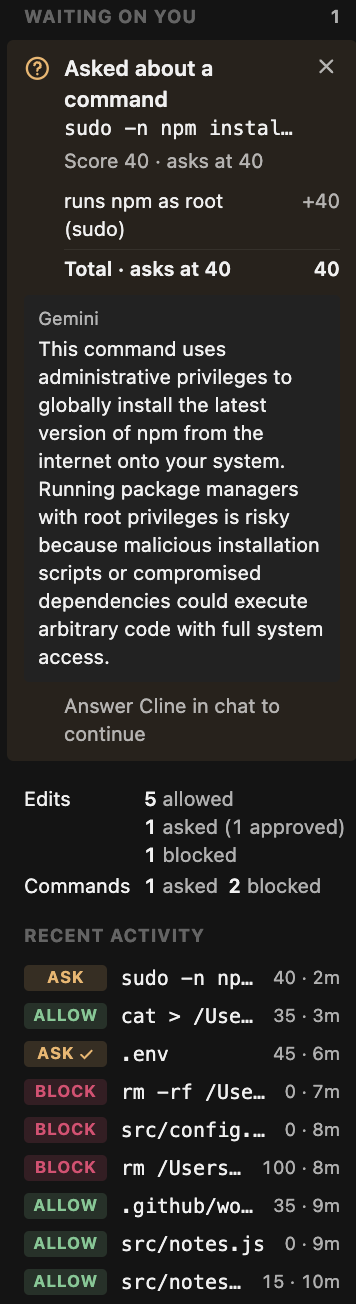
ClineShieldLive dashboard for ClineShield, the safety plugin for Cline: every allow, ask and block as it happens, and a map of the files Cline touched. Installation Launch VS Code Quick Open ( Ctrl+P), paste the following command, and press enter.Copied to clipboard |

A live dashboard for ClineShield, the safety plugin for Cline. ClineShield scores every action Cline takes before it runs and answers allow, ask or block. This extension shows what it decided, as it happens.
What it showsOpen the ClineShield view in the activity bar:
Explanations (opt-in)Run ClineShield: Set Gemini API Key, then click Explain on an action for a plain-English explanation from Gemini. Nothing is sent until you click. The key is kept in VS Code's secret storage, never in a file, and secrets are stripped from code before it is sent. ClineShield: Clear Gemini API Key turns it off. Everything else works without a key. Works inVS Code and its forks (Cursor, Windsurf, VSCodium…). It reads MoreHow scoring works, every config key and the evaluation results: github.com/HansChundekad/ClineShield. MIT © 2026 Hans Chundekad. ClineShield is an independent project, not affiliated with or endorsed by Cline. |