
Claude API SwitchManage & switch Claude Code API endpoints from the sidebar. Test connectivity, track usage, one-click apply. Installation Launch VS Code Quick Open ( Ctrl+P), paste the following command, and press enter.Copied to clipboard |

🤖 Claude API Switch
⚡ What is this?Claude Code connects to an AI backend via API. When you use providers like DeepSeek, Alibaba Qwen, or a local proxy, you need to set environment variables ( This extension gives you a sidebar UI to manage those configurations as named profiles and switch between them with a single click. No more digging through JSON files by hand.
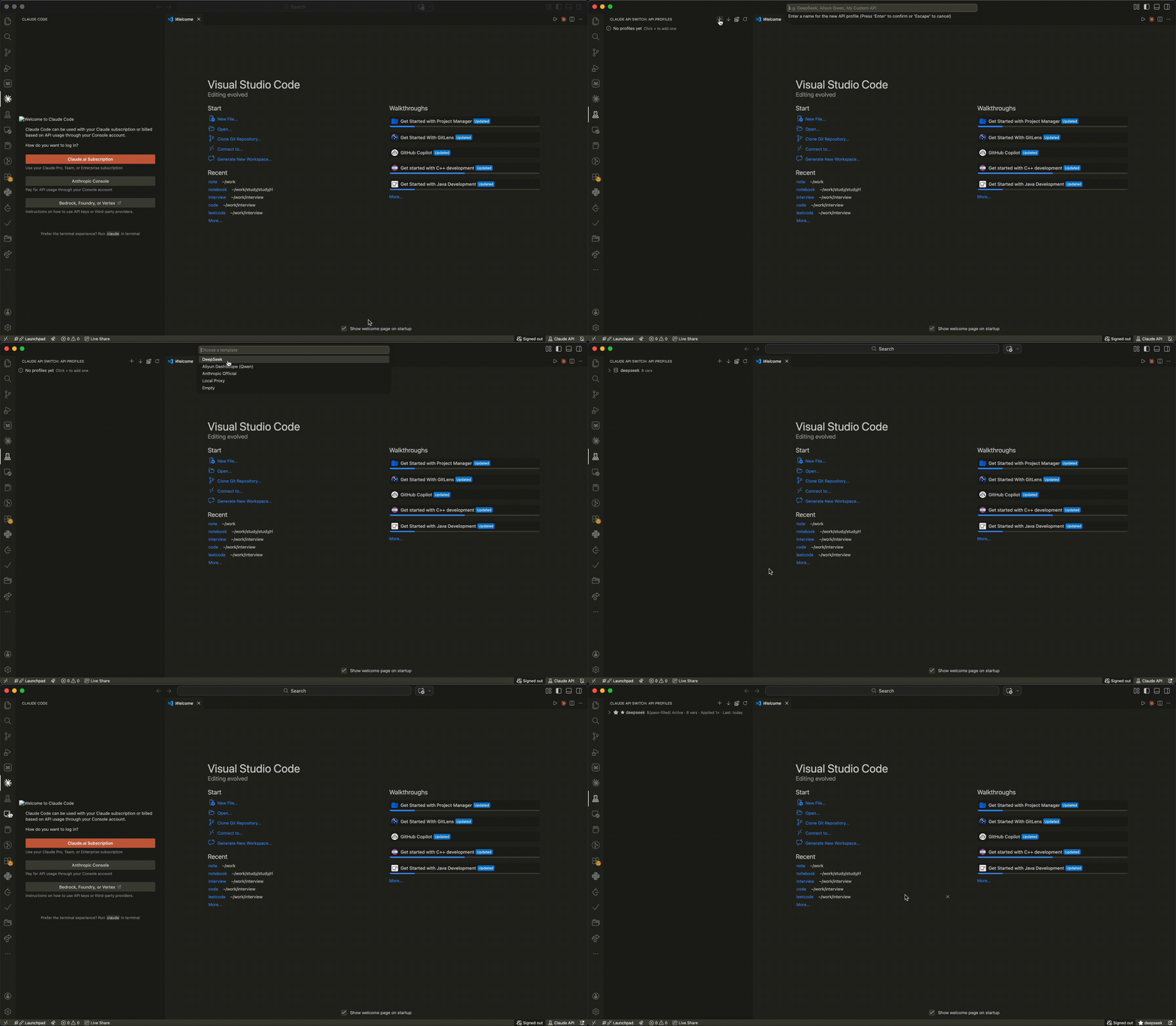
🚀 Quick Start — Add Your First Profile (3 Steps)The simplest operation: add a profile, apply it, done.
Step ① — Open the sidebarClick the server icon $(server-environment) in the activity bar (left edge of your editor). The "API Profiles" panel slides open. Step ② — Click + and fill in your keyClick the + button in the sidebar toolbar → Enter a name (e.g. A web form opens with most fields pre-filled. The only thing you need to do is replace Step ③ — Apply and test
That's it. Claude Code is now using your configured API. The whole process takes under 30 seconds. 🖥️ Extension Interface — Where to find everythingThe extension is designed so you can figure it out just by looking at the sidebar:
Each profile in the sidebar shows its name, notes preview, and usage count — active profile is marked with a ★ star. ✨ Features
📸 Demo
🧩 Why use this?
🚀 InstallationInstall from VSIX
Or from the command line: From Source (Development)📋 Profile FormatSingle Profile (
|




| Command | How to access | Description |
|---|---|---|
Add API Profile |
Sidebar + | Create a new profile |
Edit Profile |
Inline ✎ | Edit profile in web form |
Edit Profile as JSON |
Right-click | Open the editor in JSON mode — toggle between Form and JSON views, Save validates the syntax first |
Apply Profile |
Inline ✓ | Write to settings.json |
Test API Connection |
Inline ▶ | Test endpoint connectivity |
Quick Switch Profile |
Cmd+Shift+P |
Fast profile switching |
Duplicate Profile |
Right-click | Clone a profile |
Import Profile from Current Settings |
Sidebar ↓ | Capture current config |
Export Profile as JSON |
Right-click | Export single profile |
Export All Profiles |
Sidebar ⋯ | Bulk backup — all profiles as one JSON file |
Import Profile from JSON |
Sidebar ⋯ | Import a single profile — also accepts an Export-All file (imports all) |
Import Profiles from JSON |
Sidebar ⋯ | Bulk import — also accepts a single profile object |
View Current Config |
Cmd+Shift+P |
Inspect active settings |
Clear Usage Statistics |
Cmd+Shift+P |
Reset usage counters |
Refresh Profiles |
Sidebar ↻ | Refresh the tree view |
🧩 Supported Environments
The extension automatically detects which editor it's running in by locating settings.json:
| Editor | Settings Path (macOS) |
|---|---|
| Cursor | ~/Library/Application Support/Cursor/User/settings.json |
| VS Code | ~/Library/Application Support/Code/User/settings.json |
| VSCodium | ~/Library/Application Support/VSCodium/User/settings.json |
| Windsurf | ~/Library/Application Support/Windsurf/User/settings.json |
| Code - OSS | ~/Library/Application Support/Code - OSS/User/settings.json |
Also works on Windows and Linux with platform-aware path detection.
🛠 Development
git clone https://github.com/zhhwss/claude_switch.git
cd claude-switch
# Open in VS Code / Cursor
# Press F5 to launch Extension Development Host
Debug Commands
Debug: Show Extension State— Inspect all profiles, active ID, settings path, and current configDebug: Create Test Profile— Create a test profile bypassing the webview to verify the storage pipeline
Project Structure
claude_switch/
├── package.json           # Extension manifest
├── extension.js           # All extension logic (single file, zero npm dependencies)
├── .github/workflows/     # CI/CD for publishing
├── images/                # Icon files
├── LICENSE                # MIT
├── CHANGELOG.md
├── CONTRIBUTING.md
├── README.md
└── README_zh.md
📦 Publishing
VS Code / Cursor Marketplace
# Install vsce
npm install -g @vscode/vsce

# Create a publisher (one-time)
# https://marketplace.visualstudio.com/manage/createpublisher

# Package & publish
vsce package
vsce publish

# Or publish to Open VSX Registry
npm install -g ovsx
ovsx publish
CI/CD (GitHub Actions)
- Create a Personal Access Token from Azure DevOps
- Add it as a GitHub secret:
VSCE_PAT - (Optional) Add an Open VSX token as
OVSX_PAT - Push a version tag:
git tag v1.0.0 && git push --tags
🤝 Contributing
Contributions are welcome! See CONTRIBUTING.md for guidelines.
Ideas for contributions:
- Additional API provider templates
- Cost estimation based on token usage
- Workspace-specific profile auto-switching
- i18n / localization
- More comprehensive API response parsing
📄 License
MIT © 2026 Claude API Switch Contributors. See LICENSE for details.