Skip to content
| Marketplace
Sign in
Visual Studio Code>AI>Clanker ControllerNew to Visual Studio Code? Get it now.
Clanker Controller

Clanker Controller

Clanker Controller

| (0) | Free
Unified Liquid Glass launcher for headless Claude Code, Codex, and Gemini 3.8 chat sessions, opened as movable floating windows alongside the File Explorer.
Installation
Launch VS Code Quick Open (Ctrl+P), paste the following command, and press enter.
Copied to clipboard
More Info

Clanker Controller: one chat for all your AI harnesses, built on flat-rate subscriptions

Clanker Controller is an IDE extension that puts your coding agents in one chat window. Claude Code, Codex, Antigravity (Gemini) and GitHub Copilot sit side by side. You pick a model per message. It drives the official CLIs you already have installed, so you keep your sign-ins, your plans and your setup. You give nothing up.

It runs in Antigravity and VS Code.

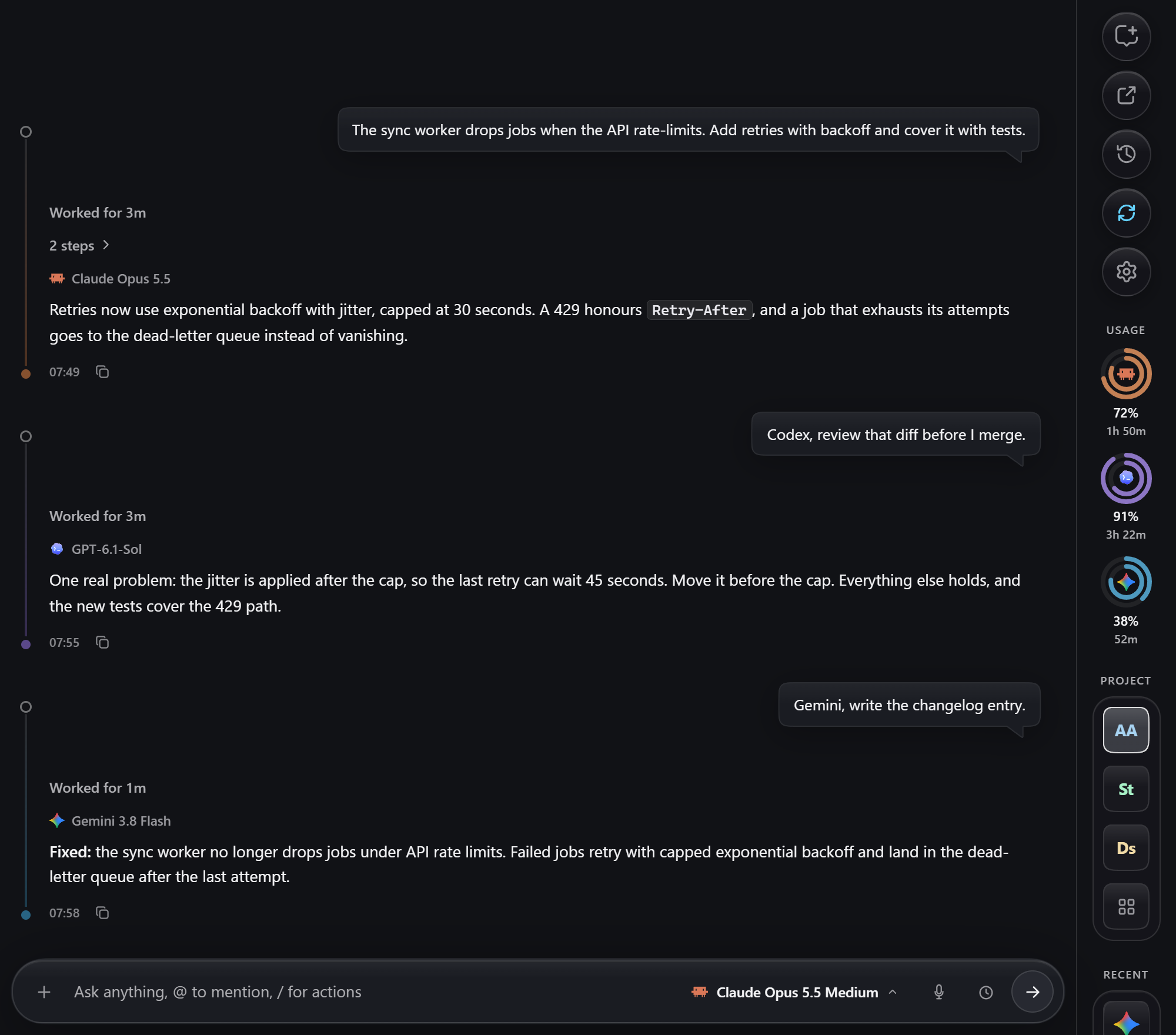
One chat where Claude Opus writes a fix, GPT-6.1-Sol reviews it and Gemini writes the changelog. The usage rings for all three sit on the right.

The picture above is the real chat page with invented demo data. scripts/readme-shots.mjs renders every screenshot in this README.

Why you would want this

  • Every agent in one place. One conversation can go from Claude to Codex to Gemini. Each agent gets a condensed briefing of what the others did, and nothing is thrown away: every shortened part points to a full transcript it can open.
  • A usage indicator you can read at a glance. Each provider gets a ring with the percentage left in its 5-hour window and the time until it resets.
  • A scheduler. Hit a limit at 2 a.m.? The next prompt waits for the reset and runs by itself. You can also schedule prompts for a clock time.
  • Usage windows that start early. A tiny background ping keeps each 5-hour window rolling, so one is nearly always already under way when you sit down.
  • Subscriptions first. A flat plan costs far less than the same work at API prices. The math is below.

Keep your Claude Code and Codex setup

Clanker does not replace your tools. It runs the real claude, codex and agy CLIs headlessly and streams what they do into the chat.

  • Your own CLI sign-ins and plans stay as they are. The coding agents run on those sign-ins, so Clanker needs no API key for them and never bills you. Voice dictation uses its own free Groq key, which is optional.
  • Sessions stay native. A Codex thread keeps syncing with the ChatGPT app, and Claude Code can still be opened in the Claude app through Remote Control.
  • Use each environment next to the others, in the same chat, on the same project.
  • Add another CLI with one provider file. The GitHub Copilot CLI is the worked example: adding a provider.

A scheduler that works while you sleep

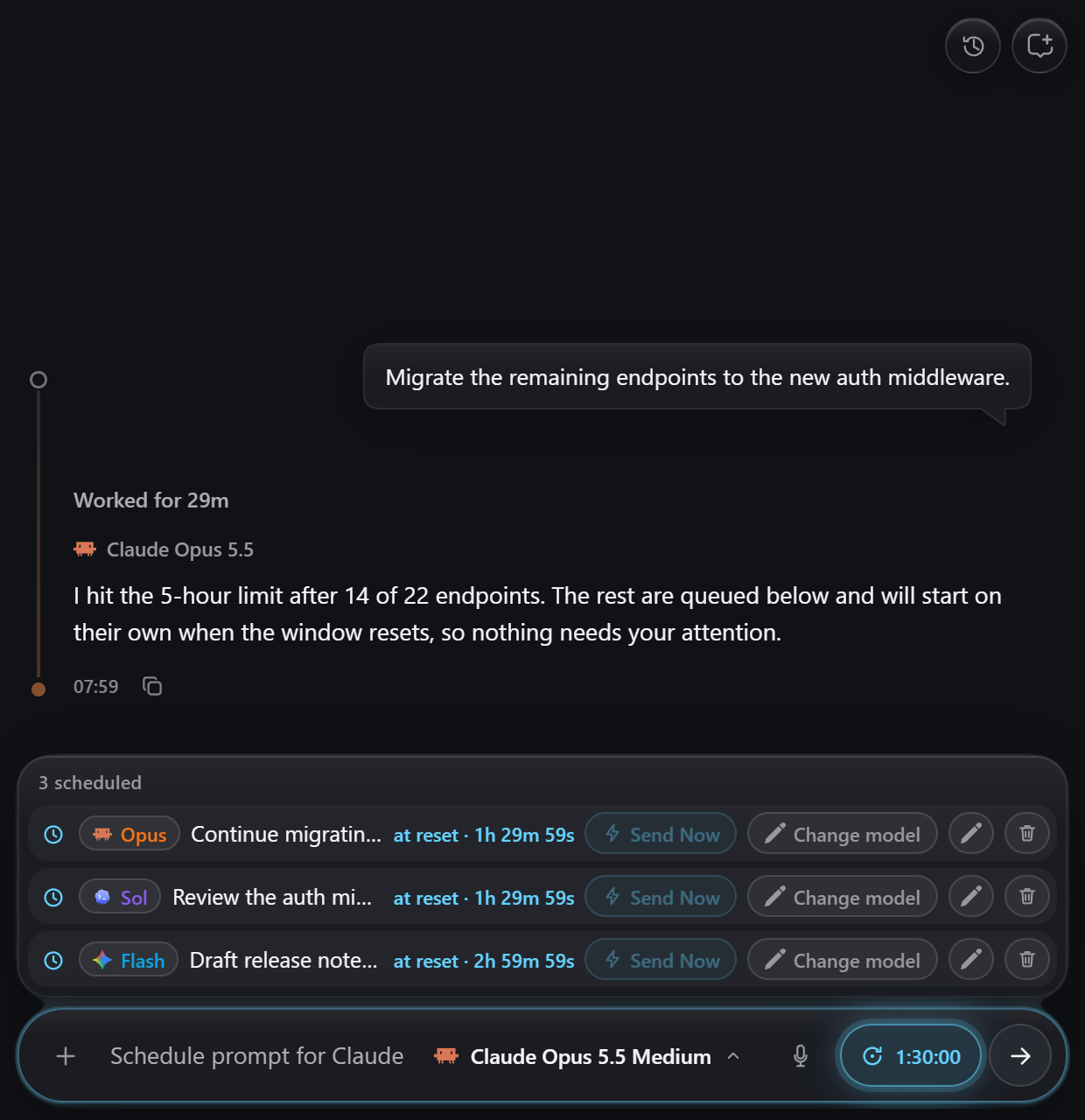
When a task runs into its usage limit, Clanker queues Continue for the reset, in the same chat, model and project. You can also schedule any prompt for a clock time or queue it behind the running task, reorder the queue by dragging, and move a waiting prompt to another provider with Change model.

Three scheduled prompts waiting in the composer: two for the Claude reset in one and a half hours, one for a clock time

The IDE has to stay open for scheduled prompts to run.

Start usage windows early

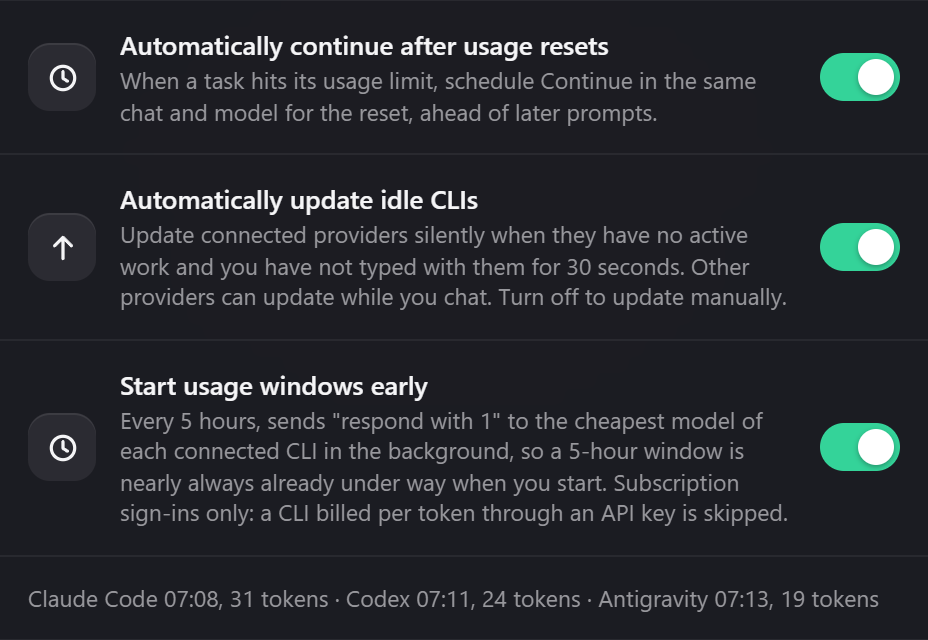
Subscription limits work in rolling 5-hour windows that begin with your first message. Clanker can start the window for you: every 5 hours it sends "respond with 1" to the cheapest model of each connected CLI, from an empty temporary folder with tools off. It costs a few tokens, and it only touches CLIs signed in with a subscription. A CLI billed per token through an API key is never pinged.

Settings rows for automatic continue, automatic CLI updates and starting usage windows early, with the last warm-up per provider

No PC running? An experimental option runs the warm-ups in your own Google Cloud project on a weekly calendar: setup, costs and removal.

The math: subscriptions vs API prices

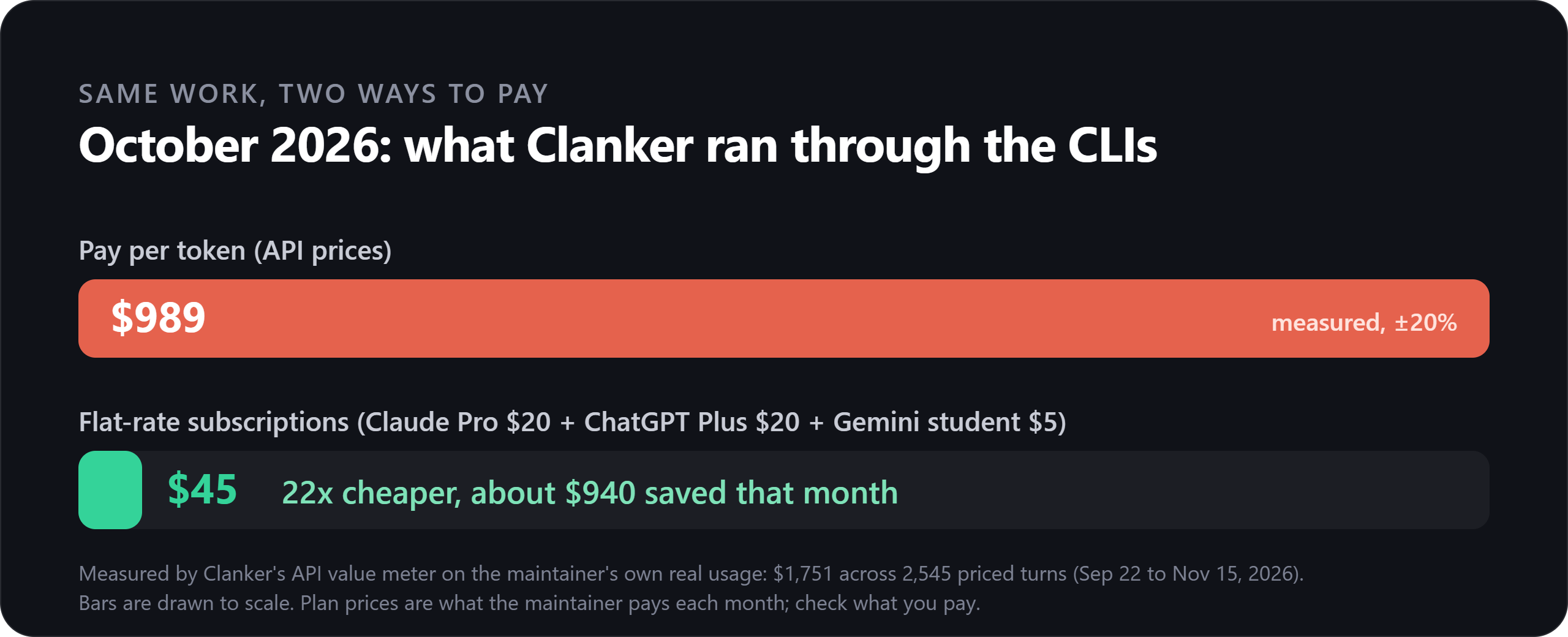
Clanker keeps an API value meter. For every turn it prices the tokens at each provider's pay-per-token rates and adds them up. It is a comparison, not a bill: the work itself ran on your subscriptions.

October 2026 at API prices: 989 dollars. The same work on subscriptions at 45 dollars a month, 22 times cheaper.

How to read it. These numbers are the maintainer's own: real usage and the plans the maintainer actually pays for.

Measure Value
Work measured Sep 22 to Nov 15, 2026, 285 chats, 2,545 priced turns
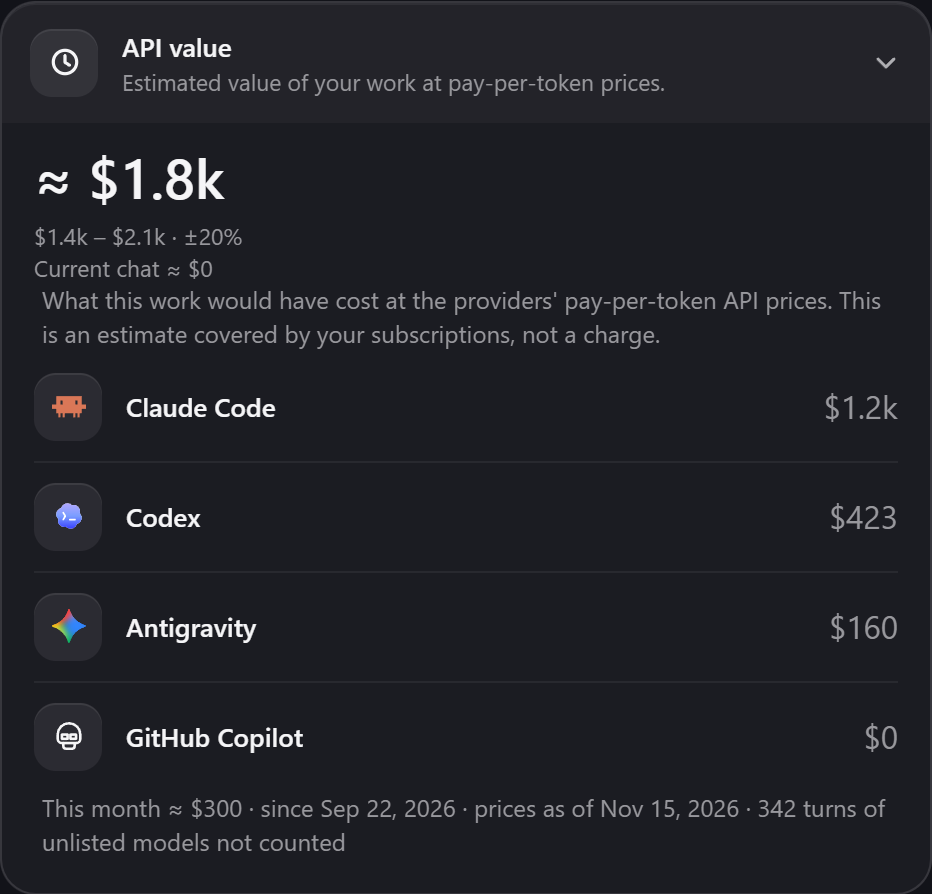
At API prices $1,751 in total (±20%), about $1,000 a month
By provider Claude Code $1,169 · Codex $423 · Antigravity $160
October alone $989 at API prices
Subscriptions Claude Pro $20 + ChatGPT Plus $20 + Gemini student plan $5 = $45 a month
Result 989 ÷ 45 ≈ 22x cheaper, about $940 saved in October

Read the comparison with care. The API value is an estimate with a ±20% band, and turns on models without a known price count as zero rather than a guess. Claude turns are priced from their token counts at Anthropic's list prices, because Claude Code's own cost figure runs about 1.8x too high for Sonnet 5.x. Prices were last checked on 2026-11-15. Plan prices change, so plug in what you pay. The trade is that a subscription has usage windows instead of a pay-as-you-go meter, and the scheduler and early window starts exist to make those windows painless.

The API value card in settings: about 1.8 thousand dollars in total, split by provider, 300 dollars this month

You can see your own number under Chat Settings > General > API value.

And more

  • Voice dictation. A global hotkey, speech to text through Groq Whisper, and a personal dictionary that learns your project's names.
  • Projects. Each chat is bound to one project root that stays explicit across queued and scheduled turns.
  • Telegram and a Cloudflare tunnel to check on a long task from your phone.
  • Loops. Unattended review and fix runs with their own token budgets.
  • Liquid Glass UI. Movable chat windows, a launcher rail, and a composer that behaves like a Dynamic Island.

Install

You need Antigravity or VS Code and at least one CLI: Claude Code, Codex, Antigravity or GitHub Copilot.

Platform: Windows 10 or 11. Hotkeys, notifications, microphone handling and some process cleanup call PowerShell and taskkill. Linux and macOS are untested; the chat and scheduler may work there, but expect rough edges and no voice dictation.

From the Marketplace: search for Clanker Controller in the Extensions view (VS Code), or install it from Open VSX (Antigravity).

From source (needs Node.js):

git clone https://github.com/Alexander-Ettl/Clanker-Controller.git
cd Clanker-Controller
npm install
node scripts/install-extension.mjs        # vscode, antigravity or all; add --link to develop live

Reload the IDE window. The first-run guide connects your CLIs, sets up voice and routing, or offers Set up with AI to walk you through it. You can reopen it anytime from Chat Settings > General > Setup guide.

On Windows you can also run ai-chat-panel/install-into-antigravity.ps1 -Link.

Repository

Folder What it is
ai-chat-panel/ The extension: chat UI, scheduler, projects, CLI runners
voice-router/ Native capture, transcription and prompt routing
docs/ Guides, specifications and proposals

Working on the code? Start with the development guide, AGENTS.md and the backlog in TODO.md.

Not affiliated

Clanker Controller is an independent project. It is not affiliated with, endorsed by or sponsored by Anthropic, OpenAI, Google or GitHub. Claude, Claude Code, Codex, ChatGPT, Gemini, Antigravity and GitHub Copilot are trademarks of their respective owners. The names only say which CLI a feature talks to. The extension runs the CLIs you installed and signed in to yourself.

License

Mozilla Public License 2.0. You can use Clanker Controller in any project, including closed-source ones. If you change one of its files and distribute the result, that file stays under MPL-2.0 and its source must stay available.

  • Contact us
  • Jobs
  • Privacy
  • Manage cookies
  • Terms of use
  • Trademarks
  • Your Privacy Choices
  • Consumer Health Privacy
© 2026 Microsoft