Codex Project Chats
English · 简体中文
Browse Codex conversations by project, then continue in the official Codex sidebar.
A small VS Code extension for developers who work across several repositories. It groups existing conversations by their working directory (cwd), without patching the official extension or implementing another chat client.
Compatibility: end-to-end verified on macOS Apple Silicon. Other platforms are not yet verified end to end. The interface follows the VS Code display language: Simplified Chinese for Chinese locales, English otherwise. This is an independent project, not an OpenAI product.
Install and use
- Install and sign in to the official Codex extension.
- Find Codex Project Chats by publisher cixiangtao, or search
@id:cixiangtao.codex-project-chats in VS Code. For an offline package, use Extensions → … → Install from VSIX.
- Open a project folder and select Codex Project Chats in the Activity Bar. You can also run Codex Project Chats: Open Project Chats from the Command Palette.
- Choose Current project or All projects. Search by title and expand a project to select a conversation.
- Continue in your existing official Codex view. If Codex is on the right, the conversation opens there without creating an editor tab.
Marketplace listing · Report a problem
Change the VS Code display language with Configure Display Language, then restart VS Code to apply it to the extension. Conversation titles and project paths remain in their original language.
Browse conversations
| Action |
How it works |
| Find a conversation |
Select Current project for workspace roots, or All projects for other directories. Enter part of its title to search. |
| Check recency |
Each compact row shows its title and conversation recency. Display and sorting both use Codex’s recencyAt field, rather than the record update time or the last reply time. Conversations in a project are sorted newest first. Labels such as Yesterday or Oct 17 help narrow the list; they are not creation times. Labels update while the view is visible. |
| Read full details |
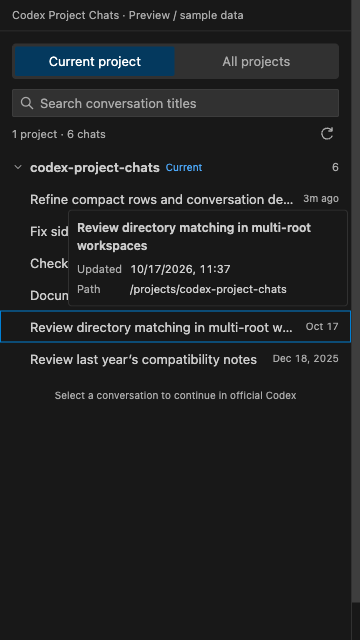
Hover over a row to see its complete title, conversation recency to the minute, and project path. The tooltip sits toward the right, leaving a clear mouse lane on the left for moving between rows. |
| Use the keyboard |
Press Tab to focus a conversation and reveal its details, Enter or Space to open it, and Esc to dismiss the tooltip. |
| Refresh or load more |
The visible list updates automatically and checks again five seconds after each query finishes. Updates pause while hidden and resume immediately when the view returns. Use the refresh icon to check immediately. Select Load more conversations for the next page; project counts describe loaded matches. |
Long titles are shortened in the list. Full details wrap in the tooltip, with scrolling for unusually long content. Missing recency metadata is labeled Unknown.
Preview
The images show the English interface with sample data, not real conversation history. The Chinese guide shows the Simplified Chinese interface.
| Current project |
All projects |
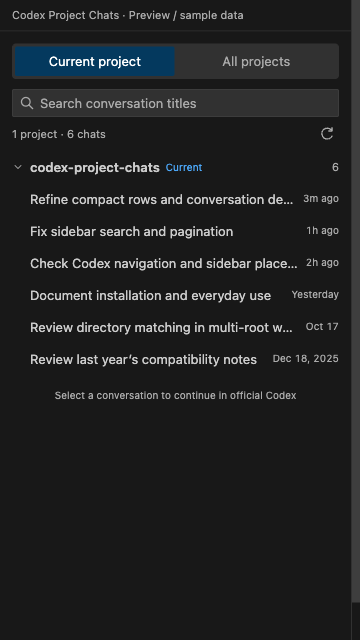 |
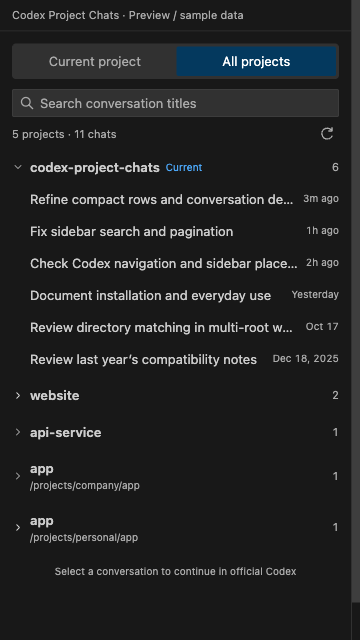 |
Hover details show the full title, conversation recency, and path while leaving the left side available for switching rows:
What it does
- Groups conversations by exact working directory, with the current project first.
- Supports multi-root workspaces and real paths for symlinked workspace roots. Subdirectories and Git worktrees remain separate groups.
- Searches titles on the server before pagination. Each page contains up to 50 conversations; Load more conversations loads the next page. Counts describe the loaded results.
- Automatically refreshes the pages already loaded, keeping the current list visible during updates. Unchanged results leave the interface and hover details untouched.
- Shows non-archived, interactive local conversations; excludes subagents and batch sessions.
- Distinguishes projects with identical folder names by their paths.
- Temporarily expands search matches and restores the previous collapse state when the search is cleared.
With no folder open, select All projects to browse all projects. Scope selection is remembered per workspace. There are no custom tags, manual categories, archive/delete actions, or transcript viewer.
Compatibility and troubleshooting
| Situation |
Guidance |
| Empty current-project list |
The saved cwd must match a workspace root. A conversation started in a subdirectory belongs to that subdirectory. Try All projects. |
| Official Codex binary cannot be found |
Update/enable the official extension, or set codexProjectChats.cliPath to an absolute executable path on the current host. |
| Clicking a conversation fails |
Open the official Codex view and retry. Report the VS Code and official extension versions; the upstream URI handler can change. |
| WSL, SSH, or a container |
Install both extensions in that remote workspace. Cross-host histories are not combined. Remote behavior is not yet verified end to end. |
| Windows forwarding Codex to WSL from a local window |
Open the project in a WSL window instead. This mixed-host mode is unsupported. |
The manifest requires VS Code 1.100 or newer. The tested baseline was VS Code 1.143.1 with openai.chatgpt 26.1021.22027 on macOS Apple Silicon; it is evidence for that combination, not a promise about every upstream version.
Privacy and integration boundary
The extension starts the official bundled codex app-server over local stdio and requests thread/list with useStateDbOnly. It passes only IDs, titles (or a first-message preview when no title exists), working directories, and conversation recency timestamps to its local webview. It does not read full transcripts or account credentials, send prompts, or directly write the Codex database. The app-server may maintain its own internal state and logs. This extension adds no telemetry or external webview resources; the official executable remains subject to its own behavior and configuration.
Navigation uses vscode.env.asExternalUri and the official extension's /local/<id> URI handler to target the current window and reveal the existing sidebar. That upstream URI route is not a stable public API. Project grouping is a navigation feature, not an access-control boundary.
If you installed the prototype as ikun-local.codex-project-chats, uninstall it before installing cixiangtao.codex-project-chats to avoid duplicate views. Uninstalling this extension does not delete Codex conversations.
Development
Use Node.js 24.18.0 (see .nvmrc) and pnpm 12.15.0 (pinned in packageManager):
pnpm install --frozen-lockfile
pnpm run check
pnpm run lint
pnpm run format:check
pnpm test
pnpm run package
Vitest runs TypeScript tests directly against the source; pnpm run check checks extension, test, and Webview types. Use pnpm run test:watch while developing. The extension host compiles to CommonJS in dist/extension/; the React and TypeScript interface in webview/src/ is built with Vite into dist/webview/. media/ contains icons. Frontend components, hooks, feature styles, and colocated tests are organized by responsibility; see the Webview guide. Oxlint and Oxfmt checks run in CI.
Run pnpm dev for the local interface preview with React Fast Refresh at http://127.0.0.1:5173/. It uses synthetic data; append ?lang=en for English. The installed extension loads the packaged Vite assets through the VS Code Webview API.
The VSIX is generated as release-artifact/codex-project-chats-<version>.vsix. The directory is created automatically and ignored by Git. React and React DOM are bundled into the browser entry; only built code, local media, and public documentation are packaged, with no node_modules/ directory. This is a VS Code extension, not an npm library (private: true prevents accidental npm publication).
CI runs the tests on Linux, macOS, and Windows and inspects a VSIX on Linux. One POSIX executable fixture is explicitly skipped on Windows. These checks do not replace a real VS Code/official Codex integration test. Live-history and extension-host tests are opt-in; see CONTRIBUTING.md.
Repository documentation and metadata may be ahead of the last Marketplace package; editing this repository does not update an already uploaded VSIX. release-it prepares the version and changelog locally; Marketplace packages are uploaded manually after CI passes, then verified before tagging. See the release procedure. No GitHub Release or npm package is created.
Support and license
Use Issues for bugs and scoped feature requests. Follow SECURITY.md for private vulnerability reports. See SUPPORT.md for safe diagnostics.
MIT. Independently implemented; no History Viewer source code was copied.
The custom icon combines the blossom used by the official Codex extension with a project-folder badge. OpenAI and Codex marks belong to OpenAI; the icon does not indicate affiliation or endorsement.

