
Nebula Drift Dusk
A dark deep-navy and magenta color theme for VS Code, with a space-themed file icon set.
Nebula Drift Dusk is built for long coding sessions. It sits on deep navy with vivid violet and magenta accents, and the bundled file icons turn your explorer into a small solar system: planets for folders, a comet for JavaScript, an alien for TypeScript, a rocket for package.json.
Prefer a light theme? See the companion extension, Nebula Drift Dawn.
What's included
|
Name |
Description |
| 🌙 |
Nebula Drift Dusk |
Dark color theme. Deep navy background, magenta and violet accents. |
| 🚀 |
Nebula Dusk Icons |
60 hand-drawn space-themed file and folder icons. |
The icon theme works with any color theme, and the color theme works with any icon theme.
Highlights
- Readable syntax colors. Keywords are magenta, functions violet, strings cyan, types gold, numbers orange. JSX components get their own mint green, so they stand apart from plain HTML tags and keywords.
- Consistent UI. Editor, sidebar, activity bar, tabs, status bar, panels, terminal, inputs, scrollbars and git decorations are all styled.
- Clear selection. The selected file in the explorer has a magenta outline, so you always know where you are.
- Git colors that make sense. Modified, added, deleted and conflicting files are easy to tell apart.
- Works with semantic highlighting.
Installation
- Open the Extensions view (
Cmd+Shift+X on Mac, Ctrl+Shift+X on Windows and Linux).
- Search for Nebula Drift Dusk and click Install.
- Choose the color theme:
Cmd+K Cmd+T (Ctrl+K Ctrl+T), then pick Nebula Drift Dusk.
- Choose the icons: open the Command Palette, run Preferences: File Icon Theme, then pick Nebula Dusk Icons.
Or set them in settings.json:
{
  "workbench.colorTheme": "Nebula Drift Dusk",
  "workbench.iconTheme": "nebula-dusk-icons"
}
Color palette
|
Color |
| Editor background |
#02133b |
| Accent |
#e000cb |
| Keywords |
#ff4fe8 |
| Functions |
#c9a0ff |
| Strings |
#7be0ff |
| Types |
#ffd27b |
| Numbers |
#ffb86b |
| JSX components |
#7be0a8 |
File icons
All 60 icons at a glance:
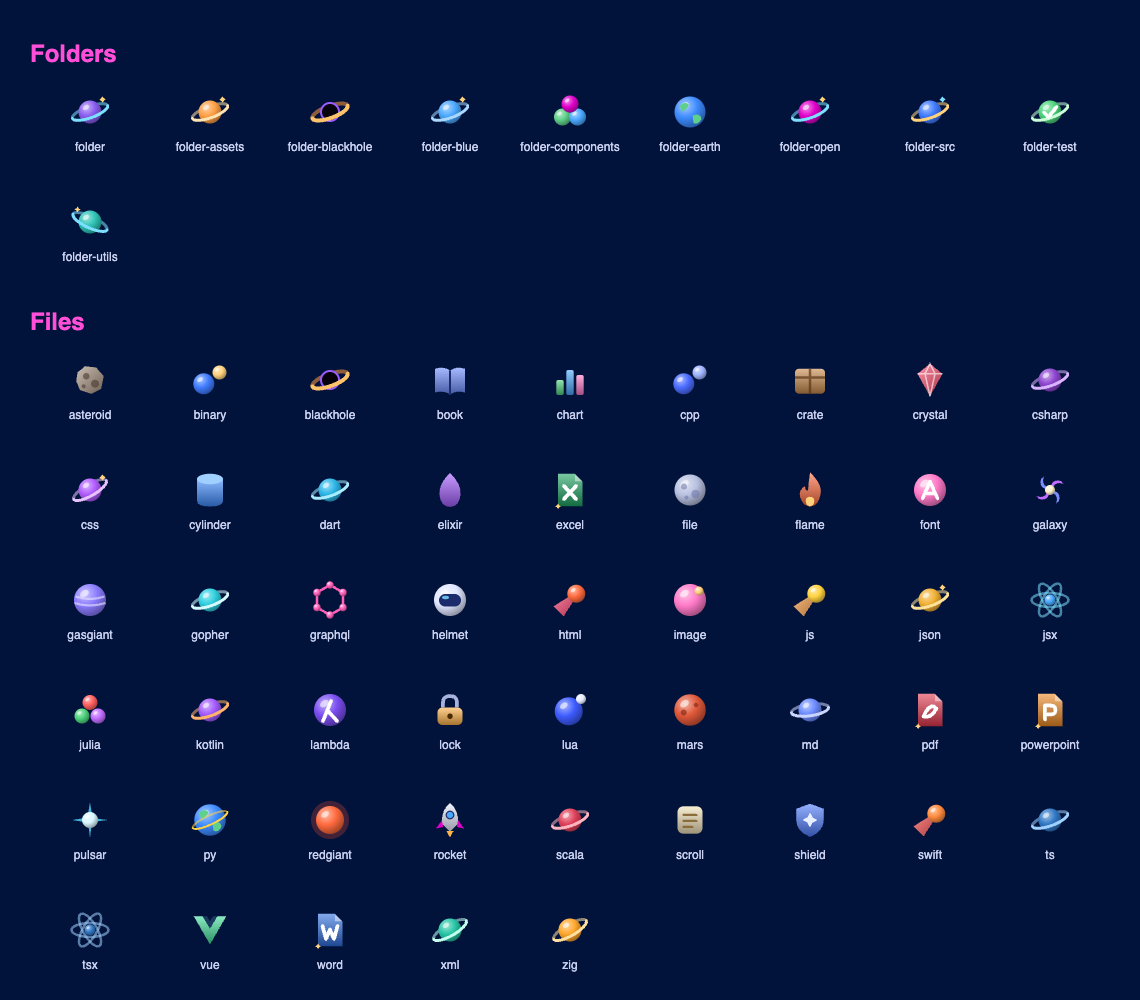
Any file without a specific icon gets a cratered moon.
Icon reference
| Files |
Icon |
.js .mjs .cjs |
Comet |
.jsx |
Atom |
.ts / .tsx |
Alien (blue / pink) |
.json |
Satellite |
package.json |
Rocket |
.md .mdx |
Crescent moon |
.css .scss .sass .less |
Nebula cloud |
.html |
UFO |
.png .jpg .gif .svg .webp .ico |
Sparkle star |
.py |
Earth |
.go |
Space gopher |
.rs |
Mars |
.java |
Red giant star |
.c .h .m .mm |
Binary star |
.cpp .cc .cxx .hpp .hh |
Triple star |
.cs .csx |
Hash planet |
.graphql .gql |
GraphQL node graph |
.php |
Gas giant |
.rb |
Crystal |
.vue |
Green V |
.swift |
Paper jet |
.kt .kts |
Kotlin shard |
.dart |
Dart |
.svelte |
Flame |
.lua |
Moon-orbited planet |
.scala .sc |
Layered stripes |
.hs .lhs |
Lambda |
.ex .exs |
Elixir drop |
.zig |
Zig bolt |
.jl |
Julia dots |
.sql .db .sqlite |
Data cylinder |
.yml .yaml .toml .ini |
Asteroid |
.lock .env, lock files |
Padlock |
.sh .bash .zsh .ps1 .bat .cmd |
Astronaut helmet |
tsconfig.json, ESLint, Prettier, Babel, Vite, Webpack, Next, Tailwind configs |
Shield |
.zip .tar .gz, Dockerfile |
Cargo crate |
.mp3 .wav .ogg .flac |
Pulsar |
.mp4 .mov .webm .mkv |
Spiral galaxy |
.csv .tsv |
Bar chart |
.xls .xlsx .xlsm .ods |
Excel page |
.doc .docx .odt .rtf |
Word page |
.ppt .pptx .odp |
PowerPoint page |
.ttf .otf .woff .woff2 |
Letter A |
.xml |
Angle brackets |
.txt .log, CHANGELOG.md |
Scroll |
.pdf |
PDF page |
README.md, LICENSE |
Book |
.gitignore .gitattributes |
Black hole |
| Anything else |
Cratered moon |
| Folders |
Icon |
| Default (closed / open) |
Ringed planet |
src |
Sun |
node_modules |
Black hole |
components |
Constellation |
assets images img media |
Spiral galaxy |
utils lib helpers hooks |
Gear |
test tests __tests__ |
Lab flask |
.vscode .github .git |
Blue ringed planet |
app pages screens public |
Ringed Earth |
dist build out |
Rocket |
docs doc |
Book |
config configs .config |
Shield |
scripts bin |
Astronaut helmet |
styles css |
Nebula cloud |
types typings |
Blue alien |
api server services routes |
Satellite |
data db database |
Data cylinder |
Feedback
Found a color that's hard to read, or a file type that needs an icon? Please open an issue, leave a review, contact me, or connect with me on LinkedIn.
| |

