
Nebula Drift Dawn
A clean white and magenta light color theme for VS Code, with a space-themed file icon set.
Nebula Drift Dawn is a bright, easy-on-the-eyes light theme with a magenta and violet identity. The bundled file icons turn your explorer into a small solar system: planets for folders, a comet for JavaScript, an alien for TypeScript, a rocket for package.json.
Prefer a dark theme? See the companion extension, Nebula Drift Dusk.
What's included
|
Name |
Description |
| ☀️ |
Nebula Drift Dawn |
Light color theme. White background, magenta and violet accents. |
| 🚀 |
Nebula Dawn Icons |
60 hand-drawn space-themed file and folder icons. |
The icon theme works with any color theme, and the color theme works with any icon theme.
Highlights
- Readable syntax colors. Keywords are magenta, functions violet, strings teal, types amber, numbers orange. JSX components get their own green, so they stand apart from plain HTML tags and keywords.
- Consistent UI. Editor, sidebar, activity bar, tabs, status bar, panels, terminal, inputs, scrollbars and git decorations are all styled.
- Clear selection. The selected file in the explorer is a solid magenta bar with white text.
- Git colors that make sense. Modified files are violet, added are green, deleted are red, conflicts are orange.
- Works with semantic highlighting.
Installation
- Open the Extensions view (
Cmd+Shift+X on Mac, Ctrl+Shift+X on Windows and Linux).
- Search for Nebula Drift Dawn and click Install.
- Choose the color theme:
Cmd+K Cmd+T (Ctrl+K Ctrl+T), then pick Nebula Drift Dawn.
- Choose the icons: open the Command Palette, run Preferences: File Icon Theme, then pick Nebula Dawn Icons.
Or set them in settings.json:
{
  "workbench.colorTheme": "Nebula Drift Dawn",
  "workbench.iconTheme": "nebula-dawn-icons"
}
Color palette
|
Color |
| Editor background |
#ffffff |
| Accent |
#c000b0 |
| Keywords |
#c000b0 |
| Functions |
#7a3fd0 |
| Strings |
#0b7a9a |
| Types |
#a86a00 |
| Numbers |
#c25a00 |
| JSX components |
#1f8a5a |
File icons
All 60 icons at a glance:
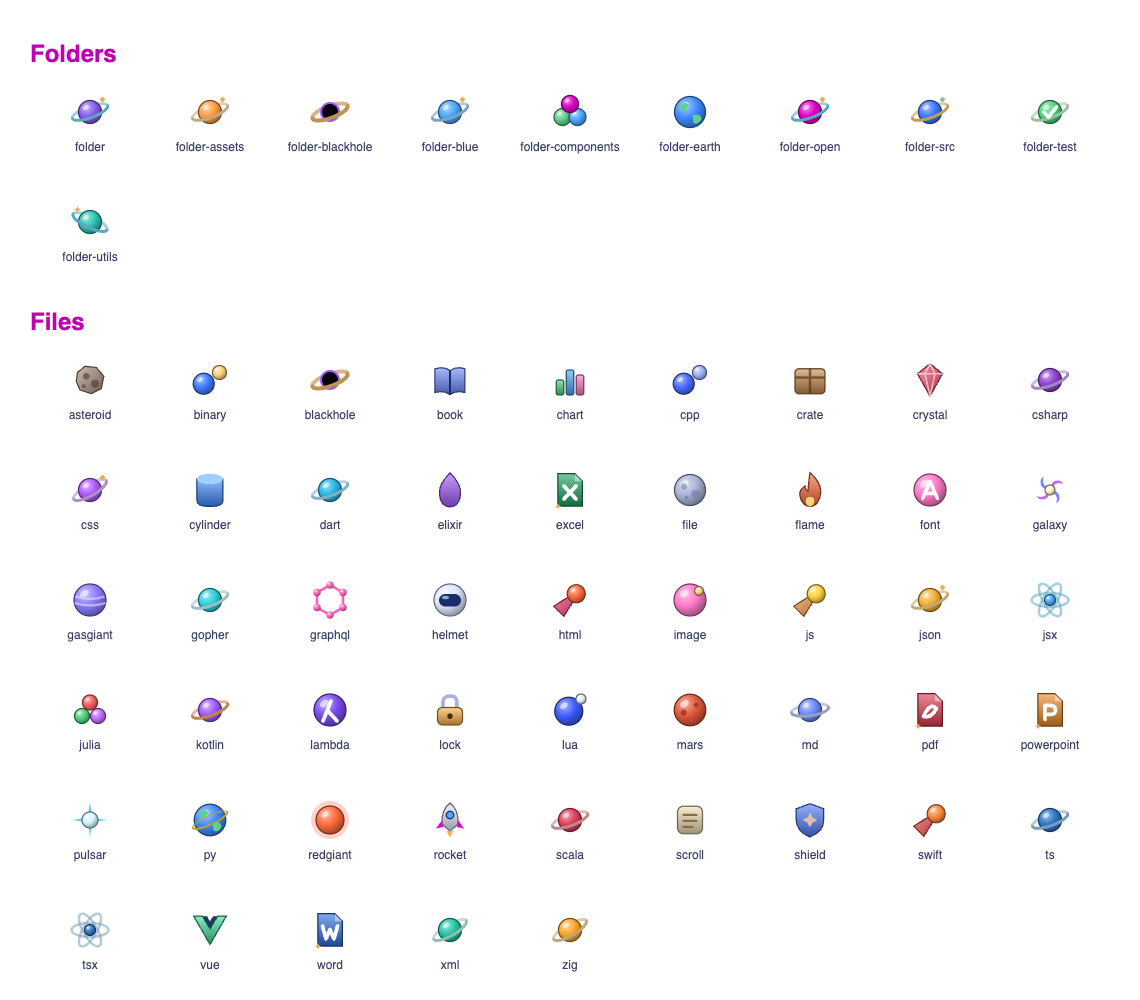
Any file without a specific icon gets a cratered moon.
Icon reference
| Files |
Icon |
.js .mjs .cjs |
Comet |
.jsx |
Atom |
.ts / .tsx |
Alien (blue / pink) |
.json |
Satellite |
package.json |
Rocket |
.md .mdx |
Crescent moon |
.css .scss .sass .less |
Nebula cloud |
.html |
UFO |
.png .jpg .gif .svg .webp .ico |
Sparkle star |
.py |
Earth |
.go |
Space gopher |
.rs |
Mars |
.java |
Red giant star |
.c .h .m .mm |
Binary star |
.cpp .cc .cxx .hpp .hh |
Triple star |
.cs .csx |
Hash planet |
.graphql .gql |
GraphQL node graph |
.php |
Gas giant |
.rb |
Crystal |
.vue |
Green V |
.swift |
Paper jet |
.kt .kts |
Kotlin shard |
.dart |
Dart |
.svelte |
Flame |
.lua |
Moon-orbited planet |
.scala .sc |
Layered stripes |
.hs .lhs |
Lambda |
.ex .exs |
Elixir drop |
.zig |
Zig bolt |
.jl |
Julia dots |
.sql .db .sqlite |
Data cylinder |
.yml .yaml .toml .ini |
Asteroid |
.lock .env, lock files |
Padlock |
.sh .bash .zsh .ps1 .bat .cmd |
Astronaut helmet |
tsconfig.json, ESLint, Prettier, Babel, Vite, Webpack, Next, Tailwind configs |
Shield |
.zip .tar .gz, Dockerfile |
Cargo crate |
.mp3 .wav .ogg .flac |
Pulsar |
.mp4 .mov .webm .mkv |
Spiral galaxy |
.csv .tsv |
Bar chart |
.xls .xlsx .xlsm .ods |
Excel page |
.doc .docx .odt .rtf |
Word page |
.ppt .pptx .odp |
PowerPoint page |
.ttf .otf .woff .woff2 |
Letter A |
.xml |
Angle brackets |
.txt .log, CHANGELOG.md |
Scroll |
.pdf |
PDF page |
README.md, LICENSE |
Book |
.gitignore .gitattributes |
Black hole |
| Anything else |
Cratered moon |
| Folders |
Icon |
| Default (closed / open) |
Ringed planet |
src |
Sun |
node_modules |
Black hole |
components |
Constellation |
assets images img media |
Spiral galaxy |
utils lib helpers hooks |
Gear |
test tests __tests__ |
Lab flask |
.vscode .github .git |
Blue ringed planet |
app pages screens public |
Ringed Earth |
dist build out |
Rocket |
docs doc |
Book |
config configs .config |
Shield |
scripts bin |
Astronaut helmet |
styles css |
Nebula cloud |
types typings |
Blue alien |
api server services routes |
Satellite |
data db database |
Data cylinder |
Feedback
Found a color that's hard to read, or a file type that needs an icon? Please open an issue, leave a review, contact me, or connect with me on LinkedIn.
| |

