MaintainabilityAI VS Code Extension
"Would you tell me, please, which way I ought to go from here?"
"That depends a good deal on where you want to get to," said the Cat.
Unlike Alice, you know exactly where you want to go — secure, well-governed, maintainable software. This extension is your companion for the entire journey: from enterprise architecture and governance scoring, through AI-assisted feature creation, to security dashboards and automated remediation.
Two panels. One mission. Ship secure code.
The Two Panels
Looking Glass — Governance & Architecture
The mirror that shows you what your organization really looks like.
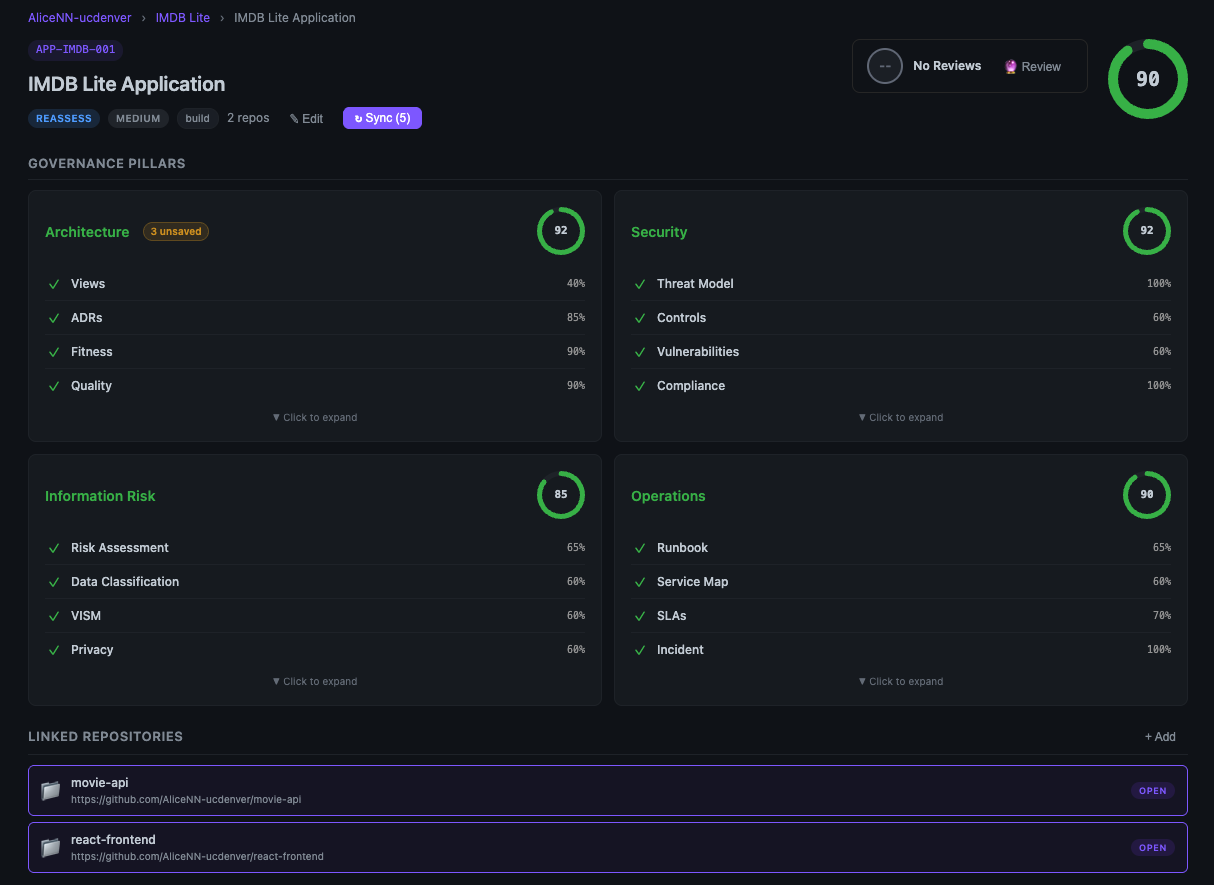
The Looking Glass is a full enterprise governance dashboard built on CALM (Common Architecture Language Model). It manages your portfolio of applications, scores governance health across four pillars, and gives you an AI assistant that speaks architecture.
Open it: Activity Bar → MaintainabilityAI → Looking Glass
The Cheshire Cat — Code & Security
The grin that stays with your repo long after the session ends.
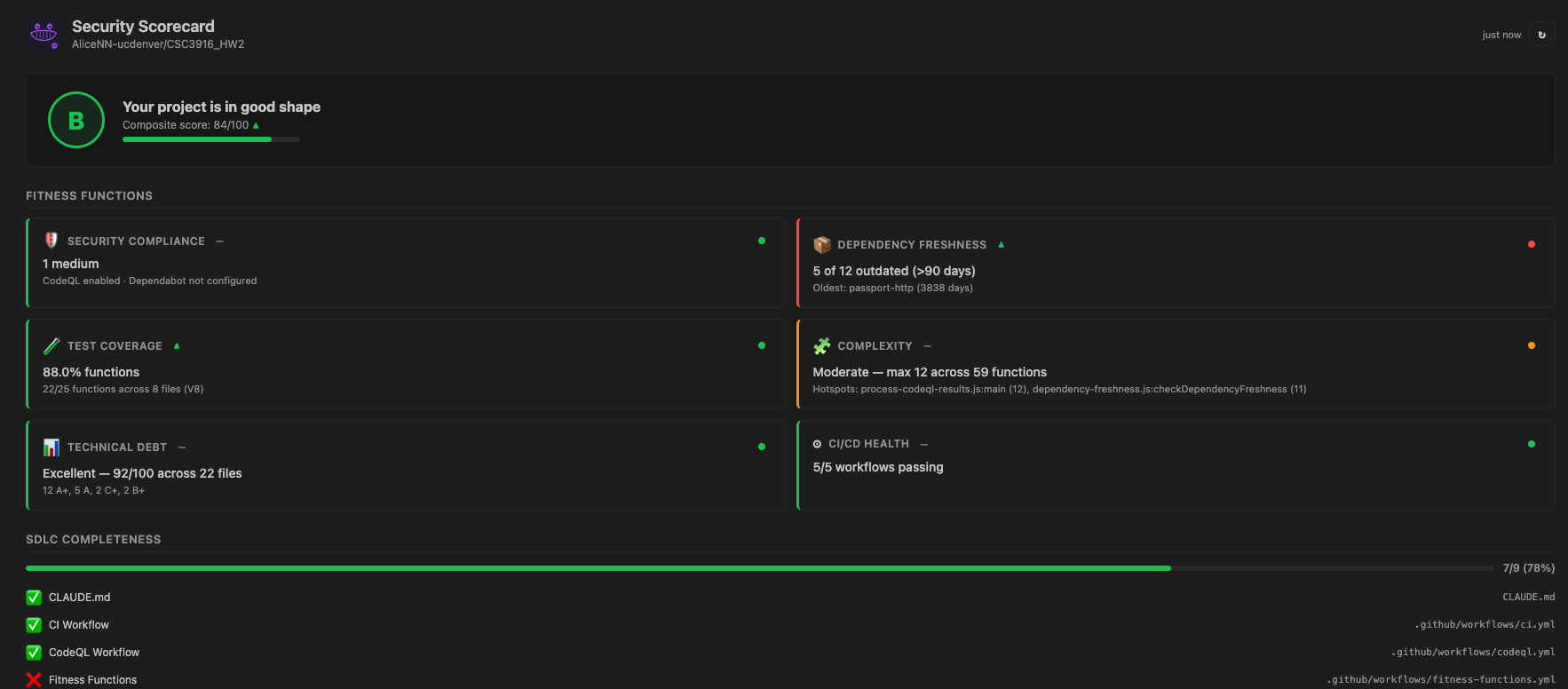
The Cheshire Cat is your code-level companion. It scaffolds SDLC structure onto projects, runs security scorecards, creates structured feature issues, and orchestrates AI agents to implement them.
Open it: Activity Bar → MaintainabilityAI → The Cheshire Cat
Features
1. Governance Mesh & Portfolio Dashboard
See everything. Score everything. Govern everything.
The Looking Glass renders a portfolio → platform → BAR (Business Application Resource) hierarchy with live governance scoring across four governance pillars: Architecture, Security, Information Risk, and Operations — each scored from artifact presence and content quality.
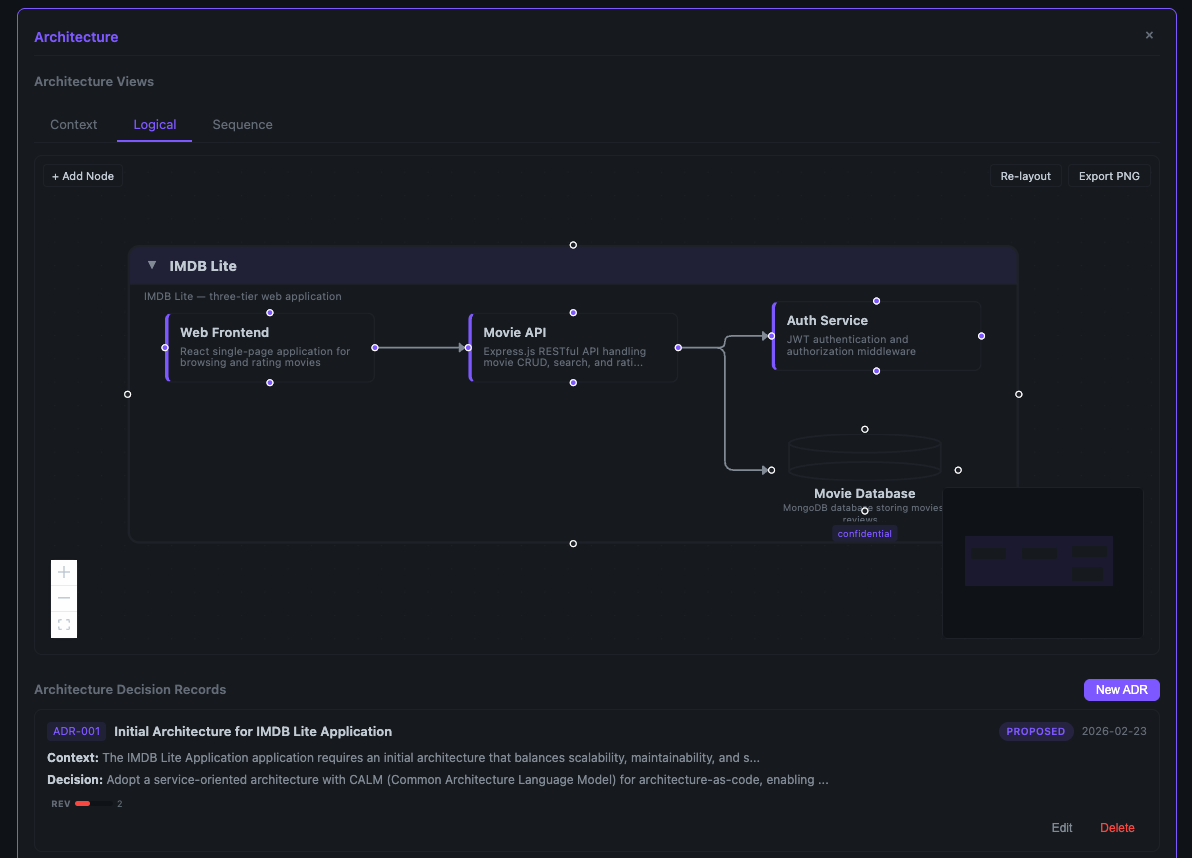
- CALM Diagrams — Interactive ReactFlow canvas with ELK.js auto-layout, custom node types, drag-and-drop palette, inline editing, container collapse, and PNG export
- Architecture Archetypes — Start from Three-Tier, Event-Driven, or Data Pipeline templates
- Sequence Diagrams — Auto-generated Mermaid diagrams from CALM flows
- Threat Model Diagrams — LLM-powered STRIDE overlays on your architecture
- Score History & Trends — Track governance maturity over time with sparklines and drift indicators
- ADR Management — Create, edit, and track Architecture Decision Records with BTABoK-inspired templates
- Git Integration — Per-pillar sync status, one-click push-to-remote, dirty file tracking
2. Enterprise Architecture Lenses
Five views. One architecture. Complete understanding.
Drill into your portfolio through Business, Application, Data, Technology, and Integration lenses:
- Business Capability Models — Pre-built Insurance (10 L1 / 35 L2 / 105 L3) and Banking (5 L1 / 48 L2 / 290 L3) models, or upload your own
- Hierarchical Drill-Down — L1 → L2 → L3 with breadcrumb navigation and BAR mapping
- Reverse Mapping — See which BARs implement which capabilities
3. NIST SP 800-53 Policy Management
Compliance as code, not compliance as spreadsheet.
- Curated Control Catalog — ~35 controls across 10 NIST families with priority indicators
- Policy Viewer — Policy cards with control mapping and status tracking
- Policy YAML Editor — Inline editing with save
- LLM-Powered Baselines — Generate policy YAML from your architecture context with one click
4. Absolem — AI Governance Assistant
"Who are you?" said the Caterpillar. This was not an encouraging opening for a conversation.
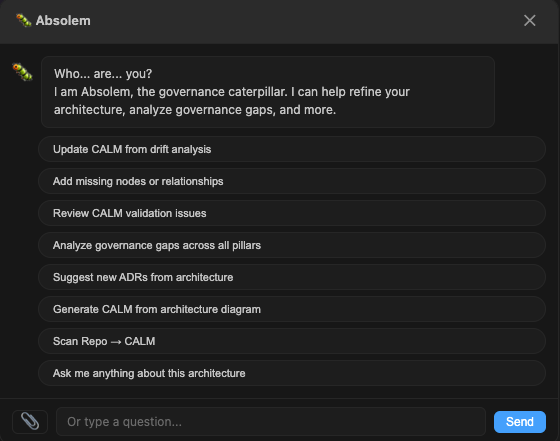
Absolem is a floating chat widget that appears on every BAR detail view — seven commands, multi-turn dialogue, and real patch generation:
| Command |
What It Does |
drift-analysis |
Reads review reports, compares against CALM, proposes targeted patches |
add-components |
Interactive guided node and relationship creation |
validate |
Runs CALM schema validation and presents results conversationally |
gap-analysis |
Cross-pillar governance gap identification across all four pillars |
suggest-adr |
Recommends missing Architecture Decision Records from patterns |
image-to-calm |
Upload a diagram image → LLM generates CALM architecture JSON |
freeform |
Open-ended architecture questions with full BAR context |
Absolem generates structured patches that can be previewed, accepted, or rejected — with "Open in Editor" for fine-grained control.
5. Oraculum — Automated Architecture Review
The Oracle sees all. The Oracle reports all.
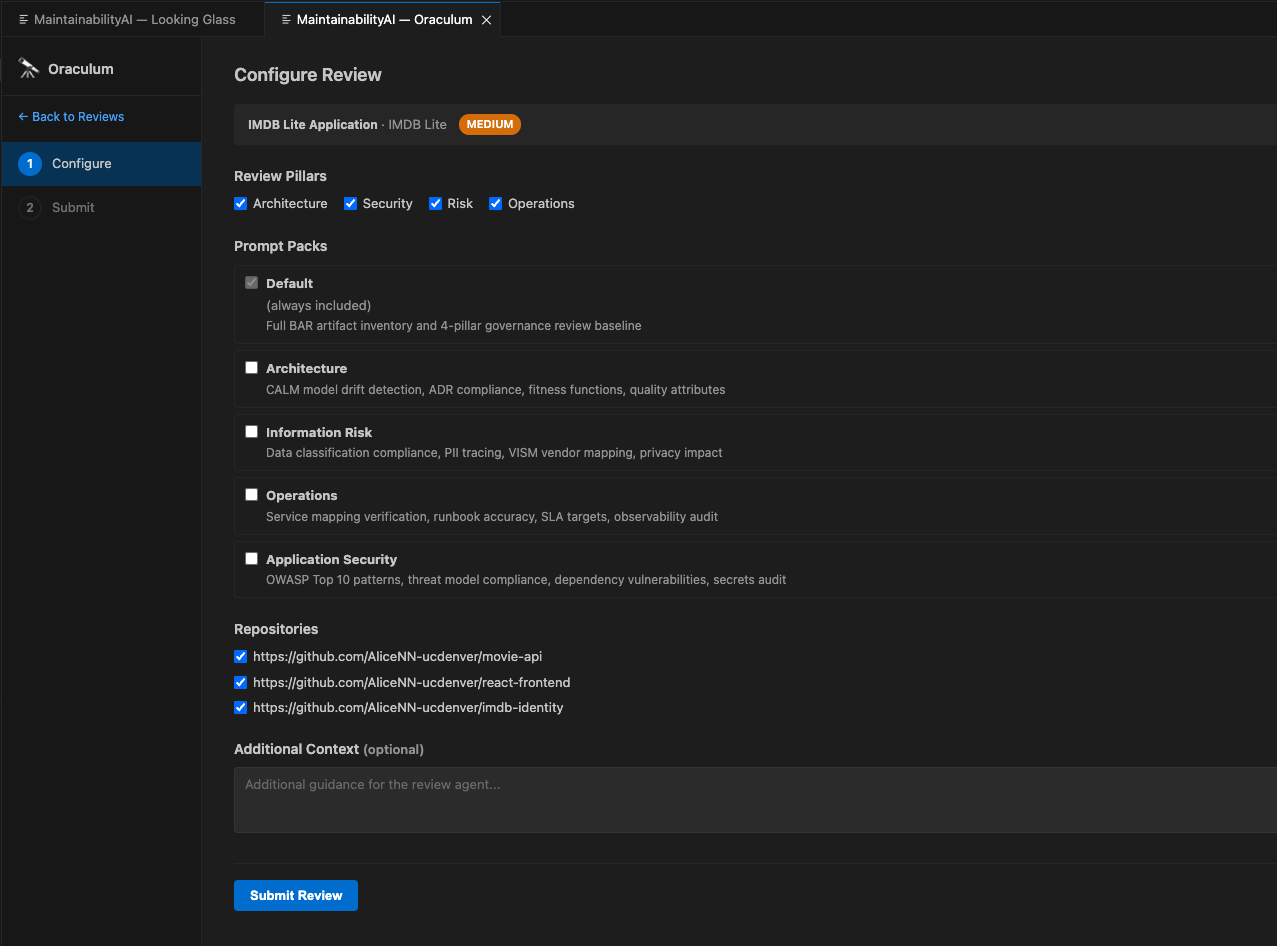
Oraculum automates architecture drift review through a 6-phase wizard:
- Select BAR — Choose which application to review
- Configure — Pick review focus areas from prompt packs
- Submit — Creates a structured GitHub issue with
oraculum YAML block
- Assign Agent — Claude Code (
@claude) or Copilot Coding Agent
- Monitor — Real-time avatar timeline with 30-second polling
- Results — Full markdown report with pillar-specific findings and drift scoring
One-click workflow provisioning deploys the oraculum-review.yml GitHub Actions workflow.
6. Security Scorecard
Six fitness functions. One grade. Zero excuses.
The Scorecard panel gives every repository a security health grade based on automated analysis:
| Metric |
Source |
Threshold |
| Security Compliance |
GitHub Code Scanning (CodeQL) |
0 high/critical |
| Dependency Freshness |
npm registry age check |
≤ 90 days |
| Test Coverage |
Istanbul / nyc / c8 / Jest / Vitest / pytest-cov |
≥ 80% |
| Cyclomatic Complexity |
pmat analysis |
≤ 10 per function |
| Technical Debt |
pmat file grading |
All files ≥ B grade |
| CI/CD Health |
GitHub Actions workflow status |
Passing |
Each metric tile has action buttons — run coverage, refresh dependencies, reduce complexity, address tech debt — that open the Rabbit Hole pre-populated with the relevant data for issue creation.
Supports multi-folder workspaces — select which project to analyze from the dropdown.
7. Rabbit Hole — Feature Issues & Agent Orchestration
Down the rabbit hole we go — but this time with a plan.
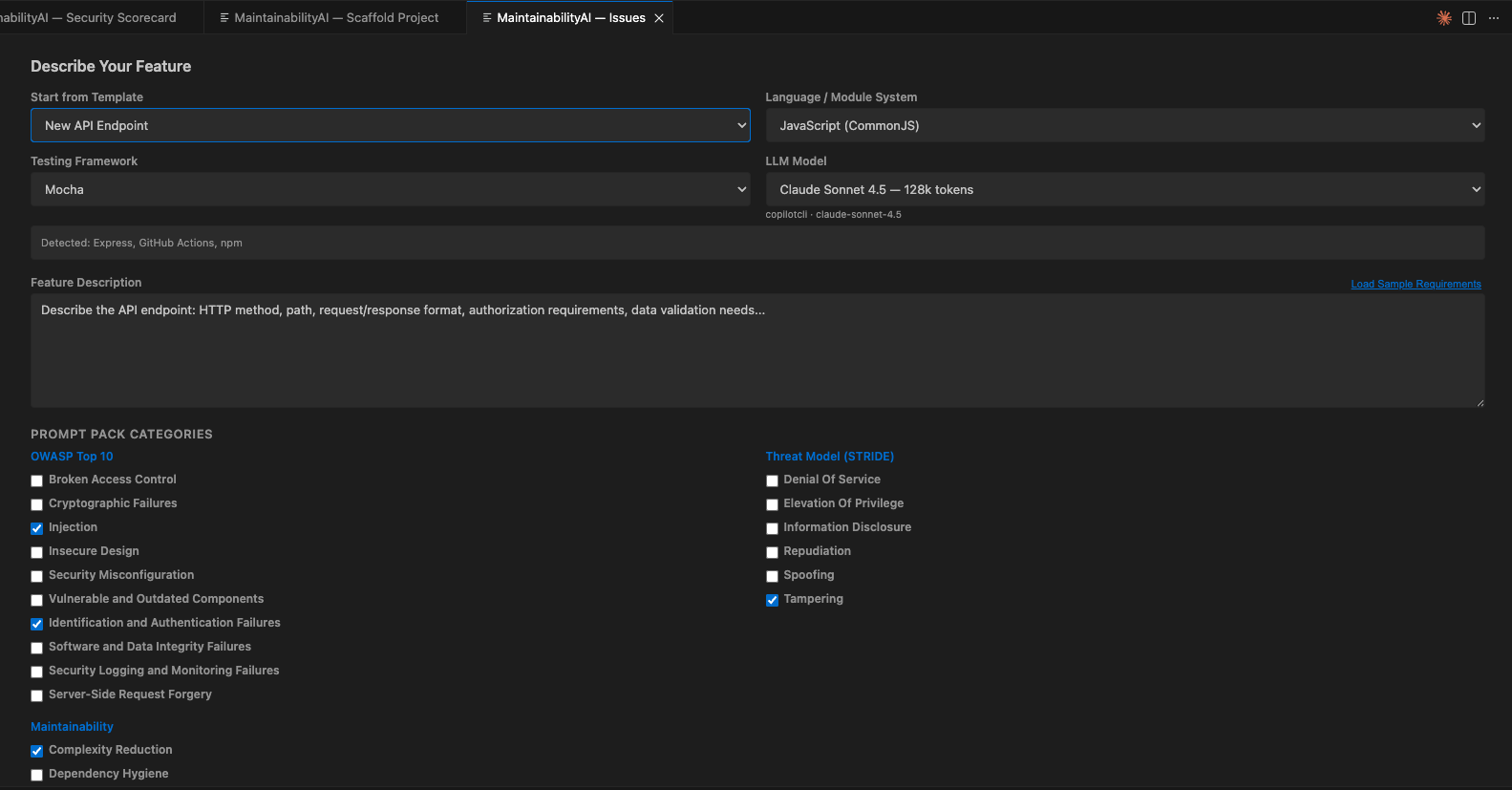
The Rabbit Hole is your issue management hub. Create structured feature issues or work through existing ones:
- Hub Mode — Browse all open issues with status indicators
- RCTRO Generation — Describe a feature, select prompt packs, LLM generates a complete Role/Context/Task/Requirements/Output specification
- Tech Stack Auto-Detection — Reads
package.json, pyproject.toml, and .github/repo-metadata.yml to set language, framework, testing, and validation context
- 23 Prompt Packs — OWASP Top 10, Maintainability patterns, STRIDE threat models
- Issue Templates — Pre-built templates for API endpoints, auth features, data pipelines, frontend components
- Agent Assignment — One-click assignment to Claude Code or Copilot Coding Agent with real-time monitoring
- Component Mode — When launched from White Rabbit, pre-populated with CALM architecture, ADRs, and threat model context
8. White Rabbit — Component Scaffolding
"I'm late! I'm late!" — But your components won't be.
White Rabbit bridges governance and implementation. From a BAR's architecture, it scaffolds a new component repository with full security context:
- Click Implement on a BAR detail page
- White Rabbit bundles the CALM architecture, ADRs, threat models, and scaffold guidelines
- Opens the Rabbit Hole pre-populated with the full component context
- LLM generates an implementation-ready RCTRO prompt
- Submit to GitHub → Assign agent → Monitor implementation
- Transitions to the Security Scorecard for the new component
9. SDLC Scaffolding
"Begin at the beginning," the King said gravely.
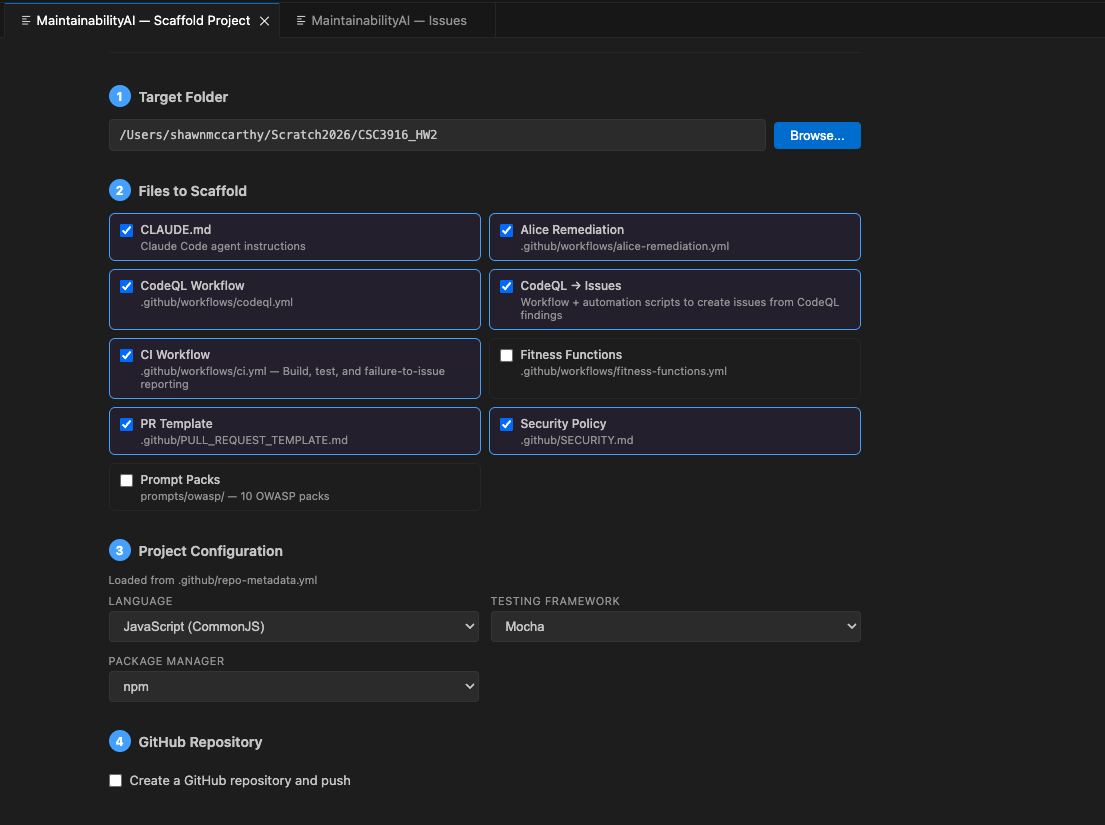
Run Scaffold SDLC Structure to bootstrap security-first CI/CD in any project:
CLAUDE.md — Agent instructions with detected tech stack.github/workflows/alice-remediation.yml — 2-phase Claude remediation workflow.github/workflows/codeql.yml — CodeQL security scanning with SARIF processing.github/workflows/validate-prompt-hashes.yml — Prompt pack integrity verification.github/workflows/fitness-functions.yml — Automated quality gates.github/PULL_REQUEST_TEMPLATE.md — PR checklist with AI disclosure.github/SECURITY.md — Vulnerability reporting policyprompts/owasp/ — OWASP prompt packs for AI agents
The Cast
| Character |
Role |
| The Looking Glass |
The governance mirror — portfolio dashboard, architecture diagrams, scoring, policies |
| The Cheshire Cat |
The code companion — scaffolding, scorecard, issue creation, agent orchestration |
| Absolem |
The governance caterpillar — multi-turn AI chat for architecture analysis and patching |
| Oraculum |
The oracle — automated architecture review via GitHub Issues and AI agents |
| The White Rabbit |
The implementation bridge — scaffolds components from governance artifacts |
| The Rabbit Hole |
The issue hub — feature creation, RCTRO generation, agent assignment and monitoring |
| The Red Queen |
The enforcer — deterministic governance enforcement via MCP tools, PreToolUse hooks, and TypeScript policy engine |
| Alice |
The remediation agent — follows RCTRO prompts to implement features via Claude Code or Copilot Coding Agent |
| You |
The architect — you describe, review, approve, and govern |
The Red Queen — Governance-Enforced Agent Intelligence
"Now, here, you see, it takes all the running you can do, to keep in the same place."

The Red Queen is a unified governance intelligence and enforcement system — deterministic constraint enforcement that moves AI agents from advisory prompts to architecture-as-law.
Available Now (Phases 1–8)
| Layer |
Mechanism |
Speed |
| PreToolUse Hooks |
Symmetric enforcement for both agents — .claude/settings.json + .github/hooks/ |
Milliseconds |
| MCP Server (The Grin) + The Red Queen's Court |
14 calm:// resources, 25 MCP tools, TypeScript policy engine with 6 rule types (TIER, PATH, SEC, CALM, CTRL, PLAT) |
Seconds |
What ships today:
- Progressive autonomy — 3 permission tiers (autonomous / supervised / restricted) driven by governance scores
- Trust battery — score decay with exponential half-life and grace window
- TypeScript policy engine — deterministic enforcement, not LLM suggestions. CALM flows, controls, and threat models enforced as rules
- Config scaffold — one command generates 16 governance files (.mcp.json, AGENTS.md, hooks, workflows, review board, audit trail)
- Multi-agent review boards — severity-weighted consensus (any-flag-escalates, unanimous, majority)
- Audit logging — JSONL append-only trail with correlation IDs and score deltas
- Agent-agnostic — one control plane for Claude Code and Copilot Coding Agent
- npm package —
npx @maintainabilityai/redqueen-mcp --scaffold --bar "My App" for zero-config usage
- 219 tests across 4 test suites
Coming in Phase 9
| Layer |
Mechanism |
Speed |
| CI Required Status Check |
redqueen-action with tree-sitter AST semantic diff blocks merge on violations |
Minutes |
- Machine-checkable contract diffs (oasdiff, buf, graphql-inspector, asyncapi-diff)
- Break-glass overrides with anti-normalization controls and quarterly budgets
- Agent memory system that learns from policy violations and prompt pack effectiveness
- Adaptive policy refinement
See the quickstart guide, design document, and The Art of the Possible for details.
Configuration
| Setting |
Description |
Default |
maintainabilityai.llm.provider |
LLM provider: vscode-lm, claude, or openai |
vscode-lm |
maintainabilityai.llm.claudeApiKey |
Anthropic API key (for Claude provider) |
— |
maintainabilityai.llm.openaiApiKey |
OpenAI API key (for OpenAI provider) |
— |
maintainabilityai.llm.model |
Model override (e.g., claude-sonnet-4-5-20250929) |
— |
maintainabilityai.llm.preferredFamily |
VS Code LM family for threat models, org scanning, policy generation |
gpt-4o |
maintainabilityai.mesh.path |
Path to governance mesh directory |
— |
maintainabilityai.github.defaultLabels |
Default labels for created issues |
["maintainabilityai", "rctro-feature"] |
LLM Providers
- VS Code LM (default): Uses GitHub Copilot's language model API. No API key needed — just have Copilot installed.
- Claude: Direct Anthropic API. Set
maintainabilityai.llm.claudeApiKey.
- OpenAI: Direct OpenAI API. Set
maintainabilityai.llm.openaiApiKey.
The Prompt Pack Library
23 packs. 3 categories. Every one a compact security guide.
OWASP Top 10 (10 packs)
A01 Broken Access Control · A02 Cryptographic Failures · A03 Injection · A04 Insecure Design · A05 Security Misconfiguration · A06 Vulnerable Components · A07 Authentication Failures · A08 Integrity Failures · A09 Logging/Monitoring · A10 SSRF
Maintainability (7 packs)
Complexity Reduction · Dependency Hygiene · DRY Principle · Fitness Functions · Single Responsibility · Strangler Fig · Technical Debt
Threat Modeling — STRIDE (6 packs)
Denial of Service · Elevation of Privilege · Information Disclosure · Repudiation · Spoofing · Tampering
Prerequisites
| Tool |
Required For |
Install |
| Git |
Repo detection, governance mesh |
git-scm.com |
GitHub CLI (gh) |
Setting secrets, issue creation |
cli.github.com |
| pmat (optional) |
Complexity and tech debt analysis |
npm i -g pmat |
Development
# Install dependencies
npm install

# Build
npm run build

# Watch mode
npm run watch

# Package as VSIX
npm run package
Part of the MaintainabilityAI Framework
This extension is part of the MaintainabilityAI security-first SDLC framework. See the workshop curriculum for training materials.
"It's no use going back to yesterday, because I was a different person then."
Ship secure code today. The Cheshire Cat will be grinning.

