AIChatRender
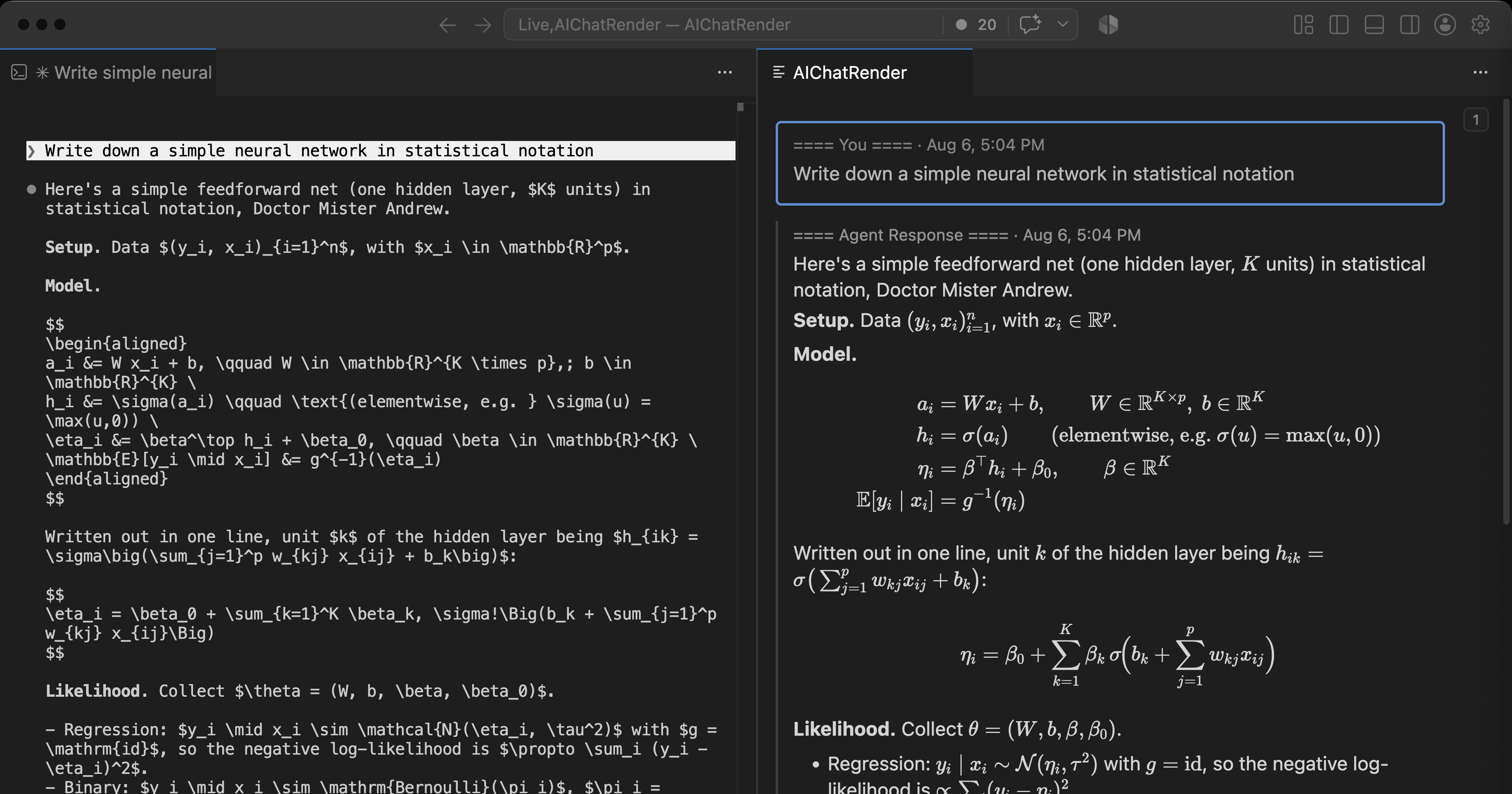
Read your Claude Code or Codex CLI session in a VS Code panel, with the math
nicely rendered. Scroll back, browse turns, while you compose your next response. Cmd+c in the rendered panel, then Cmd+v pastes the Markdown translation.
Unaffiliated. AIChatRender is an independent tool. It is not made,
endorsed, or supported by Anthropic or OpenAI. It reads the session files
those CLIs already write to your own disk; it uses no API and no account.
Requirements
- Claude Code or Codex CLI, run from this workspace. AIChatRender reads the
session files they already write; there is nothing to configure in either.
- VS Code 1.85 or newer.
- Linux or macOS. Following the active terminal needs process introspection:
/proc on Linux, pgrep/lsof/ps on macOS. On Windows, use WSL or a
remote/container workspace — AIChatRender declares
"extensionKind": ["workspace"], so it runs on the Linux side of a remote
window. Run natively on Windows, the panel and manual transcript picking still
work, but Follow Active Terminal Chat reports that it is unsupported
rather than silently failing.
Commands
| Command |
What it does |
AIChatRender: Show Panel |
Open the panel, following the newest transcript. |
AIChatRender: Follow Active Terminal Chat |
Pin to the active terminal's chat. |
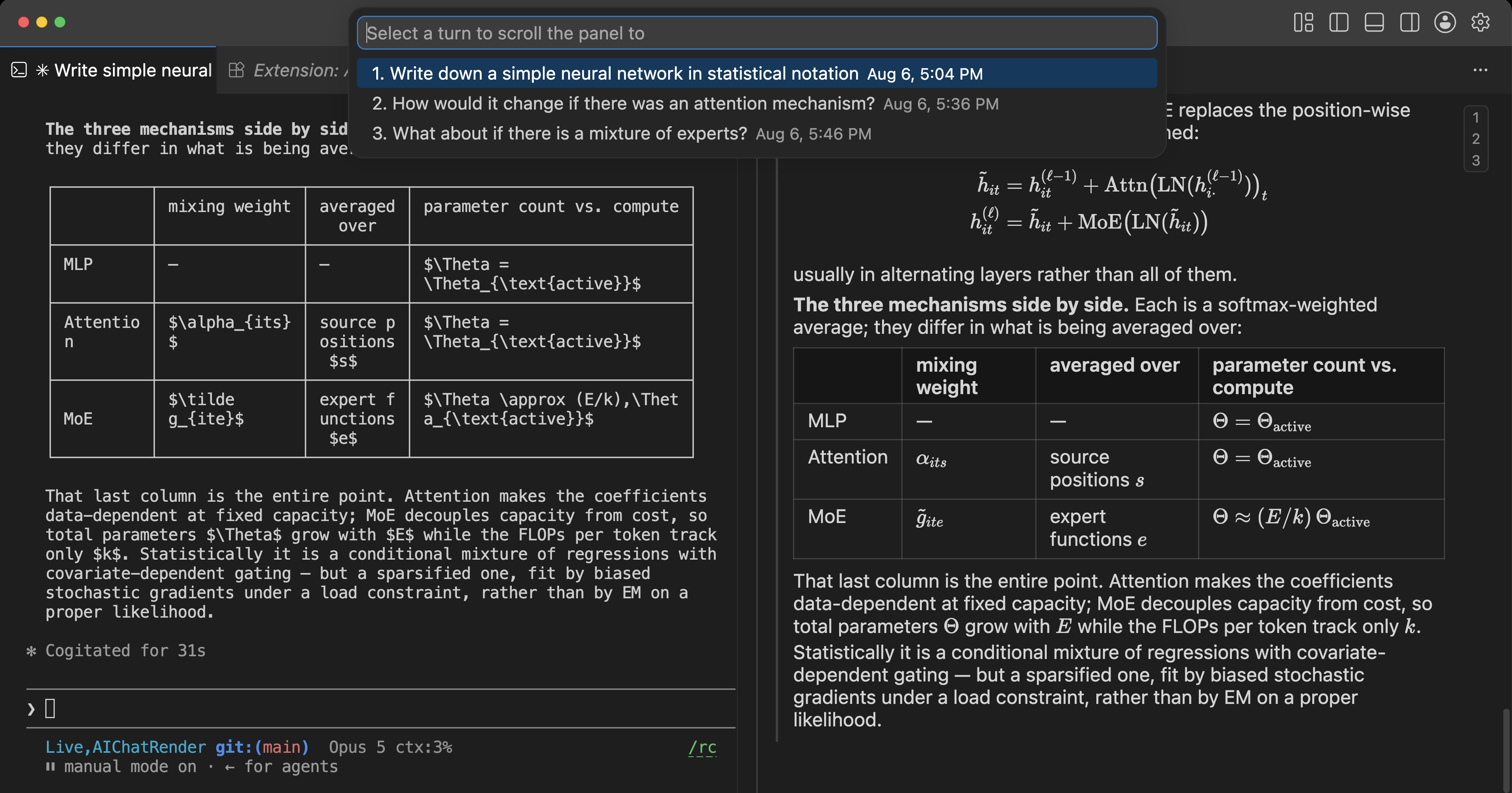
AIChatRender: Browse Turns and Pick |
List the chat's user prompts and scroll to one. |
AIChatRender: Search Chat Source |
Search the Markdown and LaTeX behind the rendering. Cmd+Shift+F / Ctrl+Shift+F with the panel focused. |
Cmd+F (Ctrl+F) with the panel focused opens VS Code's find widget over the
rendered chat. It searches the text as displayed, which is why Search Chat
Source exists: the panel draws \theta as θ, so only a search of the source
can match \theta.
What it does
- Renders math with a vendored, pinned KaTeX:
$$…$$ and \[…\] display,
\(…\) and $…$ inline, with Pandoc-style guards so currency and $VAR
don't trigger false positives.
- Renders a small Markdown subset — headings, lists, blockquotes, rules,
emphasis, code, and tables with alignment and math inside cells. Raw HTML and
links stay inert text, deliberately.
- Copies back out as Markdown source. Equations become their original
LaTeX; tables keep their pipe syntax and alignment.
- Shows tool calls in the terminal's visual language: the tool and its
argument, the first lines of its result, and a count of what was left unread.
File edits report added and removed line counts and draw the diff in the
editor's own diff colours.
- Shows the newest 100 user turns of assistant text and real prompts.
Thinking blocks, subagent traffic, and harness bookkeeping are skipped.
Each of these is covered in full in docs/reference.md.
How it works
AIChatRender watches the session files the two CLIs already write to your disk:
Claude transcripts under ~/.claude/projects/, Codex rollouts under
~/.codex/sessions/. It follows whichever was written most recently and
switches automatically.
A session counts as this workspace's when its cwd is the workspace folder or any
directory beneath it, so a CLI started in a subfolder is still followed.
Follow Active Terminal Chat goes further and pins the panel to the
transcript held open by your active terminal's process tree; when that terminal
can't be matched — an idle CLI often closes its transcript — a picker lists the
workspace's recent chats instead.
Nothing is installed into either agent. There are no hooks, no configuration
changes, and no second copy of your history.
Security and privacy
This is an extension that reads your AI chat transcripts, so the scope is worth
stating precisely.
- Read-only. It never writes under
~/.claude/ or ~/.codex/, and keeps no
copy, inbox, or history of its own.
- No network, and no local server. No HTTP listener, socket, port, or CDN
request. A loopback server would be reachable by other processes on the
machine; there isn't one. KaTeX is vendored and served over VS Code's internal
webview channel.
- No agent hooks. Neither CLI's configuration is modified.
- Nothing from a transcript is executed or made clickable. Raw HTML and
links stay inert, tool output is inserted as plain text rather than parsed,
and Codex wrapper programs are statically analyzed but never run.
- Codex discovery reads the first line of rollouts from your other projects
to find the one belonging to this workspace. Only
cwd and a timestamp are
retained; nothing from a nonmatching rollout is logged or reaches the webview.
- Transcripts are sensitive files. A session can hold prompts, command
output, diffs, paths, and any secret that ever appeared in them. AIChatRender
keeps no extra copy, but it does put that content on screen — worth
remembering when sharing a screen or recording.
These choices reduce the extension's attack surface. They do not sandbox the
underlying agent or make the panel a tamper-proof audit log. The reasoning
behind each is in docs/reference.md.
Known limitations
- Copying an equation currently brings extra text with it. The original
LaTeX is there and correct, but it arrives wrapped in two other renderings of
the same formula, so a pasted
$$…$$ block needs the surrounding text
trimmed by hand. Prose, lists, code, and tables copy cleanly; this affects
math only.
- Exactly one workspace folder.
- With concurrent Claude and Codex sessions, the panel follows whichever
matching file changed last unless you pin one.
- Codex discovery scans only the last seven date directories, so an older
rollout is not followed even when resumed.
- These CLIs ship frequently and their session formats are internal and
undocumented. A format change can break parsing until it's fixed; parsing is
fail-soft, so an unfamiliar record leaves prose intact and raises the panel's
format-drift notice.
The full list, including Codex code-mode and macOS PID-reuse caveats, is in
docs/reference.md.
License and citation
MIT — see LICENSE. Use it freely, including in commercial work. Bundled KaTeX
is separately MIT-licensed; see media/katex/LICENSE.
If AIChatRender is useful in academic work, a citation is appreciated but not
required by the license:
Chen, Andrew Y. (2026). AIChatRender: rendered math for AI coding-agent
transcripts in VS Code.
| |

