Chalk Skills
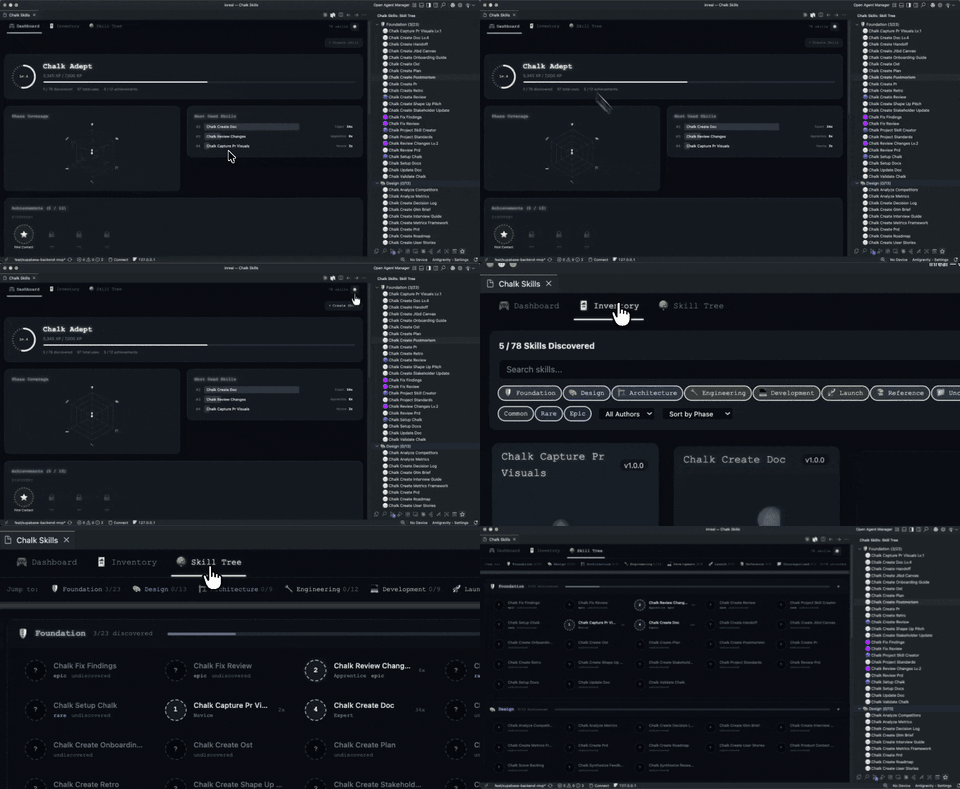
Turn your AI agent skills into a game. Track usage, earn XP, unlock achievements, and visualize your skill library with an RPG-inspired VS Code extension.
Quick Start
Option A: Start from scratch
- Install the extension
- Open any project in VS Code
- Run
Chalk Skills: Init from the Command Palette (Cmd+Shift+P)
- Three sample skills are created in
skills/ — start exploring
Option B: Create a skill
Run Chalk Skills: Create New Skill — you'll be prompted for a name, description, risk level, and tools. A v3 SKILL.md file is generated and opened.
Option C: Already have skills
If your project has skills/*/SKILL.md files, the extension activates automatically. Click the Chalk Skills icon in the Activity Bar.
What It Does
Dashboard — Player level, XP bar, phase coverage radar, achievement badges, and a most-used skills leaderboard.
Inventory — Browse skills as collectible cards with rarity tiers (common, rare, epic). Filter by phase, search by name, and see usage stats.
Skill Tree — Collapsible phase-based tree with progress bars. Jump between phases instantly. See which skills are locked vs discovered.
Auto-Recording — When an AI agent reads a SKILL.md file, usage is recorded automatically. No manual tracking.
Auto-Classification — Skills are categorized into development phases (Foundation, Design, Architecture, Engineering, Development, Launch) using pattern matching and TF-IDF classification.
Each skill is a SKILL.md file inside a named folder:
skills/
  my-skill/
    SKILL.md
Full v3 spec
---
# ── Identity ──
name: my-skill                        # Required. kebab-case identifier
description: What this skill does     # One sentence summary
author: project                       # Who made it (e.g. chalk, project, your-name)
version: "1.0.0"                      # Semver
metadata-version: "3"                 # Format version
license: MIT                          # Optional. For sharing/publishing

# ── Tools & Parameters ──
allowed-tools: Read, Write, Glob      # Comma-separated tools the skill can use
argument-hint: "[file path]"          # Autocomplete hint for arguments
input-schema:                         # Optional. Structured parameters (JSON Schema)
  type: object
  properties:
    target:
      type: string
      description: File path to process
  required:
    - target

# ── Behavioral Annotations (MCP-aligned) ──
read-only: false                      # Does not modify environment
destructive: false                    # Can cause irreversible changes
idempotent: true                      # Safe to run repeatedly
open-world: false                     # Reaches external systems (APIs, network)
risk-level: low                       # low | medium | high (drives XP + rarity)

# ── Activation ──
user-invocable: true                  # Can user trigger directly via command?
capabilities: docs.create, docs.update
activation-intents: create doc, write documentation
activation-events: user-prompt
activation-artifacts: .chalk/docs/**

# ── Organization ──
tags: docs, writing, templates        # Freeform tags for filtering
---

# My Skill

Detailed instructions for the agent go here as markdown.

## Workflow

1. Step one
2. Step two

## Rules

- Rule one
- Rule two
Field reference
| Field |
Required |
Description |
name |
Yes |
Kebab-case identifier, must match folder name |
description |
No |
One-sentence summary |
author |
No |
Who created the skill (default: chalk) |
version |
No |
Semver string |
metadata-version |
No |
1, 2, or 3 |
license |
No |
License for sharing |
allowed-tools |
No |
Tools the skill can access |
argument-hint |
No |
Autocomplete hint |
input-schema |
No |
JSON Schema for structured parameters |
read-only |
No |
MCP annotation: no side effects |
destructive |
No |
MCP annotation: irreversible changes |
idempotent |
No |
MCP annotation: safe to repeat |
open-world |
No |
MCP annotation: external system access |
risk-level |
No |
low, medium, high — drives XP and rarity |
user-invocable |
No |
Can be triggered by user directly (default: true) |
capabilities |
No |
Semantic capability tokens for routing |
activation-intents |
No |
Natural language trigger phrases |
activation-events |
No |
Lifecycle events that activate the skill |
activation-artifacts |
No |
File globs the skill operates on |
tags |
No |
Freeform tags for search/filtering |
Backward compatibility
v1 and v2 skills work without changes. The loader reads owner as author, infers annotations from risk-level, and defaults missing fields.
Commands
| Command |
What it does |
Chalk Skills: Init |
Scaffold sample skills in skills/ |
Chalk Skills: Create New Skill |
Interactive skill creator with v3 template |
Chalk Skills: Open Dashboard |
Open the main dashboard |
Chalk Skills: Open Inventory |
Browse skill cards |
Chalk Skills: Open Skill Tree |
View the skill tree |
Chalk Skills: Record Skill Usage |
Manually record a skill use |
Chalk Skills: Refresh Skills |
Reload skills from disk |
Chalk Skills: Auto-Index Skills |
Run auto-classification |
Settings
| Setting |
Default |
Description |
chalkSkills.autoRecord.enabled |
true |
Auto-record when agents read SKILL.md |
chalkSkills.autoRecord.cooldownSeconds |
60 |
Cooldown between auto-recordings per skill |
chalkSkills.animations.level |
full |
full, reduced, or off |
XP & Progression
| Action |
XP |
| Low risk skill use |
+10 |
| Medium risk skill use |
+25 |
| High risk skill use |
+50 |
| First discovery of a skill |
+100 bonus |
| Achievements |
Varies |
Skills have a rarity based on risk level: common (low/unknown), rare (medium), epic (high).
Building from Source
cd packages/vscode-extension
npm install
npm run compile
npm run package        # creates .vsix in build/
code --install-extension build/chalk-skills-*.vsix
Contributing
- Fork the repo
- Create a feature branch
- Make your changes
- Run
npm run compile to verify the build
- Open a PR
License
MIT

