OpenCode Agent
A real coding agent in VS Code — on whichever models you bring.
Not autocomplete. This is a full agent panel: it reads and edits your files, runs shell commands, asks permission before it touches anything, works through a todo list, and keeps going until the job is done.
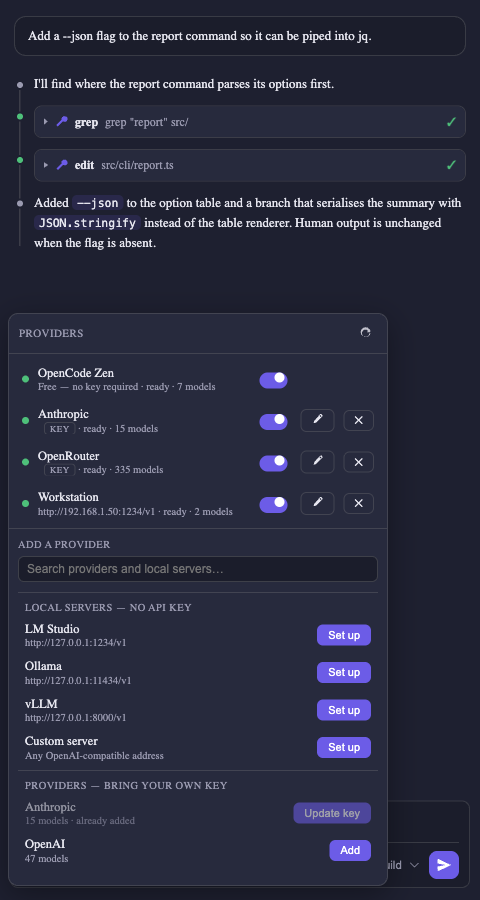
Bring your own models. Paste an API key for Anthropic, OpenAI, Google, OpenRouter — or any of the 170+ providers in the models.dev catalog — and/or point it at a local LM Studio, Ollama or vLLM server. Configure as many as you like: they are all live at once, and switching from a local model to Claude is a model choice, not a reconnect.
It works before you configure anything. OpenCode's own free Zen models are built in, so a fresh install can answer your first question with no key and no account.
Powered by the open-source OpenCode agent, bundled right in.
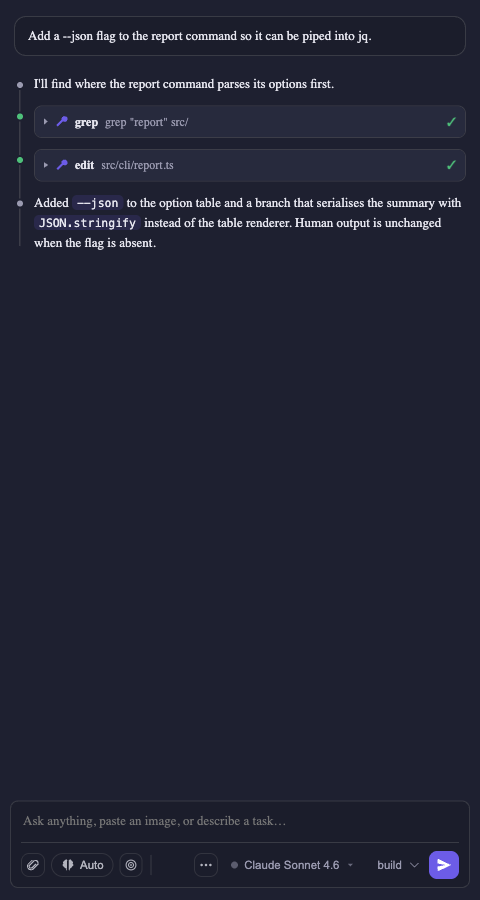
| Every provider in one panel |
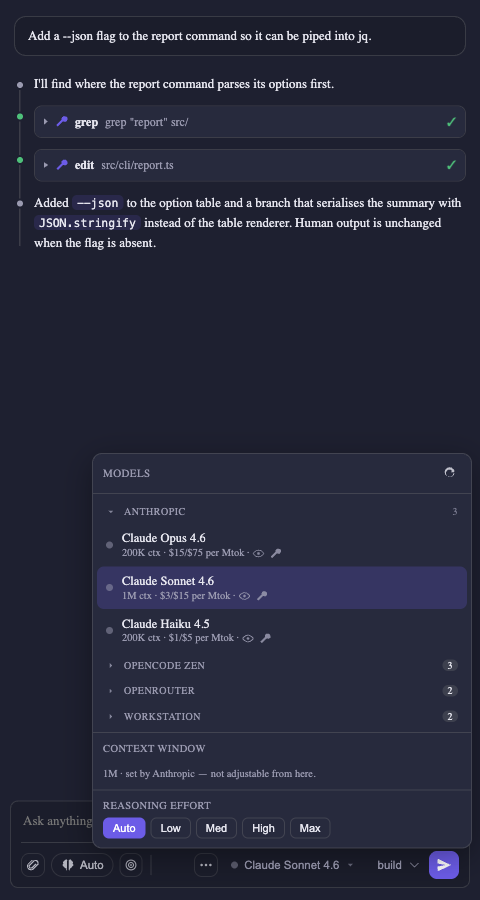
One picker, grouped by provider |
 |
 |
The agent
- Real tools — reads files, writes edits, runs shell commands, searches your codebase. Every step shows up as a tool card you can expand.
- You stay in control — inline permission prompts with Allow once, Allow always, or Deny, plus a permissions picker in the composer: Auto (the default — safe actions run on their own; outside-the-workspace access and
.env reads ask first), Manual (every tool call asks), or Bypass (nothing asks — for workspaces you trust).
- Build or plan mode —
build edits your code; plan is strictly read-only for when you just want a strategy.
- Live todo list — the agent's plan renders as a checklist that ticks off in place as it works, with a progress count.
- See it think — reasoning models get collapsible Thinking blocks, folded away with how long the model thought once a turn ends. Toggle Show reasoning in the behavior menu to hide them without changing how the model works.
- Dial the thinking — set reasoning effort per model from the behavior menu's Thinking slider or
/effort. The levels offered are the ones the model actually declares, so you never get a slider that does nothing.
- Streaming everything — responses render as markdown with syntax-highlighted code as they arrive.
Agents — specialists you define
- Bring your own agent — drop a
.opencode/agent/<name>.md in your workspace (YAML frontmatter + a body that becomes its system prompt) and it shows up in the agent picker. Each agent can pin its own model, restrict which tools it may use, and set its own reasoning effort.
mode decides who reaches it — primary puts it in your picker; subagent keeps it out of the picker and lets the model delegate to it through the built-in task tool when your request matches its description; all does both.- Delegation saves context, it doesn't spend it — a subagent runs in its own session with its own context window and returns only its answer, so a long search doesn't fill up the conversation you're having.
/agents shows both halves — what you can select, and what the model can delegate to. /agents new <name> scaffolds a definition and opens it.- Heads up: new agents are picked up when the OpenCode server restarts, and delegation depends on your local model reliably calling tools — smaller models may just answer directly instead.
Goals — point it at an objective and walk away
/goal <objective> starts an autonomous loop. After each turn, an isolated judge — running on your local model — decides whether the goal is actually met. If it isn't, the agent continues with specific feedback about what's still missing.- A pinned goal bar tracks the objective, round count, and elapsed time, with edit / pause / resume / clear controls.
- It can't run away — a 25-round cap plus stall detection that pauses the loop and tells you why when progress flatlines.
- It listens — change your mind mid-goal and it notices, offering a one-click Update goal instead of chasing a stale target.
Steer it mid-flight
Type while the agent is working and hit Enter — your message is handed to it at its next step, so it adjusts work already in progress instead of you stopping and starting over. Hit ⌥/Alt+Enter instead to queue it for when the current turn finishes.
Messages waiting to be picked up sit above the composer, marked Steering or Queued: switch one between the two, or cancel it before the agent ever sees it. Each lands in the conversation at the moment the agent actually reads it, so the transcript stays in the order the model saw things. The stop button still stops.
Your models, your keys
- Add a provider in two clicks — search the models.dev catalog, paste a key, done. No per-provider setup: the model list, context limits, capabilities and prices all come back from the provider itself.
- Local servers too — LM Studio, Ollama, vLLM, oMLX, llama.cpp, or anything else speaking OpenAI-compatible
/v1. A one-click scan finds LM Studio, Ollama and vLLM on their usual ports; anything else is added by URL. A server that reports its own context window is used at that size.
- One picker, every provider — models grouped by provider, with context window, vision/tool badges, and price per million tokens where there is one. Local models additionally show loaded ● / unloaded ○, publisher, format (MLX/GGUF) and quantization, and can be loaded or ejected right from the menu.
- Keys stay secret — stored in VS Code's encrypted Secret Storage, never in a settings file, never sent back to the UI, and never inherited by the tool processes the agent spawns (they are handed to OpenCode through a 0600 file reference, not the environment).
- Effort that matches the model — the reasoning levels offered are the ones each model actually declares: Anthropic's low/medium/high/max, OpenAI's medium/high/xhigh, or the honest Auto/Off/On that most local models really support. Models with no reasoning support hide the control entirely.
- Context handled for you — on LM Studio, the extension reloads your model with an adequate context window, so a 4096-token default never blows up mid-task.
- Room to think — the output budget scales with the context window (up to 32k), so long reasoning doesn't get chopped off mid-answer. If a response does hit the ceiling, you're told.
- Quiet by default — a 30-second liveness check shared across panels, paused when hidden, and only ever against your local servers: probing a metered API to see if it is alive would bill you to learn what the next real request tells us for free.
Context, without the busywork
- Highlight to share — select code in any file and it's automatically attached to your next message, exact lines and range included. The + menu lists what's going along, so nothing rides invisibly.
/file toggles the open file as context.- Paste images — screenshots and mockups attach as labelled chips with dimensions; click for a full-size lightbox.
/compact summarizes the conversation to reclaim context when you're running low, and shows you the summary it produced.- A context meter above the composer so you always know where you stand.
Sessions that survive
- Auto-restored — reopen VS Code and your last conversation is right where you left it, per workspace.
- Full history — browse, resume, rename, and delete past sessions. Empty chats never clutter the list.
- Work in parallel — Open in Editor Tab gives a conversation its own tab, so you can run several at once.
Extend it — MCP servers and skills
- MCP tools — browser automation, databases, issue trackers, docs. Local (stdio) and remote (http/sse) servers both work, and their tools get the same tool cards and permission prompts as built-ins.
- Nothing to re-enter — the
.mcp.json you already wrote for Claude Code and the .vscode/mcp.json you wrote for VS Code are discovered automatically.
/mcp shows live status per server: 🟢 connected, 🟡 disabled, 🔴 failed with the reason. A broken server never blocks your chat./skills lists the skills available to the model with their source (project / global / built-in) and path — your .opencode/skill and .claude/skills are picked up too.- Slash commands — type
/ for a filterable menu: /clear, /compact, /file, /mcp, /skills, /goal, /help, plus your own skills and OpenCode commands, with arguments.
Fits your window
The panel lives in the Activity Bar (or the secondary side bar). The composer keeps four controls — + for context, ? for slash commands, the model chip and the permissions chip — with everything else one click inside them, so it stays legible in a narrow side bar.
Quick start
- Install this extension.
- Click the spark icon in the Activity Bar.
- Type a task and hit Enter — the built-in free models answer with nothing configured.
- When you want your own models, open Providers and either paste an API key or add a local server.
Requirements
- VS Code 1.104+
- That's it to get started. For your own models, one of:
- an API key for any provider in the models.dev catalog (Anthropic, OpenAI, Google, OpenRouter, Groq, xAI, DeepSeek, Mistral, …), or
- a local server speaking the OpenAI-compatible API — LM Studio (default
http://127.0.0.1:1234), Ollama (11434), vLLM (8000), llama.cpp (8080, added by URL), oMLX, or anything else
- (LM Studio only, recommended) the
lms CLI as a fallback for automatic context-window management
OpenCode 2 runs inside the extension — there is no separate server to install, start or stop, no port, and nothing left running when VS Code closes. It works offline. An OpenCode install elsewhere on your machine (yours, Homebrew's) is never used and never affected: the panel keeps its own sessions and settings.
OpenCode is MIT-licensed by anomalyco/opencode; its notice ships with the extension as opencode-sdk/LICENSE.opencode. This extension is an independent project and is not affiliated with or endorsed by the OpenCode maintainers.
Beta channel
New features ship to the Marketplace pre-release channel first (odd minor
versions, e.g. 0.13.x; stable releases use even minors). To try betas, open
the extension's Marketplace page in VS Code and click Switch to Pre-Release
Version — VS Code updates you along the beta track and you can switch back
any time with Switch to Release Version.
Settings
| Setting |
Default |
Description |
opencodeChat.autoDetectLocalServers |
true |
Offer local servers found on the well-known ports on first run |
opencodeChat.defaultModel |
(first) |
Default model as provider/model, e.g. anthropic/claude-sonnet-4-6 |
opencodeChat.agent |
build |
build or plan |
opencodeChat.autoEnsureContext |
true |
(LM Studio only) Reload the model with an adequate context window before prompting |
opencodeChat.minContextLength |
32768 |
Context length to (re)load LM Studio models with, and the window assumed for a local server that reports none. Servers started with a fixed window (llama.cpp --ctx-size, vLLM --max-model-len, oMLX) report their own and are used as-is |
opencodeChat.defaultThinkingEffort |
auto |
Starting reasoning effort for models you haven't set one for; snapped to the levels each model declares |
opencodeChat.gpuOffload |
max |
(LM Studio only) GPU offload for lms load |
opencodeChat.healthCheckSeconds |
30 |
Local-endpoint poll cadence while connected (5–600). Cloud providers are never polled. Disconnected retries stay at 5s; the model list refreshes immediately while the model picker is open |
Providers themselves are not settings — they live in the Providers panel, because their API keys belong in Secret Storage rather than a JSON file.
| opencodeChat.mcpServers | {} | MCP servers to expose to the agent (in addition to auto-discovered ones) |
MCP servers
The agent can call tools from MCP (Model Context Protocol) servers — browser automation, databases, issue trackers, docs, and more. OpenCode runs the servers; this extension just gathers them from wherever you've configured them and hands them over.
Where servers come from
Servers are merged from these sources, in increasing precedence (a later source wins on a name collision):
| # |
Source |
Format |
Top-level key |
| 1 |
.mcp.json at your workspace root |
Claude Code project format |
mcpServers |
| 2 |
.vscode/mcp.json in your workspace |
VS Code workspace format |
servers |
| 3 |
VS Code's user-level mcp setting |
VS Code user format |
servers |
| 4 |
opencodeChat.mcpServers (VS Code settings) |
bare map of name → server |
(the map itself) |
If you already use MCP with Claude Code or VS Code Copilot, those servers work here with nothing to re-enter. Use opencodeChat.mcpServers to add a server just for OpenCode Agent, or to override a discovered one.
Setting up a .mcp.json (shareable, per project)
Create .mcp.json at your project root — the same file Claude Code uses, so it's safe to commit and share with your team:
{
  "mcpServers": {
    // local (stdio) server — runs a command, talks over stdin/stdout
    "playwright": {
      "command": "npx",
      "args": ["-y", "@playwright/mcp@latest"]
    },
    // local server with a working dir and env var
    "filesystem": {
      "command": "npx",
      "args": ["-y", "@modelcontextprotocol/server-filesystem", "."],
      "env": { "LOG_LEVEL": "info" }
    },
    // remote (http/sse) server, with a token pulled from the environment
    "docs": {
      "type": "http",
      "url": "https://example.com/mcp",
      "headers": { "Authorization": "Bearer ${MY_TOKEN}" }
    },
    // defined but off — won't be started
    "staging": {
      "command": "npx",
      "args": ["-y", "some-mcp-server"],
      "enabled": false
    }
  }
}
A .vscode/mcp.json is identical except the top-level key is servers instead of mcpServers (VS Code's convention) — both are supported.
What's supported
| Field |
Applies to |
Notes |
command |
local (stdio) |
Executable name or path (e.g. npx, uvx, an absolute path). |
args |
local (stdio) |
Array of arguments passed to command. |
env |
local (stdio) |
Environment variables for the server process. |
type |
both |
"http" / "sse" mark a remote server; "stdio" / "local" a local one. Inferred from the fields when omitted (a url ⇒ remote, a command ⇒ local). |
url |
remote (http/sse) |
The server endpoint. |
headers |
remote (http/sse) |
HTTP headers, e.g. an Authorization token. |
enabled |
both |
Set false to keep a server defined but not started. |
${VAR} references in env values, headers, and url are resolved from the environment before the server launches — keep secrets in your environment, not in the file.- Transports: local (stdio) and remote (http/sse). Both the Claude Code field shape (
command + args) and the VS Code shape are accepted and normalized for you.
Checking status — the /mcp command
Type /mcp in the chat to list your configured servers and their live status:
- 🟢 connected — running and its tools are available
- 🟡 disabled — defined but
"enabled": false
- 🔴 failed — couldn't start/connect; the reason is shown (a bad server never blocks the chat)
Each row shows the transport (local/remote) and the command or URL it was configured with.
Notes
- Applying changes. Edits to
opencodeChat.mcpServers (or VS Code's mcp setting) restart the agent automatically. Edits to the .mcp.json / .vscode/mcp.json files apply on the next OpenCode Agent: Restart OpenCode Server (or a window reload).
- Mind the context window. Each MCP server adds its tool schemas to every request. Local models have far less context than cloud ones (OpenCode's own system prompt + built-in tools already use ~11k tokens), so enable only the servers you need. On LM Studio — or any server that does not report a window of its own — raising
opencodeChat.minContextLength buys room; a server launched with a fixed window already reports it, so restart that server larger instead.
npx/uvx on PATH. Local servers launched with npx/uvx need Node and those tools on PATH. The extension augments PATH with common install locations (Homebrew, ~/.local/bin, nvm/fnm, bun, cargo), but if a server shows as failed, check OpenCode Agent: Show Logs.
How it works
VS Code webview (chat UI)
        │  postMessage
        ▼
Extension host ─ bridge          providers + keys (Secret Storage)
        │  in-process calls + event stream
        ▼
OpenCode 2 (@opencode/sdk,  ──┬── Anthropic / OpenAI / Google / OpenRouter / …
  embedded, no server)        ├── LM Studio · Ollama · vLLM   (OpenAI /v1, local)
                              └── OpenCode Zen                (built in, no key)
OpenCode runs inside the extension host through its embedding SDK — no
process, no port, no password. Every provider you enable is handed to it in
memory when it starts — nothing is written to your workspace or global
config, and only the providers you configured here are enabled (a key
exported in your shell is never picked up behind your back). Its sessions,
database and settings live in the extension's own storage, isolated from any
OpenCode you run yourself; chats from earlier versions carry over.
- Cloud providers need only their
apiKey; the model list, limits, prices
and reasoning variants come from OpenCode's own catalog, which is why 170+
providers work without a line of per-provider code.
- Local servers are declared as
@ai-sdk/openai-compatible providers with
their models enumerated from the server itself, since no catalog knows what
you are running on your own machine.
- API keys never sit in the config text. Each key is written to its own
0600 file and referenced with OpenCode's {file:…} placeholder, which the
engine resolves at load. Removing a provider deletes its file.
Develop from source
npm install
npm run bundle:opencode-sdk  # build the embedded OpenCode engine into opencode-sdk/ for your platform
npm run compile              # type-check + bundle (extension + webview)
# then press F5 in VS Code to launch the Extension Development Host
npm test                     # unit tests
npm run test:integration     # drives the real webview in a VS Code instance
npm run test:live            # the engine against a local model (LM Studio on :1234)
npm run package:vsix:bundled # build a platform .vsix with the engine embedded
The engine is built from @opencode/sdk, pinned to an exact version in
devDependencies — its API is still marked experimental, so upgrades are
deliberate. opencode-sdk/ is generated and git-ignored; run
bundle:opencode-sdk once before launching the dev host, and again after
changing the pinned version.
License
MIT
| |

