Weft for VS Code
Red squiggles for teams of coding agents, inside the editor. When several agents (Claude Code,
Copilot, Codex, Cursor, Gemini/Antigravity, Hermes, …) work on one repo through
Weft, this extension shows what Otto shows:
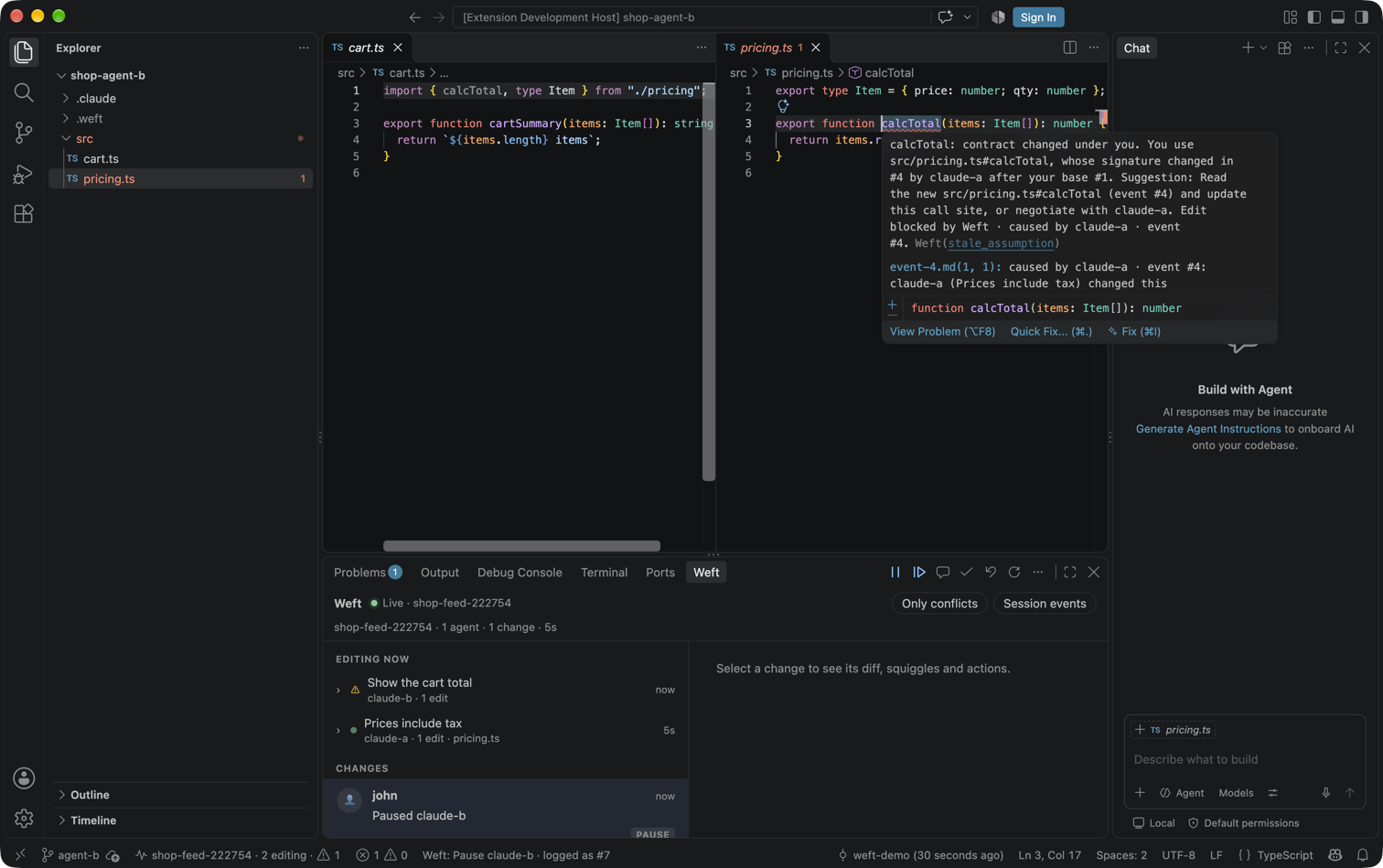
- Changes feed across your repos, live, in the panel (Weft tab): every intent, edit,
claim, negotiation, land and human action, with the coloured diff and the squiggles of each.
- Editing now: one row per task that is editing right now, with its trail of edits.
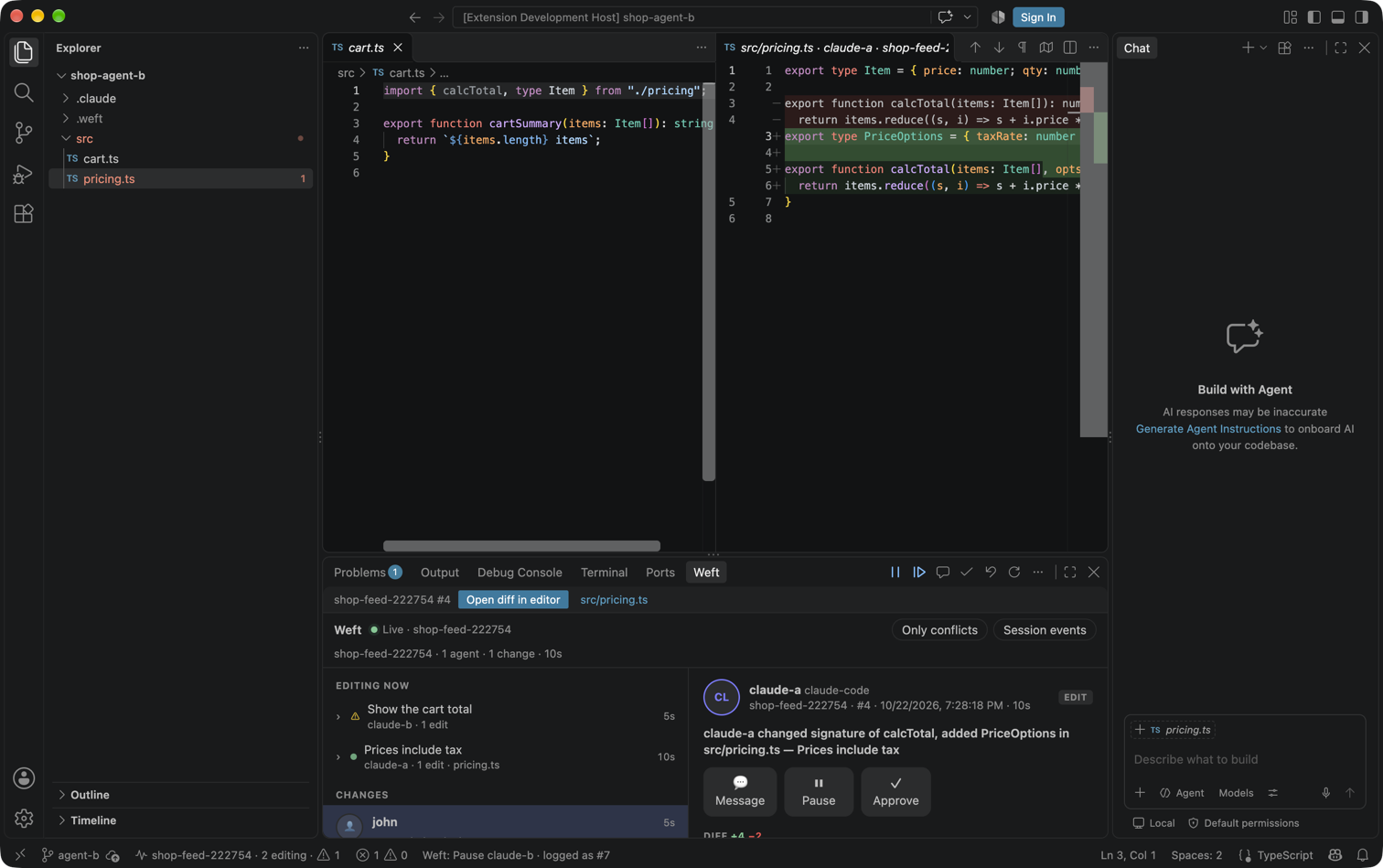
- Diffs: any event in the native diff editor (
Weft: Open diff for event…, or the
Open diff in editor button above the feed).
- Squiggles linked to their cause: Weft's open conflicts on this checkout's change become
editor diagnostics (Problems panel included) on the symbol, with “caused by claude-a ·
event #4” as related information and a quick fix Open causing event.
- Actions: Approve, Undo (asks for a reason), Pause, Resume and Message, from the feed's
detail pane, the panel toolbar or the command palette.
It runs in VS Code and in every fork: Cursor, Windsurf, Kiro, Antigravity and VSCodium install
it from Open VSX, Trae from the .vsix.
Install
npx @celador/weft                          # in your repo: free hosted space + agent hooks
code --install-extension celador.weft-agents      # VS Code (Visual Studio Marketplace)
cursor --install-extension celador.weft-agents    # Cursor, Windsurf, VSCodium, Kiro, Antigravity (Open VSX)
Or search Weft in the Extensions view. Open the repo's folder: the extension finds the space
npx @celador/weft set up in .weft/ and connects. Nothing to configure.
Squiggles reach the agents too
The squiggles are ordinary diagnostics, so any editor agent that reads diagnostics sees them.
VS Code's Copilot agent mode does (get_errors / #problems): ask it “what errors are in this
file?” and it reports the Weft squiggle (verified on 2026-10-22). In Cursor, the squiggle's
Fix with Agent / Fix in Agent hands it to Cursor's agent. See docs/harness-coverage.md
§7 Q5 in the Weft repo for what was verified in which editor.
Setup
Run npx @celador/weft in your repo (it writes .weft/ and ~/.config/weft), or install a
Weft adapter in a checkout. The extension then finds everything itself:
| What |
Where it comes from, first match wins |
| Gateway URL |
setting weft.url → WEFT_URL → the checkout's .weft/space.json or adapter config (.weft/claude.json, …) → http://localhost:8787 |
| Repo |
setting weft.repo → WEFT_REPO → .weft/ → a visible repo named like the folder |
| Token |
WEFT_TOKEN → the checkout's .weft/human-token, then the adapter's agent token (.weft/token) → ~/.config/weft (the space's viewer key in cli.json, <repo>.token, token) → Weft: Set token (VS Code secret storage) |
Reading needs a token with the observe scope. Actions need the human scope: an agent
token or a viewer key can only read. Actions try the tokens in the order above and skip any
the gateway refuses, so a human token saved with Weft: Set token works even when the
checkout's own token is read-only. When no token can act, the extension says so and offers
Set token….
In an untrusted workspace the checkout's .weft/ is ignored (a cloned repo could plant a
gateway URL or token there); settings, environment variables and the saved token still work.
Settings
weft.squiggles: auto (this checkout's own changes; the whole repo if the checkout has no
agent), repo (every open squiggle in the workspace's repos) or off.weft.squiggleMaxAgeHours: hide open squiggles older than this (default 24, 0 = no limit).
A squiggle is open until the change that got it redoes the work (an accepted edit on that
symbol), lands, or releases a symbol it never wrote — WCP §6.5, replayed from the log by
openSquiggles() in @weft/feed.
Privacy and security
The webview has no network access and never sees a token (strict CSP: one nonce'd script,
styles only from the extension's files, no inline style). The extension host talks to the
gateway with the token in the Authorization header or the first WebSocket frame, never in a
URL. Tokens are never written to the log.
Build
pnpm --filter @weft/vscode build       # dist/ + media/dist/
pnpm --filter @weft/vscode test        # unit tests (vitest)
pnpm --filter @weft/vscode test:smoke  # the packaged extension in a real VS Code, against a gateway double
pnpm --filter @weft/vscode package     # out/weft-<version>.vsix
code --install-extension apps/vscode/out/weft-0.1.1.vsix     # or: cursor / windsurf / kiro / antigravity --install-extension …
pnpm --filter @weft/vscode test:install -- --app vscode|cursor [--from vsix|marketplace]  # fresh profile + a new `npx @celador/weft` space
pnpm --filter @weft/vscode release     # build, package, publish to the Marketplace + Open VSX, check both listings
release reads the tokens from VSCE_PAT / OVSX_PAT or the macOS keychain items
weft-vsce-pat / weft-ovsx-pat (see scripts/publish.mjs).

