Skip to content
| Marketplace
Sign in
Visual Studio Code>Other>Smarter CommentsNew to Visual Studio Code? Get it now.
Smarter Comments

Smarter Comments

Colm Delaney

| (0) | Free
Insert and remove comments in the style that fits — with per-language defaults, accurate target-text detection, and a single global uncomment command.
Installation
Launch VS Code Quick Open (Ctrl+P), paste the following command, and press enter.
Copied to clipboard
More Info

Smarter Comments

Add the right comment to any file with a single command, remove any comment with a single command. Insert any of the other supported comment styles directly when you want a specific one instead.

Why Smarter Comments?

  • One command, the right comment style, every time. Run Smarter Comments: Comment in a .js file and get a JSDoc block; run it in a .css file and get a C-style block comment; run it in an .ini file and get a semicolon comment. No file type, no problem — Smarter Comments already knows. All defaults are user-configurable.
  • Any comment style, on demand. Every supported comment style has its own command, usable in any file, regardless of that file's own default.
  • One uncomment command for everything. Smarter Comments: Uncomment finds and removes whatever comment is targeted, whether your cursor is resting inside it or you've selected it directly.

Example

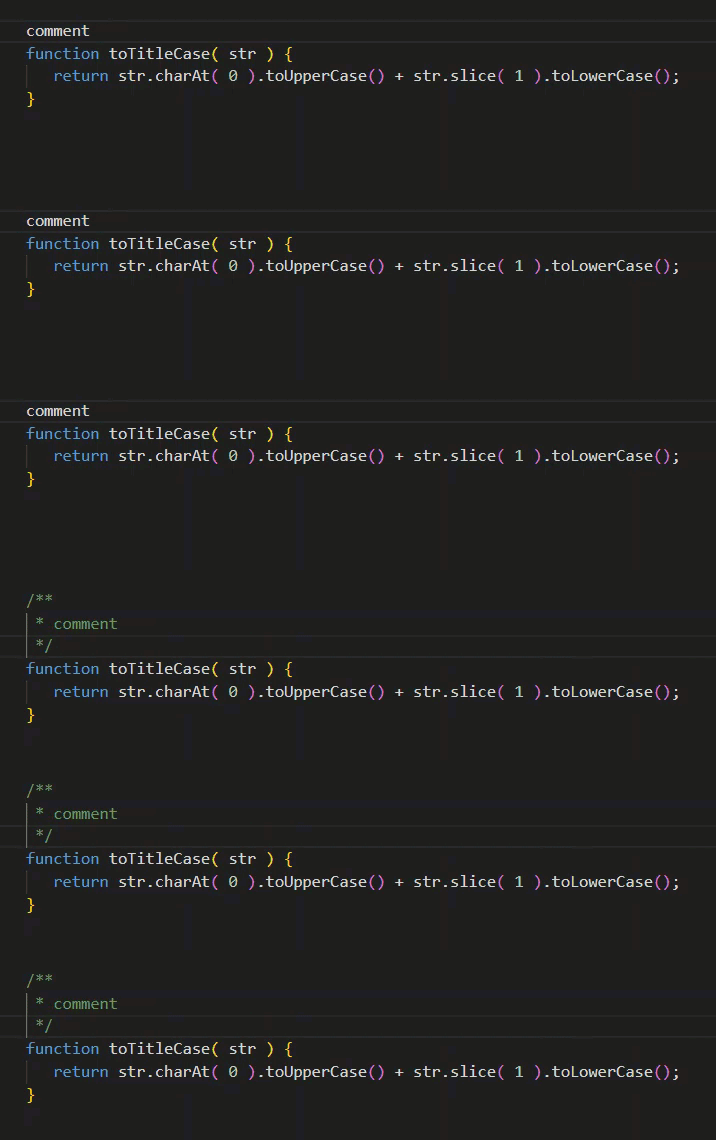
A JavaScript function with a line of plain text above it, commented via a single command from the Smarter Comments extension

  • Add a comment: select some text, or just place the cursor anywhere on a line of text. Run Smarter Comments: Comment to convert it to the default comment type for the current file, or choose one of the commands below for a different comment type. Also works on blank lines, inserting the correct comment style before you type the comment.

  • Remove a comment: select the comment (or leave the cursor inside or abutting the comment, as in the above example), run Smarter Comments: Uncomment, and the comment is converted to plain text.

Features

  • Context-aware default comment style for each supported file type, with a single global command Smarter Comments: Comment.
  • User-configurable default style for every commonly-used file type with more than one comment style (JavaScript/TypeScript and their React variants, CSS/SCSS/LESS, SQL, PHP, HTML).
  • Built-in default styles for languages with only one comment style (Perl, Visual Basic, INI, Common Lisp, Clojure, Apache config files and related config formats — .gitattributes, .gitconfig, .gitmodules, .editorconfig, .env).
  • Filename-based fallback for common config file types (.htaccess, .htgroups, .htpasswd, .conf).
  • Explicit command for every supported comment style, usable in any file.
  • Accurate target-text detection whether or not you've made a selection: comments the current line, the selected text, or the whole block, whichever applies.
  • A single global Uncomment command, Smarter Comments: Uncomment, that finds and removes any comment your cursor is on or inside, or that a selection covers.
  • Option for global Uncomment command to treat trailing comments as special cases by offering to remove them entirely or just uncomment them. Doesn't apply to HTML comments. On by default.
  • A dedicated Remove or Uncomment Trailing Comments command, Smarter Comments: Remove or Uncomment Trailing Comments, for removing or uncommenting end-of-line comments specifically.
  • Option to leave target text selected after commenting or uncommenting. On by default.
  • Optional leading-indentation normalisation, in either direction — normalise leading whitespace to tabs or spaces. Off by default.
  • No telemetry, no external services, no network access at all.

Commands

Smarter Comments: Comment

Applies the current file's own default comment style — set per language, or falling back to a single global default — to the current selection, or the current line if nothing is selected.

Insert a specific style

Every supported style is also its own command, usable in any file regardless of that file's own default. C Multiline and HTML have both an inline and a block style.

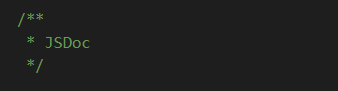
An example of a JSDoc comment

Smarter Comments: JSDoc

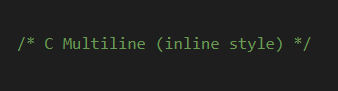
An example of a C Multiline (inline style) comment

Smarter Comments: C Multiline (inline style)

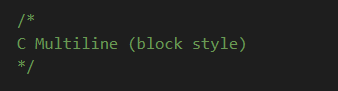
An example of a C Multiline (block style) comment

Smarter Comments: C Multiline (block style)

An example of a C Single Line comment

Smarter Comments: C Single Line

An example of a Perl comment

Smarter Comments: Perl

An example of a SQL comment

Smarter Comments: SQL

An example of a Visual Basic comment

Smarter Comments: Visual Basic

An example of an INI comment

Smarter Comments: INI

An example of an HTML (inline style) comment

Smarter Comments: HTML (inline style)

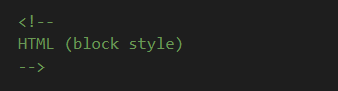
An example of an HTML (block style) comment

Smarter Comments: HTML (block style)

Each behaves the same way as Smarter Comments: Comment — applied to the selected text, or to the current line if nothing is selected — just always in that specific style.

Smarter Comments: Uncomment

Finds and removes a comment, in any of the supported styles, wherever your cursor is currently positioned or that your current selection fully covers (or is fully covered by). If nothing qualifies, you'll see a message rather than a silent no-op.

Smarter Comments: Remove or Uncomment Trailing Comments

Removes trailing comments specifically — a comment following real code on the same line, in any supported style, whether that's a single-line comment (//, #, etc.) or a multiline comment flattened to a single-line-style comment (e.g. /* ... */) — across the current selection, or the current line if nothing is selected. HTML comments are the one exception: a <!-- ... --> immediately after a tag is treated as an ordinary comment, not a trailing one.

Settings

smarterComments.defaultStyle

The comment style Smarter Comments: Comment applies to a file type with no more specific default set below.

Default: "jsdoc"

smarterComments.languageDefault.<language>

A dedicated default-style setting for each of the following languages, each offering a dropdown of every style that genuinely makes sense for it:

Language Default
JavaScript JSDoc
JavaScript React JSDoc
TypeScript JSDoc
TypeScript React JSDoc
CSS C Multiline (block style)
SCSS C Multiline (block style)
LESS C Multiline (block style)
SQL Perl-style (#)
PHP JSDoc
HTML HTML (block style)

Every other supported language (Perl, Visual Basic, INI, Common Lisp, Clojure, Apache config files, and the broader .gitattributes/.gitconfig / .gitmodules / .editorconfig / .env family) has only one style that genuinely fits, so it's applied automatically with no setting to configure.

smarterComments.outputConfirmationModal

Show a confirmation modal after inserting or removing a comment, in addition to the status bar message.

Default: false

smarterComments.askRemoveOrUncommentTrailingComments

When on (the default), a trailing comment gets special handling from Smarter Comments: Uncomment — you're asked whether to Remove it entirely or just Uncomment it (exposing its content instead, with the separating whitespace normalised the same way leading indent is, per smarterComments.normaliseLeadingWhitespace). When off, every trailing comment gets that same Uncomment treatment automatically, with no prompt. Smarter Comments: Remove or Uncomment Trailing Comments is a separate command offering the exact same choice, governed by this same setting. Does not apply to HTML comments.

Default: true

smarterComments.preserveSelectionAfterEdit

When the targeted text is commented or uncommented, keeps it selected afterward, encompassing the whole new comment after adding one, or the whole revealed content after removing one. Off reverts to always collapsing to a cursor position after editing.

Default: true

smarterComments.normaliseLeadingWhitespace

Normalises leading indentation before it's used as a new comment's own base indent, or restored when a comment is removed, correctly preserving relative indentation between lines rather than flattening it. The same treatment also applies to the whitespace separating a trailing comment from the code before it, when choosing to Uncomment one rather than Remove it outright. Options are spaces, tabs or "Leave as-is," which touches nothing.

Mixed tab/space indentation is handled as a best-effort approximation in either direction.

Default: "" (leave as-is)

Privacy

Smarter Comments:

  • Reads and edits only the file you're actively working in
  • Does not transmit any data
  • Does not collect telemetry
  • Does not access any external service or network resource

Requirements

Visual Studio Code 1.80.0 or later.

Known Limitations

  • Converting an existing comment to a different style works reliably when the whole selection is one existing comment. A selection that mixes some already-commented lines with some bare ones, where the target style differs from what's already there, may not fully remove the old marker — it's folded into the new comment's content instead of being stripped. This doesn't affect converting to the same style, or removing a comment outright.
  • A selection that only partially overlaps two different existing comments is treated as ambiguous and left untouched, by design — Smarter Comments only acts when it's unambiguous which comment you mean.

Release Notes

1.0.0

Initial public release.

License

MIT

  • Contact us
  • Jobs
  • Privacy
  • Manage cookies
  • Terms of use
  • Trademarks
  • Your Privacy Choices
  • Consumer Health Privacy
© 2026 Microsoft