
Recent Files (All)Filterable list of recently accessed files across all workspaces. Installation Launch VS Code Quick Open ( Ctrl+P), paste the following command, and press enter.Copied to clipboard |

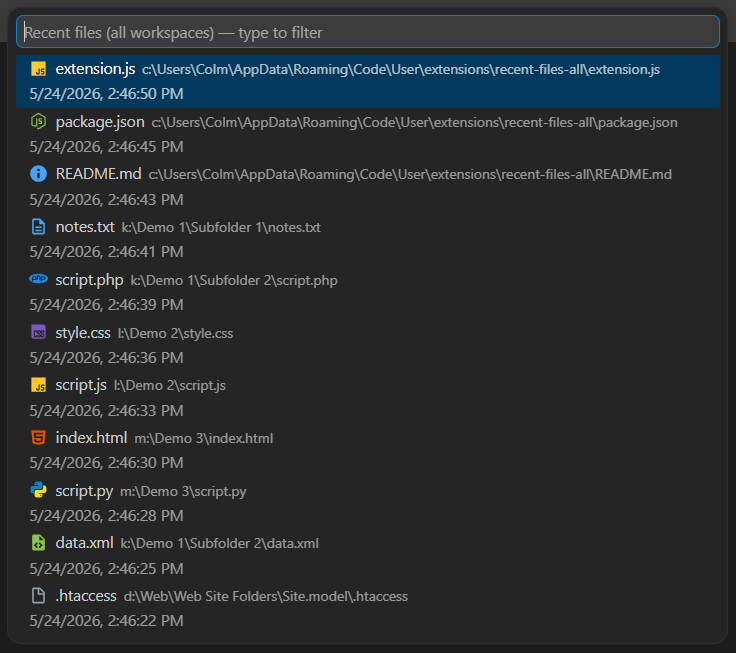
Recent Files (All)A global Recent Files list for Visual Studio Code. Unlike VS Code's built-in recent file history, Recent Files (All) maintains a single Most Recently Used (MRU) list across all workspaces and windows. Files are always displayed in reverse chronological order, even while filtering.
Features
Commands
|
| Value | Description |
|---|---|
material |
Material Icon Theme file icons, one per file type (default) |
codicon |
Generic file icon, the same for all files |
none |
No icon |
Default: "material"
recentFilesAll.showTimestamp
When enabled, shows the date and time each file was last accessed below the filename. Disabling this doubles the number of files visible in the list at one time.
Default: true
Programmatic Usage
Other extensions or scripts can add files to the recent files history:
vscode.commands.executeCommand(
	'recentFilesAll.addFile',
	filePath
);
Example use cases:
- Backup scripts
- Save-a-copy workflows
- Generated files
- Export tools
Privacy
Recent Files (All):
- Stores file paths locally inside VS Code extension storage
- Does not transmit any data
- Does not collect telemetry
- Does not access file contents beyond receiving file paths from VS Code events or commands
Requirements
Visual Studio Code 1.80.0 or later.
Known Limitations
- Untitled editors and non-filesystem documents are ignored
- Remote filesystem behaviour may vary depending on VS Code remote extensions
Release Notes
1.0.0
Initial public release.
Features include:
- Global MRU tracking across workspaces
- Live filtering with preserved chronological ordering
- Programmatic file registration API
- Configurable history size (default: 500 items)
- File-type icons with choice of Material, generic, or none
- Optionally hide timestamps to maximise list density
License
MIT