Git Blame Hover
Git blame, exactly when you want it - nowhere else.
Hover over any line of code and instantly see who changed it, when, and why.
No gutters. No sidebars. No noise.
✨ Why Git Blame Hover?
Most Git extensions try to turn VS Code into a Git dashboard. Git Blame Hover does one thing — and does it quietly.
- Shows blame only on hover
- Zero visual clutter
- Lightweight & fast
- Works with GitHub, GitLab, Azure Repos, Bitbucket
- Ideal for large repos & enterprise codebases
🖱️ How it works
Just hover your mouse over a line of code.
You’ll see:
- Author name
- Commit date
- Commit message (the “why”)
- Commit hash
Move away → it disappears.
That’s it.
🧠 When should you use Git Blame Hover?
Use this extension if you:
- Only want Git blame when you ask for it
- Don’t want gutter annotations or overlays
- Prefer minimal tooling during code reviews
- Already disabled most GitLens features
- Work in large or performance-sensitive repositories
- No background Git scans
- Blame runs only on hover
- Cached per file & commit
- No telemetry
- No network calls
- Works fully offline
Built to be safe for monorepos and enterprise environments.
🔐 Enterprise-friendly
- No data collection
- No external services
- Uses local Git only
- Predictable behavior
Safe for locked-down environments.
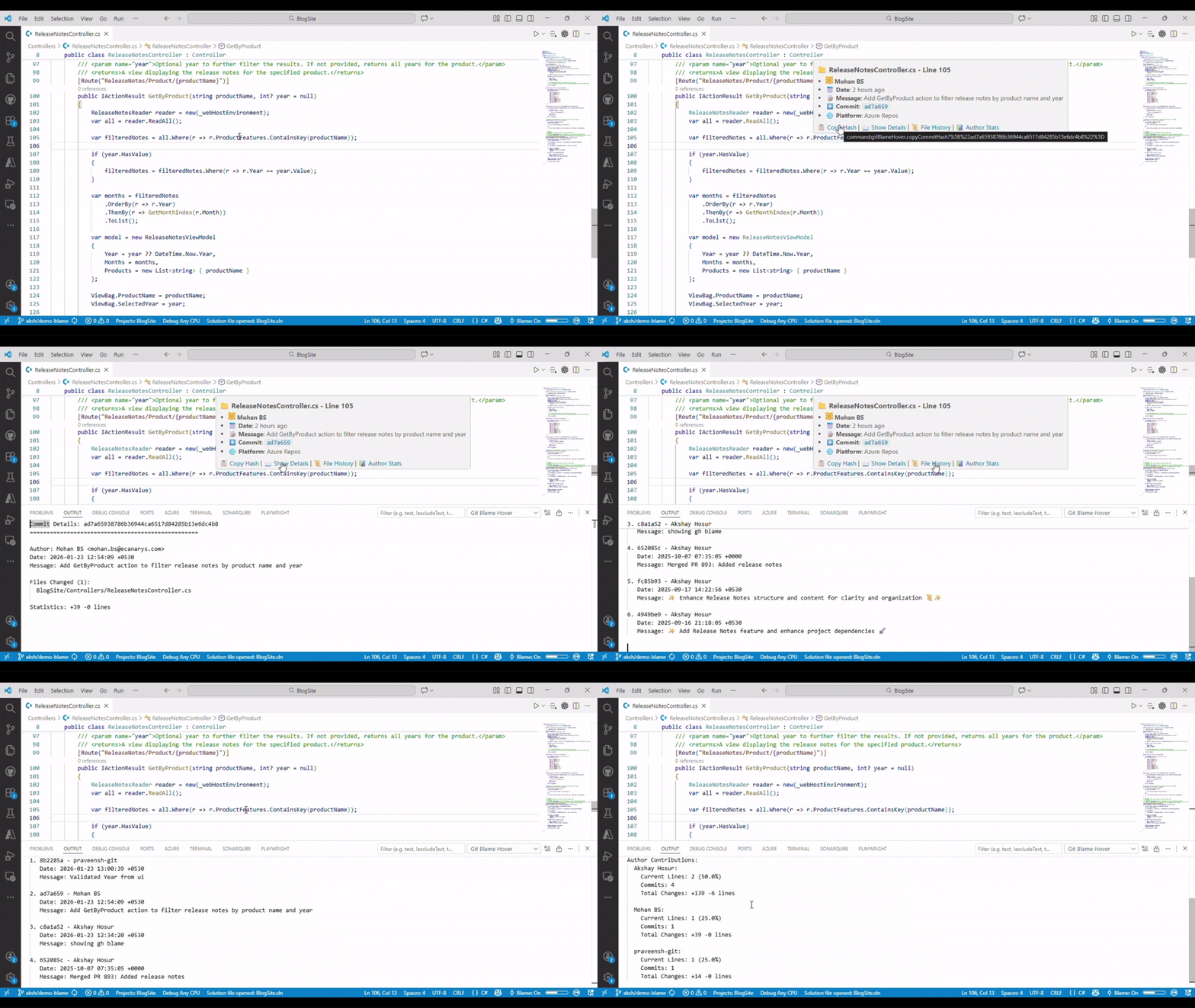
🚀 Advanced git blame with hover tooltips, inline annotations, heat maps, and comprehensive analytics - instant blame information with zero configuration
🎯 What Makes This Different?
Unlike other git blame extensions that clutter your status bar or add inline annotations, Git Blame Hover provides blame information exactly when and where you need it - on hover.
| Git Blame Hover ✨ |
Other Extensions 😑 |
| 🎯 Hover-based - Info appears only when needed |
📊 Status bar clutter - Always visible |
| 🚫 Zero UI clutter - No persistent visual elements |
📝 Inline annotations - Text everywhere |
| ⚡ Performance optimized - Smart caching & debouncing |
🐌 Continuous processing - CPU intensive |
| 🎨 Smart tooltips - Rich formatting with emojis |
📋 Plain text - Basic information |
| ⚙️ Fully configurable - Show exactly what you want |
🔒 Fixed format - Limited customization |
✨ Key Features
- Rich markdown tooltips: Detailed blame info with clickable commit links
- Author avatars: Gravatar integration for visual author identification
- Platform detection: Direct links to GitHub, GitLab, Bitbucket, Azure Repos
- File context: Shows file path, line numbers, and commit statistics
- Error handling: Clear, user-friendly error messages with helpful suggestions
📝 Inline Annotations (Optional)
- End-of-line annotations: Subtle blame info at line endings
- Customizable format: Configure what information to show inline
- Performance aware: Only renders visible lines
- Toggleable: Enable/disable per preference
🗺️ Visual Heat Maps
- Code age visualization: Color-coded lines based on commit age
- Hot spots identification: Quickly spot frequently changed areas
- Configurable colors: Customize heat map appearance
- Performance optimized: Efficient rendering for large files
📊 Author Analytics & Statistics
- File contribution stats: See who contributed what percentage
- Author activity maps: Understand team collaboration patterns
- Timeline analysis: Oldest and newest commits per file
- Line ownership: Detailed breakdown by author
- Advanced caching: Intelligent cache with configurable timeouts
- Smart debouncing: Prevents excessive git operations
- File size limits: Configurable limits for large files
- Loading indicators: Visual feedback during git operations
- Cancellation support: Respects VS Code's cancellation tokens
- Clickable commits: Direct links to commit pages
- Repository detection: Automatic platform identification
- Browser integration: One-click commit viewing
- Multi-platform support: GitHub, GitLab, Bitbucket, Azure DevOps
🚀 Getting Started
Installation
- Open VS Code
- Go to Extensions (
Ctrl+Shift+X)
- Search for "Git Blame Hover"
- Click Install
Note: This extension is published by Canarys Automations. Available on VS Code Marketplace.
Usage
- Open any file in a git repository
- Hover over any line of code
- See instant blame info in a beautiful tooltip!
That's it! No configuration required. 🎉
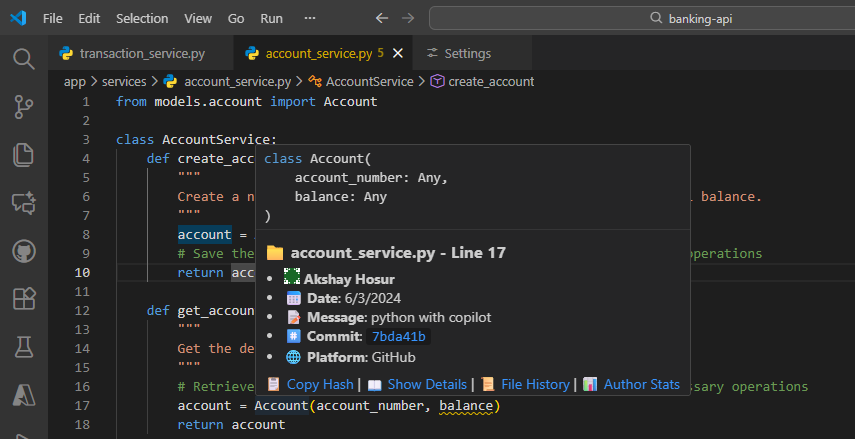
Inline Annotations
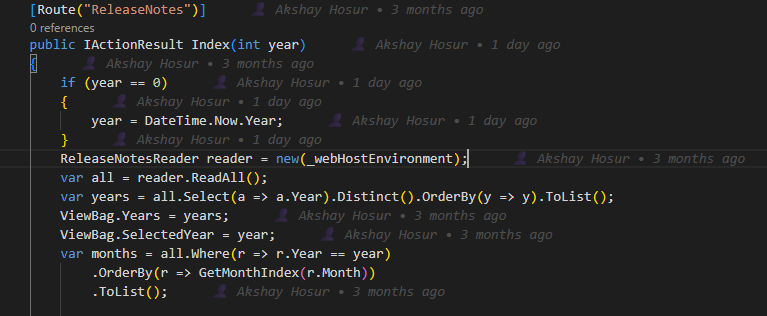
Error Handling
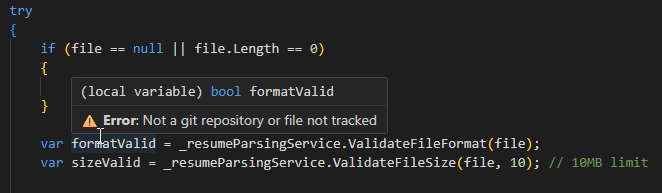
Status Bar Toggle
Bottom right corner: [$(git-commit) Blame: On]
Click to toggle On/Off
⚙️ Configuration
Core Settings
| Setting |
Default |
Description |
gitBlameHover.enable |
true |
Enable/disable the extension |
gitBlameHover.showRelativeTime |
true |
Show "2 hours ago" vs "1/8/2026" |
gitBlameHover.hoverDelay |
200 |
Delay before tooltip appears (ms) |
gitBlameHover.enableClickableCommits |
true |
Make commit hashes clickable links |
gitBlameHover.showLoadingIndicator |
true |
Show loading indicator during operations |
| Setting |
Default |
Description |
gitBlameHover.showAuthor |
true |
Show 👤 author name |
gitBlameHover.showDate |
true |
Show 📅 commit date |
gitBlameHover.showMessage |
true |
Show 📝 commit message |
gitBlameHover.showCommitId |
true |
Show #️⃣ commit hash |
gitBlameHover.showPlatform |
true |
Show 🌐 platform info |
gitBlameHover.showAuthorAvatar |
false |
Show 🖼️ author avatars (Gravatar) |
gitBlameHover.maxCommitMessageLength |
100 |
Max message length (0 = no limit) |
Inline Annotations
| Setting |
Default |
Description |
gitBlameHover.enableInlineAnnotations |
false |
Show blame info at line endings |
gitBlameHover.inlineAnnotationFormat |
"👤 {author} • {timeAgo}" |
Annotation format template |
Heat Maps & Visual Features
| Setting |
Default |
Description |
gitBlameHover.enableHeatMap |
false |
Show visual heat map for code age |
| Setting |
Default |
Description |
gitBlameHover.cacheTimeout |
300000 |
Cache timeout in milliseconds (5 min) |
gitBlameHover.maxFileSize |
1048576 |
Max file size for processing (1MB) |
Example Configuration
{
  "gitBlameHover.enable": true,
  "gitBlameHover.showRelativeTime": true,
  "gitBlameHover.hoverDelay": 150,
  "gitBlameHover.showAuthor": true,
  "gitBlameHover.showDate": true,
  "gitBlameHover.showMessage": true,
  "gitBlameHover.showCommitId": true,
  "gitBlameHover.showPlatform": true,
  "gitBlameHover.showAuthorAvatar": true,
  "gitBlameHover.enableClickableCommits": true,
  "gitBlameHover.maxCommitMessageLength": 80
}
🎨 Customization Examples
Minimal Setup (Author + Time only)
{
  "gitBlameHover.showMessage": false,
  "gitBlameHover.showCommitId": false,
  "gitBlameHover.showPlatform": false,
  "gitBlameHover.showAuthorAvatar": false
}
Full-Featured Setup (All features enabled)
{
  "gitBlameHover.showAuthorAvatar": true,
  "gitBlameHover.enableInlineAnnotations": true,
  "gitBlameHover.enableHeatMap": true,
  "gitBlameHover.enableClickableCommits": true,
  "gitBlameHover.inlineAnnotationFormat": "👤 {author} • {timeAgo} • #{hash}",
  "gitBlameHover.maxCommitMessageLength": 0,
  "gitBlameHover.hoverDelay": 100
}
{
  "gitBlameHover.hoverDelay": 500,
  "gitBlameHover.maxCommitMessageLength": 50,
  "gitBlameHover.showAuthorAvatar": false,
  "gitBlameHover.enableInlineAnnotations": false,
  "gitBlameHover.enableHeatMap": false,
  "gitBlameHover.cacheTimeout": 600000,
  "gitBlameHover.maxFileSize": 2097152
}
Visual Focus Setup (Annotations + Heat Maps)
{
  "gitBlameHover.enableInlineAnnotations": true,
  "gitBlameHover.enableHeatMap": true,
  "gitBlameHover.inlineAnnotationFormat": "👤 {author} • {timeAgo}",
  "gitBlameHover.showAuthorAvatar": true,
  "gitBlameHover.hoverDelay": 150
}
Access via:
- Command Palette (
Ctrl+Shift+P)
- Status bar button click
| Platform |
Status |
URL Format |
| 🐙 GitHub |
✅ Full support |
github.com |
| 🦊 GitLab |
✅ Full support |
gitlab.com |
| 🪣 Bitbucket |
✅ Full support |
bitbucket.org |
| 🔵 Azure Repos |
✅ Full support |
dev.azure.com, visualstudio.com |
| 🏠 Self-hosted |
✅ Basic support |
Shows as "Local/Other" |
📋 Requirements
- VS Code: Version 1.90.0 or higher
- Git: Must be installed and available in PATH
- Repository: Must be a valid git repository
- File Size: Files under 1MB (configurable via
maxFileSize setting)
🐛 Known Limitations
- Large files: Files exceeding the size limit (default 1MB) are skipped for performance
- Binary files: No blame information for binary files
- Merge conflicts: Limited info during active merge conflicts
- Shallow clones: May show incomplete history information
- Cache dependency: Cached results may be stale until cache timeout (5 minutes default)
📞 Support
Made with ❤️ by Canarys Automations
If you find this extension helpful, please ⭐ star the repository and leave a review on the marketplace!

