Orrery
Every coding agent. One sidebar. Like the clockwork instrument it's named after, Orrery puts all your models in motion from one place: it drives the agent CLIs you already have installed — Claude Code, Codex (GPT) and Grok — with their complete tool suite, streaming output and permission model. No API keys, no extra accounts: it uses each CLI's own login.
Why Orrery
Chat extensions wrap a completion API. Orrery runs the full agent harness — the same one you get in the terminal — rendered as a fast, glassy chat panel.
The agents
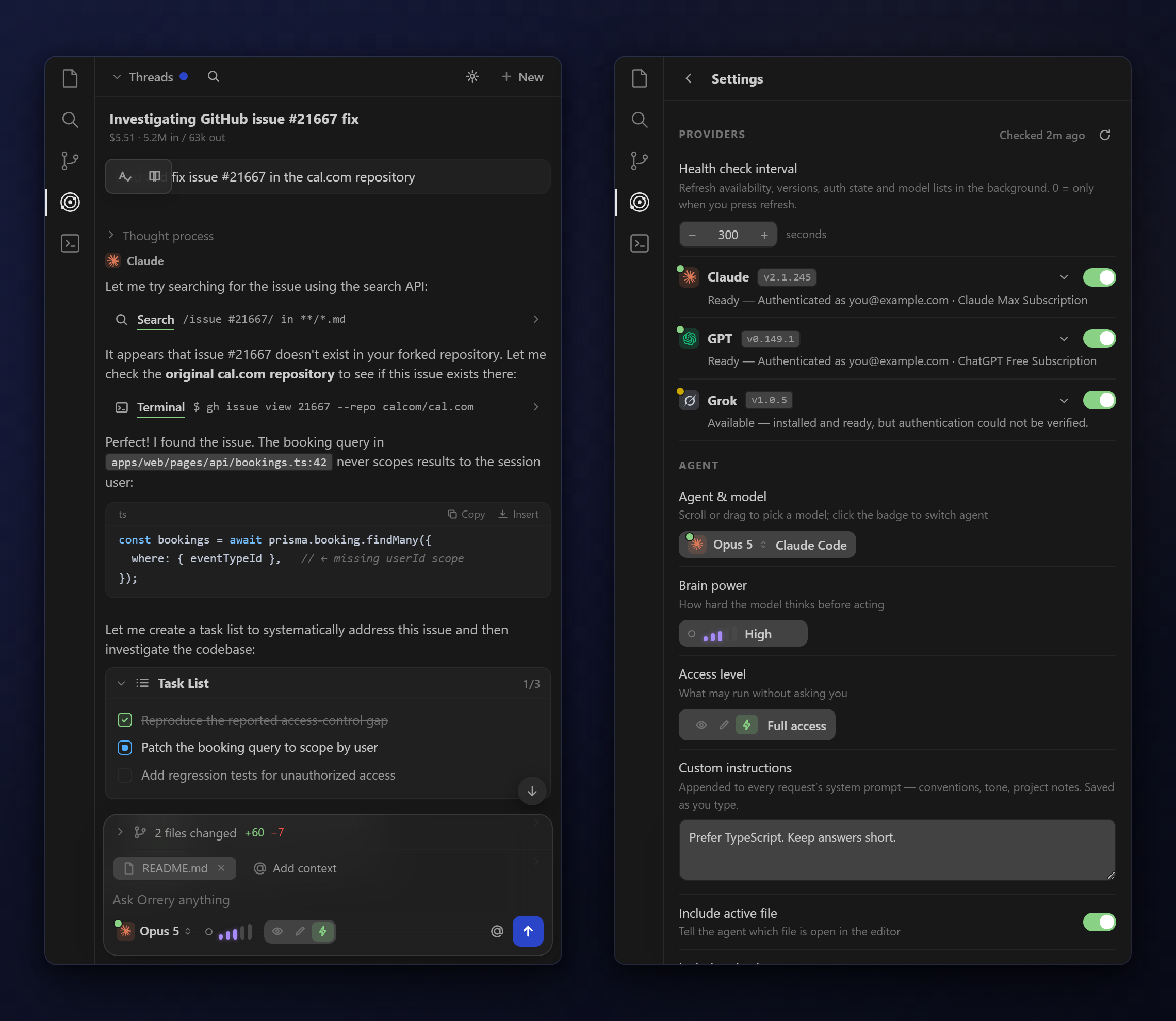
- Three harnesses, one chat — spin the model wheel through Claude, GPT and Grok models; every answer carries a badge for who wrote it
- Brain power — a reasoning-effort slider (Low → Max) passed straight to each CLI; levels a model can't do are greyed out
- Access levels — Read only (explore & plan), Edit files (edits land, commands blocked) or Full access (runs unattended), mapped to each CLI's own permission flags
- Full tool suite — file edits, terminal, search, web fetch, subagents, skills — whatever the active harness ships
The conversation
- Streaming with collapsible thinking sections and one-line tool runs — the tool's name underlines green on success, red on failure, with the output one chevron away
- Live task list — the agent's todo list renders as a checklist that ticks itself
- Files changed — every touched file with +/− line counts; click any state (modified, new, deleted) for a real side-by-side diff
- Cost per run — tokens in/out, duration and price under every answer, plus a running thread total. Rates for every model ship built in; when a CLI reports its own billed cost, that wins
- Attach anything — paste an image, drag files onto the dock, or pick from the workspace / anywhere on disk with
@
The workflow
- Threads — persistent per-workspace conversations: pin, rename inline, duplicate, export to Markdown, full-text search, keyboard navigation
- Run several at once — start a new thread while another works; a badge counts running threads, finished ones get an unread dot. While a run is live the send button splits into stop (deep red) and new thread (dark blue)
- Quick actions — a floating two-orb rail in the chat window (fix grammar, explain, find bugs, tests, refactor, docs, commit message, review); pick, arrange or hide them entirely in settings
- Full screen — drag the panel into the editor area for a centred reading column with a thread sidebar
Make it yours — font size and control size scale separately; slider sensitivity (Relaxed / Standard / Quick); arrange or hide the composer controls; acrylic glass surfaces that respect reduced-transparency settings; custom instructions appended to every request.
Requirements
At least one of these installed and logged in:
- Claude Code —
claude on your PATH, or set sideAgent.cliPath
- Codex CLI —
codex on your PATH, or set sideAgent.codexPath
- Grok CLI —
grok on your PATH, or set sideAgent.grokPath
- Cursor CLI —
cursor-agent on your PATH, or set sideAgent.cursorPath
- GitHub Copilot CLI —
copilot on your PATH, or set sideAgent.copilotPath (usage meter needs the gh CLI signed in)
- Gemini CLI —
gemini on your PATH, or set sideAgent.geminiPath
- Qwen Code —
qwen on your PATH, or set sideAgent.qwenPath
- OpenCode —
opencode on your PATH, or set sideAgent.opencodePath; any provider you've configured in OpenCode (including its free hosted models) shows up in the model list
- DeepSeek Harness —
dsh on your PATH, or set sideAgent.dshPath; needs DEEPSEEK_API_KEY. Its headless mode prints only the final answer, so there are no tool cards or token counts
Two gateways need no CLI at all — just an API key under Settings › Providers:
- OpenRouter — hundreds of models behind one key, including
openrouter/auto
CLI or API
Claude, GPT, Grok, Gemini, Qwen and DeepSeek can run in either of two modes, chosen per provider under Settings › Providers:
- CLI (default) — Orrery drives the vendor's command-line agent, so you use its login, plan and tools.
- API — Orrery calls the vendor's API directly with your API key and runs the tools itself (read/write/edit files, search, shell — gated by the access level). Keys are stored in VS Code's secret storage; the vendor's usual environment variable (
ANTHROPIC_API_KEY, OPENAI_API_KEY, XAI_API_KEY, GEMINI_API_KEY, DASHSCOPE_API_KEY, DEEPSEEK_API_KEY) works as a fallback. sideAgent.apiBaseUrls points a provider at a proxy or gateway. Conversations in API mode live in memory for the extension host's lifetime.
Orrery finds the CLIs even when VS Code's PATH doesn't include them: the setting is tried as a path, then every PATH entry, then well-known install locations, then — on Windows — the registry PATH.
Getting started
- Install the extension
- Click the Orrery icon in the activity bar
- Pick an agent and model, choose an access level, and start chatting
The settings gear opens the Providers panel: a status dot per harness (logged in / installed / missing), CLI version, who you're signed in as, an enable toggle, and the live model list. Health checks re-run every sideAgent.healthCheckInterval seconds.
How the access levels map
| Level |
Claude Code / Grok |
Codex |
Cursor |
Copilot |
Gemini / Qwen |
OpenCode |
| Read only |
--permission-mode plan |
-s read-only |
--mode plan |
deny create/edit/shell |
--approval-mode plan |
--agent plan |
| Edit files |
--permission-mode acceptEdits |
-s workspace-write |
default (commands rejected) |
allow create/edit, deny shell |
--approval-mode auto_edit |
permission.bash = deny |
| Full access |
--permission-mode bypassPermissions |
--dangerously-bypass-approvals-and-sandbox |
--force |
--allow-all-tools |
--approval-mode yolo |
--auto |
DeepSeek Harness's headless profile has no permission flags; the access level is not enforced there.
Settings
| Setting |
Default |
Description |
sideAgent.provider |
claude |
Active harness: claude, codex, grok, router, openrouter, cursor, copilot, gemini, qwen, opencode or deepseek |
sideAgent.models |
all default |
Model per provider; default uses the CLI's configured model |
sideAgent.effort |
default |
Brain power: low → max, clamped to what the model supports |
sideAgent.access |
edit |
read, edit or full |
sideAgent.instructions |
"" |
Custom instructions appended to every request |
sideAgent.includeActiveFile |
true |
Tell the agent which file is open |
sideAgent.includeSelection |
true |
Send the editor selection with each request |
sideAgent.maxThreads |
50 |
Threads kept per workspace |
sideAgent.providersEnabled |
all true |
Which harnesses appear in the model wheel |
sideAgent.providerMode |
{} |
Per provider cli or api (Claude, GPT, Grok, Gemini, Qwen, DeepSeek) |
sideAgent.apiBaseUrls |
{} |
Endpoint overrides for API mode, keyed by provider |
sideAgent.healthCheckInterval |
300 |
Seconds between provider checks; 0 = manual |
sideAgent.modelPricing |
{} |
Per-model rate overrides (provider/model → {in, cachedIn, out} USD per Mtok); built-in rates cover every model already |
sideAgent.cliPath / codexPath / grokPath / cursorPath / copilotPath / geminiPath / qwenPath / opencodePath / dshPath |
CLI names |
Executable paths |
sideAgent.favouriteModels / starredModels |
{} |
Chat rotation and pinned models per provider |
Chat style lives in the panel itself (Settings › Chat style), not in settings.json. Colours always follow your VS Code theme; the one choice is the accent — Mono (the default: the theme's own black or white), Blue, Green or Rose — which colours send, links, running indicators, tool icons and the bubble tint. The brain-power bars and the access word in the composer draw in the theme's text colour, so they read on light and dark themes alike. The rest of the section is the message style (bubbles, flat or cards), which side your messages sit on, corner radius, reading width, line height and the text font. Code always uses the editor's monospace font.
Spending less per turn
| Setting |
Default |
Description |
sideAgent.verbosity |
normal |
detailed, normal, brief or minimal — output tokens cost several times input |
sideAgent.workspaceMemory |
true |
Notes in .orrery/notes.md plus recently-touched files, so the agent re-explores less |
sideAgent.repoMap |
true |
~2k-token cached map of files and top-level symbols in the system prompt |
sideAgent.trimPrompts |
true |
Strip whitespace and escape codes from what you send; cap selections at 3k chars |
sideAgent.freshStartAt |
0 |
Context limit: past this % of the window, do sideAgent.contextAction; 0 = never automatically (/compact and /fresh still work by hand) |
sideAgent.contextAction |
compact |
At the limit: compact summarises the history in place and keeps the session (Claude Code only, nothing is reset), handoff writes a summary and restarts the session, none just posts a note |
sideAgent.compactInstructions |
"" |
Standing focus appended to every /compact — what the summary must keep. A one-off focus goes after the command: /compact keep the failing test output |
sideAgent.finishTask |
true |
Tell Opus models to finish the whole task before ending a turn |
sideAgent.autoContinue |
3 |
Continue automatically while the agent's own task list has open items |
sideAgent.usageLog |
true |
Append per-turn tokens, cost and active savers to .orrery/usage.jsonl |
sideAgent.claude.strictMcp |
true |
Keep your global MCP servers out of Orrery's Claude sessions |
sideAgent.claude.subagents |
true |
Allow Claude Code to spawn subagents (each is a separate model run) |
sideAgent.claude.disallowedTools |
see default |
Claude Code tools to leave out; every definition costs prompt tokens |
sideAgent.claude.autocompact |
0 |
Compact at this many tokens (100k–1M); 0 = the CLI's default |
sideAgent.claude.maxBudgetUsd |
0 |
Stop a Claude session after this many dollars; 0 = no cap |
.orrery/notes.md and .orrery/usage.jsonl are written into the workspace root. They are per-project state — if your project is a git repo, add .orrery/ to .gitignore.
Building from source
npm install
npm run compile      # type-check + build both bundles, then press F5
npm run watch        # rebuild on save; CSS/JS changes hot-reload the open webview
npm test             # vitest (npm run test:watch while developing)
npx @vscode/vsce package   # build a .vsix
Releasing
Pushing a version tag runs .github/workflows/release.yml, which type-checks,
tests, packages a .vsix and attaches it to a GitHub release:
# 1. bump "version" in package.json
git tag v0.3.2 && git push origin v0.3.2
The .vsix is then downloadable from the repo's Releases page (and from the
workflow run's artifacts). If a VSCE_PAT secret exists in the repo settings,
the same run also publishes to the Microsoft Marketplace. To enable that:
create a PAT at https://dev.azure.com (all accessible organizations, Marketplace
→ Manage), then add it in the repo as Settings › Secrets and variables ›
Actions under the name VSCE_PAT.
Project layout
src/                 extension host (Node)
  extension.ts         activation
  chatViewProvider.ts  the sidebar view: threads, runs, messages to/from the webview
  providers.ts         provider + model catalog, efforts, access levels
  pricing.ts           rate card and cost arithmetic
  providerHealth.ts    CLI/API availability, versions, auth and plan usage
  agents/              one runner per harness (Claude Code, Codex, Grok, Cursor, Copilot,
                       Gemini, OpenCode, DeepSeek) plus the direct-API agent and its tools
webview/             the sidebar UI (Preact + Signals, TypeScript)
  main.tsx             entry: mounts <App/>, routes host messages to the store
  protocol.ts          every inbound message → store writes
  store/               state.ts (signals + actions), transcript.ts (per-message signals)
  lib/                 markdown renderer, formatting, icons, quick actions, VS Code API handle
  components/          App, Composer, Transcript, Threads, Sliders, Settings, Providers, …
media/               shipped assets: main.css, icons, and main.js (built from webview/)
test/                vitest: catalog/pricing/markdown units + DOM tests per component
                     and an end-to-end App test driven by real protocol messages
Build: esbuild.mjs bundles src/extension.ts → out/extension.js and webview/main.tsx → media/main.js;
tsc only type-checks (tsconfig.json for src, tsconfig.webview.json for webview).
License
Proprietary. Copyright (c) 2026 Caeden Clark, all rights reserved. Orrery is not open source: no right to use, copy, modify or redistribute it is granted without a written agreement. See LICENSE.txt.
| |


