Orbit — Agent Chat
A real coding agent in your VS Code sidebar. Orbit drives the agent CLIs you already have installed — Claude Code, Codex (GPT) and Grok Build — with their full tool suite, streaming output and permission model. No API keys: it uses each CLI's own login.
Why Orbit
Unlike the built-in VS Code chat or Copilot chat, Orbit runs the full agent harness under the hood — the same one you get in the terminal, rendered as a chat panel.
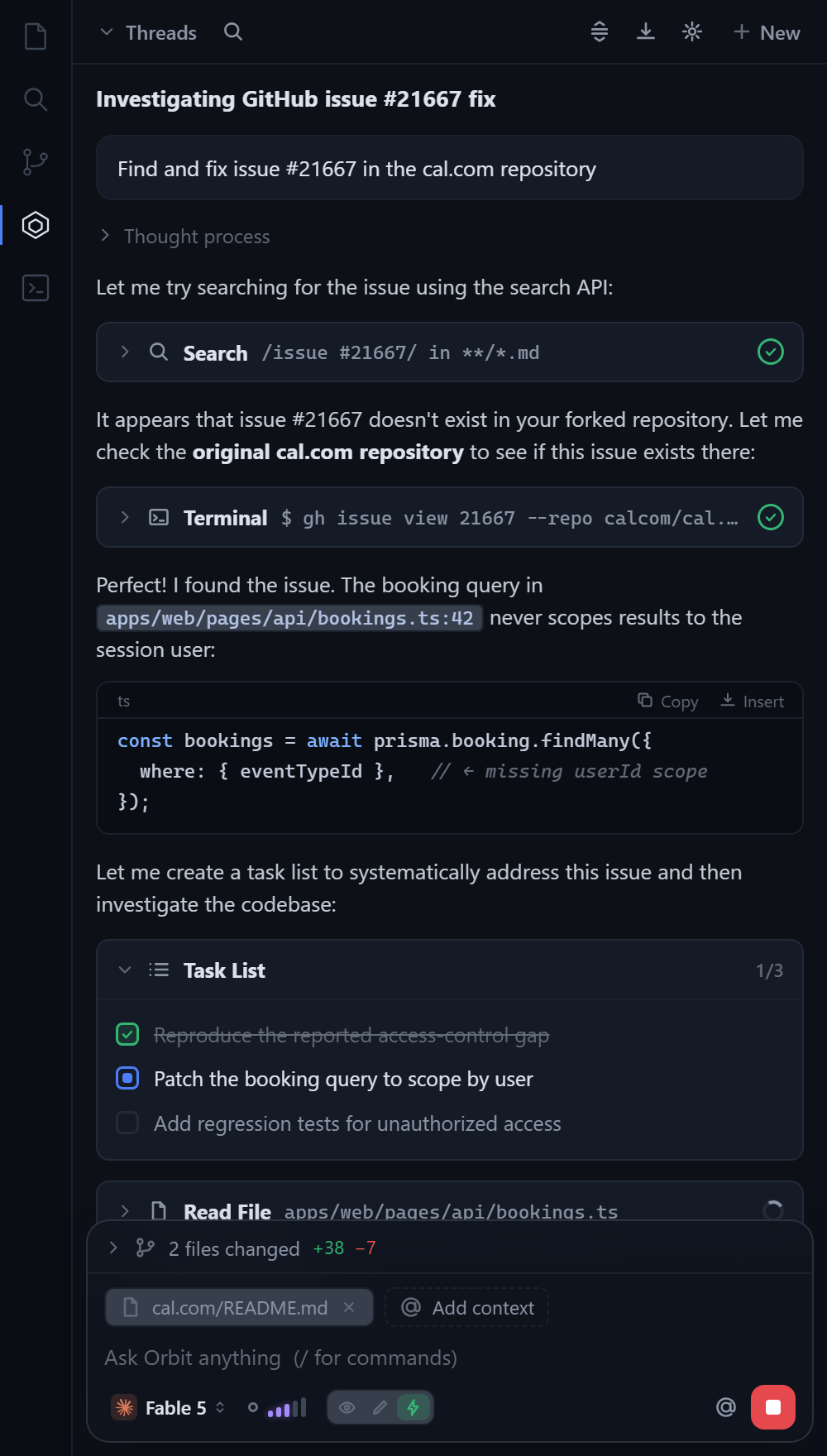
- Three harnesses, one chat — the agent picker in the composer switches between Claude, GPT (Codex CLI) and Grok, each with its own model list; the answer shows a provider badge so you always know who wrote it
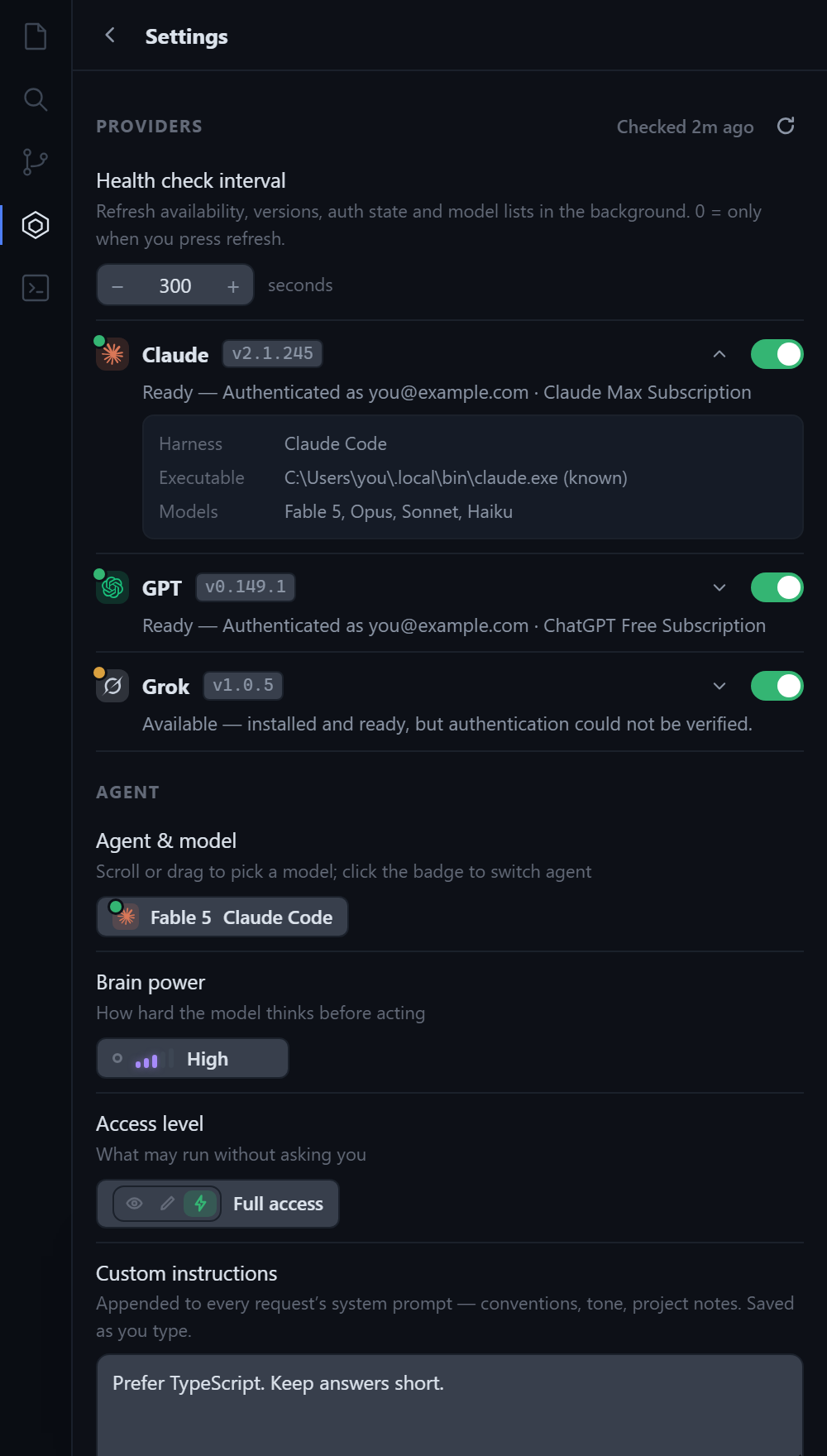
- Brain power — a reasoning-effort gauge (Low → Max) passed straight to the CLI (
--effort, model_reasoning_effort, --reasoning-effort); levels a model doesn't support are greyed out
- Access levels — Read only (explore & plan), Edit files (edits applied, commands blocked) or Full access (everything runs unattended), mapped onto each CLI's permission / sandbox flags
- The complete tool suite of whichever harness is active — file read/write/edit, terminal, grep/glob, web search & fetch, subagents, and skills
- Streams responses token by token, with collapsible thinking sections and tool-call cards (green check on success)
- Task list card — Claude Code's todo list renders as a live checklist in the chat
- Files-changed bar — every file the agent touches, click to open
- Context chips — attach workspace files with
@ Add context; the active editor file and selection are included automatically
- Threads — persistent conversations per workspace, each resuming its own CLI session. The thread list (
Ctrl+K) is grouped by day, shows a preview of the last message, and searches full message text
- Run several at once — start a new thread (
Ctrl+Shift+N) while another is still working; the Threads button shows how many are running, finished threads get an unread dot, and each running thread can be stopped from the list
- Sessions per harness — each thread resumes its CLI session; switching provider mid-thread starts a fresh session for that CLI while the chat history stays on screen
Requirements
At least one of these installed and logged in (the picker lists all three; a missing CLI just errors when you send):
- Claude Code —
claude on your PATH, or set sideAgent.cliPath
- Codex CLI —
codex on your PATH, or set sideAgent.codexPath
- Grok Build —
grok on your PATH, or set sideAgent.grokPath
Getting started
- Install the extension
- Click the Orbit icon in the activity bar
- Pick an agent and model in the composer, choose an access level, and start chatting
Providers panel
Settings (gear icon) opens with a T3-Code-style Providers list: a status dot per harness (green = logged in, amber = installed but auth unverified / disabled, red = not found), the CLI version, who you're authenticated as and on which plan, an enable toggle (disabled harnesses disappear from the model wheel), and an expandable row with the resolved executable path and the live model list. Checks run when the panel opens and every sideAgent.healthCheckInterval seconds (300 by default, 0 = only on refresh).
The CLIs are located even when VS Code's own PATH doesn't include them: the setting value is tried as a path, then every PATH entry, then well-known install locations (~/.local/bin, %APPDATA%\npm, ~/.grok/bin, Homebrew, Volta, …), then — on Windows — the user and machine PATH from the registry.
Settings panel
Everything above is also editable from the gear icon: Providers (health, toggles, per-agent default model, executable path with Browse), Agent (model wheel, brain power, access level, custom instructions, context inclusion), Composer (Enter-to-send, which quick actions to show), Appearance, Conversation, Threads (retention, export, clear, delete all), a keyboard-shortcut reference, and About (copy diagnostics, open settings.json, reset UI settings).
How the access levels map
| Level |
Claude Code |
Codex |
Grok |
| Read only |
--permission-mode plan |
-s read-only |
--permission-mode plan |
| Edit files |
--permission-mode acceptEdits |
-s workspace-write |
--permission-mode acceptEdits |
| Full access |
--permission-mode bypassPermissions |
--dangerously-bypass-approvals-and-sandbox |
--permission-mode bypassPermissions |
Settings
| Setting |
Default |
Description |
sideAgent.provider |
claude |
Active harness: claude, codex or grok |
sideAgent.models |
all default |
Model per provider, e.g. { "claude": "opus", "codex": "gpt-5.6-terra", "grok": "grok-4.6" }; default uses the CLI's configured model |
sideAgent.effort |
default |
Brain power: low, medium, high, xhigh, max (clamped to what the model supports) |
sideAgent.access |
edit |
Access level: read, edit or full |
sideAgent.instructions |
"" |
Custom instructions appended to every request's system prompt |
sideAgent.includeActiveFile |
true |
Tell the agent which file is open in the editor |
sideAgent.includeSelection |
true |
Send the editor selection with each request |
sideAgent.maxThreads |
50 |
Threads kept per workspace (oldest unpinned dropped first) |
sideAgent.providersEnabled |
all true |
Which harnesses are offered in the model wheel |
sideAgent.healthCheckInterval |
300 |
Seconds between background provider checks; 0 = manual only |
sideAgent.cliPath |
claude |
Path to the Claude Code CLI |
sideAgent.codexPath |
codex |
Path to the Codex CLI |
sideAgent.grokPath |
grok |
Path to the Grok CLI |
License
MIT
| |

