
CacheLens
Runtime visibility for ASP.NET Core IMemoryCache.
Browse cached keys, inspect values, and track expiration and hit counts — live, without leaving
VS Code.
Website · Documentation · Source · Report an issue
See it work
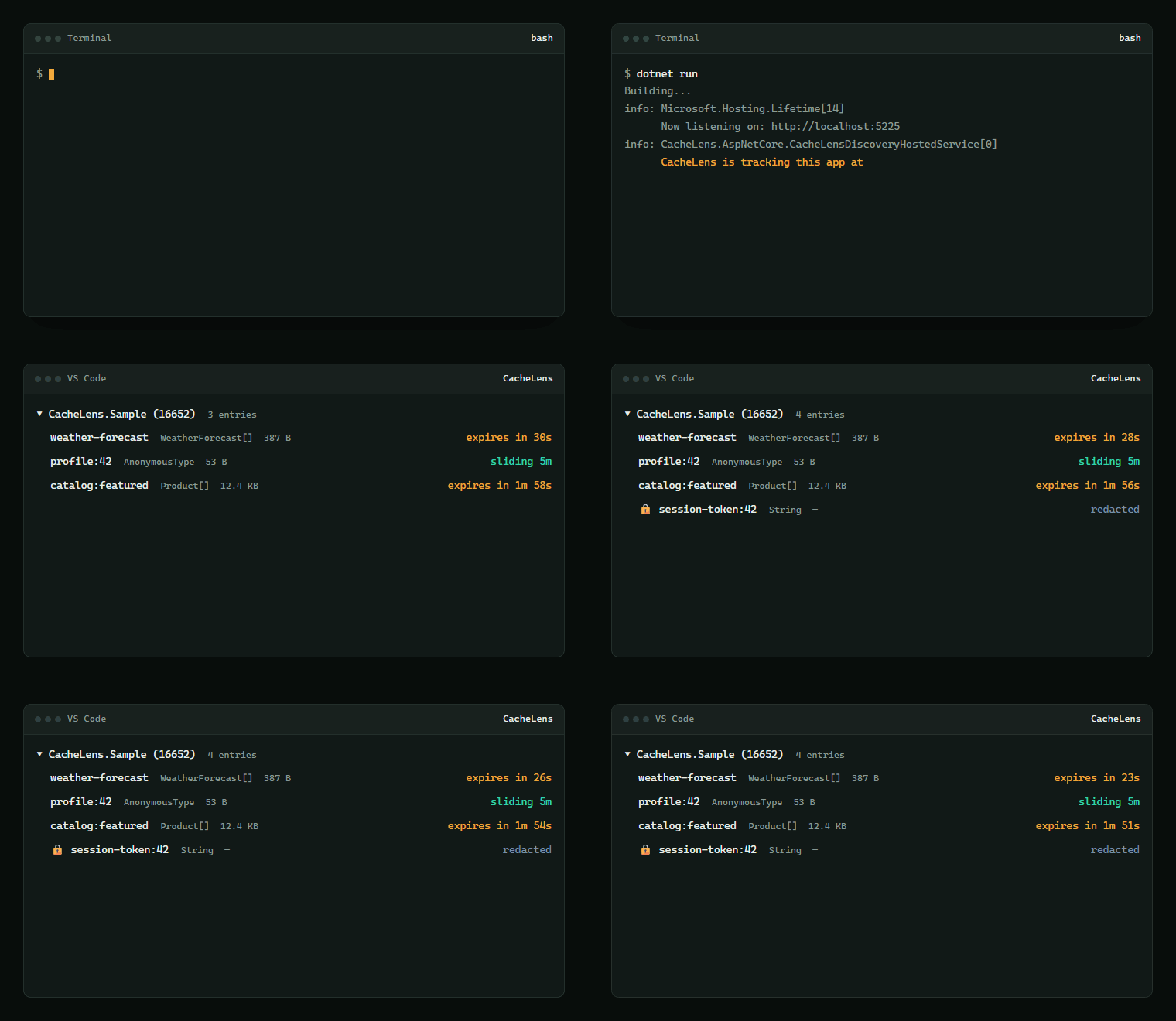
Start your app, and it appears on its own — no host, port, or token to configure anywhere.
Why this exists
.NET 9 added MemoryCache.Keys, which returns a list of key objects. Useful, and that is where
it stops:
- Keys only — no values, no expiry, no sizes, no per-key hit counts.
- Wrong type — it sits on the concrete
MemoryCache class, not the IMemoryCache interface
your code receives from dependency injection.
- Absent on .NET 8 — still a supported LTS release.
So teams keep a shadow list of every key they set, which drifts out of sync the moment an entry
expires on its own — and still tells you nothing about the entries themselves.
CacheLens closes that gap.
Getting started
CacheLens is two halves, and you need both. This extension is the viewer; a NuGet package
instruments your application.
1 — Install this extension.
2 — Add the package to the app you want to inspect:
dotnet add package CacheLens.AspNetCore
3 — Register it in Program.cs:
if (builder.Environment.IsDevelopment())
{
    builder.Services.AddCacheLens();
}

var app = builder.Build();

if (app.Environment.IsDevelopment())
{
    app.MapCacheLens();
}
Your existing Set / Get / GetOrCreate calls stay exactly as they are — CacheLens wraps the
cache from the outside.
4 — Run your app. You should see:
CacheLens is tracking this app's caches at http://localhost:5225
5 — Open the CacheLens panel in the Activity Bar. Your app appears on its own within a few
seconds — there is no token to enter and no URL to paste. Your app writes a small file when
it starts; the extension watches for it.
The folder open in VS Code must contain a .csproj, .sln, or .slnx. The extension stays
dormant otherwise, so it never slows down non-.NET work.
Full walkthrough: Installation guide ·
Interactive version: cache-lens.vercel.app
If your app doesn't appear by itself
Almost always this means CacheLens never started inside your app rather than a missing
connection step. Run CacheLens: Troubleshoot — Why don't I see my app? from the Command
Palette: it names the folder it watches and lists what it can see.
The usual causes, in order:
- The app is not running.
- The app is not in Development — the documented setup gates CacheLens behind
IsDevelopment(), so it never starts in any other environment.
- Only one of the two lines is present. Both
AddCacheLens() and MapCacheLens() are needed.
The check that settles it: your app prints CacheLens is tracking this app's caches at … at
startup. No line means it never started, and no discovery file exists to look for.
Containers and remote hosts
Run CacheLens: Add Remote Connection. Two routes:
- Select a discovery file — reads the URL and the token from the app's
<pid>.json, so
nothing is typed. That file lives on the machine running the app; copy it across first.
- Enter a URL — your app's own base address, the one it logs at startup, with no
/_cachelens suffix. For an app on this machine the token is filled in automatically.
Full guide, including which URL to use and where the token lives:
CONNECTING.md
Capabilities
|
|
| Live key browser |
Every tracked key with size, time-to-live, and hit count |
| Value inspector |
Formatted JSON with full entry metadata |
| Expiry countdowns |
Absolute and sliding expirations, updating in place |
| Eviction |
Drop a single key or clear the cache without restarting |
| Snapshot export |
Save the full cache state to JSON for a bug report |
| Zero configuration |
Applications are discovered automatically on the local machine |
Commands
Available from the Command Palette (Ctrl+Shift+P / Cmd+Shift+P):
| Command |
Description |
CacheLens: Refresh |
Fetch the current cache state |
CacheLens: Clear All Entries |
Evict everything in the selected application |
CacheLens: Evict |
Remove a single key |
CacheLens: Export Snapshot as JSON... |
Write the current state to a file |
CacheLens: Add Remote Connection... |
Connect to an application on another host |
CacheLens: Copy Value |
Copy a cached value to the clipboard |
Security model
Exposing cache contents is a data-disclosure risk, so CacheLens fails closed by default:
| Control |
Behaviour |
| Environment gated |
The documented setup keeps it disabled outside development |
| Loopback only |
Requests from other hosts are rejected regardless of the bind address |
| Per-process token |
A fresh bearer token is generated at startup and read automatically |
| Redaction |
Keys matching password, token, secret and similar return metadata only |
| Payload ceiling |
Values above 64 KB are reported by size rather than transmitted |
Configured in your application, not in VS Code settings:
builder.Services.AddCacheLens(options =>
{
    options.RedactKeyPatterns = ["password", "secret", "token", "apikey"];
    options.MaxValuePayloadBytes = 64 * 1024;
    options.RoutePrefix = "/_cachelens";
});
Note: Export Snapshot writes real cached values to disk. Review the file before sharing it.
Requirements and current scope
|
|
| .NET |
8.0 or 9.0 |
| Application type |
ASP.NET Core |
| VS Code |
1.85 or later |
Not yet supported, stated plainly:
IMemoryCache, plus HybridCache L1. HybridCache's in-process tier is stored in the
registered IMemoryCache, so those entries appear too; its distributed tier does not.
IDistributedCache is not tracked — the in-memory provider keeps its own private cache.- Polls every 3 seconds while the view is visible; live push updates are planned.
- ASP.NET Core only — console applications and worker services are not yet covered.
- Entries cached before CacheLens starts are not tracked.
Roadmap and design notes: architecture.md
MIT licensed. Contributions welcome — see
CONTRIBUTING.md.

