
md2 for VS Code
Write Markdown once and publish it to 公众号 (WeChat), 知乎 (Zhihu), 小红书 (Xiaohongshu) and X / Threads / Bluesky / LinkedIn, with long images and covers.
一篇 Markdown,发遍公众号、知乎、小红书、X / Threads,还能出长图和封面。
English · 简体中文
Features
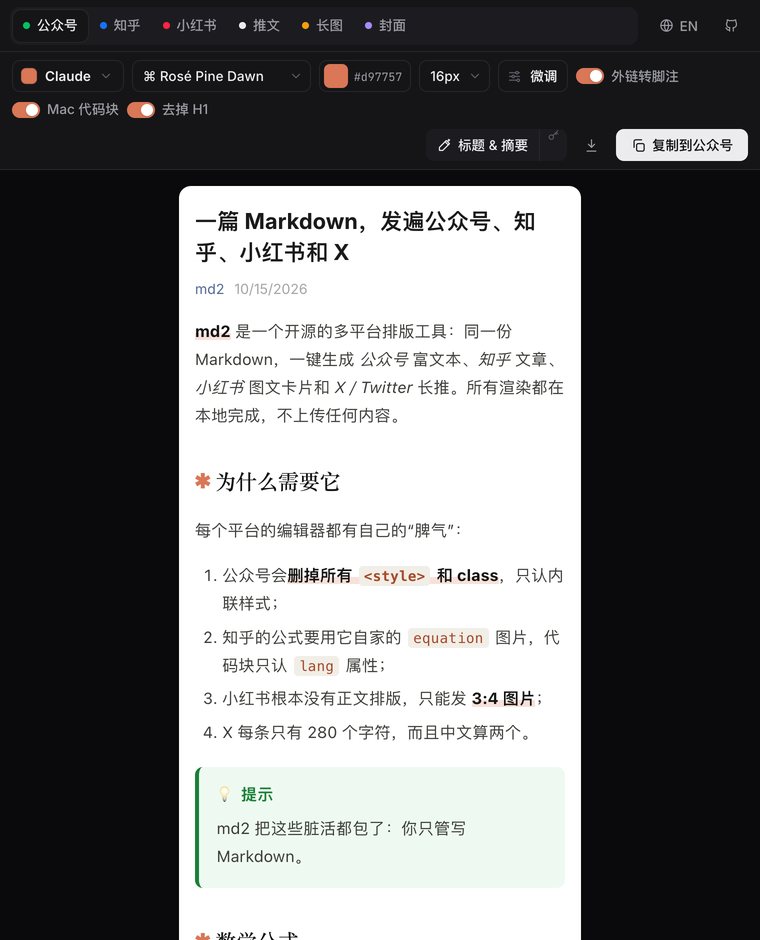
Click md2 in the editor title bar (or press ⌘⌥M / CtrlAltM) to open a live preview beside your Markdown. It updates as you type and scrolls with your editor.
| Tab |
What you get |
| 公众号 WeChat |
Rich text with every style inlined (WeChat strips <style> and classes). Formulas and Mermaid diagrams become inline SVG, external links become numbered references, and code keeps its indentation. Copy, then paste into the WeChat editor. |
| 知乎 Zhihu |
Clean HTML using Zhihu's native equations, <pre lang> code blocks and native references for footnotes. |
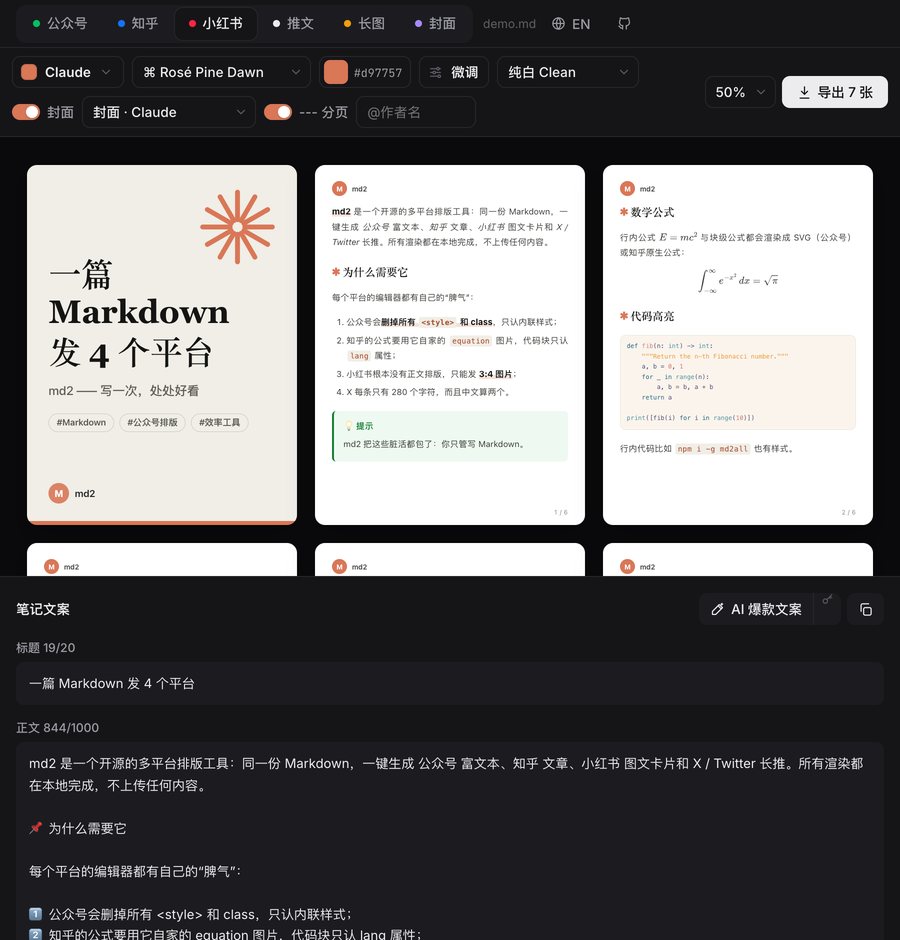
| 小红书 Xiaohongshu |
1080×1440 image cards with smart pagination (split paragraphs, lists, code, tables), a cover card and a caption checked against the 20 / 1000-character limits. |
| 推文 Threads |
Threads for X (weighted counting: CJK = 2, URL = 23), Threads, Bluesky, Mastodon, or a single LinkedIn post with Unicode-bold headings. |
| 长图 Long image |
The whole article as one tall PNG for 朋友圈 / 微博. |
| 封面 Cover |
10 modern templates (Aurora, Glass, Claude, Bento, Swiss, Neo-Brutal, Terminal, Notes, Editorial, Photo) in 6 sizes. |
- 16 contemporary themes: Claude, Linear, Geist, Apple, Editorial, Swiss, Neo-Brutal, Bento, Aurora, Midnight, Matcha, Wabi, Distill, Coral, Stripe and 宋韵. There are also 8 code palettes (Vitesse, Tokyo Night, Catppuccin, Rosé Pine, GitHub) and fine-tuning controls (首行缩进, justify, spacing, heading alignment, custom CSS).
- Math and diagrams:
$…$, $$…$$ and ```mermaid render everywhere and survive pasting into WeChat.
- AI copywriting (optional, bring your own key): 小红书 titles, caption and hashtags; thread rewrites; 公众号 headlines and digest; cover copy. Supports Claude (default
claude-opus-5-5) or any OpenAI-compatible endpoint (DeepSeek, Kimi, Qwen, OpenRouter, Ollama). Keys are stored in VS Code SecretStorage.
- Publish to WeChat drafts: md2: Publish to WeChat Drafts uploads your images, uses the cover from front matter (or generates one), and creates a draft in 公众号 → 草稿箱. It never mass-sends.
- Private by default: everything renders locally. Nothing leaves your machine except the AI and WeChat API calls you explicitly trigger.
Commands
| Command |
|
md2: Open md2 Preview |
live preview beside the editor |
md2: Copy for WeChat (公众号) |
rich text on the clipboard |
md2: Copy for Zhihu (知乎) |
rich text on the clipboard |
md2: Export Xiaohongshu Cards (小红书) |
PNGs + caption.txt in md2-export/ |
md2: Copy Thread |
the thread for the selected platform |
md2: Export Long Image (长图) |
one tall PNG |
md2: Export Cover (封面) |
PNG in the selected size |
md2: Publish to WeChat Drafts |
needs AppID / AppSecret and a whitelisted IP |
md2: Set WeChat AppID / AppSecret · md2: Clear Stored Keys |
credentials in SecretStorage |
Everything is also in the editor's right-click md2 menu. Inside the preview, ⌘⇧C runs the current tab's main action.
Front matter
---
title: 文章标题            # falls back to the first H1
subtitle: 副标题           # covers
author: 作者
tags: [AI, 效率工具]        # 小红书 / thread hashtags, cover chips
description: 摘要          # WeChat digest, thread hook
cover: ./cover.png        # WeChat draft cover
xhs:
  title: ≤20 字的小红书标题
---
Settings
md2.exportFolder: where exports are written, relative to the Markdown file (default md2-export).md2.revealAfterExport: offer to reveal exported files.md2.wechat.coverTemplate: template for generated WeChat covers.
Also available
MIT © Bryce Wang and contributors
| |

