GitHub CI Status
See the CI status for the pull request behind your current Git branch directly
in the VS Code status bar.
GitHub CI Status is built for repositories that use GitHub pull requests and CI
providers such as GitHub Actions, CircleCI, Netlify, Argos, and any other service
that reports commit status checks back to GitHub.
Features
- Shows pull request CI status in the status bar.
- Opens a picker with every check, its status, and its details URL.
- Opens the current branch pull request from the picker.
- Works with GitHub Actions check runs and classic commit status contexts.
- Uses the GitHub CLI when available, then falls back to VS Code GitHub
authentication and the GitHub API.
- Auto-refresh when branch changes.
Screenshot
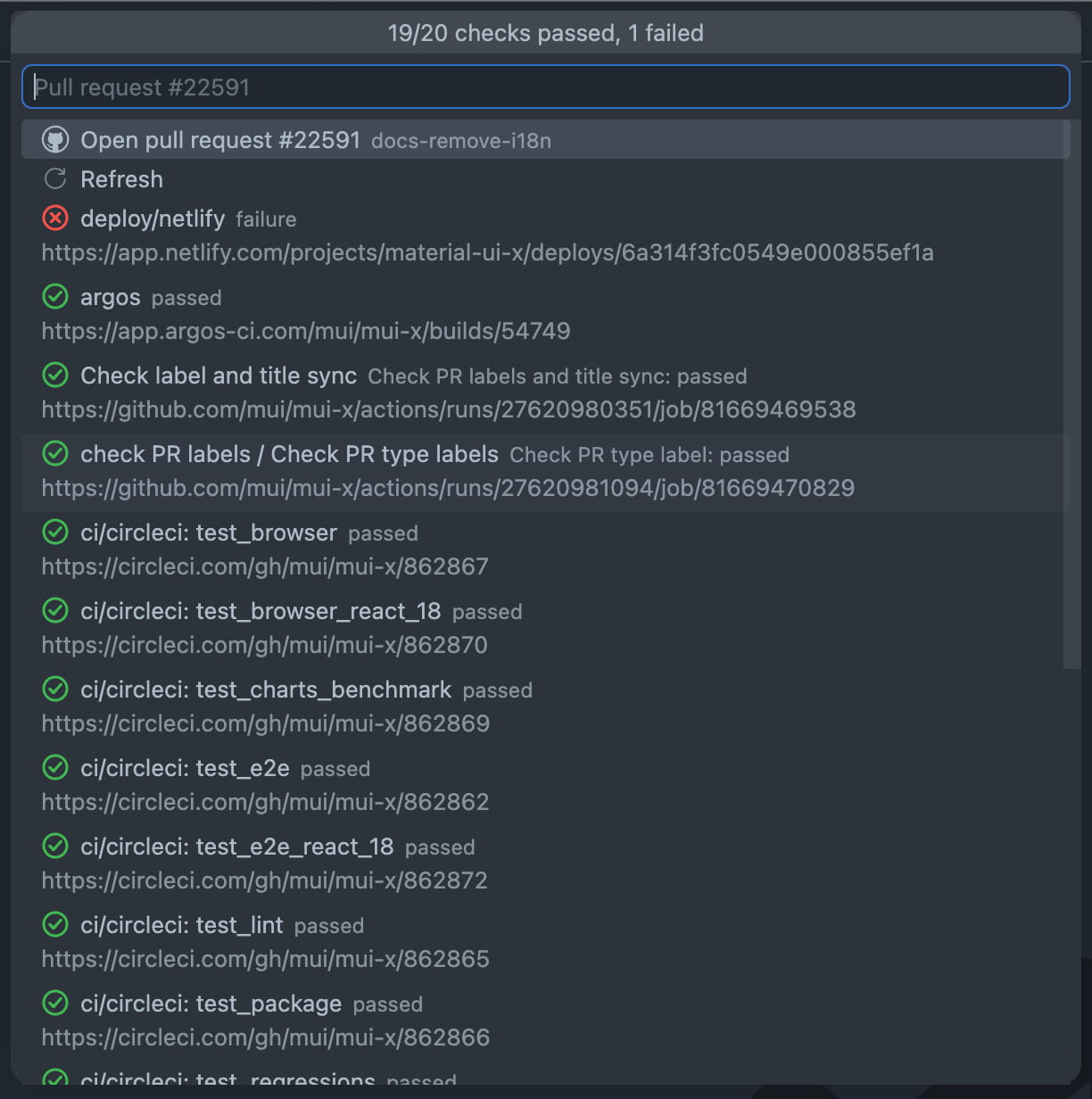
How It Works
Open a GitHub repository in VS Code. When the current branch has an open pull
request, the status bar shows how many checks have passed out of the total
checks reported by GitHub.
Requirements
The extension works best when the GitHub CLI is installed and authenticated:
gh auth login
If gh is unavailable or cannot load the pull request, the extension asks VS
Code for GitHub authentication and uses the GitHub API instead.
Commands
GitHub CI Status: show the current pull request checks.GitHub CI Status: Refresh CI Status: reload the current branch CI status.GitHub CI Status: Open GitHub Pull Request: open the current pull request.
Keyboard Shortcuts
Refresh CI status is bound to Ctrl+Alt+R (Cmd+Alt+R on macOS) by default.
Change it from Keyboard Shortcuts (search for githubCiStatus.refresh), or bind
any other command the same way.
Settings
githubCiStatus.autoRefreshIntervalSeconds
Refresh interval for CI status checks. The default is 60. Set it to 0 to
disable automatic refresh.
githubCiStatus.githubApiBaseUrl
Base URL for the GitHub REST API. Leave empty for github.com. For GitHub
Enterprise Server, set it to https://your-host/api/v3. When a custom URL is
set, the extension authenticates through the GitHub Enterprise account.
Notes
- The extension only shows checks when the current branch has an open GitHub pull
request.
- The status count is based on checks reported for the pull request head commit.

