BravosYour codebase already knows what can go wrong with it. Bravos writes that down, then proves which parts are real. AI made it cheap to generate security findings. It did not make them true. Teams now drown in reports that are plausible, unverified, and mostly not worth fixing. Bravos does the opposite. It finds fewer things and proves each one — by attacking your running application until the threat either succeeds or is ruled out. What comes back is not a list of maybes. It is a short list of what is actually exploitable, what is working as designed, and why.
1. Your threat model lives in your codeMost threat models are a document someone wrote once. It was accurate for about a week. Bravos keeps the threat model in the source, as code. An AI reads your repository and writes what each part exposes, what mitigates it, which assets and trust boundaries exist, and which feature the code belongs to — as ordinary comments, right above the lines they describe. Your codebase becomes the single source of truth for its own risk. Because it is code, it is reviewed in pull requests, diffed, and versioned like everything else. And because every change gets read and annotated again, it cannot quietly go out of date. That is what continuous threat modeling means here — not "runs on a schedule," but "cannot go stale." Every threat is recorded as a hypothesis. Not a bug. Not a claim. Something that looks dangerous and has not been tested yet: That is honest, and it is where most tools stop and start emailing you. 2. A polyglot exploitation frameworkA hypothesis is worth very little. That SQL injection may be unreachable — perhaps nothing user-controlled ever arrives at that function. Real weakness, zero exploitability. Any tool that reports it as a vulnerability has just wasted your afternoon. So Bravos tries to exploit it, using cert-x-gen — an exploitation framework driven by templates written in whatever language suits the target. JavaScript for a web application, something else for a protocol or a binary. Use what fits. The templates are not guessed in a vacuum. Cert-x-gen reads the annotations, parses them, and works from the same understanding of your codebase that produced them. Then an AI writes an exploit for that specific threat — and if the first attempt fails, that is not the answer. It mutates the approach and tries again, working toward the goal, the way a person would. Getting that to work is mostly orchestration, which is the unglamorous part that decides whether any of it is real: standing up an environment, running Docker, capturing credentials and refreshing them when they expire, choosing which identity makes a given exploit meaningful, rotating through attack perspectives, and recording everything it tried. What you get is a record, not a verdict handed down: which attack was attempted, under which identity or anonymously, which layers of your code it got through, and exactly where a control stopped it or where it went all the way. 3. Triage: the question nobody automatedProving something is exploitable does not make it a vulnerability. Everyone in your company can read everyone's chat. A probe will prove it. It is also exactly how the product is supposed to work. That is a business decision, not a breach. This is the wall bug bounty programs are hitting. AI made it cheap to write a convincing report, so reports arrive by the thousand, and triage — done by humans, one at a time — became the bottleneck. Programs get paused not because the findings are all worthless, but because nobody can work through the queue fast enough to find the ones that aren't. Bravos validates against the code itself. The threat model and the means to test it already live in your repository, so an incoming report becomes something you pipe in and get an answer to: does it reproduce, which privilege did it need, and was that privilege already entitled to that effect? That last question is the one that gets findings rejected. Bravos asks it explicitly, and when the
answer means "this is by design," you say so in the code, where it stays — an An entitlement argues about reporting only. It never hides anything from the exploitation run: the probe still fires, the evidence is still collected, and the threat still appears in the model. It changes what the finding is called, not whether it was tested. Some threats can never be waved away this way — anything about one user reaching another user's data, tenant isolation, ownership. Bravos refuses to downgrade those on entitlement grounds, because "the admin is allowed to" is not an answer to "user A read user B's messages." 4. It does not stopFix the issue and push. The new code is read and annotated again. If your fix worked, the threat is marked mitigated. If your fix introduced a new one, that is annotated too — immediately, in the same pass. Then the cycle runs again. Threat model, prove, triage, fix, push, re-annotate. Continuous threat modeling and continuous exploitation, running wherever your CI/CD does. This matters more than it sounds, because the annotations are ordinary comments in your source. Any AI agent working in your codebase reads them. It sees a threat marked on the function it is about to touch, and it has the context to fix it rather than route around it — and if that fix opens something new, the next pass catches it. The threat model is never a document that went stale. It is the current state of your code. Where this is goingNot built yet — described here so you know the shape of the thing: Because guardlink annotates by feature, and features map to the people who build them, a proven finding can be routed to the developer who owns that code — with integrations that open the ticket in whatever system you already use. Triage that ends in the right person's queue instead of a security backlog. What you see in the editorThis extension is where you watch the loop and drive it. It is a thin client: it detects a locally installed bravos engine and drives it, and never embeds Python, guardlink, cxg or Docker. The sidebar — the Bravos icon in the activity bar opens three views, top to bottom:
In your code — annotated lines are marked as you read them.
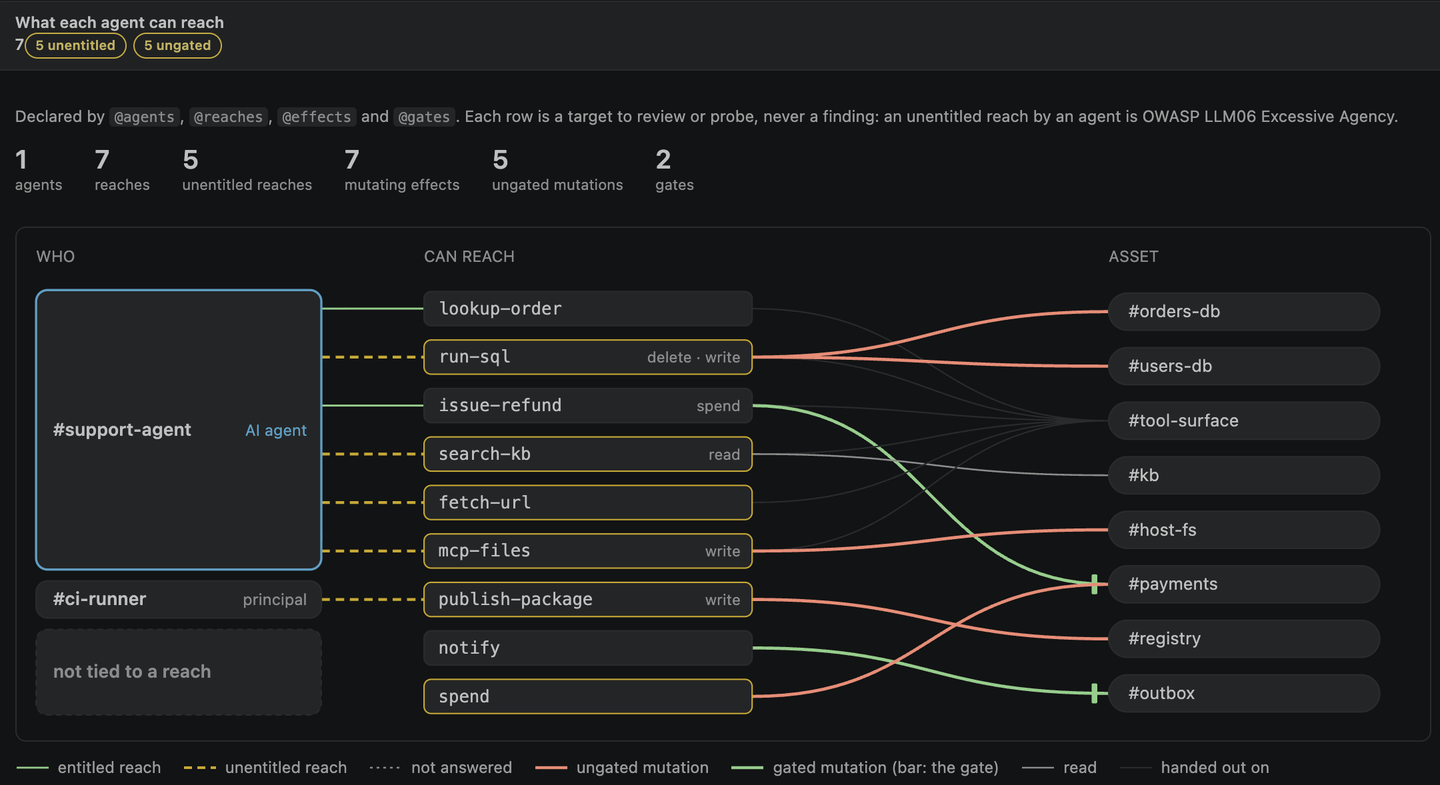
Hovering gives you the asset, the threat, the severity, the verdict and the reason. Each This works however your repository is annotated — inline comments and out-of-source Code analysis (Bravos: Code analysis findings) opens a stored analysis as attack surface → handler → finding: the path from something an attacker can send to the line that mishandles it. Findings the graph looked at and could not reach are a group of their own, and findings the graph had no answer for are a third — never folded into the second, because "nothing reaches this" and "we could not tell" are different claims. Producing an analysis needs the licensed analyzer; reading one does not, so a report your CI produced opens here on any machine. Results — one editor tab with five tabs across the top: Findings, Report (the whole threat model, diagrams included), Dashboard, Code analysis and Agent reach. The Findings view's title bar has one Results button; Bravos: Open report, Bravos: Open dashboard, Bravos: Code analysis findings and Bravos: Agent reach still work from the palette, and each opens its own tab of the same panel, so you never have five tabs that might each be showing a different run. Guardlink's own dashboard stays a panel of its own, because it needs no bravos run at all. Advisories open the entire finding: the write-up, its CWEs and CVSS, a Reproduce panel with the exact cxg template that tested it so you can rerun it deliberately, and the full evidence trail — every request fired, what came back, and what it proved. Agent reachCode that embeds an AI agent hands it capabilities: a tool that runs SQL, a refund it can issue, a
file system it can write. guardlink records that in the same annotations as the rest of the threat
model — The Findings view lists each agent and principal with its reaches, then the unentitled reaches and ungated mutations, each with guardlink's own reason; every row opens its annotation. The Agent reach tab (Bravos: Agent reach) is the dashboard's panel, with the reach map: who → what they can reach → which asset, each line drawn as entitled or not, gated or not. These are review items, never findings — an unentitled reach by an agent is OWASP LLM06 Excessive Agency to look at, not a vulnerability anybody proved, and nothing here joins a finding count. It needs bravos 0.4.0 or newer and a threat model built with guardlink 2.2.0 or newer. With an older engine, or a model an older guardlink exported, the tab says which and what to upgrade. The code graph, in the editorWhere to find it. The Code graph view in the Bravos sidebar, ⌥⌘G (Ctrl+Alt+G on Windows and Linux) to jump to it, the graph button on the Findings view's title bar, and right-click › Bravos in the editor and the explorer. ⌥⌘U (Ctrl+Alt+U) asks what depends on the file you are editing. Both keys were checked against VS Code's own default keymap, and the check runs again every time the extension is exercised in an editor. On Windows and Linux, Ctrl+Alt is AltGr, and some keyboard layouts type a character with AltGr+U or AltGr+G; if yours does, rebind the shortcut in Keyboard Shortcuts (search for Bravos) — like every VS Code shortcut, it is yours to change. The code graph ships in the bravos wheel. It needs no licence and no annotations — index once
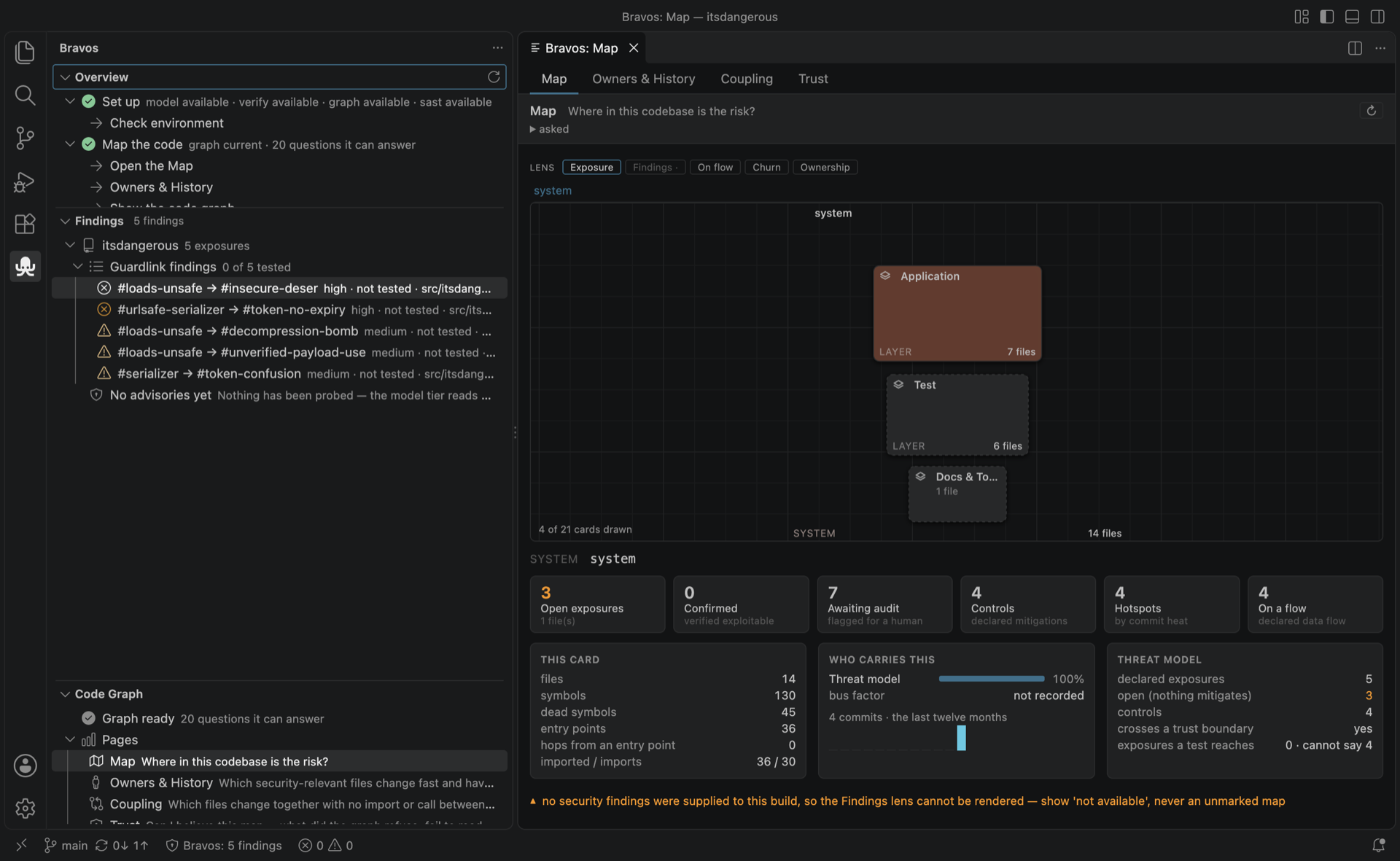
with Bravos: Index this repository for code search (or A graph is addressed by the commit it was built from, so editing does not disturb it and committing does. When that happens the panel says so and offers to re-index — it does not tell you that you have never indexed the repository. There is no show me the call graph. A picture of thirteen thousand symbols is not a picture. Every symbol-level command opens on a question, seeded by something you already named, and the canvas grows only where you click it. The one view of the whole repository is the Map (below), and it is a map of layers, folders and files that opens on the layers — not a picture of every function.
Breadth folds; it is never trimmed. Doubt is drawn, not omitted. The graph filters call edges at confidence 0.5 and tells you how many recorded callers that floor excluded; it also publishes how much of its own edge table never resolved to a target (52% of this repository's reference edges). So the canvas has three strokes and they never look alike:
Where the graph publishes a per-row confidence — the dead-code detector does, 0.1 to 0.9 — it is on the node as a chip. Where it publishes none, there is no chip. An empty answer says which kind of empty it is: nothing calls this and the threshold excluded four things are different sentences. The Workbench's pagesThe Bravos Workbench's code-graph pages, in the editor — from the Code graph view's Pages, the
Overview, or Bravos: Open a code graph page…. One panel, a strip across the top, and each page
prints the
The pages draw the Workbench's own models, their code copied unchanged, so the two products agree about every number; nothing is trimmed (the Map asks for every file, and folds as you zoom — on a 9,234-file repository the first screen draws 9 cards). A Findings lens is shown unavailable rather than as a clean map, because the graph is not given scan findings yet; the Workbench's Architecture, Triage and Third-party pages need engine work first. Driving it from a coding agentAsk your agent a question about the code, and the picture in your editor can become that query's
answer — one surface instead of two. Your agent writes It names the question; it never supplies the answer. The editor runs that question against your
own graph, through the same The questions are whatever the graph publishes — sixteen today, asked live at the moment the intent arrives, so one the graph learns is answerable the same day. An ask that needs a join across two of them, a filter on a field no argument exposes, or more than one seed is refused with that live list rather than approximated: there is no free-form query tool. Start here
What building the threat model writes. It sends nothing anywhere, but it is not read-only: it
publishes the model into Four capabilities
The model tier is safe to run against anything you can open. The verify tier attacks a running target, so it asks you to name that target and type an attestation saying who authorised the test. Bravos: Check environment prints this table as your machine answers it, with the exact command for anything that is missing. It is the engine's own answer, not the extension's guess — so a capability added to the engine shows up here without the extension being updated. The code graphFree, and the thing most likely to earn its place in a working day. Index once — Bravos: Index this repository for code search — and then ask it things:
The list is read from the graph every time it is opened, so a question the graph learns is in the picker the day it lands. A name several symbols carry is refused with its candidates, and you pick which one you meant rather than getting a confident answer about the wrong function. Bravos: Who signed off which risk, and when it lapses is the acceptance register: every
Your code stays yoursThe extension runs everything locally, talks to the engine over Probe evidence is captured traffic from a system under attack, so the extension treats all of it as hostile: every URL, payload and response is displayed as inert text. A payload containing markup is shown exactly as it was sent, and does nothing. The extension sends your code nowhere. The only thing that generates traffic is the verify tier, at the target you name, after you attest. RequirementsThis extension needs the Bravos engine on your The engine is free to install and needs Python 3.11 or newer. If it lives somewhere unusual, point
Bravos: Check environment tells you what this machine has and what to install for the rest. Settings
The annotation colours are contributed as theme colours ( Built onTwo open-source tools, both public:
SupportDocumentation: docs.bugb.io/bravos. Issues, questions and feedback: bugb.io. |