Pi for VS Code
简体中文
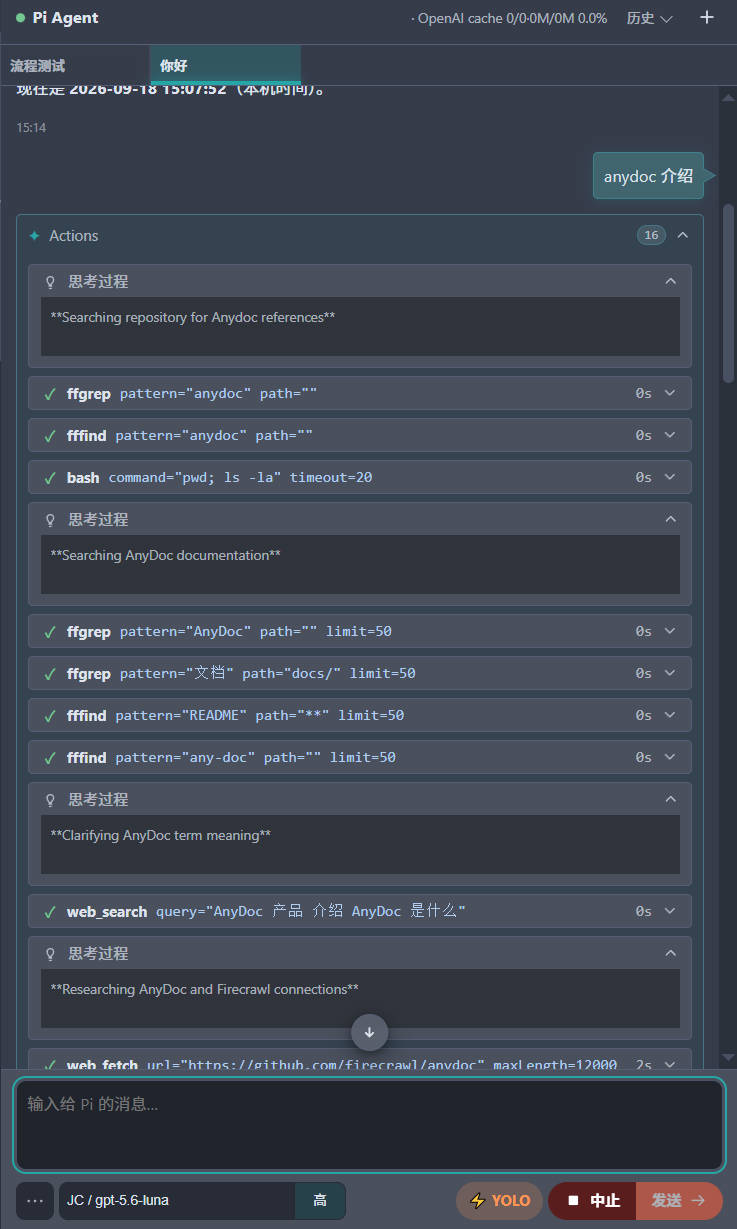
Pi for VS Code brings the Pi coding agent into the VS Code Activity Bar. Use the sidebar chat to work with Pi while keeping your editor, Explorer, and project context close at hand.
Screenshots
| Chat |
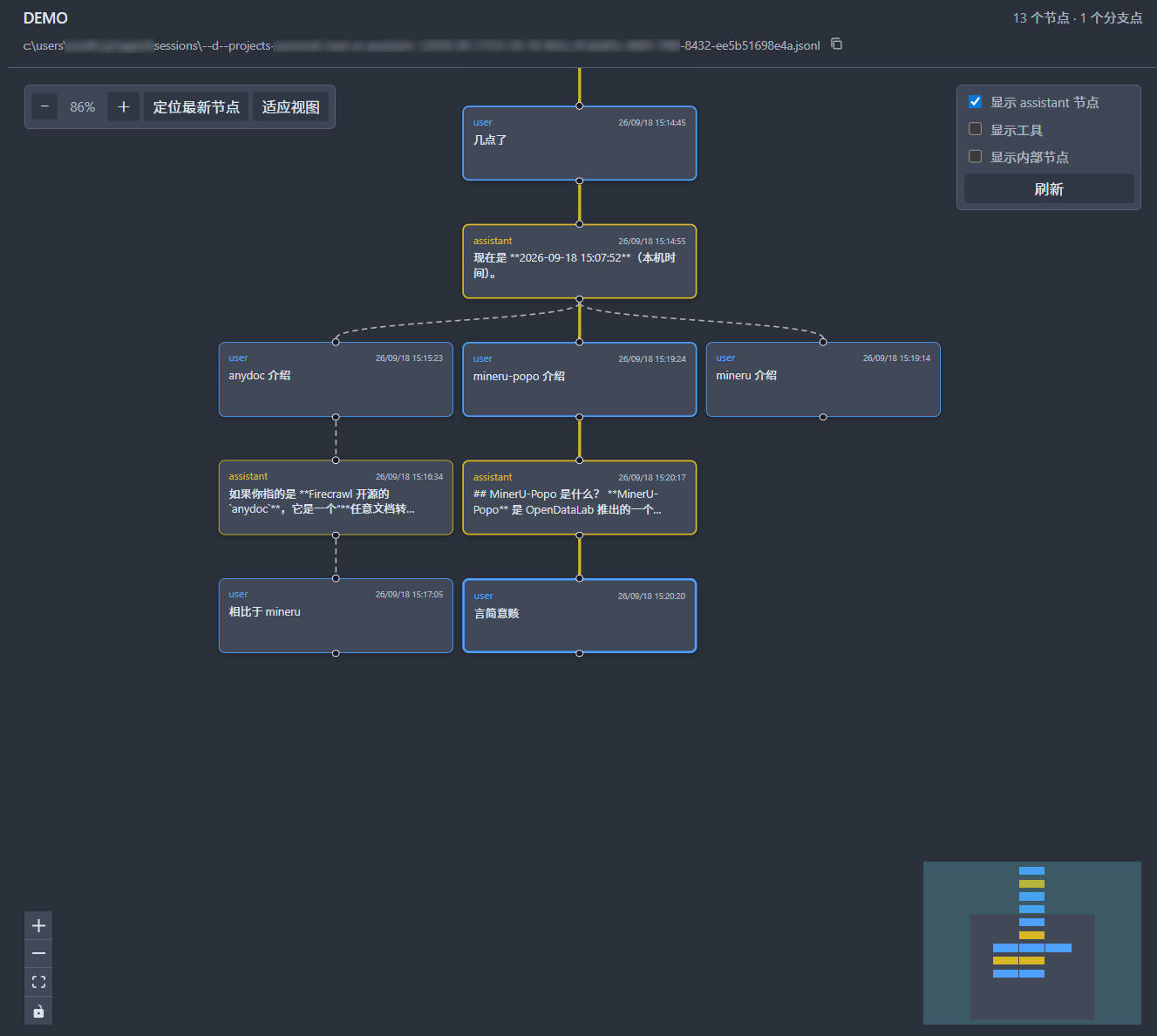
Session tree |
 |
 |
Features
- Chat with Pi in a dedicated Activity Bar view.
- Create and switch between persistent Pi sessions.
- Send the active editor selection or an Explorer path to the chat composer.
- Queue follow-up prompts or steer a running response.
- Review tool activity, agent questions, confirmations, and task progress in the chat.
- Navigate a Pi session tree in the editor and switch to an earlier branch.
- Follow the VS Code display language: Simplified Chinese for
zh-*, English otherwise.
- Receive optional system notifications when VS Code is unfocused.
Requirements
- VS Code 1.85 or later.
- A working Pi installation with a configured model and API key. See the Pi documentation for setup.
Get Started
- Install Pi for VS Code from the VS Code Marketplace.
- Open the Pi view from the Activity Bar.
- Enter a prompt and submit it to start a Pi session.
Use the Command Palette to run pivs: Open Chat whenever you need to bring the chat into focus. Create a separate conversation with pivs: New Session.
Add Context
Use Ctrl+J on Windows and Linux, or Cmd+J on macOS, to add context to the composer:
- In an editor, the current selection is inserted into the composer.
- In Explorer, the selected file or folder path is inserted into the composer.
The same actions are also available from the editor and Explorer context menus.
Working During a Response
When Pi is running, a submitted follow-up can be handled in two ways:
- Queue: press
Enter to send a prompt after the current work completes.
- Steer: press
Ctrl+Enter on Windows and Linux, or Cmd+Enter on macOS, to give Pi new direction for its next step.
Settings
Configure the extension in VS Code Settings by searching for PiVS.
| Setting |
Default |
Description |
pivs.notifications.ask |
true |
Notify when Pi needs input while VS Code is unfocused. |
pivs.notifications.runSettled |
false |
Notify when Pi finishes a response while VS Code is unfocused. |
pivs.piAgentDir |
Pi default |
Override Pi's global resources and session directory. |
pivs.piSdkPath |
Empty |
Set the @earendil-works/pi-coding-agent package directory; leave empty to prefer the npm-global Pi SDK. |
pivs.tools |
read, bash, edit, write |
Choose the tools enabled for Pi sessions. |
pivs.maxOpenSessionTabs |
10 |
Limit loaded session tabs before idle tabs are put to sleep. |
pivs.sessionTabWidth |
120 |
Set the width of open session tabs in pixels. |
pivs.ui.radius |
4 |
Set the corner radius for chat UI containers in pixels. |
pivs.ui.radiusQuestion |
4 |
Override the corner radius for question panels. |
Using an older Pi SDK
To use an older Pi SDK without reinstalling or changing the global pi, set the Pi package directory in VS Code settings.json:
{
  "pivs.piSdkPath": "C:\\Users\\<your-windows-user>\\.pi\\agent\\npm\\node_modules\\@earendil-works\\pi-coding-agent"
}
Replace <your-windows-user> with your Windows account name. After changing it, run Developer: Reload Window, then confirm the loaded SDK VERSION and package path from the [runtime] entry in PiVS.
Set the value back to an empty string to restore the default Pi SDK lookup.
Language
The chat interface follows the VS Code display language. It uses Simplified Chinese when the VS Code locale begins with zh; all other locales use English. Conversation content, tool output, and existing session titles are preserved as-is.
License
MIT

