T.A.R.G.E.T. Script for VS Code
Language support for the Thrustmaster T.A.R.G.E.T. HOTAS scripting language
(.tmc, .tmh, .ttm) — highlighting, completion, diagnostics, and compiling and
running your script without leaving the editor.
Unofficial. A community extension, not made or supported by Thrustmaster /
Guillemot. Bug reports belong
here.
Requirements
VS Code 1.85+. Nothing else is required to read and write scripts: highlighting,
snippets, completion, hover and the outline all work on their own, because the builtin
tables ship with the extension.
T.A.R.G.E.T. installed is needed for three things — compiling and running,
resolving include "target.tmh", and the checks that need to know every name your
project declares (those stay quiet rather than guess when the headers cannot be found).
It is auto-detected; set targetScript.installPath if it lives somewhere unusual.
Windows, or WSL. Compiling and running invoke Thrustmaster's own tools, which are
Windows executables. From WSL they are reached through interop. Everything else is
platform-independent.
Quick start
- Install the extension and open a
.tmc, .tmh or .ttm file — it is recognised
automatically.
- In a new
.tmc, type tmcmain and press Tab. That writes the
skeleton every TARGET script needs: include "target.tmh", a main() that calls
Init(), and an EventHandle that calls DefaultMapping().
- Start typing a mapping —
MapKey(&Joystick, — and the completion list narrows to
that device's controls, in button order.
- Press Ctrl+Shift+P → TARGET: Check Script for
Compile Errors. It compiles without running, so it cannot touch your HOTAS.
- When it is clean, TARGET: Run Script.
Usage
Commands
| Command |
What it does |
| TARGET: Check Script for Compile Errors |
Compiles without running. Errors land in Problems at the right file and line. |
| TARGET: Run Script |
Compiles, then launches the script with TARGETGUI.exe -r. |
| TARGET: Stop Running Script |
Closes TARGET. |
| TARGET: Show Where This Key Is Bound |
Right-click a key or DX button: peeks every place your games bind it. |
Compile and Run are also on the editor title bar. While a script runs, a
TARGET: <script> indicator sits in the status bar — click it to stop. Run a header
and it compiles the .tmc beside it, since a header alone is not a compilation unit.
If your scripts live on the WSL filesystem, Run offers to stage a copy on a Windows
drive — TARGET cannot load a script over a \\wsl.localhost\ path.
Settings
| Setting |
Default |
Meaning |
targetScript.installPath |
auto-detect |
The TARGET scripts folder. Set this if TARGET is not in the default location. |
targetScript.bindsFolder |
auto-detect |
Folder holding your game's binding files. |
targetScript.diagnostics.enable |
true |
Turn diagnostics off entirely. |
targetScript.diagnostics.unboundKeys |
false |
Report keys your game's loaded bindings do nothing with. Off by default: the answer depends on which preset is loaded on your machine. |
Features
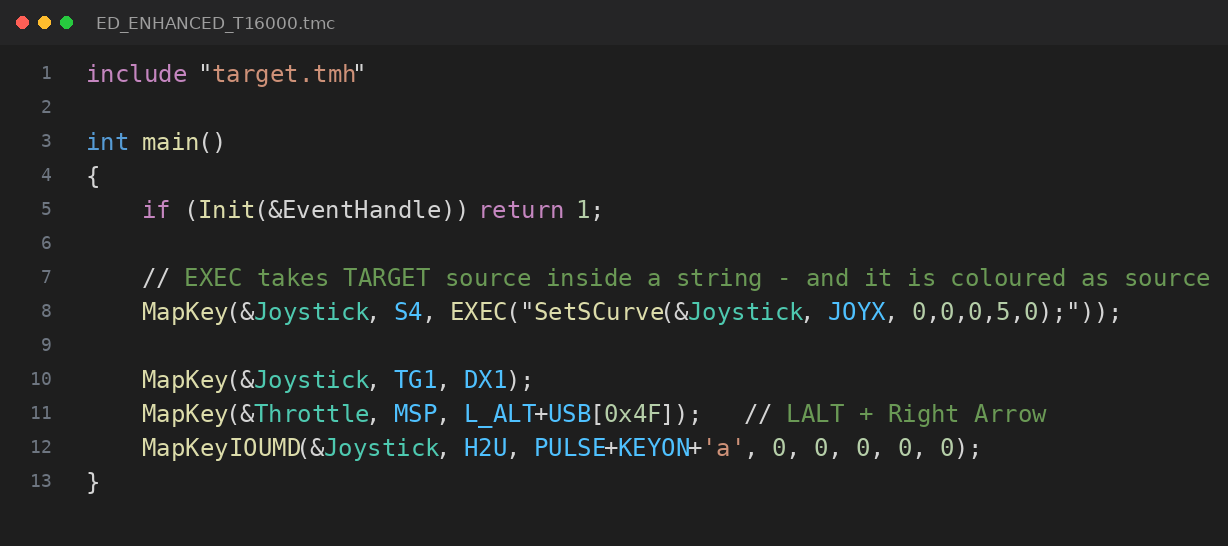
Syntax highlighting, including the hard part: EXEC() and REXEC() take TARGET
source code inside a string literal, and that code is highlighted as code.
Device-aware completion. Nobody remembers whether the button is TG1, TS1 or
TBTN1. Type MapKey(&T16000, and you get the T.16000M's controls — only those, in
button order. It follows handles your script binds itself, and axis functions rank that
device's axes first.
Plain-English control names. EFLNORM is meaningless; "Engine Fuel Flow Left" is
not. Taken from the per-device diagrams TARGET installs. USB[0x2C] is named as Space,
and typing inside USB[ lists every scancode by key name.
Hover and signature help for all 171 builtins with real parameter lists and default
values — and for your own functions, including the comment above them, looked up across
include files. Outline and go-to-definition work across them too.
Diagnostics for what the TARGET compiler reports poorly or not at all. A missing
main(), an event handler that does not exist, a call to a function defined nowhere,
a header included twice, C syntax TARGET lacks — all compile cleanly and fail mid-flight
instead. → every check, and why
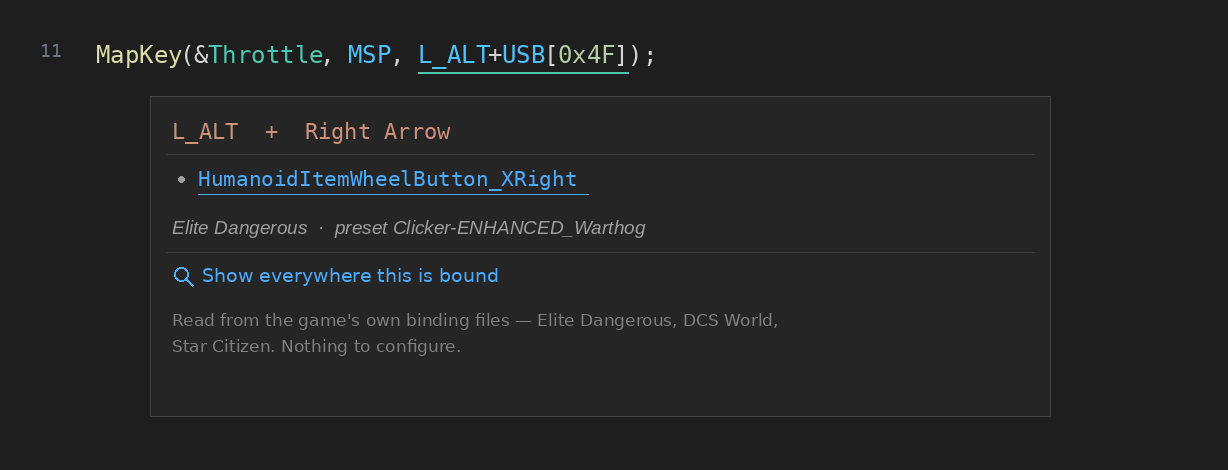
What the game does with the key. A script sends keystrokes and virtual buttons; the
game decides what they mean. The extension reads your game's own binding files — Elite
Dangerous .binds, DCS World .diff.lua, Star Citizen ActionMaps — and tells you. It
answers for the whole chord, and narrows to the preset the game will really load.
→ more
How it works
TARGET's own behaviour had to be established before much of this could be relied on —
what the compiler actually checks, how many buttons the virtual device really has, how
each game stores its bindings. That working out lives with the code:
docs/.
Acknowledgements
Validated against
ED_Enhanced_T16000, a large
real-world Elite Dangerous TARGET script.
License
MIT. "Thrustmaster" and "T.A.R.G.E.T." are trademarks of Guillemot Corporation S.A.,
used here only to say what this extension is for. The extension is not affiliated with
them.

