Conyang (코냥이 · こにゃん · 码喵)
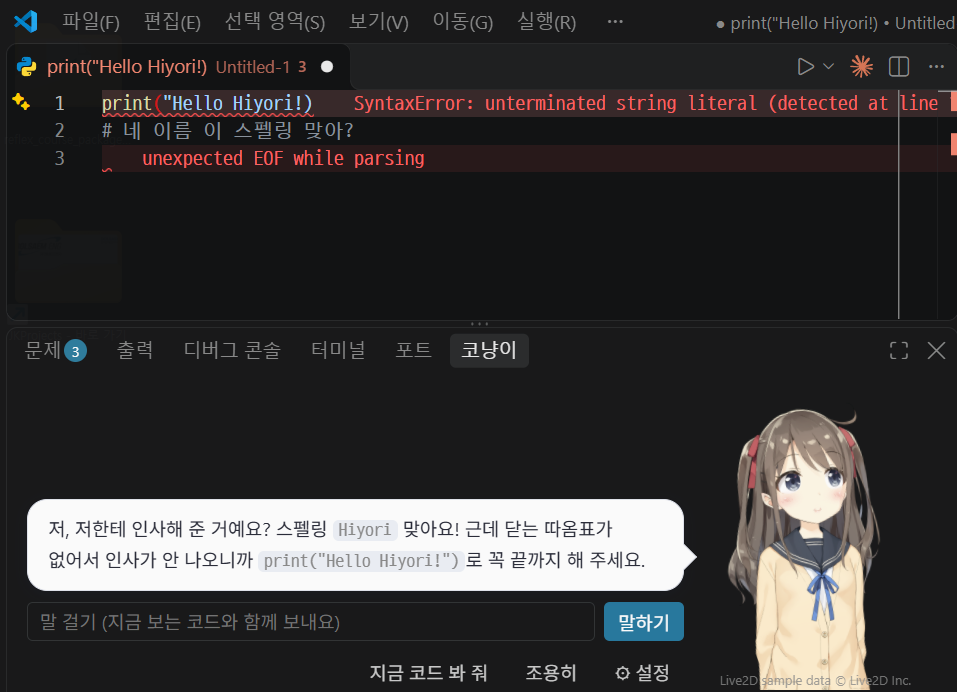
A coding buddy that lives in your VS Code panel. It reacts to your code and errors like a light-novel sidekick, makes small talk when things are quiet, and sulks if you ignore it for too long.
English · 한국어 · 日本語 · 中文
Features
- Two characters: the Conyang cat (default), or the Live2D character Hiyori. Expressions change with the mood, the mouth moves while talking, and she follows your mouse.
- Real conversation: it uses what your code actually says (strings, names, comments) as material, picks its own expression, and remembers the recent conversation.
- Error help:
- Explains Python errors from your terminal and from the editor's red squiggles.
- Common slips (a missing import, an uninstalled package, bad indentation, an unclosed quote or bracket) are explained even without AI.
- Personality: gentle, tsundere or nagging.
- Chattiness: quiet, normal or chatty. When chatty, it small-talks about every 3 minutes.
- Pats: click the head, face or body (the cat also has ears and a tail). Each spot gets its own reaction.
- 4 languages: Korean, English, Japanese and Chinese, for the built-in lines, the buttons and the AI replies.
- All settings in the panel: open ⚙ Settings in the panel for character, personality, chattiness, AI, language, speech-bubble color and custom instructions.
AI: use either of these
- GitHub Copilot (no key needed): if you are signed in to Copilot in VS Code, Conyang borrows its models. The free plan has a monthly limit. Click Review my code once to allow it.
- Your Anthropic API key: ⚙ Settings → Set Anthropic API key. The key is stored only in VS Code's secret storage and billed to your account.
Privacy
- When AI is on, the following go to the AI you chose:
- about 80 lines around your cursor
- the end of failing terminal output
- a few recent messages
- Files such as
.env, *.pem or *.key, and anything named like secret or credential, are never sent.
- Turn AI off and nothing is sent.
한국어
VS Code 아래 패널에 사는 코딩 친구예요. 코드를 보다가 에러가 나면 짚어 주고, 조용할 땐 잡담하고, 한참 말을 안 걸면 삐져요.
- 캐릭터: 고양이 코냥이(기본)와 Live2D 히요리가 있어요.
- 말투와 참견 빈도:
- 말투: 다정 / 츤데레 / 잔소리
- 참견 빈도: 과묵 / 보통 / 수다
- 쓰다듬기: 누른 곳마다 반응이 달라요.
- AI: GitHub Copilot에 로그인돼 있으면 키 없이 써요. 처음 한 번 "지금 코드 봐 줘"로 허락해 주세요. 내 Anthropic API 키를 넣어도 돼요.
- 설정: 모든 설정은 패널의 ⚙ 설정에서 바꿔요.
日本語
VS Code のパネルに住んでいる、コーディングの相棒です。コードやエラーにツッコんでくれて、静かなときは雑談、しばらくほったらかすと拗ねます。
- キャラクター: ねこの「こにゃん」(標準)と、Live2D の「ひより」がいます。
- 性格とおしゃべり度:
- 性格: やさしい / ツンデレ / 口うるさい
- おしゃべり度: ひかえめ / ふつう / おしゃべり
- なでる: なでた場所によって反応が変わります。
- AI: VS Code で GitHub Copilot にサインインしていれば、キーなしで使えます。最初の一回だけ「コードを見て」で許可してください。自分の Anthropic API キーも使えます。
- 設定: 設定はすべてパネルの ⚙ 設定から変えられます。
中文
住在 VS Code 面板里的写代码小伙伴。看到报错会提醒你,闲下来陪你聊天,太久不理它还会闹别扭。
- 角色: 猫咪「码喵」(默认)和 Live2D 角色「日和」。
- 性格与插话频率:
- 性格: 温柔 / 傲娇 / 唠叨
- 插话频率: 安静 / 普通 / 话多
- 摸摸头: 摸不同的地方会有不同的反应。
- AI: 在 VS Code 里登录 GitHub Copilot 就能免密钥使用。第一次请点「帮我看看代码」授权。也可以使用你自己的 Anthropic API 密钥。
- 设置: 所有设置都在面板的 ⚙ 设置里。
Notices
This content uses sample data owned and copyrighted by Live2D Inc. The sample data are utilized in accordance with terms and conditions set by Live2D Inc. This content itself is created at the author's sole discretion.
Notices for Live2D Cubism Core and open-source libraries are in THIRD_PARTY_NOTICES.md, which ships with the extension.
Made by BlueGrass Studio, the team behind ReflexKR, an interactive Python & Reflex course site in Korean.
| |

