Skip to content
| Marketplace
Sign in
Visual Studio Code>Themes>College ColorsNew to Visual Studio Code? Get it now.
College Colors

College Colors

bjjeong

|
3 installs
| (0) | Free
VS Code themes in the colors of 53 well-known universities — Michigan, Ohio State, Alabama, Texas, Stanford, Duke, Berkeley, all eight Ivies and more. One dark and one light theme per school: the official palette drives the editor chrome, with a syntax scheme tuned for contrast against it.
Installation
Launch VS Code Quick Open (Ctrl+P), paste the following command, and press enter.
Copied to clipboard
More Info

College Colors

VS Code themes in the colors of 53 well-known universities — one extension, one dark and one light theme per school.

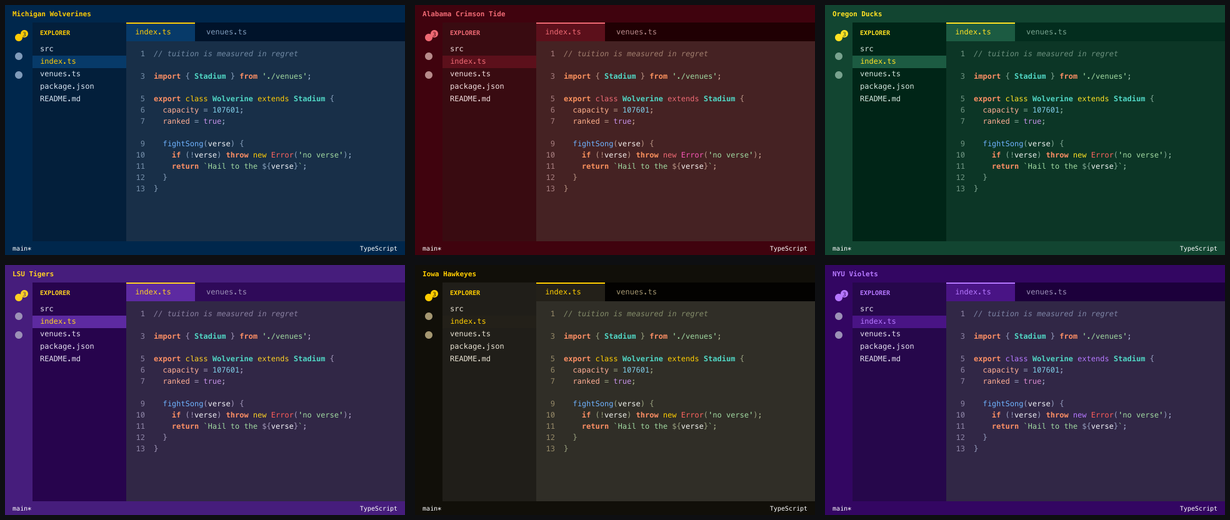
College Colors preview

Each school's official brand palette drives the editor chrome — activity bar, status bar, title bar, tabs — while the syntax colors are generated to stay readable against it. The light variants keep the same branded chrome and flip the working surfaces to near-white, with the school's dark brand color as the ink. Every theme is checked against WCAG contrast floors and a perceptual-separation floor before it ships, so no two token types end up looking alike.

Installation

  1. Open VS Code.
  2. Open the Extensions panel (Cmd+Shift+X / Ctrl+Shift+X).
  3. Search for "College Colors" and click Install.
  4. Command Palette (Cmd/Ctrl+Shift+P) → Preferences: Color Theme → pick your school.

Or from the command line:

code --install-extension bjjeong.college-colors

Schools included

Every school ships a dark and a light theme, listed in the picker as College Colors: School and College Colors: School Light. Each link below is a preview render — dark first, light in parentheses.

Alabama Crimson Tide (light) Arizona State Sun Devils (light) Arizona Wildcats (light)
Auburn Tigers (light) Brown Bears (light) Bucknell Bison (light)
California Golden Bears (light) Caltech Beavers (light) Chicago Maroons (light)
Clemson Tigers (light) Columbia Lions (light) Cornell Big Red (light)
Dartmouth Big Green (light) Duke Blue Devils (light) Florida Gators (light)
Florida State Seminoles (light) Franklin & Marshall Diplomats (light) Georgia Bulldogs (light)
Georgia Tech Yellow Jackets (light) Harvard Crimson (light) Illinois Fighting Illini (light)
Iowa Hawkeyes (light) Johns Hopkins Blue Jays (light) Kansas Jayhawks (light)
Kentucky Wildcats (light) LSU Tigers (light) Miami Hurricanes (light)
Michigan State Spartans (light) Michigan Wolverines (light) Minnesota Golden Gophers (light)
MIT Engineers (light) Nebraska Cornhuskers (light) North Carolina Tar Heels (light)
Northwestern Wildcats (light) Notre Dame Fighting Irish (light) NYU Violets (light)
Ohio State Buckeyes (light) Oklahoma Sooners (light) Oregon Ducks (light)
Penn Quakers (light) Penn State Nittany Lions (light) Princeton Tigers (light)
Purdue Boilermakers (light) Stanford Cardinal (light) Tennessee Volunteers (light)
Texas A&M Aggies (light) Texas Longhorns (light) UCF Knights (light)
UCLA Bruins (light) USC Trojans (light) Washington Huskies (light)
Wisconsin Badgers (light) Yale Bulldogs (light)

Don't see your school? Request it — adding one is a ten-line change, and the request form asks for everything it needs.

How the themes are built

The themes aren't maintained by hand. Each school is a small palette entry:

{
  "slug": "michigan",
  "label": "Michigan Wolverines",
  "dark": "#00274C",
  "accent": "#FFCB05",
  "source": "brand.umich.edu — Michigan Blue / Maize"
}

npm run build expands that into a dark and a light theme and rewrites contributes.themes. The generator works in OKLCH so it can move lightness and chroma independently without the hue drift you get from HSL, and it applies a few rules:

  • The chrome keeps the school's exact official hex — in both variants. That's what makes a theme recognizably Michigan or Alabama; the light variants keep the branded activity bar, status bar, and tab rail and only flip the working surfaces.
  • The editor background stays a barely-tinted neutral across all schools — dark charcoal in the dark variants, just off white in the light ones. It's the surface you stare at all day; the brand color belongs in the chrome, not behind your code.
  • Syntax colors may deviate from the brand palette to stay readable. Alabama crimson and Penn red are too dark to read as keywords on a dark background, so they get lifted until they clear their contrast floor. The light variants pull the same trick downward: the ink comes from the school's dark brand color when it has one (navy for Michigan, purple for LSU), otherwise the bright accent is darkened until it reads on the page.
  • Every token clears a WCAG contrast floor against the editor background — 4.5:1 for code, 3.5:1 for comments.
  • No two token colors are perceptually confusable. The floor is ΔE 0.052 in OKLab, calibrated against the tightest pair in a hand-tuned theme.
  • Errors never read as keywords. Normally red — but on a red-brand school that would collide, so the error color swings to magenta and gains an underline as a color-independent signal.

npm test builds and then validates all 106. It exits non-zero if any theme fails, so a bad palette can't be packaged.

Adding a school

  1. Append an entry to palettes/schools.json.
  2. npm test
  3. node scripts/preview.mjs to render a mock editor window for eyeballing.

If the accent is too dark, too close to the comment color, or collides with the error color, the validator will say so by name.

Contributing

Issues and pull requests welcome at github.com/bjjeong/vscode-college-colors.

Releasing

Releases are cut from tags. Bump version in package.json in a PR, merge it, then tag the merge commit:

git tag v1.2.0 && git push origin v1.2.0

The release workflow rebuilds and validates every theme, publishes to the VS Code Marketplace and Open VSX, and creates a GitHub Release with the packaged .vsix attached. It refuses to run if the tag doesn't match package.json, and the Marketplace rejects re-publishing a version number, so a version can only ever ship once.

Trademark note

This extension is an independent, unaffiliated project. It is not endorsed by, sponsored by, or associated with any of the universities named. School names are used descriptively, to identify which color palette a theme reproduces. No institutional logos or marks are included — the extension icon is an abstract palette. Colors themselves are not protectable subject matter.

License

MIT

  • Contact us
  • Jobs
  • Privacy
  • Manage cookies
  • Terms of use
  • Trademarks
© 2026 Microsoft