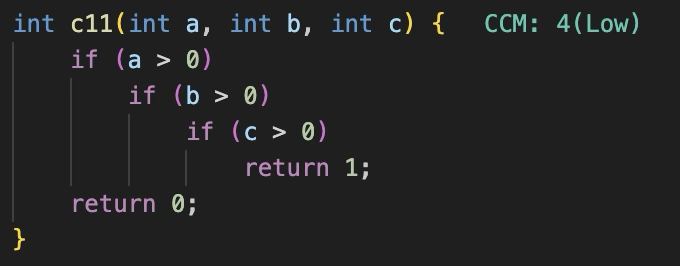
A Visual Studio Code extension that computes and displays cyclomatic complexity metrics inline for multiple programming languages. Cyclomatic complexity is a software metric used to indicate the complexity of a program by measuring the number of linearly independent paths through the source code.
Features
🎯 Multi-Language Support
C/C++: Full support with preprocessor directive handling
Java: Comprehensive method complexity analysis
JavaScript/TypeScript: Modern web development support
Python: Scripting language support with proper indentation handling
Consistent rules: Same calculation regardless of macro definitions
⚡ Performance
Debounced analysis: Prevents performance issues during typing
Efficient parsing: Minimal impact on editor responsiveness
Zero configuration: Works out of the box
⌨️ Usage
IDE Usage
Open any supported file in the editor, and you will see the CCM scores and complexity inline next to each function. It is updated as you type.
Command Palette Usage
Open command palette by pressing Ctrl+Shift+P (Windows/Linux) or Cmd+Shift+P (Mac).
Select CCM: Analyze — Computes cyclomatic complexity for all supported files under a given path (file or directory). Results are saved as ccm_analysis.csv in the workspace root and displayed in an output panel.
Select CCM: Update — Inserts or update @complexity <Level> docstring tags in source code for all functions across all supported files under a given path.
Both commands prompt for a path (absolute or relative to the workspace root).
How It Works
Complexity Calculation
The extension uses McCabe's cyclomatic complexity formula with a base complexity of 1, adding 1 for each decision point:
if statements (including else if)
for loops
while loops
case statements (in switch blocks)
Ternary operators (? :)
Logical operators (&&, ||) in some languages
Exception handling (catch, except)
Preprocessor Directive Handling (C/C++)
Construct
Rule
#if/#elif/#else chain
+1 (only one branch is active)
#ifdef/#elif/#else chain
+1 (only one branch is active)
Independent #ifdef X block
+1 each (macro value unknown)
Independent #ifndef X block
+1 each (macro value unknown)
Real-time Analysis
Code is analyzed as you type, with debouncing to prevent performance issues. Complexity scores update automatically on save or after a brief pause in typing.
Color Coding
Score
Color
Meaning
≤ 10
🟢 Green
Low complexity — generally acceptable
11–20
🟡 Yellow
Medium complexity — acceptable but marginal
21–30
🟠 Orange
High complexity — consider refactoring
31–50
🔴 Red
Very high complexity — needs immediate attention
> 50
🔴 Red
Critical complexity — Untestable
Use Cases
Code Review: Quickly identify complex functions during code reviews
Refactoring: Target complex functions for simplification
Quality Gates: Enforce complexity limits in CI/CD pipelines
Educational: Help developers understand code complexity concepts
Limitations
Nested functions are counted as part of the parent function
Technical Details
Pure JavaScript implementation with no external dependencies
Modular design with separated core logic from VS Code integration
Verified with comprehensive test suite for each supported language