AST Lens
AST Lens is a VS Code extension that generates tree-sitter queries from your code selection and runs them across your workspace — or just the current file. Select a pattern once, and AST Lens finds every structurally similar piece of code, in any supported language.
Open the AST Lens sidebar from the activity bar (globe icon) to start.
Quick Start
- Open the AST Lens sidebar (globe icon on the left).
- Put your cursor in (or select part of) a
.java, .js, .ts, or .c file.
- Select some code and press ✦ Add Query — a query is generated into the editor.
- Press ⟫ Run All (whole workspace) or ▶ Run File (current file only).
- Click any result to jump straight to the matching line.
Demo
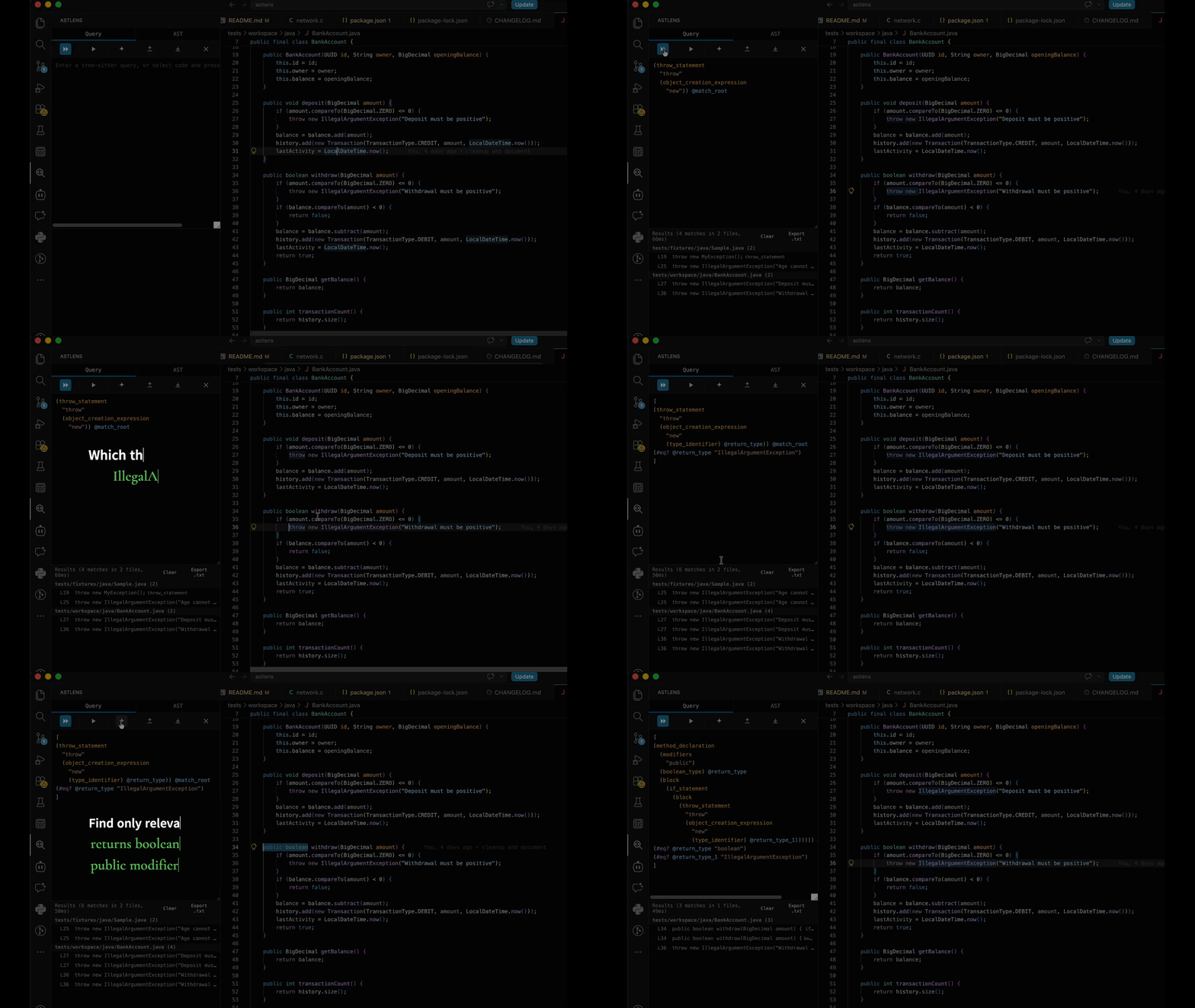
Query View
Video demonstrates how to build complex query that consists of multiple patterns.
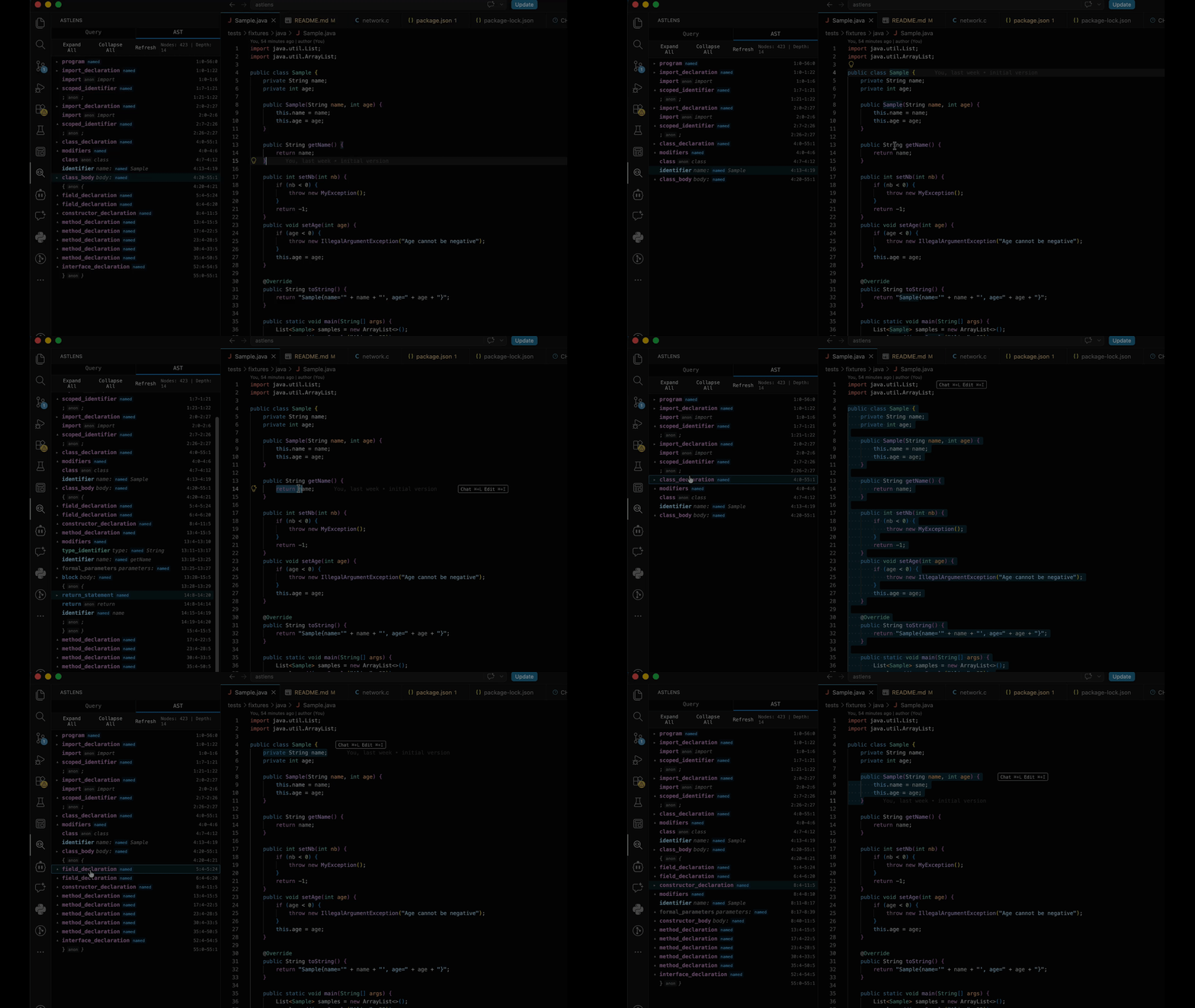
Instant AST view
- Click on source code to instantly generate and highlight the corresponding AST
- Click on the AST to highlight the matching source code.
The QUERY Tab
[⟫ Run All] [▶ Run File] [✦ Add Query] [⤓ Export] [⤒ Import] [✕ Clear]
                                                           [··· More options]
| Button |
What it does |
| ⟫ Run All |
Runs the query in the editor against every supported file in the workspace. |
| ▶ Run File |
Runs the query only against the currently open file. Faster for iterating. |
| ✦ Add Query |
It generates a query from your current selection in IDE. If there is existing query, it merges the new selection into it — combining both patterns into one AND like query (see Composing queries). |
| ⤓ Export |
Saves the query to a .scm file (adds a header comment with the language). |
| ⤒ Import |
Loads a .scm file back into the editor (language is read from the header comment). |
| ✕ Clear |
Empties the query editor and resets any composed selections — no matter whether the text was generated or typed by hand. |
| ··· More options |
Toggles the Files to include / Files to exclude filter inputs (see Searching & filters). |
Searching & filters
When you press ··· More options (bottom-right of the toolbar, next to Clear) two VS Code-style filter inputs appear:
- Files to include — only files matching at least one pattern are searched (leave empty to search everything).
- Files to exclude — files matching any pattern are skipped. These combine with the
astlens.excludePatterns setting (node_modules, dist, build, bin, .git, __pycache__, venv by default).
Patterns are comma- or newline-separated globs, with the usual search-view semantics:
- A bare name matches that name at any depth (
node_modules excludes any node_modules folder, wherever it is).
- Globs like
*.java, src/**, **/*.test.js match anywhere (a **/ is assumed when you don't start with one); ./ anchors to the workspace root (e.g. ./src/**); braces like {*.java,*.kt} are supported.
- Absolute paths are supported too:
C:/WORK/repo/dev (Windows) or /Users/me/repo/dev (macOS/Linux) are matched against the file's full path, a bare absolute folder path (no /**) selects that folder's contents, and absolute patterns are matched case-insensitively (so C:/WORK matches C:/Work on disk). Relative patterns keep being matched against the workspace-relative path and remain case-sensitive.
- Filters survive across searches in the sidebar while it is open (per-session), and Run File respects them too — a file matching an exclude filter is skipped with a log message.
Only files with a supported extension (.c, .h, .java, .js, .jsx, .ts, .tsx) are ever enumerated.
Query editor
- The editor has live syntax highlighting (node types, captures, predicates, strings, fields, numbers, comments).
- Place your cursor next to
(, [ or { and the matching bracket is highlighted.
- The editor is resizable — drag the handle below it for more room.
- You can hand-edit the query at any time (rename captures, tweak predicates, add
#eq?) and run the edited version. If you then press ✦ Add Query while the text was written/edited by hand, the generator treats it as a fresh start and replaces it with a query generated from your current selection.
Results
- Results appear below the editor, grouped by file (
filename (n)).
- Click a filename to open that file; click a result row to jump to the exact line.
- Each row shows the line number, a preview of the matching text, and the matched node type.
- Clear clears the results; Export .txt saves them to a file.
- The header shows the totals:
Results (count in n files, elapsed ms).
The AST Tab
A real-time view of the syntax tree for the current file.
- Toolbar: Expand All, Collapse All, Refresh (re-parse the file), and a counter (
Nodes: n | Depth: d).
- Each row shows the node type, its field name (e.g.
name:, body:), a named / anon badge, a short text preview for leaf nodes, and its line:col range.
- Nodes are color-coded by category: declarations, statements, functions, types, variables, expressions, strings, numbers, keywords, punctuation, comments.
- Click a node → the corresponding range is selected in the editor.
- Move the cursor in the editor → the matching node is highlighted and scrolled into view in the tree.
- Keyboard while focused on a node:
↑/↓ navigate, ←/→ collapse/expand, Enter/Space selects the node's range in the editor.
Selection Guide
The generator anchors on the smallest syntax node that fully contains your selection, then keeps only the parts you touched. Two rules drive everything:
1. Select a little → general match. Select more → specific match.
2. Whitespace decides roles. Whether a type keyword is read as a bare type ("anywhere") or as a specific role (return type / parameter / field / local) depends on how the selection ends: the end point is treated as exclusive.
- Double-click the token (selection ends exactly at word end) → bare type → matches everywhere.
- Include a trailing space (or anything after the token) → the anchor climbs to the enclosing declaration → the type is scoped to its role there.
The reference below is organized by AST node type (the same color categories as the AST tab). Queries are shown condensed; actual output may wrap/rename captures, but the structure is faithful.
Type nodes — bare keyword vs. role
int, void, double, boolean, String, number, float, char, …
| You select |
Best query (condensed) |
Matches |
int exactly (double-click) |
(integral_type "int") @match_root |
every int: return, parameter, field, local |
void exactly (double-click) |
(void_type "void") @match_root |
every void in any position |
int + trailing space, in a signature |
(method_declaration (integral_type "int")) @match_root |
methods returning int |
int + trailing space, in a parameter list |
(formal_parameter (integral_type "int")) @match_root |
int parameters (any method) |
int + trailing space, in a field |
(field_declaration (integral_type "int")) @match_root |
int fields |
String exactly (double-click) |
(type_identifier) @name (#eq? @name "String") |
String used as any type |
String + trailing space, in a signature |
(method_declaration (type_identifier) @return_type) |
methods whose return type is String |
String[] — the full array type |
(array_type (type_identifier) @element …) |
every array of String |
Comparable<Sample> (a generic type) |
(generic_type … ) @match_root + #eq? |
that exact generic type usage |
Modifiers + type combinations — which declaration
Combining modifiers with a type pins the type to the declaration that owns it. Result depends on where you select it.
| You select |
Best query (condensed) |
Matches |
public void (in a method) |
(method_declaration (modifiers "public") (void_type) @return_type) |
public methods returning void |
static void (in a method) |
(method_declaration (modifiers "static") (void_type) @return_type) |
static methods returning void |
private int (on a field) |
(field_declaration (modifiers "private") (integral_type "int")) |
private int fields |
public String getName |
(method_declaration (modifiers "public") (type_identifier) @return_type (identifier) @method) |
public methods named getName returning String |
public static void main |
(method_declaration (modifiers "public" "static") (void_type) @return_type (identifier) @method) |
public static void main |
Add more modifiers (abstract, final, synchronized, …) |
modifiers list grows |
narrows to that modifier set |
Declaration nodes — class, import, implements
| You select |
Best query (condensed) |
Matches |
class Foo |
(class_declaration "class" (identifier) @name) |
classes named Foo |
implements |
(super_interfaces "implements") @match_root |
every implements clause |
import java.util.List |
(import_declaration … (identifier) @name_1) |
imports of that exact package/name |
a class name identifier (Foo, double-click) |
(identifier) @name (#eq? @name "Foo") |
identifier Foo anywhere |
Statement nodes — keyword vs. keyword+content vs. whole statement
| You select |
Best query (condensed) |
Matches |
return (keyword alone) |
(return_statement "return") @match_root |
every return, any value |
if (keyword alone) |
(if_statement "if") @match_root |
every if, any condition/body |
while / for / switch / break (keyword alone) |
(while_statement "while"), (…for…), (switch…), (break_statement "break") |
all statements of that kind |
return history |
(return_statement "return" … history…) |
returns whose expression starts with history |
throw new |
(throw_statement "throw" (object_creation_expression "new")) |
throws that create via new |
if (age < 0) (condition included) |
(if_statement "if" (parenthesized_expression (binary_expression …))) |
ifs with that condition structure |
case 1: |
(switch_label "case" (decimal_integer_literal "1")) @match_root |
switch labels for case 1 |
| the whole statement line |
exact query, everything #eq?-constrained |
identical statement only |
Function & method nodes
| You select |
Best query (condensed) |
Matches |
a function name (getName, double-click) |
(identifier) @name (#eq? @name "getName") |
identifier getName anywhere |
getName( |
(method_declaration (identifier) @method (formal_parameters "(")) |
methods named getName |
getName(String prefix) — full signature |
(method_declaration (identifier) @method (formal_parameters …)) |
methods with that exact signature, any body |
function calculateTotal(items) |
(function_declaration (identifier) @method (formal_parameters …)) |
JS functions with that signature |
return type + name (e.g. String getName), in a signature |
(method_declaration (type_identifier) @return_type (identifier) @method) |
methods named getName returning String, ignoring modifiers |
(a, b) => a + b (an arrow function) |
(arrow_function … ) @match_root |
identical arrow functions |
| whole method with body |
exact query |
identical method only |
Call & member-access nodes
| You select |
Best query (condensed) |
Matches |
samples.get(0) |
(method_invocation (identifier) @receiver … (identifier) @method … (#eq? …)) |
calls of get on samples with 0 |
obj.method() (a full call) |
(method_invocation … ) @match_root + #eq? |
identical calls |
items.reduce(…) (a JS call) |
(call_expression (member_expression (identifier) @receiver …) …) |
calls on items (any args) |
this.name |
(field_access (this) @receiver "." (identifier) @property) |
this.name accesses |
item.price (property read) |
(member_expression (identifier) @receiver "." (property_identifier) @property) |
reads of item.price |
Expression nodes
| You select |
Best query (condensed) |
Matches |
prefix == null |
(binary_expression (identifier) @left "==" (null_literal) @right) |
identical comparisons |
a + b |
(binary_expression (identifier) @left "+" (identifier) @right) |
identical additions |
!items.length |
(unary_expression "!" (member_expression …)) |
negations of that member |
age = 0 (in a declarator) |
(variable_declarator (identifier) @name "=" (decimal_integer_literal) @value) |
declarators age = 0 |
Variable & field nodes
| You select |
Best query (condensed) |
Matches |
an identifier (count, double-click) |
(identifier) @name (#eq? @name "count") |
every identifier named count |
const s = "hello" (a variable declaration) |
(variable_declarator (identifier) @name "=" (string)) |
declarations of s with a string |
int[] nums = {1, 2} (an array initializer) |
(array_initializer "{" … "}") @match_root |
identical array initializers |
Literal & string nodes
| You select |
Best query (condensed) |
Matches |
"Ada" (whole string literal) |
(string_literal … (#eq? …)) |
string literals containing Ada (grammar-dependent: Java pins the text, JS matches all (string) nodes) |
0 |
(decimal_integer_literal "0") @match_root |
the literal 0 |
3.14 |
(floating_point_literal "3.14") @match_root |
the literal 3.14 |
true / false |
(boolean_literal "true") / (boolean_literal "false") |
those boolean literals |
null |
(null_literal "null") @match_root |
null literals |
| You select |
Best query (condensed) |
Matches |
any comment (// foo, /* … */, \# foo) |
(comment) @match_root |
every comment — the text is not constrained |
The comment node holds no named children, so there is nothing to pin — a comment selection always matches all comments. To target comment text, hand-edit the query and add an #eq? on a (comment) capture (textual, not structural).
Composing Queries (Add Query)
Combine multiple selections into a single AND query — matches must satisfy every selected part.
- Select part A (e.g. the
if keyword) → ✦ Add Query. The editor now holds a query for if.
- Select part B in the same file (e.g. the
throw keyword inside that if) → ✦ Add Query again. The editor now holds a merged query:
(if_statement
  "if"
  (block
    (throw_statement "throw"))) @match_root
- Run it — only
if statements that contain a throw (with the throw keyword) match. Conditions, else branches, and bodies are not part of the query unless selected.
Rules of composition:
- Every ✦ Add Query after the first adds the new selection as an AND constraint; the anchor becomes the smallest node containing all selections.
- Selection order doesn't matter; the merge is always structural.
- Composed selections reset when you switch files, change language, hand-edit the query, or press ✕ Clear.
- Selections that live in unrelated places (e.g. two far-apart statements) still compose — the anchor widens to their common container (a whole
block, class, etc.), so the query means "a container that includes both parts".
Supported Languages
| Language |
Extensions |
| C |
.c, .h |
| Java |
.java |
| JavaScript |
.js, .jsx |
| TypeScript |
.ts, .tsx |
Tips
- Start with the file scope (
▶ Run File) while tuning a query; it's fast and limited to the file you're looking at.
- If a search returns too many results, add a modifier or surrounding keyword to the selection — the query immediately becomes more specific.
- If a search returns nothing, try selecting less code — a single keyword is the most permissive starting point.
- Generated queries are valid tree-sitter
.scm files — export them, tweak them by hand, and import them back later.
| |

