Semantic Markdown (.smd) for VS Code
Formerly Styled Markdown (bislink360.styled-markdown). Same format, settings and commands under a new name. If the old extension is still installed, uninstall it: the two can't run side by side. What changed
One document format for developers, product managers and AI agents. Semantic Markdown is Markdown plus callouts, colors, diagrams, decisions, risks, API blocks, KPIs and audience-aware content, with a live preview, validation, and token-efficient views for AI agents.
Every .md file is already valid .smd, so you can rename a file and start adding structure.
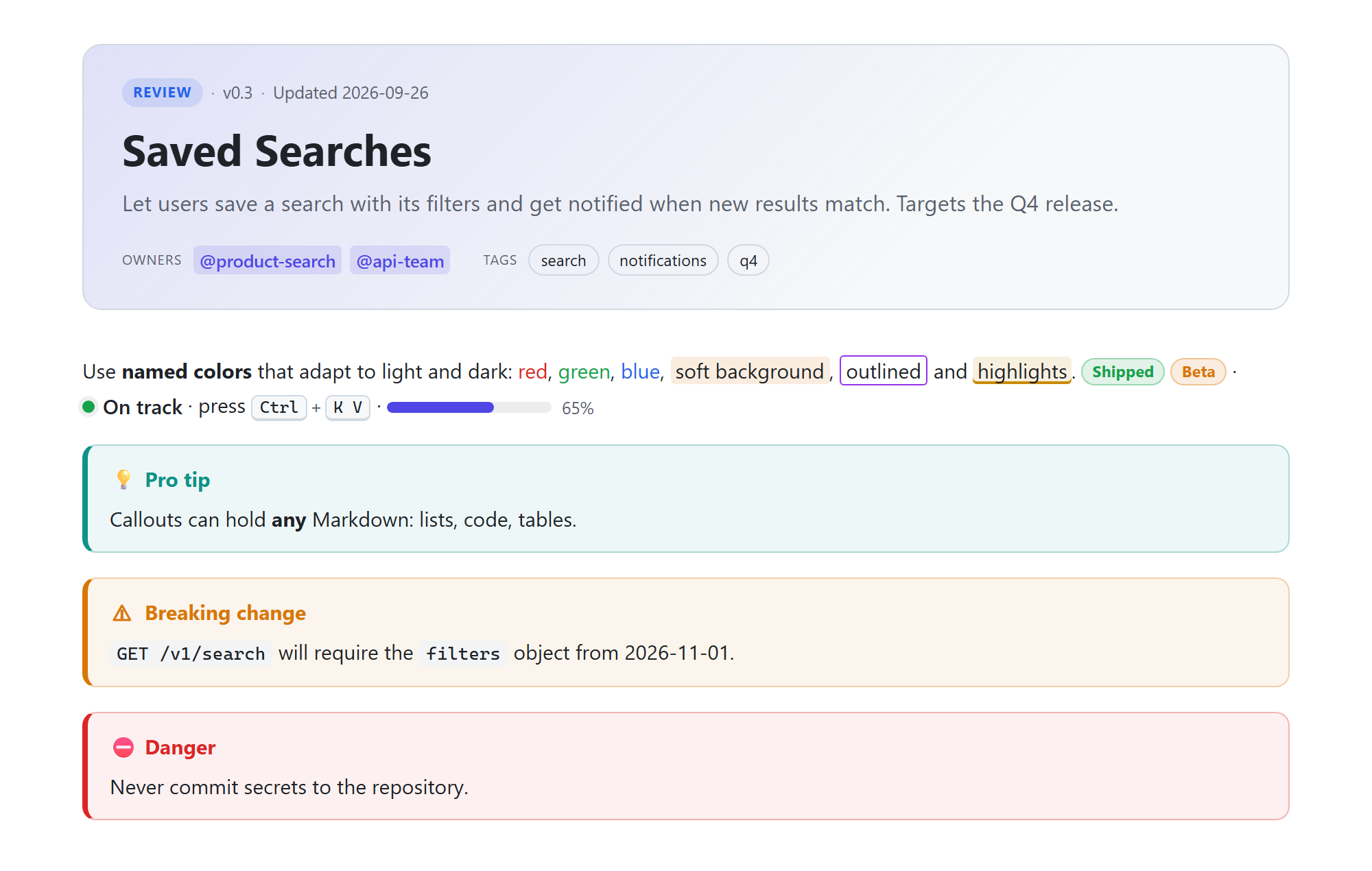
New in 2.0: spec v2 (smd: 2, which new documents get) shows text as written and reads a few things more strictly; existing documents keep the v1 rules until you run Migrate to Spec v2 (or Preview Migration to Spec v2 first). VS Code's built-in .md preview applies .smd syntax only to .md files that opt in with an smd: front matter key (smd.markdownPreview.enabled). Needs VS Code 1.97 or newer. What changed.
Highlights
- Live preview (
Ctrl+K V): themed to match VS Code, scroll sync, double-click to jump to source, clickable tasks, Mermaid diagrams, KaTeX math, tabs and columns. Edits keep your scroll position, diagrams, selected tabs and open collapsibles.
- Block Editor (Preview): open a
.smd file with Open With… → Semantic Markdown Block Editor (Preview) to see it as the preview renders it and edit one block's source at a time, in place: insert blocks from templates (Ctrl+/), move them (Alt+↑ Alt+↓, or drag them), set a container's title and attributes or the front matter in a form, change a badge, status, due date or styled span in a small inline form, edit tables cell by cell in a grid, tick tasks, apply quick fixes from a block's problems (Ctrl+.) and paste or drop images. Only the lines of the block you edit change; save, undo (Ctrl+Z in a text box undoes your typing, elsewhere the document) and diffs work as in the text editor. Its UI may change in minor releases. More.
- Project blocks:
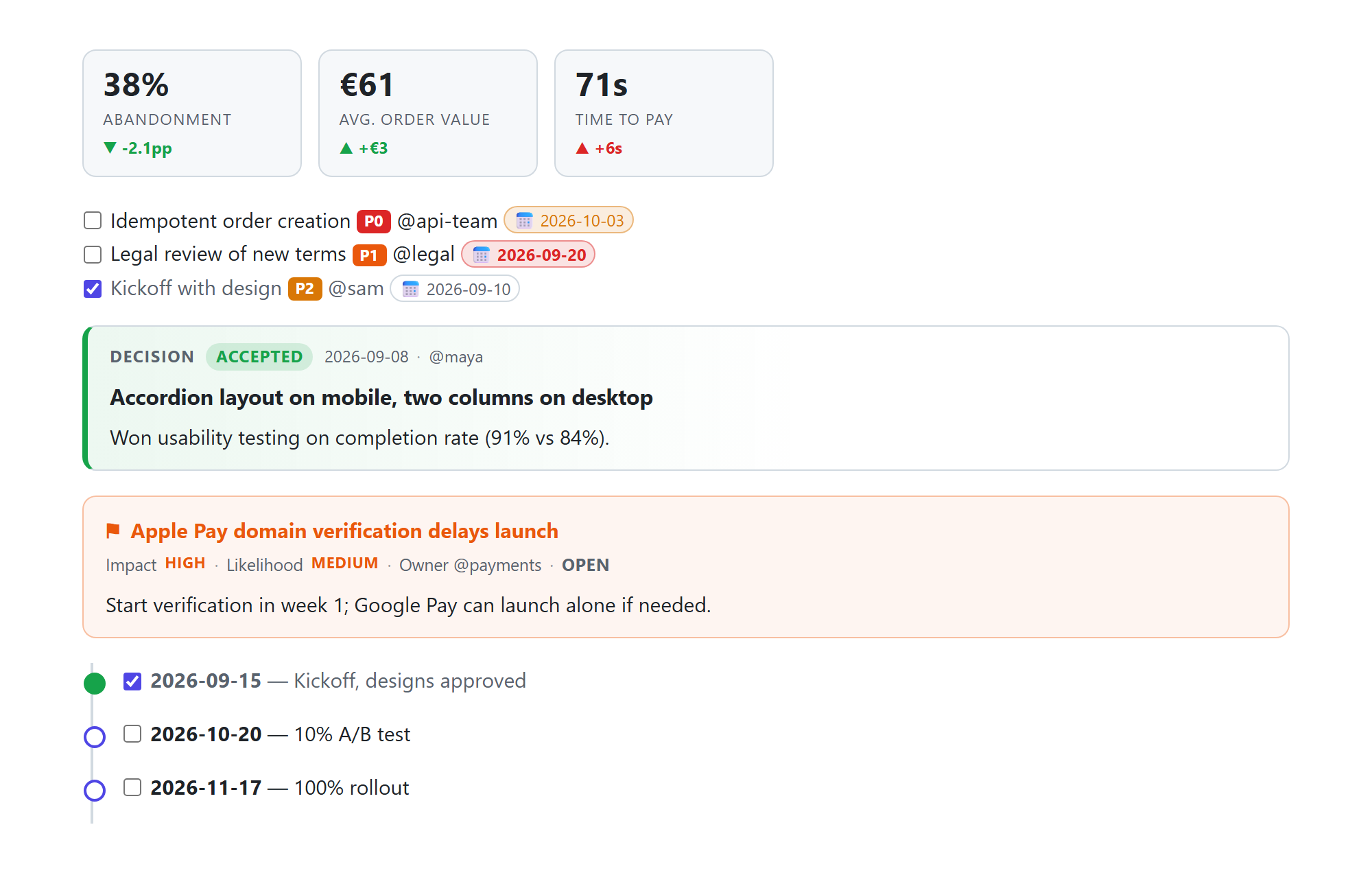
:::decision, :::risk, :::timeline, KPI tiles (:metric), priorities, and due dates that turn red when overdue. Tasks carry owners.
- SMD Tasks view in the Explorer: open tasks from every
.smd file in the workspace, grouped by owner, due date (Overdue, Today, This week, Later) or document, overdue first, then by priority. Tick a checkbox to check the task off in its file, click a task to open it, and see the overdue count as a badge.
- Document status workflow: the status bar shows the front matter
status of the active document (or No status, or a warning for an unknown value). Click it to pick the next step, draft → review → approved, or deprecated / archived: only the status: value changes (quotes and comments kept), updated: is set to today, and Undo takes it back.
- Developer blocks:
:::api endpoint cards, code line highlights {2,5-7}, and live source embeds file="…" lines="…" so docs never drift from code. :::include{file="shared/terms.smd" section="Pricing"} includes text shared by several documents.
- GitHub alerts (
> [!NOTE], > [!WARNING]…) render as callouts, so README-style documents look the same in the preview and on GitHub.
- Refactorings (
Ctrl+.): wrap the selection in a callout, card, :::details, :::agent or :::human block; change a callout's type; turn a > **Warning:** or > [!WARNING] blockquote into a :::warning callout.
- Validation with quick fixes as you type (
:::warnign → :::warning, flowchat → flowchart, blu → blue), including Mermaid syntax errors on the exact line before the diagram renders. Turn rules off or change their severity in smd.config.json / .smdrc, which get completion from a schema, or silence one line with <!-- smd-disable-next-line rule/code -->.
- Formatter: Format Document (
Shift+Alt+F) and "editor.formatOnSave" tidy container fences, attribute lists, table columns and blank lines, with the same rules as smd fmt in CI.
- IntelliSense: completion for blocks, directives, attributes and allowed values, and for paths and
#anchors in links, related: entries, file="…" embeds and :::include files, and front matter names after {{; hover docs and {{variable}} values; color picker; go to definition for anchors, linked files and reference links; find references and rename for headings, which updates every link to them across the workspace; Ctrl+T search across every heading, decision, risk and API endpoint in the workspace; hover previews of linked sections, documents and embedded code, and definitions of glossary terms; outline; folding; 41 snippets.
- Agent view: 🤖 shows exactly what an AI agent reads, with styling, layout and human-only sections stripped and meaning kept (5–37% fewer tokens for a whole example document, about 80% when an agent reads only the section it needs from a long one; see token costs). Copy the whole view or selected sections to any chat tool. A status-bar token counter shows the size.
- Export to standalone HTML, PDF, GitHub Markdown, Confluence (storage format), Notion (JSON) or Word (.docx, for Word, LibreOffice or Google Docs), and convert
.md → .smd.
- Spec v2 migration: Preview Migration to Spec v2 shows what moving a document to
smd: 2 changes so it keeps its meaning; Migrate to Spec v2 applies it as one edit that Undo reverts.
Commands
| Command |
Default key |
| Semantic Markdown: Open Preview to the Side |
Ctrl+K V |
| Semantic Markdown: Open Preview |
Ctrl+Shift+V |
| Semantic Markdown: Open Block Editor / Reopen in Text Editor |
Open With… · ⋯ in the title bar |
| Semantic Markdown: Show Agent View / Show Brief Agent View |
🤖 in the title bar |
| Semantic Markdown: Copy Agent View / Copy Sections for an Agent… |
— |
| Semantic Markdown: Export to HTML / Export to Plain Markdown (.md) |
— |
| Semantic Markdown: Export to Confluence (Storage Format) / Export to Notion (JSON) |
— |
| Semantic Markdown: Export to Word (.docx) (built in; uses Pandoc when installed) |
— |
| Semantic Markdown: Export to PDF (prints with an installed Chrome, Edge, Chromium or Brave) |
— |
| Semantic Markdown: Convert Markdown File to .smd |
Explorer context menu |
| Semantic Markdown: Validate All .smd Files in Workspace |
— |
| Semantic Markdown: Preview Migration to Spec v2 / Migrate to Spec v2 |
— |
| Semantic Markdown: Set Up Spell Checking (cSpell) |
— |
| Semantic Markdown: Set Document Status… |
Click the status in the status bar |
| Semantic Markdown: Group Tasks By… / Show Completed Tasks / Hide Completed Tasks / Refresh Tasks |
SMD Tasks view title bar |
Settings
| Setting |
Default |
Description |
smd.preview.theme |
auto |
auto follows VS Code; or force light / dark |
smd.preview.showAgentBlocks |
collapsed |
How :::agent blocks appear to humans: collapsed, expanded, hidden |
smd.preview.allowHtml |
true |
Render raw HTML (scripts never run) |
smd.markdownPreview.enabled |
opt-in |
Which .md files get .smd syntax in VS Code's built-in Markdown preview: opt-in (only those whose front matter has an smd: key), always or never |
smd.validation.enabled |
true |
Report problems |
smd.validation.checkLinks |
true |
Warn about relative links, images and related: entries that point to missing files or headings |
smd.validation.mermaid |
true |
Parse Mermaid diagrams and report syntax errors before they render |
smd.validation.staleAfterDays |
180 |
Flag a document as stale when updated is older than this and its status isn't archived or deprecated (0: off) |
smd.editor.continueLists |
true |
Enter continues task lists (unchecked, keeping @owner), bullets and numbered lists; Enter on an empty item ends the list |
smd.images.folder |
docs/images |
Where pasted and dropped images are saved, relative to the workspace folder |
smd.export.docxEngine |
auto |
What writes Export to Word (.docx): auto (Pandoc when it is set or on the PATH, else the built-in writer), builtin or pandoc |
smd.export.pandocPath |
"" |
Pandoc for Export to Word (.docx), when it isn't on the PATH (user setting; empty: SMD_PANDOC, then the PATH) |
smd.export.browserPath |
"" |
The browser that prints Export to PDF (user setting; empty: SMD_BROWSER, then Playwright or Puppeteer in the workspace, then an installed Chrome, Edge, Chromium or Brave) |
smd.export.pdfFormat |
A4 |
Paper size for Export to PDF: A4 or Letter |
smd.export.pdfLandscape |
false |
Export to PDF in landscape |
smd.status.updateDate |
true |
Set Document Status also sets the front matter updated date to today, when the document has that key |
Syntax at a glance
---
smd: 2
title: Saved Searches
summary: Let users save a search and get notified about new results.
status: review
---

:::warning Breaking change
The `filters` parameter is now required.
:::

- [ ] Idempotent order creation :priority[P0] @api-team :due[2026-10-03]

:::decision{status=accepted date=2026-09-08 owner=@maya} Accordion layout on mobile
:::

```mermaid
flowchart LR
  A --> B
```

## Background {agent=skip}

:::agent
Constraints for AI agents working on this document.
:::
Learn more
Author: Roshan Alwis · License: MIT
| |

