Damn Is It DownSee in your status bar when GitHub, npm, AWS, Vercel, OpenAI or any service you use is down. Confirmed outages only. No account, no tracking. Installation Launch VS Code Quick Open ( Ctrl+P), paste the following command, and press enter.Copied to clipboard |

Damn Is It Down for VS CodeKnow when it's not your code. A small heartbeat line in the status bar watches the services you build on (GitHub, npm, AWS, Vercel, Supabase, Stripe, OpenAI and thousands more) and only speaks up when Damn Is It Down sees a problem. Works in VS Code, Cursor, Windsurf and VSCodium.
What it shows
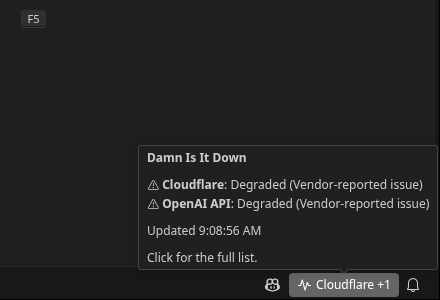
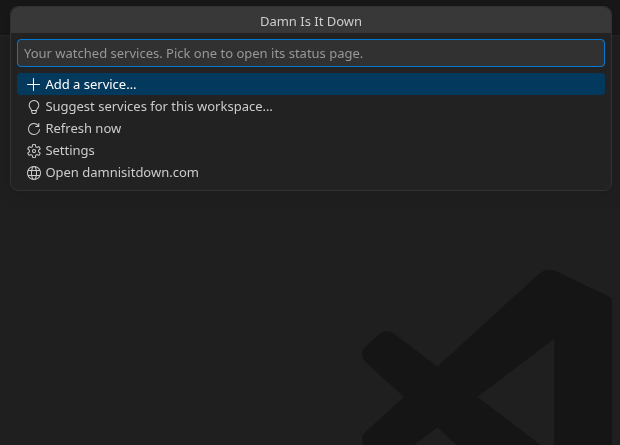
The levels are exactly the verdicts on each service's status page at Hover for a summary. Click for the full list, where you can open a status page, stop watching a service, or add one.
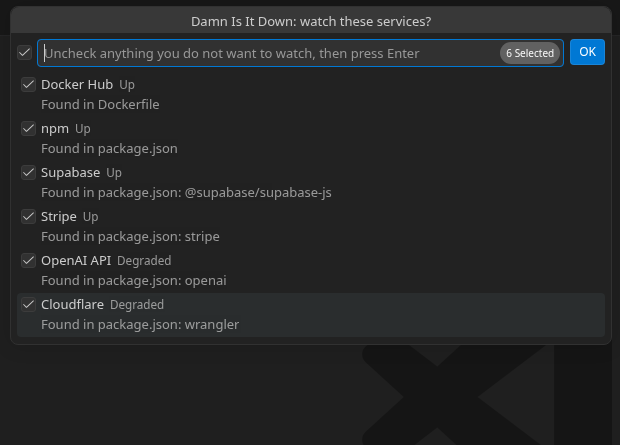
Suggestions from your projectWhen you open a folder, the extension can offer to watch services your project uses. It looks at manifest and deploy files on your machine:
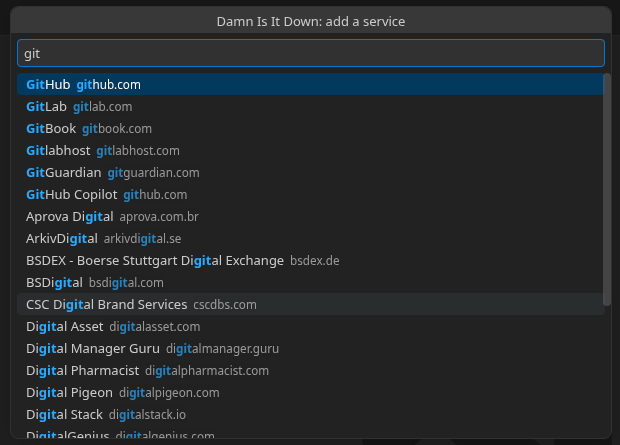
Run Damn Is It Down: Suggest services for this workspace any time, or Damn Is It Down: Add a service to search by name.
NotificationsYou get a notification only when a watched service has a confirmed outage and when it is back up. Degraded and possible-outage states stay in the status bar. Turn notifications off with Your list on every machineNo account and no login. Your watched services and preferences are ordinary user settings, so Settings Sync carries them to your other machines automatically. You can also edit them by hand: Privacy
Network useOne request per check for all watched services, every 5 minutes by default (minimum 2). If the server asks it to slow down, the extension backs off and honors Supportsupport (at) bigtoymarket.com · damnisitdown.com Damn Is It Down is a Big Toy Market LLC product. |