ROAR-NET API Generator
Generate the documentation and the language APIs of the
ROAR-NET API from a model, right inside VS Code.
You describe the API once as an Ecore model, its variability as a UVL feature model, and which API
elements belong to which feature in a mapping. Your own Nunjucks
templates then turn these models into any number of files: Markdown documentation, Java interfaces, or
whatever your target needs. Every generated artefact can state which features an API element belongs to.
Preview: the extension is at an early stage. Configuration format, template context and behaviour
may still change between versions.
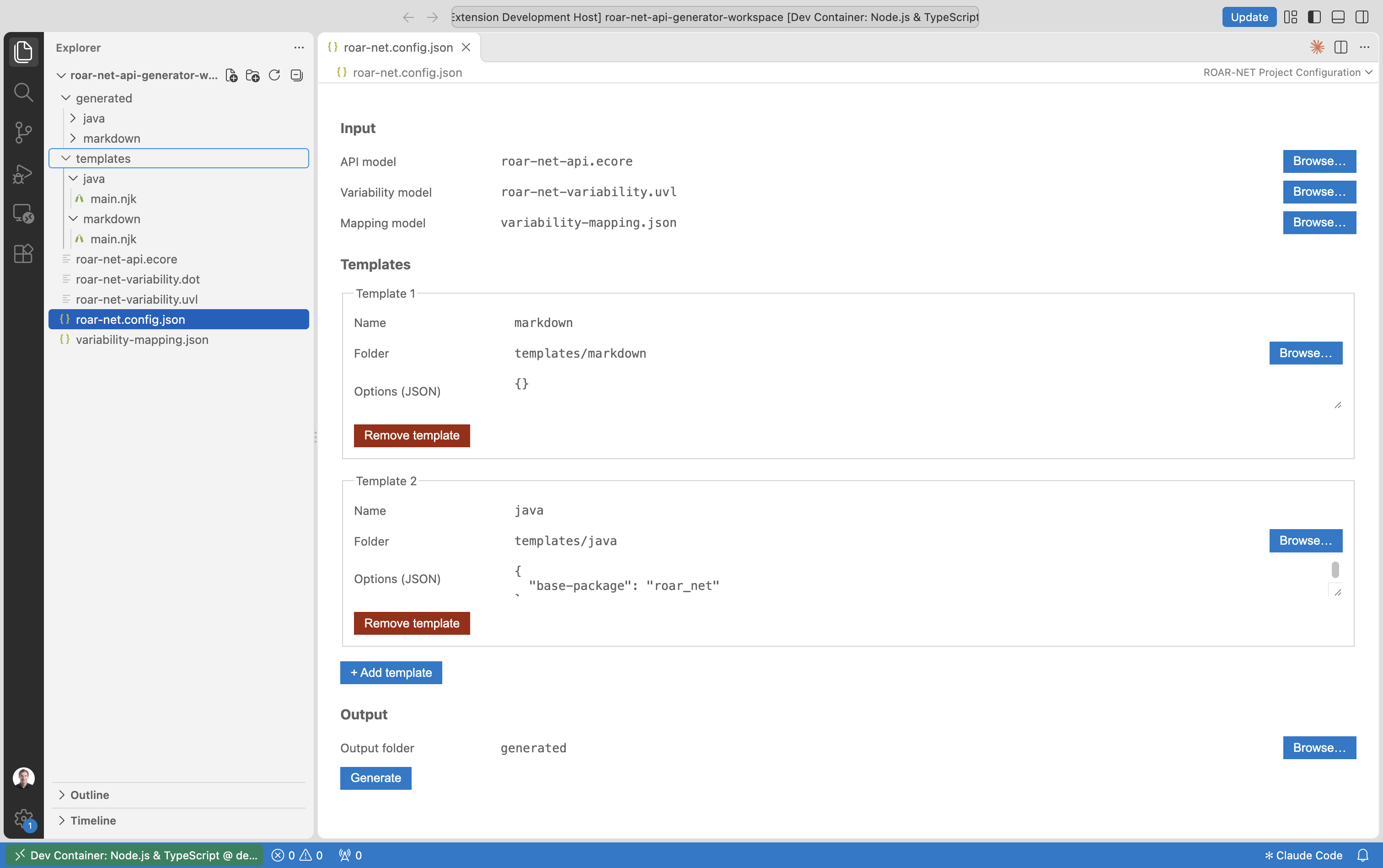
Features
- Project configuration editor for
roar-net.config.json: pick the models, the templates and the output
folder with file dialogs, and start the generation with one click.
- Three models, one resource set: the API model (
.ecore), the variability model (.uvl) and the mapping
(TypeMF JSON) are loaded together; cross-model references are resolved before rendering, and unresolved
references abort the generation with a list of what is missing.
- Several templates per project: e.g. Markdown documentation and a Java API, each with its own options and
output subfolder.
- One template, many files: the
{% file %} tag writes its content to a file, so a template can emit one
file per class, operation or feature.
- Variability-aware helpers: look up the features of an API element and the API elements of a feature.
- JSON schema validation for
roar-net.config.json in the regular text editor.
Getting started
The quickest start is the example project in the
playground
folder of the repository. It contains the ROAR-NET API model, its feature model, the mapping, and templates
for Markdown documentation and a Java API.
- Open a folder that contains a
roar-net.config.json (or create one, see below).
- Open
roar-net.config.json; it opens in the ROAR-NET Project Configuration editor.
(Use Reopen Editor With… → Text Editor to edit the JSON directly.)
- Select the models, add your templates and choose the output folder.
- Click Generate. Progress is logged to the ROAR-NET Generator output channel; errors are shown as a
notification.
Project configuration
All paths are relative to the folder containing roar-net.config.json.
{
  "api-model": "roar-net-api.ecore",
  "variability-model": "roar-net-variability.uvl",
  "mapping-model": "variability-mapping.json",
  "templates": [
    { "template": "markdown", "folder": "templates/markdown", "options": {} },
    {
      "template": "java",
      "folder": "templates/java",
      "options": { "base-package": "roar_net" }
    }
  ],
  "output-folder": "generated"
}
| Field |
Meaning |
api-model |
Ecore model (XMI) of the API: packages, classes, operations and their documentation. |
variability-model |
Feature model in UVL. |
mapping-model |
Mapping of API elements to features (TypeMF JSON, see below). |
templates |
Templates to render. template names the output subfolder, folder contains main.njk. |
options |
Free-form JSON object passed to the template as options. |
output-folder |
Where the output goes; each template writes into <output-folder>/<template>. |
Writing templates
Each template folder contains a main.njk, which may include or import further Nunjucks files from the same
folder. Only content inside {% file %} blocks is written; everything else is discarded.
{%- for c in api.getEClassifiers() -%}{%- if isEClass(c) -%}
{%- file "types/" + c.getName() + ".md" -%}
# {{ c.getName() }}

{{ documentation(c) }}

{% for op in c.getEOperations() -%}
- `{{ op.getName() }}` – features: {% for f in featuresOf(op) %}{{ f.getName() }}{{ ", " if not loop.last }}{% endfor %}
{% endfor %}
{%- endfile -%}
{%- endif -%}{%- endfor -%}
Variables
| Name |
Content |
api |
Root EPackage of the API model |
variability |
The feature model (getRoot() → root feature with its groups and subfeatures) |
mapping |
The mapping model (getMappings()) |
options |
The template's options from the configuration |
Helpers
| Name |
Returns |
featuresOf(element) |
Features an API element is mapped to |
elementsOf(feature) |
API elements mapped to a feature |
documentation(element) |
The element's GenModel documentation annotation, if any |
isEClass(classifier) |
Whether a classifier is a class (and not a data type or enumeration) |
Model objects expose the usual EMF accessors (getName(), getEOperations(), getEType(), …).
The mapping model
The mapping is a TypeMF JSON file with one entry per (API element, feature) pair. References are relative to
the mapping file; features are addressed by name as <file>.uvl#Feature_<name>:
{
  "$namespaces": {
    "map": "http://roar-net.com/mapping",
    "ecore": "http://www.eclipse.org/emf/2002/Ecore"
  },
  "$roots": [
    {
      "$eClass": { "namespace": "map", "name": "MappingModel" },
      "mappings": [
        {
          "$eClass": { "namespace": "map", "name": "Mapping" },
          "ecore": {
            "$ref": "roar-net-api.ecore#//Problem/emptySolution",
            "$eClass": { "namespace": "ecore", "name": "EOperation" }
          },
          "variability": {
            "$ref": "roar-net-variability.uvl#Feature_constructive"
          }
        }
      ]
    }
  ]
}
Requirements
- VS Code 1.90 or newer.
- The TypeMF Instance Editor
extension; VS Code installs it automatically as a dependency.
Known limitations
- UVL: Boolean features and feature groups are read; attributes, constraints, typed features and imports
are ignored or not supported yet.
- Generation overwrites files but does not delete files that a template no longer produces; clean the output
folder yourself when needed.
About
The generator is developed in the context of ROAR-NET, the COST Action
CA22137 "Randomised Optimisation Algorithms Research Network". It is
supported by COST Action CA22137, funded by COST (European Cooperation in Science and Technology).
Issues and contributions are welcome on GitHub.
License
Apache-2.0

