AI Skill Installer
Discover popular GitHub AI skills and install them into the right skill folders for the main AI coding CLIs and IDEs.
Karpathy Guidelines remains the built-in default skill and fallback when GitHub is slow or unreachable.
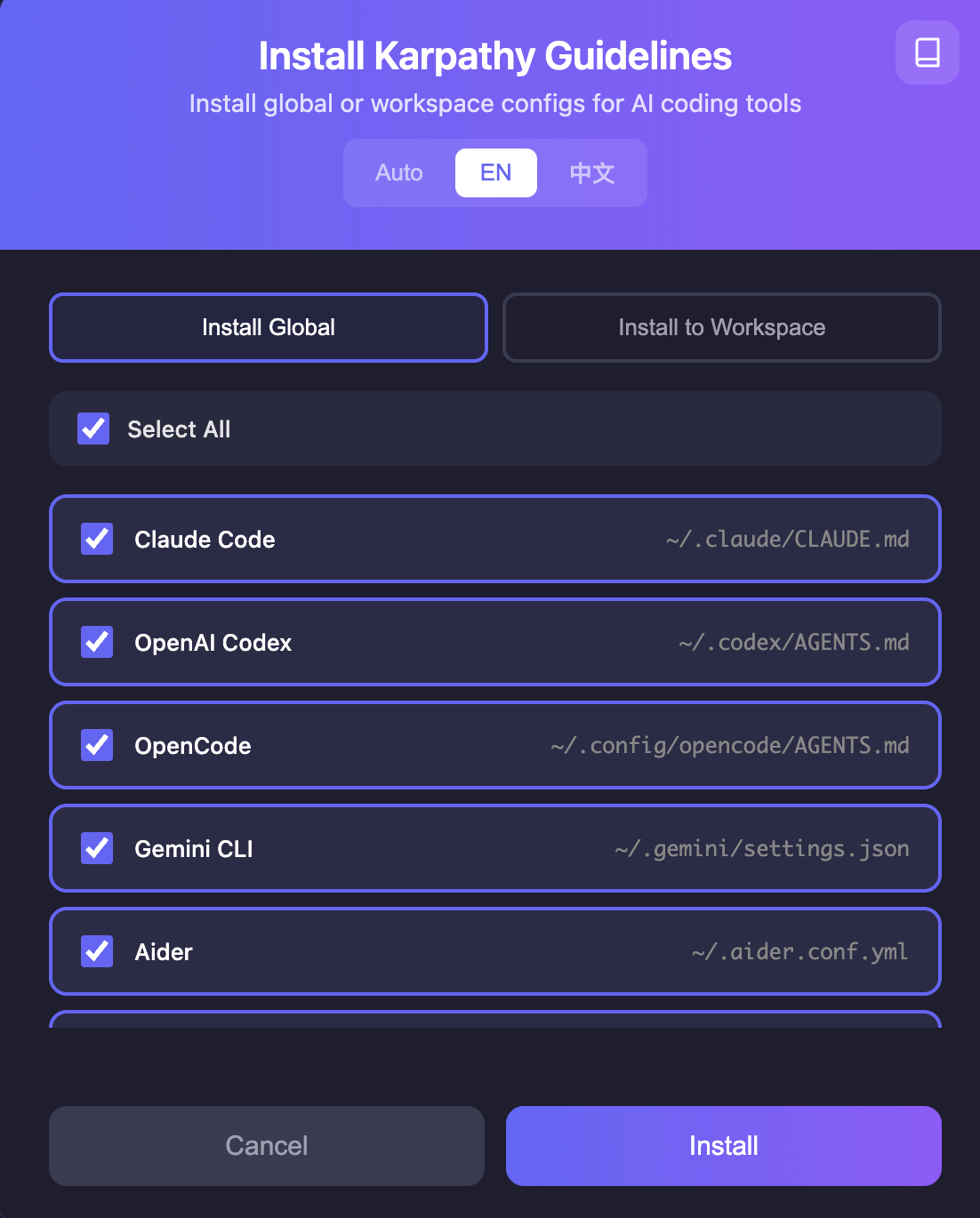
What It Does
- Fetches popular GitHub AI skill repositories updated in the last 30 days.
- Keeps Karpathy Guidelines as the first/default install option.
- Falls back to Karpathy Guidelines when GitHub cannot be reached.
- Shows GitHub skills with aligned source labels, star counts, and a 5-level yellow popularity badge.
- Updates the install dialog title, description, and detail panel when a different skill is selected.
- Installs real skill files instead of writing selected skills into
CLAUDE.md or AGENTS.md.
Install Paths
Workspace installs write:
skills/<skill-slug>/SKILL.md
Global installs write under each supported tool's skill folder, for example:
~/.claude/skills/<skill-slug>/SKILL.md
~/.codex/skills/<skill-slug>/SKILL.md
~/.config/opencode/skills/<skill-slug>/SKILL.md
~/.gemini/skills/<skill-slug>/SKILL.md
The older config-generation commands are still available for users who want workspace adapter files such as AGENTS.md, CLAUDE.md, Cursor rules, or Copilot instructions.
Commands
| Command |
Description |
AI Skills: Install Global Skills |
Install the selected skill into global skill folders |
AI Skills: Install Workspace Skill |
Install the selected skill into the current workspace |
AI Skills: Install Local Skill |
Alias for workspace skill install |
AI Skills: Install All Global Skills |
Open the installer with every global target selected |
AI Skills: Refresh Popular GitHub Skills |
Re-fetch popular GitHub AI skill repositories |
AI Skills: Open Installer |
Open the install and configuration dialog |
AI Skills: Show Selected Skill |
Open the selected skill in a Markdown tab |
AI Skills: Insert Selected Skill |
Insert the selected skill into the active editor |
AI Skills: Create Configs for Selected Tools |
Generate legacy workspace config files for selected tools |
AI Skills: Create Detected Tool Configs |
Detect tools from the workspace and generate compatible config files |
AI Skills: Create All Supported Configs |
Generate every supported target config |
AI Skills: List Supported Tools |
Show supported tools, output paths, and notes |
AI Skills: Check Workspace Configs |
Inspect which workspace configs already exist |
Supported Targets
| Tool |
Type |
Skill install base |
| Claude Code |
CLI |
~/.claude/skills/ |
| OpenAI Codex |
CLI |
~/.codex/skills/ |
| OpenCode |
CLI |
~/.config/opencode/skills/ |
| Gemini CLI |
CLI |
~/.gemini/skills/ |
Workspace skill installs are tool-neutral and always use skills/<skill-slug>/SKILL.md.
Popularity
GitHub skills are sorted by stars from the current discovery result and mapped into five display levels:
★★★★★
★★★★☆
★★★☆☆
★★☆☆☆
★☆☆☆☆
The badge is visual guidance only; the selected skill content still comes from the repository SKILL.md when available.
Configuration
| Setting |
Default |
Description |
karpathyGuidelines.defaultSkill |
karpathy-guidelines |
Default skill selected in the installer |
karpathyGuidelines.defaultTool |
cursor |
Default preselected target in the multi-tool picker |
karpathyGuidelines.overwriteExisting |
true |
Overwrite existing skill/config files during install or generation |
karpathyGuidelines.insertAs |
markdown |
Insert format: markdown, comments, or plaintext |
karpathyGuidelines.autoActivate |
false |
Automatically open quick reference when a Markdown file is opened |
karpathyGuidelines.language |
auto |
Language for generated content and dialogs |
Development
cd vscode-extension
npm install
npm run compile
code --extensionDevelopmentPath=$(pwd)
Package
cd vscode-extension
npm install
npm run package
code --install-extension karpathy-guidelines-1.1.5.vsix
License
MIT

