Skip to content
| Marketplace
Sign in
Visual Studio Code>Themes>MonoluméNew to Visual Studio Code? Get it now.
Monolumé

Monolumé

Benito Anagua

|
3 installs
| (0) | Free
Quiet Light and Monokai reimagined with Material Design 3 - Classic themes, modern architecture
Installation
Launch VS Code Quick Open (Ctrl+P), paste the following command, and press enter.
Copied to clipboard
More Info

Monolumé VSCode Theme

Classic editor themes reimagined with Material Design 3 architecture.

Themes

  • Monolumé Light - Quiet Light + Brackets Light Pro terminals
  • Monolumé Dark - Monokai + Kanagawa accents

Screenshots

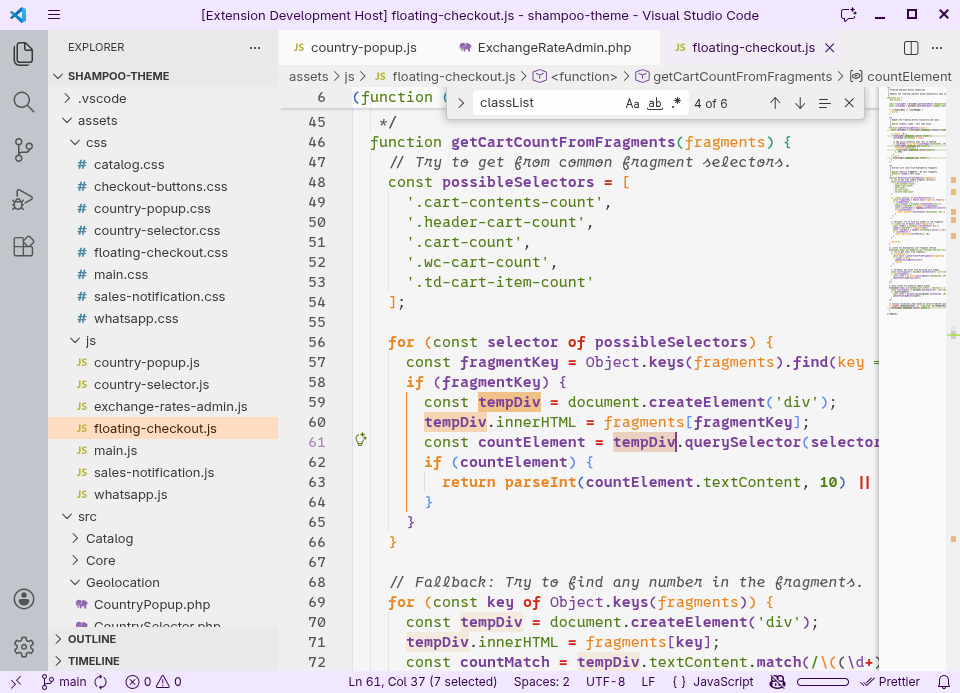
Monolumé Light

Monolumé Light Theme

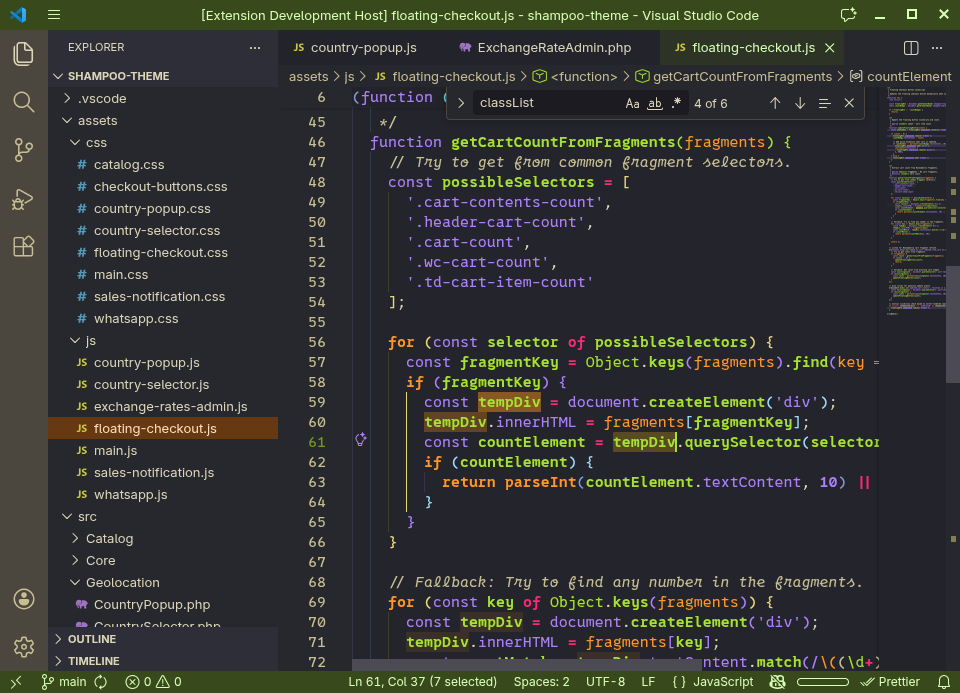
Monolumé Dark

Monolumé Dark Theme

Installation

From Marketplace

  1. Open VSCode Extensions (Ctrl+Shift+X)
  2. Search for "Monolumé"
  3. Click Install

Manual

  1. Download .vsix from Releases
  2. Ctrl+Shift+P → "Install from VSIX"
  3. Select the file

Development

git clone https://github.com/benitoanagua/Monolume.git
cd Monolume
npm install
npm run build

Scripts

  • npm run build - Generate themes
  • npm run dev - Build with message
  • npm run watch - Auto-rebuild on changes
  • npm run package - Create VSIX
  • npm run publish - Publish to marketplace

Theme Details

Monolumé Light

Quiet Light core with Brackets Light Pro terminal palette.

Professional and easy on the eyes. Purple-forward syntax with blue structure. Warm neutral backgrounds optimized for extended reading.

Best for daytime coding and documentation.

Monolumé Dark

Monokai core with Kanagawa color harmony touches.

Vibrant and energetic. Green-forward syntax with iconic warm charcoal background. High contrast without being harsh.

Best for nighttime coding and focus work.

Material Design 3

Uses MD3 token structure:

  • Primary/Secondary/Tertiary with containers
  • Five-level surface elevation
  • Semantic colors (error/warning/success)
  • Complementary terminal palettes

Contributing

  1. Fork the repository
  2. Create feature branch
  3. Edit src/theme/config/color-schemes.js
  4. Run npm run build
  5. Submit Pull Request

Credits

Inspired by:

  • Quiet Light - Professional light theme
  • Brackets Light Pro - Terminal aesthetics
  • Monokai - Iconic dark theme
  • Kanagawa - Japanese color harmony
  • Material Design 3 - Token architecture

License

MIT - see LICENSE

Created by Benito Anagua

  • Contact us
  • Jobs
  • Privacy
  • Manage cookies
  • Terms of use
  • Trademarks
© 2026 Microsoft