ContextGuard
The linter for your AI configuration.
Your agents each rely on their own configuration layer: CLAUDE.md, AGENTS.md, .cursorrules, Copilot instructions, MCP schemas, and more. Yet nothing reviews that layer. When an agent ignores a rule, few people think to inspect the 6,000-token CLAUDE.md where it sits buried beneath a contradiction and a duplicated style guide.
ContextGuard is ESLint for that layer. Deterministic rules catch oversized instruction files, unmeasured MCP overhead, secret-like values in AI-visible files, and token bloat. Every finding points at the file that caused it, and no model is involved. Scans run locally; your code never leaves your machine.
It starts as a linter and keeps going: inspect what your agents actually load, put a dollar figure on it, catch secrets before they reach a model, and export clean, paste-ready bundles for any web AI.
See what loads · Know what it costs · Spot secrets before agents do · Export clean context
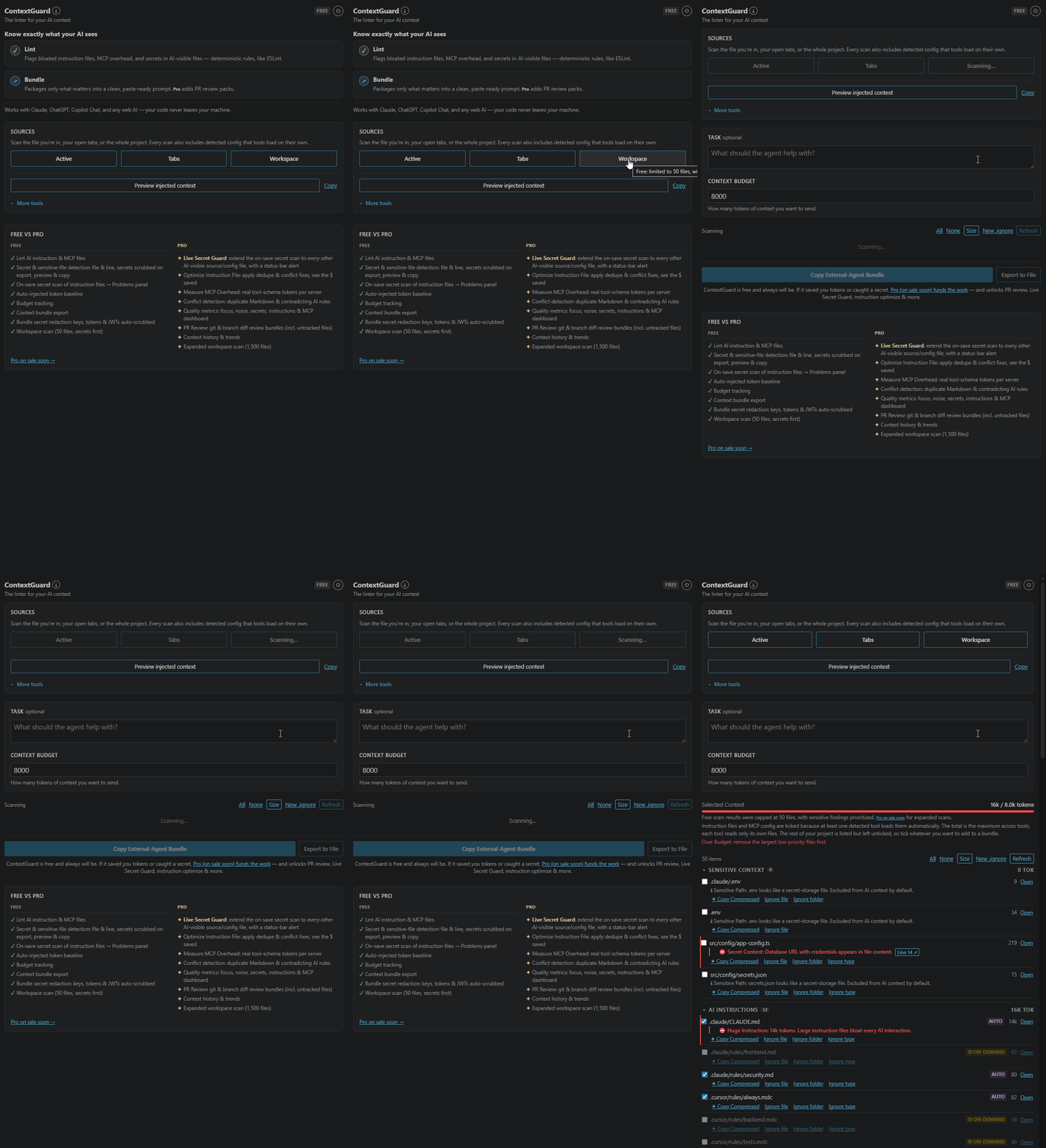
Screenshots use real projects where it matters: the Cline examples come from the public, open-source Cline repo; secret-finding examples use a local test repo. ContextGuard is an independent tool and is not affiliated with, sponsored by, or endorsed by any of the projects or vendors it detects. All product names and trademarks belong to their respective owners.
30 seconds to value: open a project. If it loads any AI config, the status bar shows your combined configuration footprint. Hover it for the monthly cost, or click it to see what's eating your context.
Quick Start
- Install and open a project. The status bar (bottom right) shows your combined configuration footprint; hover it for cost and completeness details.
- Click the ContextGuard icon in the Activity Bar.
- Pick a scope: Active for the file you're in, Tabs for everything open in your editor, or Workspace for the whole project.
- Fix the warnings, or select files and export a clean bundle.
What drifts, and why it matters
Every AI tool brings its own project config, and that config rots:
- Instruction files grow until they consume more context whenever they load
CLAUDE.md and .cursorrules start contradicting each other once you use more than one tool- MCP servers quietly add schema overhead most teams never measure
- Secrets land in files agents happily read, even gitignored ones
- Handing context to a web AI means hand-picking files and stripping noise, again and again
ContextGuard audits these surfaces locally with deterministic rules. No AI is required to lint your AI configuration.
Lint: ESLint for AI context
Scan your active file, open tabs, or workspace (Pro adds PR Review and Branch Diff). Every warning is a rule, not a guess:
| Rule |
What it catches |
| Large / Huge Instruction |
AI instruction files over 1.5k–6k tokens that inflate requests whenever they load |
| Duplicate Context / Rule (Pro) |
Repeated Markdown context or the same rule across CLAUDE.md, .cursorrules, AGENTS.md, … |
| Conflicting Rule (Pro) |
"Use tabs" in one file, "use spaces" in another, with Jump To navigation |
| Sensitive |
.env, *.pem, *.key, keystores, Terraform state, and secret-like content (API keys, JWTs, DB URLs) in source files |
| MCP Unknown |
MCP configs whose runtime schema overhead isn't counted anywhere |
| Large / Huge File |
Files over 3k / 8k tokens that would dominate a request |
| Generated / Noisy |
dist/, lockfiles, logs, snapshots: high-token, low-signal context |
| No Test Changes (Pro review scans) |
Git diff touches source files but no tests |
Instruction-file warnings also show up in the Problems panel on save, no manual scan needed.
Know what it costs
The status bar shows your combined configuration footprint: the sum of always-on instruction content ContextGuard found across detected conventions. Hover it for the modeled monthly cost. This is deliberately not yet a per-agent baseline; each agent loads only its own instructions. MCP config files are listed for audit, but their file bytes are not model context and are excluded. A 4k-token CLAUDE.md still isn't free.
The defaults are 50 requests/day and $3 per million input tokens. Set costModel.requestsPerDay and costModel.usdPerMillionInputTokens to your actual usage and price to make the estimate useful. Cost is only part of the story: always-on instructions also leave less context-window room for the task. Token and dollar figures are estimates, not billing records.
The footprint includes always-on project instructions, explicit @imports, and any parent or global instruction files you have permitted ContextGuard to read.
Secrets do not disappear from the accounting. An instruction file containing a detected secret stays counted and is flagged separately; Preview, Copy, and bundle rendering redact the value. Conditional rules are listed outside the footprint until they apply.
Instruction files also get an inline CodeLens, so the cost is visible at the top of the file and at the section that is carrying the weight.
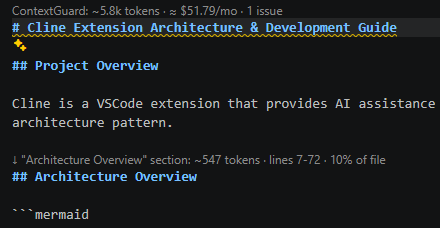
On-demand rules are counted only when they fire. Path/glob-scoped rules (Cursor globs, Claude paths:, Windsurf trigger: glob) and subdirectory CLAUDE.md/AGENTS.md files aren't in the every-request baseline. But scan a file one of them targets and it's counted and badged "✓ Applies here," because the agent really would inject it there. Rules that load on the agent's judgment or an @-mention can't be predicted, so they're listed but left uncounted.
Incomplete scans say so. If a plan, discovery, sensitive-file, deep-security, or per-convention safety cap is reached, the panel keeps a persistent warning rather than quietly showing you a smaller number as if it were the whole picture. Every file is read under one shared 512 KiB UTF-8 limit.
Review what may be injected
Preview Injected Context opens one document with the combined instruction footprint (@imports expanded), conditional rules, and a separate MCP configuration section. MCP config bytes are explicitly not counted as model context. Copy Injected Context copies only the always-on instruction content. Both redact detected secrets to [REDACTED] first; token totals still reflect the real, unredacted instruction size.
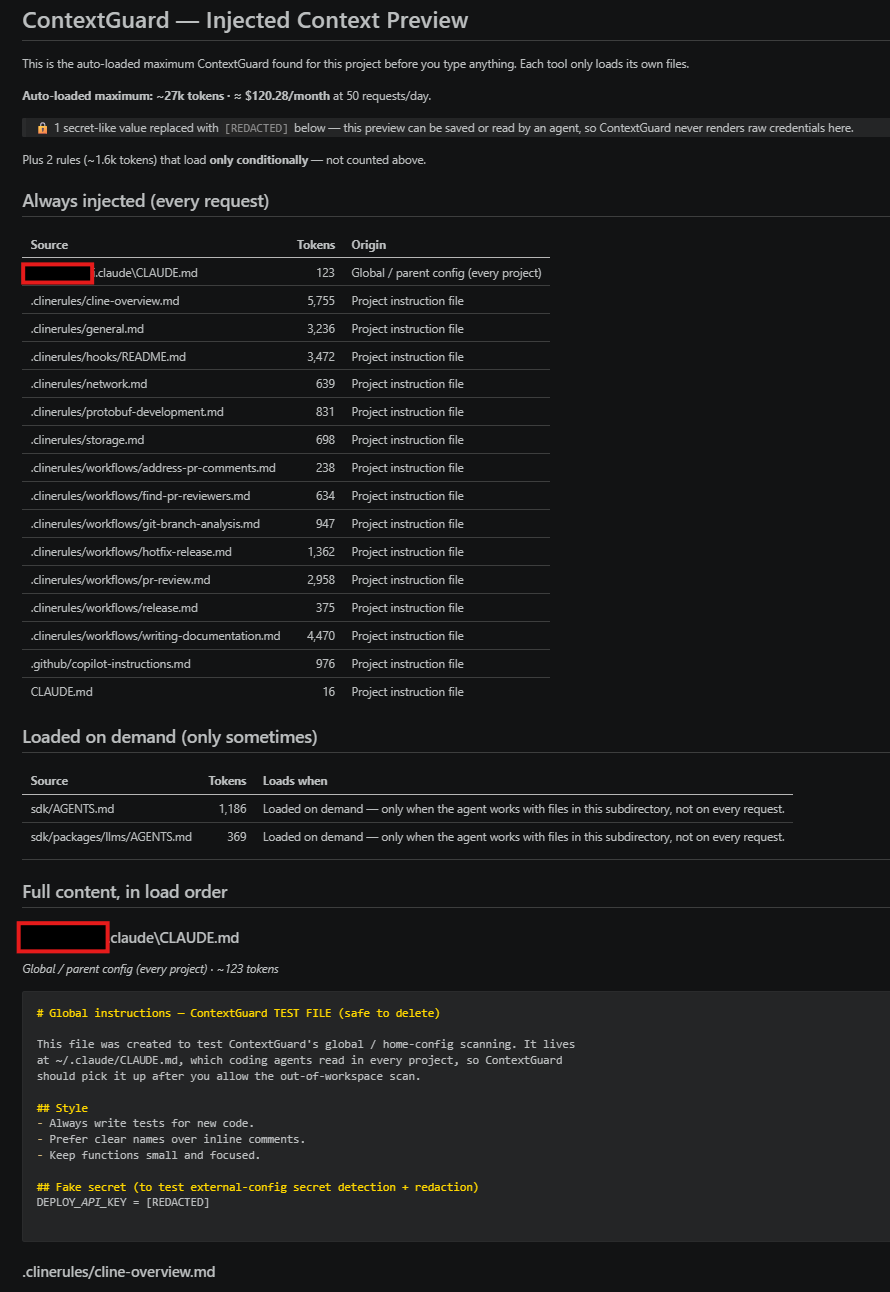
Reading config outside your project (global ~/, and parent directories on Pro) happens only after a one-time, machine-wide consent prompt, shown the first time a scan reaches outside the workspace. Turn it off anytime under Settings → Scan global & home config.
Guard: catch secrets before the agent does
Secret-like values in your instruction files (CLAUDE.md, .cursorrules, AGENTS.md, …) are flagged in the Problems panel on every save, free. These files may be loaded automatically, so this check is part of the core safety layer rather than a paid extra.
Live Secret Guard (Pro) extends that same on-save check to other supported AI-visible source and configuration files (.ts, .py, .json, …). When detection finds a key, token, JWT, or database URL, you get a status-bar alert and a Problems entry with the exact line. Detection covers OpenAI/Anthropic, GitHub, GitLab, Slack, Stripe, AWS, Google, and npm key formats, plus JWTs, private-key blocks, and credentialed DB URLs.
Workspace Security Audit sweeps the whole project on demand and shows the file and line of each detected finding, free. Pro adds the continuous on-save guard for other AI-visible source and configuration files.
Adopting on a legacy repo? (free) Bulk-accept the pile of pre-existing findings instead of drowning in them: the scan panel's Accept secrets button writes a committed .secrets.baseline of the current findings. Future scans suppress exactly those by file + value-hash, while any new secret still surfaces, and a finding stays suppressed even if its line moves. (Only a hash of each value is stored, never the secret itself.) For one-off lines, an inline contextguard:allow comment still works.
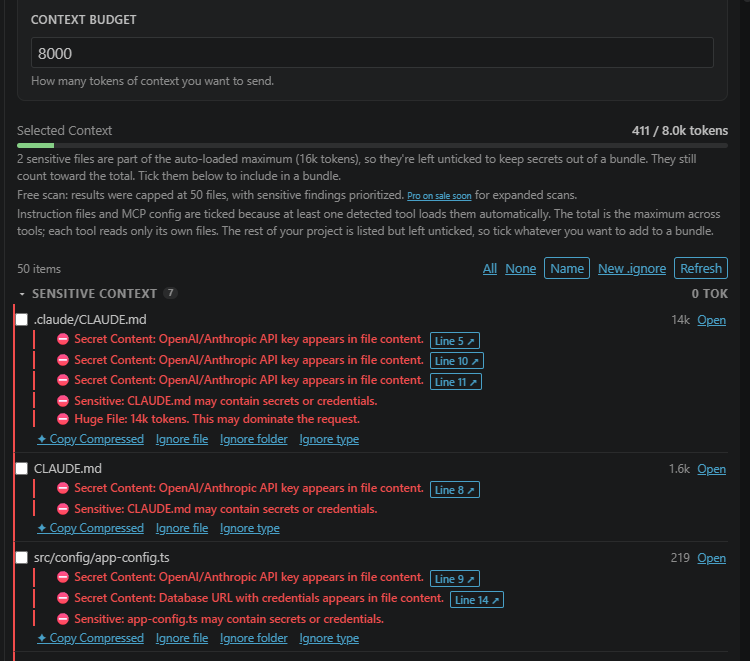
Secret redaction (free) replaces detected secret-like values with [REDACTED] in every exported bundle and in the Preview/Copy views (bundles say so in the preamble). Env-var references and placeholders are left alone. Detection is best-effort, so review a bundle before sharing it. (PR review packs are Pro, so their redaction is Pro.)
Known limit: a quoted multi-word passphrase (password = "correct horse battery staple") is not flagged or redacted. Values with spaces read as prose, and treating them as secrets would flag half of every config's descriptions. Keep passphrases out of AI-visible files.
Bundle: clean context for any AI
Pick what matters, cut what doesn't, and export a paste-ready Markdown bundle for Claude, ChatGPT, Copilot Chat, or any web AI:
- Token counts per file, with a budget bar
- Per-file allocation breakdown (Pro)
- Remove Noise deselects lockfiles, generated output, logs, and snapshots in one click
- A compact file map at the top so the AI sees your project structure
- Live selection tracking: highlight code, bundle just the selection
- Export to clipboard or to a Markdown file for CLI agents that read context from disk
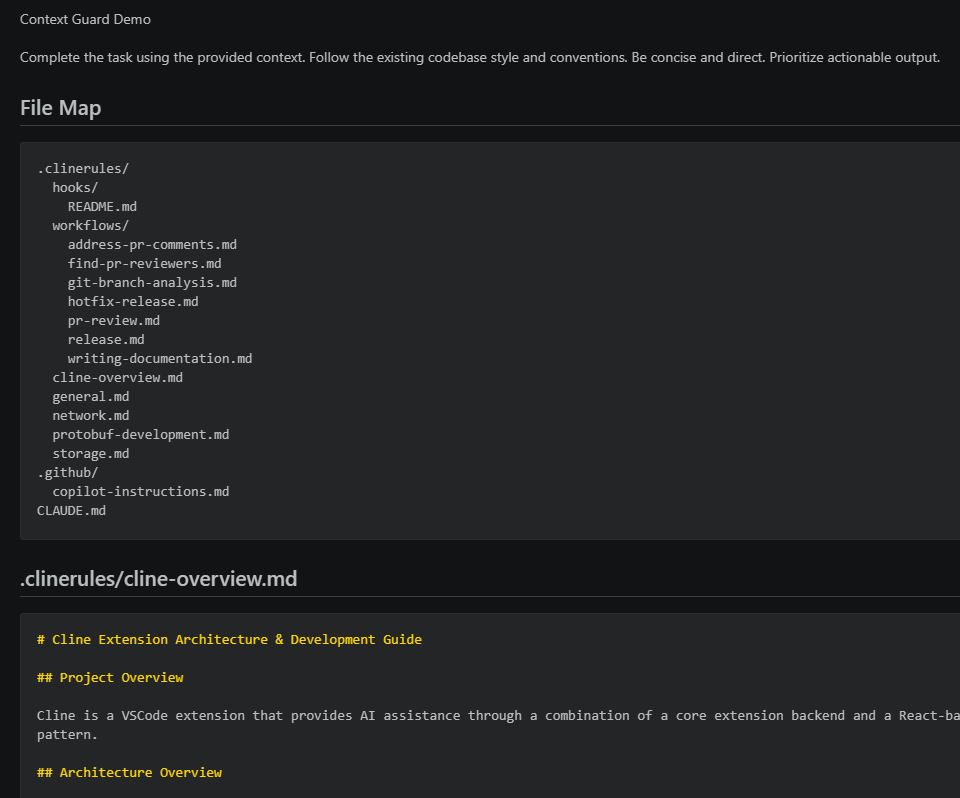
Bundle budgets count the rendered Markdown, not just source-file estimates, so task text, file maps, headings, fences, warnings, redaction notes, and part labels all contribute before a bundle is split.
Free vs Pro
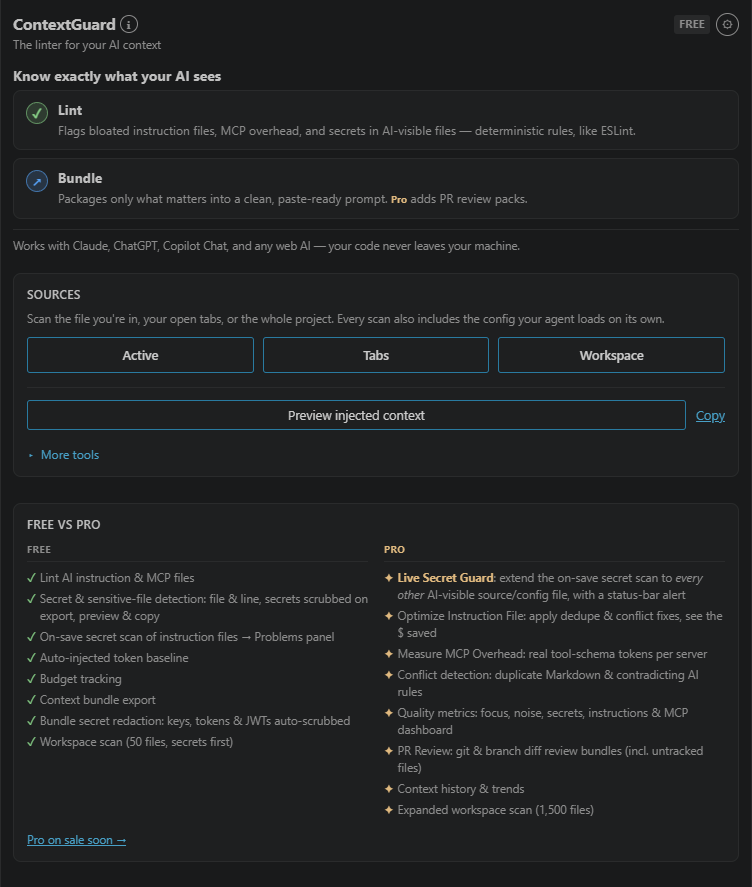
| Feature |
Free |
Pro |
| Core lint rules (size, sensitive, generated, noisy, MCP) |
✓ |
✓ |
| AI instruction & MCP config detection |
✓ |
✓ |
| Combined configuration footprint + cost in status-bar tooltip |
✓ |
✓ |
| Budget tracking, Remove Noise, bundle export, file map |
✓ |
✓ |
.contextguardignore + .gitignore-aware scans |
✓ |
✓ |
| Workspace scan |
50 files, with secrets prioritized |
1,500 files |
| Secret redaction: bundles redact detected keys, tokens & JWTs |
✓ |
✓ |
| On-save secret scan of instruction files (CLAUDE.md, .cursorrules, AGENTS.md, …) → Problems panel |
✓ |
✓ |
| Workspace Security Audit: file & line of each detected finding |
✓ |
✓ |
| Live Secret Guard: on-save secret scan of all other AI-visible files (source, config) + status-bar alert |
— |
✓ |
| Secret redaction in PR review packs |
— |
✓ |
| Optimize Instruction File: remove same-file duplicate rules with diff preview |
— |
✓ |
| Measure MCP Overhead: estimated tool-schema tokens per server |
— |
✓ |
| Duplicate Context & Instruction Conflict Detection |
— |
✓ |
| PR Review: git diff (incl. untracked files) → paste-ready review prompt |
— |
✓ |
| Branch Diff Review: review committed changes without touching git state |
— |
✓ |
| Context History & Trends: 30-day growth tracking |
— |
✓ |
| Quality metrics: focus, noise, secrets, instructions, MCP |
— |
✓ |
| Copy Compressed: mechanical excerpts of logs, JSON, markdown to your clipboard |
— |
✓ |
When a scan hits the file cap, sensitive-looking files (.env, keys, keystores, Terraform state) and files with detected secret content are prioritized first.
Early-access pricing is $5/month or $39/year. Get ContextGuard Pro (details on the website). After purchase, activate with ContextGuard: Activate Pro License from the Command Palette.
What Pro adds
Fix: don't just flag
Optimize Instruction File turns mechanically safe warnings into edits. Pick a file and ContextGuard proposes only duplicate rules within that same file. Cross-file duplicates and contradictions remain analysis-only because precedence differs by agent and convention. You approve every removal in a native diff preview, and the summary shows the payoff.
Measure: real MCP overhead
MCP configs only tell you a server exists; they cannot show the runtime size of its tool schemas. Measure MCP Overhead launches configured stdio servers after your confirmation, performs the handshake, calls tools/list, and estimates schema tokens per server and their monthly cost.
Scope: ContextGuard measures repo-local MCP configs and the stdio servers you approve. Global, remote, client-managed, or built-in agent context may not be visible from the workspace.
PR Review
PR Review scans your uncommitted changes, including untracked files that git diff silently misses. Each file shows diff and full-file token counts, toggleable per file. The export is a paste-ready review prompt in unified-diff format, with related test files included so the reviewer sees current coverage. Branch Diff Review packages all commits ahead of your base branch without touching git state, which is ideal for reviewing someone else's branch. Oversized packs split into labeled "Part X of N" pastes.
22 tools, one registry. ContextGuard detects Claude Code, AGENTS.md, Cursor, Copilot, Cline, Windsurf, Roo Code, Gemini, Codex CLI, Aider, Zed, Continue, JetBrains Junie, Amazon Q, Kilo Code, Goose, OpenHands, Amp, Augment Code, Firebase Studio, Trae, and Qwen Code, each mapped to its real paths (CLAUDE.md, .cursorrules, .github/copilot-instructions.md, .mcp.json, …). If a repo has Claude, Cursor, and Copilot config, ContextGuard shows all three so teams can see the combined footprint. Each tool still loads only its own files. Missing one is a bug, so file it.
.contextguardignore
Create a .contextguardignore at the project root to exclude files from scans:
# Logs and generated files
*.log
logs/
*.min.js
archive/
Workspace scans also respect your .gitignore, except for sensitive-looking files. A gitignored .env may still be readable by a local coding agent, so it's still flagged.
Settings
| Setting |
Default |
What it does |
contextguard.costModel.requestsPerDay |
50 |
Assumed AI requests/day behind every "≈ $X/month" estimate |
contextguard.costModel.usdPerMillionInputTokens |
3 |
Input-token price (USD/M) behind the cost estimates |
contextguard.statusBar.enabled |
true |
Show the token baseline in the status bar |
contextguard.scanGlobalConfig.enabled |
true |
Count your home/global AI instructions (~/.claude/CLAUDE.md, ~/AGENTS.md, ~/.codex/AGENTS.md, ~/.gemini/GEMINI.md, Copilot user instructions in VS Code and COPILOT_HOME, …) and surface user-level MCP configs (asks permission once before reading outside the workspace) |
contextguard.alwaysInjectedBudgetTokens |
0 |
Soft combined-footprint budget; over it, the status bar and panel nudge you. 0 disables it. Never blocks anything |
contextguard.codeLens.enabled |
true |
Show the inline token/cost CodeLens at the top of instruction files |
contextguard.liveSecretGuard.enabled |
true |
Run the on-save secret check (Pro) |
contextguard.secretScan.highEntropy |
false |
Warn on random-looking values that do not match a known token pattern or secret key name. More recall, more false positives; silence a line with a contextguard:allow comment |
contextguard.scanParentDirectories.enabled |
false |
On a Workspace scan, also check parent directories up to the filesystem root for instruction/MCP files (Pro; asks permission first) |
How it works
Deterministic rules over a data-driven registry of 22 agent conventions, with a strict split between the pure detection core and the VS Code layer. Every finding comes from a named rule and points at the file that triggered it. Rules about content, like secret detection, also give you the line. Rules about a whole file, like Large Instruction, have no line to give. The same scan gives the same answer twice.
Privacy
Local-first. Scans, lints, and bundles run on your machine. No telemetry, no analytics, and your code is never uploaded. On the free tier, ContextGuard makes no network calls at all.
Reading AI config outside your project (global ~/, and parent directories on Pro) happens only after a one-time, machine-wide consent prompt; until you allow it, ContextGuard stays inside the workspace.
Pro licensing is the only thing that touches the network. When you activate a key, ContextGuard sends two things to the ContextGuard license server, which forwards them to Lemon Squeezy: your key, and an instance label made of VS Code plus the first 8 characters of VS Code's machineId. That label is what enforces the per-key device limit, and it is the only value ever derived from your machine ID. After activation, ContextGuard re-validates on startup, at most once every 7 days, sending the key and a server-issued instance ID instead. That instance ID identifies your installation to the licensing provider for as long as the license is active. Those are the extension's only outbound requests.
What is kept, and for how long. The ContextGuard license server is a stateless proxy. It has no application database, and it does not intentionally write license keys, instance labels, or request bodies to logs. It runs on Cloudflare Workers. If Cloudflare Workers Logs are enabled, Cloudflare retains invocation logs containing request, response, and related metadata for 3 days on the free Workers plan or 7 days on paid plans. Lemon Squeezy stores the license key and activated instance record as needed to provide license validation and enforce the device limit, and may retain related information as described in its privacy policy.
Measure MCP Overhead launches workspace-configured MCP commands after your confirmation; those servers may make their own network calls.
Support
ContextGuard's free tier stands on its own: token baseline, lint rules, secret detection with exact locations, bundle redaction, and clean export, all local. If it's saved you tokens or caught a secret, Pro funds the work (and unlocks PR review, Live Secret Guard, Optimize, and more). Early-access pricing is $5/month or $39/year.
License
Proprietary. See LICENSE.

