Skip to content
| Marketplace
Sign in
Visual Studio Code>Snippets>My Skills (.agents) (.claude)New to Visual Studio Code? Get it now.
My Skills (.agents) (.claude)

My Skills (.agents) (.claude)

Gohit X

|
2 installs
| (1) | Free
| Sponsor
Available now: VSCode • Antigravity • Cursor • Windsurf • Trae.ai • Kiro & (Firebase Studio)
Installation
Launch VS Code Quick Open (Ctrl+P), paste the following command, and press enter.
Copied to clipboard
More Info

My Skills

Version  Downloads  Rating  Github Star ⭐️

Español 🇪🇸 | 中文 🇨🇳 | Deutsch 🇩🇪 | Français 🇫🇷 | 日本語 🇯🇵 | 한국어 🇰🇷 | Português 🇧🇷 | Русский 🇷🇺 | Tiếng Việt 🇻🇳 | हिन्दी 🇮🇳 | العربية 🇸🇦...


Create, install, and manage AI instructions for your projects — no code needed.
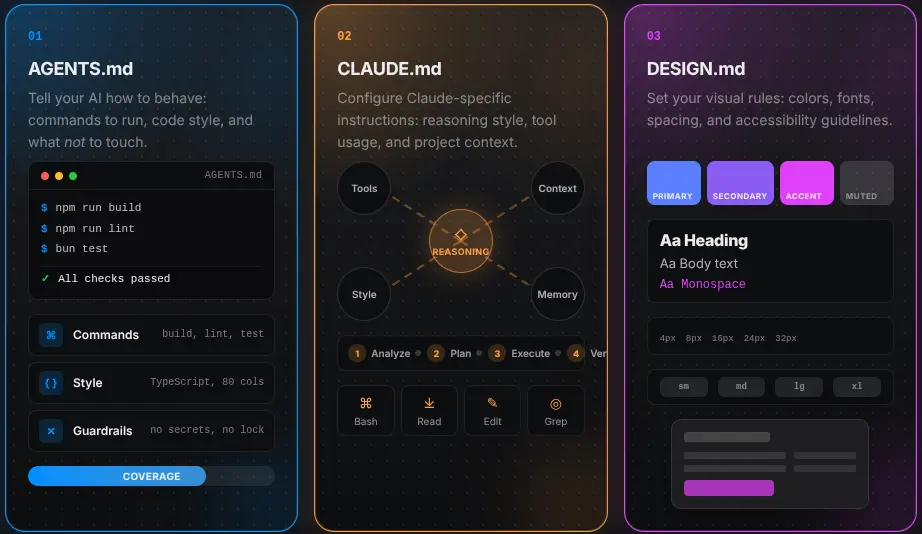
Works with VSCode, Cursor, Antigravity, Kiro, Trae, and more.


Image

CREATE

Pick a name, choose a category, describe what you want — the wizard builds a SKILL.md for you. Also generates AGENTS.md, CLAUDE.md, or DESIGN.md in one click.

INSTALL

Browse a marketplace of community skills. Search, filter by category, and install to .agents/skills/ or .claude/skills/ instantly.

LOCAL

See everything installed in your workspace. Enable, disable, edit, delete, or save skills to reuse across projects.


Installation

Method 1 — Quick Open

  • Linux Ctrl+P
  • macOS ⌘P
  • Windows Ctrl+P

Paste the following command and press Enter:

ext install bastndev.my-skills

Method 2 — Extensions View

  1. Open Extensions (Ctrl+Shift+X / ⌘+Shift+X)
  2. Search "My Skills"
  3. Click Install

About Me

gohitx
Gohit X
Creator & Maintainer
  • 🐦 X : For questions and discussions.
  • 🌱 IG : new – Project previews & life updates.
  • 🔴 YouTube : Code, Software and development insights.


Sponsors Image

Sponsors my skills

Complementary Extensions 🧩

Extension Name Description
Lynx Theme Pro Lynx Theme Pro A professional extension with six available themes: Dark, Light, Night, Ghibli, Coffee, and Kiro—with integrated icons. Each theme is optimized to offer a more pleasant visual experience.
Lynx Keymap Pro Lynx Keymap Pro Standardizes keyboard shortcuts across all code editors, giving you instant access to any functionality with a single key combination — boosting your workflow and dev experience. If you have a normal keyboard, better download this one.
ATM ATM An all-in-one toolkit 👻 that supercharges your workflow with essential features like Error Lens, Git Blame, Env Protection, and code screenshots across major editors.

Enjoy 🎉 (My Skills) is now installed!
Found a bug or have feedback? Open an issue

Made in 🇵🇪 by Gohit X · Licensed under MIT

  • Contact us
  • Jobs
  • Privacy
  • Manage cookies
  • Terms of use
  • Trademarks
© 2026 Microsoft