Mesh Infra
Design, visualize, and document your infrastructure-as-code topology directly inside VS Code.

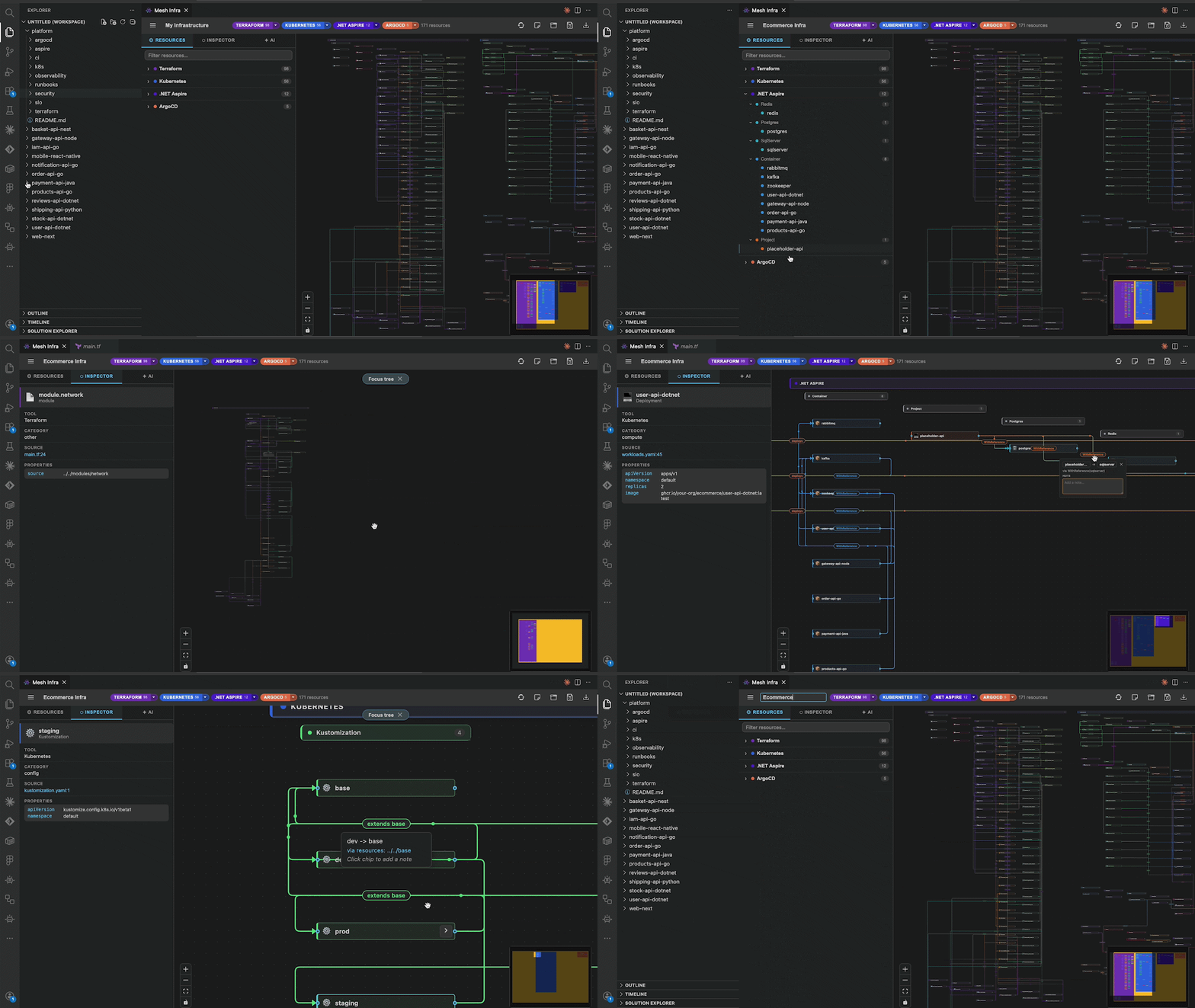
Mesh Infra scans your workspace, discovers infrastructure resources and dependencies across multiple IaC ecosystems, and renders an interactive graph you can inspect, filter, export, and save as a portable .mix file. Everything runs locally in VS Code, right next to the infrastructure code your team already maintains. From the team behind MeshGraph — featured on the VS Code Marketplace homepage. Listed on the CNCF Landscape in the Application Definition & Image Build category.
Use it to see what a Terraform change touches before you apply it, trace a GitOps deployment from an ArgoCD Application down to the Kubernetes workloads it manages, or document your cloud topology for reviews and onboarding, all without leaving your editor.
Key Features
- Automatic workspace scanning for Terraform, Kubernetes, Docker Compose, .NET Aspire, and ArgoCD
- Cross-tool dependency graphs that link resources across ecosystems (for example ArgoCD Application -> Kubernetes Kustomization)
- Interactive canvas with pan, zoom, minimap, and relationship-focused node exploration
- Resource and tool filters plus live search across names, types, and paths
- Rich Inspector for both resource nodes and tool/group nodes, with jump-to-source
- AI documentation generation via any language model available in VS Code
- Portable diagrams — save and reopen your topology as a
.mix file
- Export support for PNG, JPEG, SVG, and PDF
- Built-in visual themes and optional edge animations
Supported Scanners
Mesh Infra currently ships with production parsers for:





- Terraform (
.tf)
- Kubernetes (
.yaml, .yml)
- Docker Compose (
compose*.yaml, .yml patterns)
- .NET Aspire (
.cs AppHost patterns)
- ArgoCD (
Application, ApplicationSet, AppProject)
What You Can Do
Scan and Explore
- Open your workspace and let Mesh Infra scan automatically — no configuration needed
- See resources grouped by tool and type
- Inspect dependencies such as
depends_on, references, and network/data/deployment flow
Inspect with Context
- Click any resource node to view:
- type, category, provider
- parsed properties/tags
- source file and line jump
- Click tool/group nodes to view aggregated details (counts, versions, and structure metadata)
Focus, Filter, and Search
- Filter by tool and resource type
- Search resources by name, type, or path
- Double-click a node to focus on its connected topology and quickly understand the impact radius of a change
Document and Export
- Generate AI-based architecture documentation from scanned topology
- Save and reopen diagrams as
.mix
- Export diagram visuals as PNG, JPEG, SVG, or PDF
Getting Started
- Install Mesh Infra from VS Code Marketplace or a local VSIX.
- Open a workspace that contains infrastructure files.
- Run
Mesh Infra: Open Designer from Command Palette.
- Or use shortcut:
- macOS:
Cmd+Shift+I
- Windows/Linux:
Ctrl+Shift+I
Commands
| Command |
Description |
Mesh Infra: Open Designer |
Open the designer and trigger scan view |
Mesh Infra: Load MI |
Load a saved .mix file |
Mesh Infra: Save MI |
Save current diagram as .mix |
Configuration
| Setting |
Default |
Description |
meshinfra.language |
auto |
UI language (auto, en, de, tr, es) |
Requirements
- VS Code
1.90.0 or newer
- For AI documentation features: an installed VS Code AI model provider (for example GitHub Copilot)
Privacy
Mesh Infra works on your local workspace content. Diagram files are saved only where you choose. Review your AI provider settings for model-side data handling when using AI documentation.
License
Mesh Infra Free Use License v1.0 (see LICENSE)
Made by barisozgenn
| |

