Margin Guard
Scan your project. Forecast costs. Protect profit.
Margin Guard is a VS Code-compatible extension for SaaS margin analysis, pricing detection, profitability forecasting, gross margin visibility, and hosting cost comparison directly from your codebase. It helps developers, founders, indie hackers, and technical product teams answer one hard business question before growth gets expensive:
If this project gets users, will it make money or burn money?
Margin Guard scans your codebase, detects pricing and revenue signals, identifies provider and infrastructure cost risks, and forecasts realistic revenue, cost, profit, and margin scenarios as your user base grows.
It is built to stay practical, deterministic, and local-first in v1. Your code is scanned locally. No source code needs to be sent to OpenAI, Ollama, or any other AI provider for the core workflow.
Who this is for
- SaaS founders who want to see whether their architecture will stay profitable as usage grows
- Indie hackers comparing API, hosting, storage, and payment cost drag before launch
- Product and engineering teams reviewing pricing assumptions and unit economics from the codebase
- AI app builders who need better visibility into token cost, media generation cost, and infrastructure margin pressure
Core use cases
- Profitability: see whether your project can stay profitable as users grow
- Pricing detection: discover plan, billing, checkout, and revenue signals from your codebase
- Profitability forecast: simulate user growth and see revenue, cost, profit, and margin at scale
- Gross margin visibility: understand where API, hosting, payment, storage, and database costs drag margin down
- Hosting cost comparison: compare managed hosting and infrastructure choices against cheaper alternatives
What you get after one scan
- detected pricing and revenue signals
- detected API, database, storage, hosting, email, SMS, and payment providers
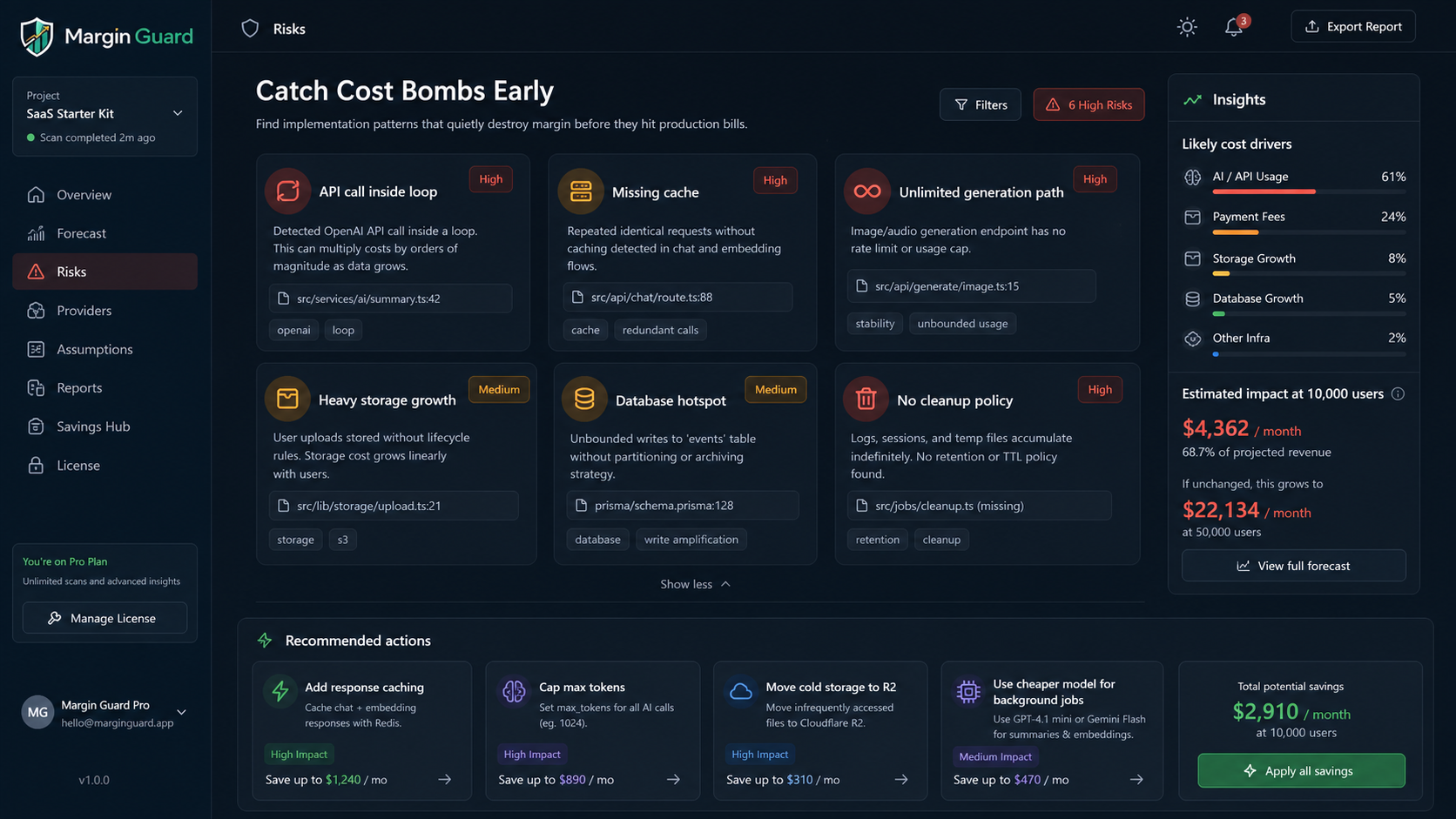
- high-risk implementation patterns that can quietly destroy margin
- user growth scenarios for 100, 1,000, 10,000, and 50,000 users
- revenue, cost, profit, and gross margin forecasts
- current stack vs cheaper provider alternatives
- exportable Markdown and JSON reports for planning, reviews, or investor updates
Overview
Margin Guard is built for the moment when a promising software product starts asking a harder question than "does it work?"
It answers:
If this project gets users, will it make money or burn money?
That means Margin Guard is not just another code scanner. It is a margin visibility tool for developers and technical founders who want to see pricing assumptions, provider cost risk, storage and database growth pressure, payment fee drag, hosting cost pressure, and profitability scenarios before those problems show up in production finance.
Margin Guard is especially useful if you are searching for:
- SaaS margin analysis
- pricing detection for SaaS projects
- profitability forecast for a software project
- profitability analysis for SaaS
- gross margin visibility for software products
- API cost estimation from source code
- hosting cost comparison for growing apps
- database and storage cost forecasting
- payment fee comparison for SaaS pricing
- unit economics estimation for developer products
- gross margin calculator for software products
- local-first pricing and cost scanner
- codebase-based revenue and cost forecasting
- AI cost estimation for SaaS
- software cost forecast tool
- founder profitability tool
Supported editors
Margin Guard is built first for the VS Code extension ecosystem:
- VS Code
- Cursor
- Windsurf
- VSCodium
- Theia and other Open VSX-based desktop IDEs
For users outside the VS Code extension model, Margin Guard also ships with a separate CLI and standalone desktop app in the main project.
Works With
- VS Code
- Cursor
- Windsurf
- VSCodium
- Theia
- Open VSX-based desktop IDEs
- JetBrains workflows through the CLI
- Visual Studio terminal workflows
- Sublime terminal workflows
- Zed terminal workflows
- Neovim terminal workflows
- Emacs terminal workflows
- direct terminal usage
- Windows x64
- Windows ARM64
- macOS Intel
- macOS Apple Silicon
- Linux x64
- Linux ARM64
What Margin Guard does
- Detects pricing and revenue model signals from source files and project docs
- Detects AI, API, storage, database, email, SMS, and payment providers
- Separates active provider usage from configured-only integrations and loose references to reduce false positives
- Flags cost-risk patterns such as API calls inside loops, missing cache, missing rate limits, unlimited token usage, repeated embeddings, and heavy storage growth paths
- Estimates revenue, cost, profit, and margin across growth scenarios
- Breaks total spend into API, storage, database, email/SMS, payment, and infrastructure buckets
- Compares the detected provider stack against lower-cost alternatives for hosting, storage, database, messaging, payments, and AI models
- Generates JSON and Markdown reports
- Suggests cost savings, cheaper models, and better provider tradeoffs
Pricing detection
Margin Guard looks for pricing clues across real project files such as:
pricing.tspricing.jsplans.tsbilling.tsstripe.tscheckout.tsproducts.tsconfig/pricing.jsonREADME.md- landing page files
.env.example- Gumroad links
- Stripe price ids
- LemonSqueezy variant ids
If pricing is detected, Margin Guard uses those signals as starting assumptions and lets you confirm or edit them.
If pricing is missing, Margin Guard can work from manual assumptions instead.
Provider and cost-risk detection
Margin Guard looks for usage patterns around providers such as:
- OpenAI
- Anthropic
- Gemini
- Mistral
- Groq
- OpenRouter
- Replicate
- ElevenLabs
- Cohere
- Pinecone
- Supabase
- Firebase
- AWS S3
- Cloudflare R2
- Backblaze B2
- PostgreSQL
- MySQL
- MongoDB
- Redis
- Stripe
- Gumroad
- LemonSqueezy
- SendGrid
- Resend
- Mailgun
- Twilio
It also highlights patterns that often become margin problems later:
- API calls inside loops
- API calls inside frequently hit routes
- missing cache
- missing rate limit
- missing token caps
- repeated embeddings
- image, audio, or video generation paths
- chat history persistence
- unbounded log growth
- likely high-growth database tables
- missing cleanup or retention policies
Forecast scenarios
Margin Guard generates business scenarios so you can understand how the same codebase behaves at different growth levels.
Current built-in scenarios include:
- 100 users
- 1,000 users
- 10,000 users
- 50,000 users
For each scenario, Margin Guard estimates:
- revenue
- AI and API costs
- storage costs
- database costs
- email and SMS costs
- payment processing costs when possible
- infrastructure and hosting costs
- total cost
- profit
- margin percentage
- risk level
What the report shows
Margin Guard reports are designed to be decision-friendly, not just technically interesting.
A report can include:
- detected pricing
- detected providers
- core growth assumptions
- cost breakdown by category
- cost breakdown by provider stack
- alternative provider and model cost comparisons across API, storage, database, messaging, payments, and infrastructure
- explicit current-versus-alternative monthly cost comparisons such as
AWS S3 vs Cloudflare R2, Supabase Postgres vs MySQL, Stripe vs LemonSqueezy, and managed edge hosting vs lower-cost server hosting
- forecast table by user scenario
- profitability score
- cost risk score
- scalability score
- overall verdict
- savings suggestions
- risky implementation patterns
Verdicts are grouped into:
SafeWatchRiskyDangerous
Screenshots
Margin overview
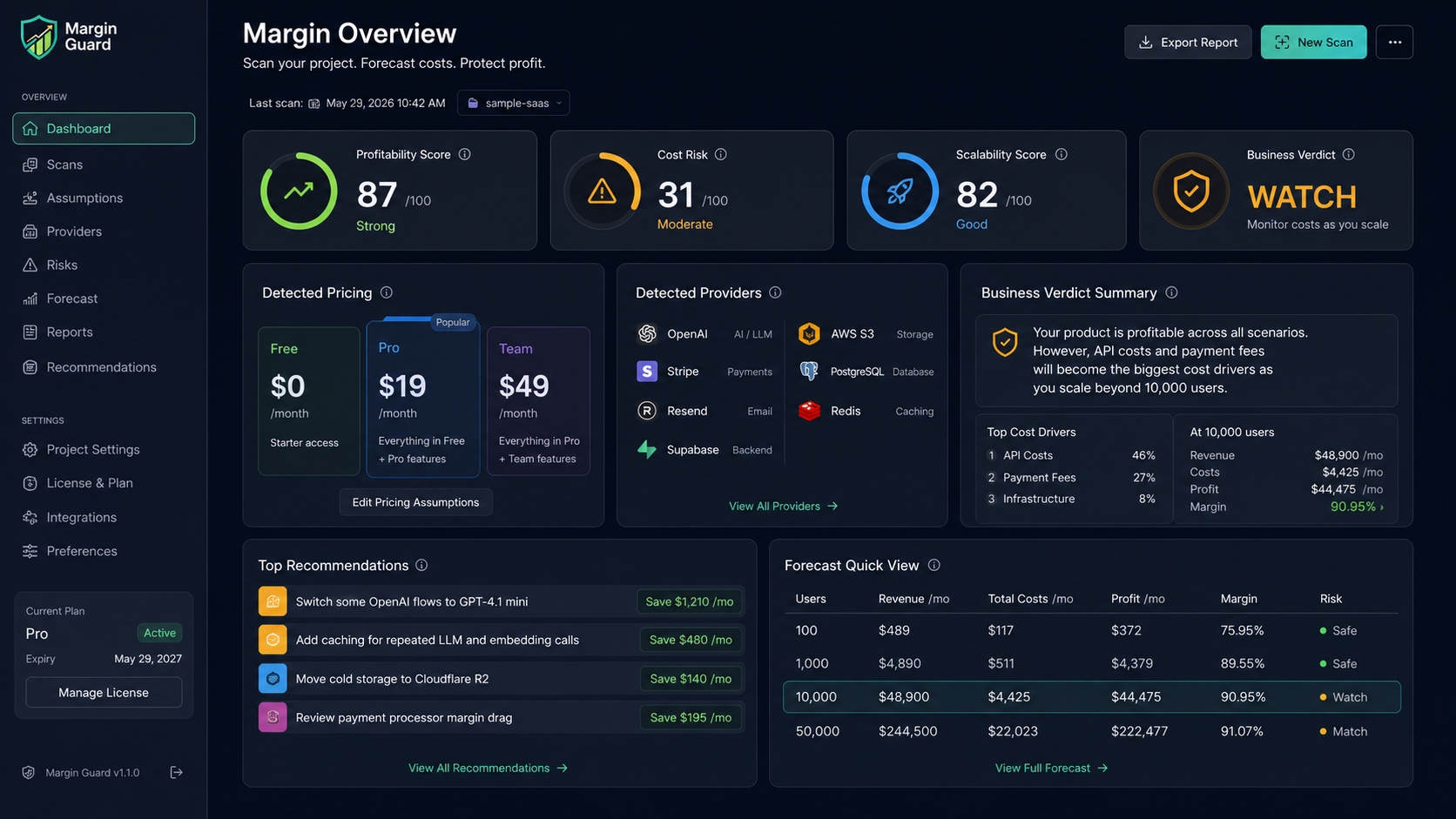
Forecast scenarios

Cost-risk detection
Desktop, extension, and export flow
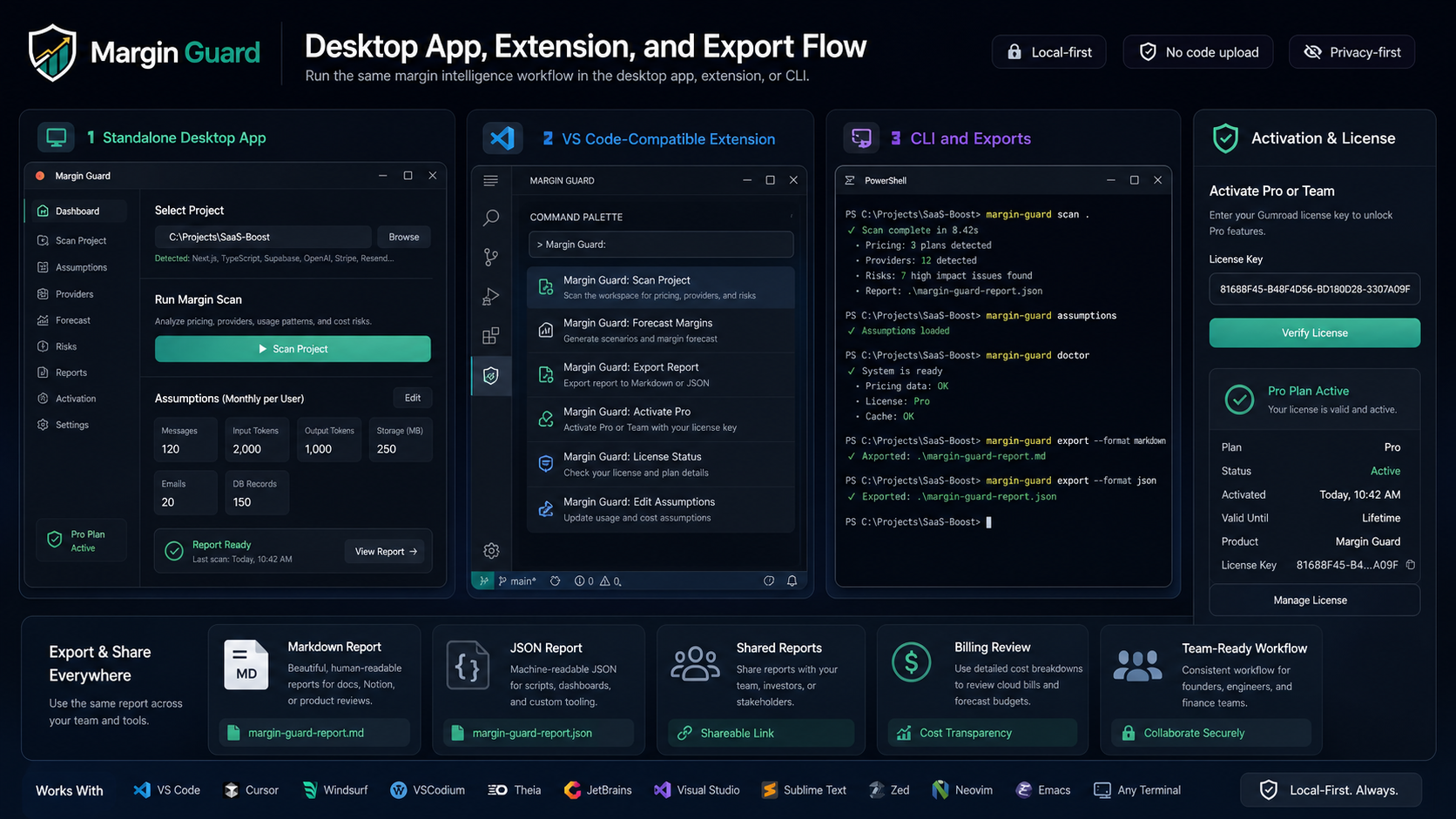
Commands
Open Ctrl+Shift+P and run:
Margin Guard: Scan ProjectMargin Guard: Edit AssumptionsMargin Guard: Forecast MarginsMargin Guard: Export ReportMargin Guard: Activate ProMargin Guard: License Status
Why teams use Margin Guard
- Find hidden cost bombs early: spot API-in-loop patterns, missing cache, missing token caps, storage growth issues, and cleanup gaps before they hit production bills.
- See your real cost stack: break costs into API, payment, hosting, storage, database, messaging, and infrastructure buckets.
- Compare current vs cheaper alternatives: see where a lower-cost model, storage provider, database option, or payment processor could improve margin.
- Keep it private: scan locally without uploading source code to AI services.
- Stay actionable: export reports for docs, internal planning, founder reviews, and pricing decisions.
How to use it
- Open a project folder in your editor
- Open the Command Palette
- Run
Margin Guard: Scan Project
- Review the detected pricing, providers, and growth assumptions
- Edit assumptions if needed
- Run margin forecasting and export the report when ready
Margin Guard is meant to help you understand business risk early. It does not modify your files or rewrite your code.
Local-first privacy
Margin Guard scans locally and does not upload your source code in v1.
By default, Margin Guard does not send:
- source code
- repository contents
- file contents
- prompts
- secrets
- tokens
- project business data
The first release is intentionally deterministic and local-first.
Pricing and plans
Margin Guard is prepared for a simple upgrade path:
- Free
- 3 scans per month
- basic forecast
- Pro - $19/month
- unlimited scans
- advanced forecast
- provider and model savings suggestions
- report export
- Team - $49/month
- everything in Pro
- team-ready usage preparation
- shared reports preparation
- future CI and PR checks preparation
Gumroad licensing
Margin Guard uses Gumroad-based license activation for paid plans.
Typical flow:
- User installs Margin Guard
- User upgrades through Gumroad when ready
- Gumroad provides a license key
- User runs
Margin Guard: Activate Pro
- Margin Guard verifies the license through the configured activation endpoint
- Plan access is stored locally
Margin Guard product separation is enforced by Gumroad product_id and product metadata so it does not mix with other products that may share webhook infrastructure.
Margin Guard supports export workflows for:
Those exports are useful for:
- business planning docs
- founder and investor reviews
- internal pricing reviews
- engineering cost reviews
- hosting and infrastructure migration decisions
- AI model and provider tradeoff analysis
This makes it easier to share internal forecasts, save snapshots, or feed later workflows.
Support
Support / contact placeholder:
support@margin-guard.munatrust.online
Replace this with the final public support channel if you want a different support address.

