Getting started · Pricing · Release notes · License
Documentation · Support · Privacy
Documents: Pricing · Changelog · License
See every tag in the project, with a real usage count, and clean it up
safely.
Tagfold adds a page under Project Settings that lists every work item tag
in the project — how many items use it, and which other tags look like a
near-duplicate: differ only by case, by a separator (tech-debt /
techdebt), by a likely typo, or just look similar — each with a suggested
tag to keep. From there you can:
- Rename a tag everywhere it's used, in one action.
- Merge one or several source tags into a target in a single job. Tagfold
updates readable work items and retains each shared source tag definition;
pull request labels are not migrated. A combined receipt reports the result.
- Delete a shared tag definition after a fresh work item count and typed
confirmation. Azure DevOps also uses shared tag definitions for pull request
labels, so deleting one can also affect labels with the same name.
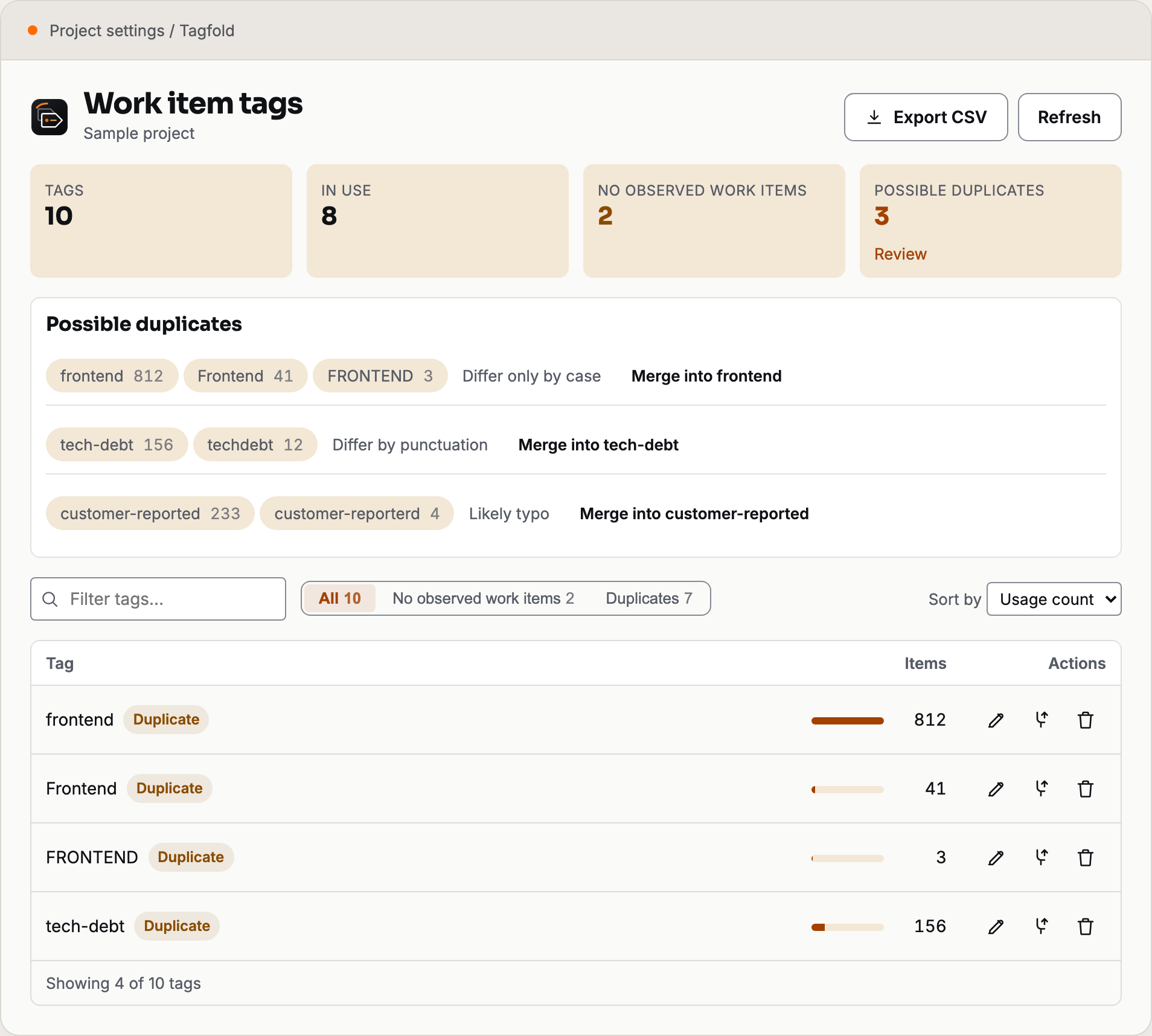
Actual product components with synthetic sample data.
| At a glance |
Tagfold |
| Open in Azure DevOps |
Project Settings → Tagfold |
| Actions |
Rename, merge, delete and export CSV |
| Counts |
Work items only; unknown counts never mean zero |
| Loading |
Immediate page shell, progressive counts, action panels on demand |
| Privacy |
Your Azure DevOps sign-in; no Bacumi backend or analytics |
| Price |
Free; no Bacumi account required |
Usage and merge results
Tagfold shows work item usage counts as each query finishes and leaves counts
unknown until they are available. It suggests likely duplicates for your
review. Before a merge or delete, it shows a fresh count and a sample of
affected work items. After a merge, its CSV receipt records updated, unchanged,
failed, not-started and outcome-unknown items. Review current tags before
retrying; the receipt does not undo changes.
Safety
- Merge re-reads a work item's current tags immediately before writing, so
other tags added while the page was open are preserved.
- A merge shows a live recount, a sample of affected items, and a note that
every item gets a new revision before it runs; above 500 items it requires
typing the tag's name, the same as delete.
- A merge retains source tag definitions. Work items that fail, cannot be read,
or remain outside the bounded recheck coverage can keep their source tags.
Pull request labels are not migrated.
- Cancelling stops further processing. Confirmed writes remain, and a
dispatched write with a lost response may already have been applied. There
is no automatic rollback.
- A downloadable CSV receipt covers every source in a group merge. It records
updated, unchanged, failed, not-started and outcome-unknown items, plus
incomplete coverage when Tagfold can no longer verify the source tag.
Check current tags before deciding whether to retry.
- Delete requires typing the tag's exact name; there is no accidental
one-click delete.
- Azure DevOps shares tag definitions with pull request labels. Deleting a
definition can also affect pull request labels with that name; a merge retains the
source definition and does not migrate those labels. A zero work item count
does not mean the tag is unused by pull request labels.
- If you don't have permission to change tags in a project, Tagfold tells you
so instead of failing silently.
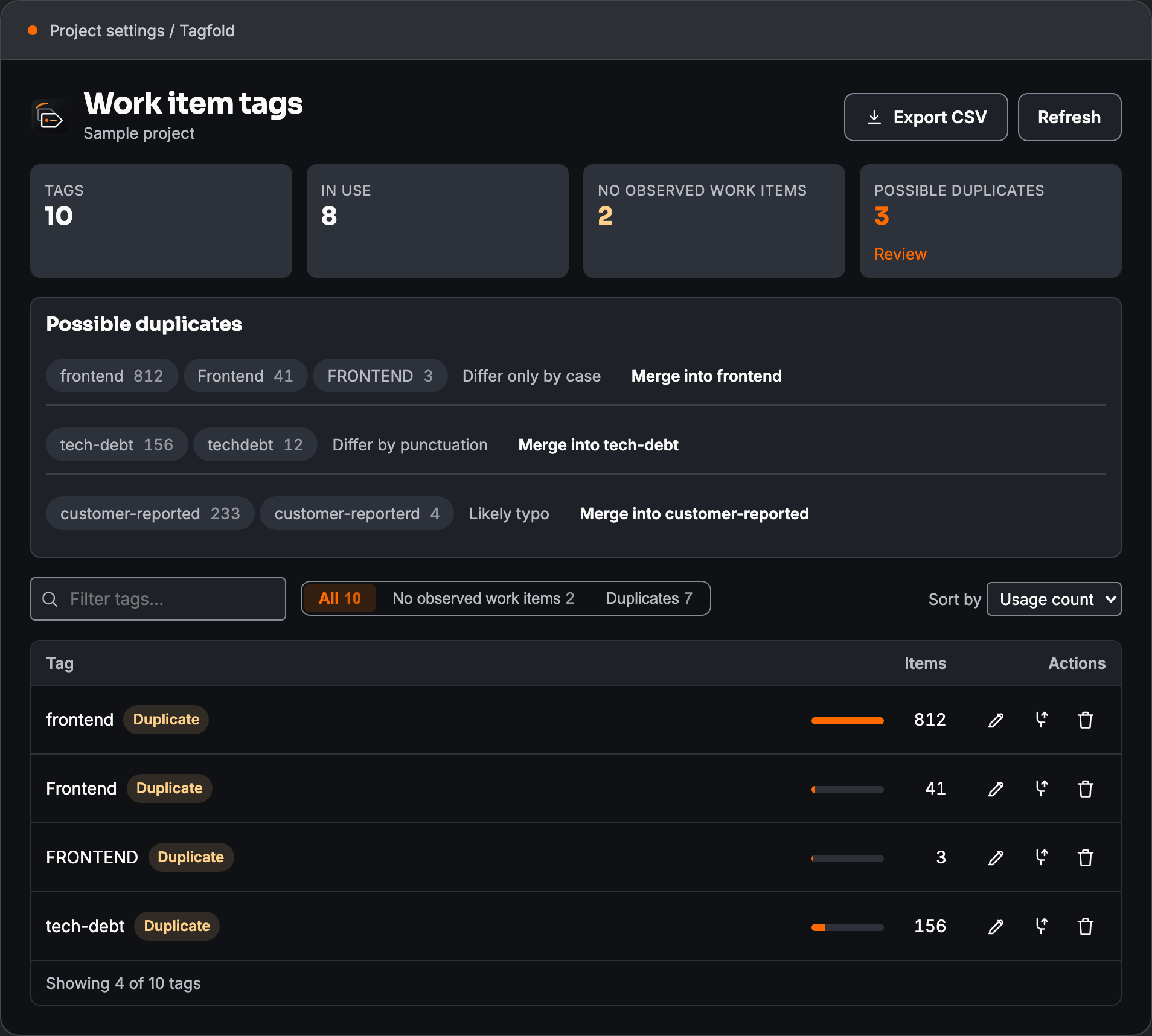
Also included
- A filter for tags with zero work item usage. Bulk cleanup is unavailable in
this release because that count cannot establish that a shared definition
is unused by pull request labels.
- CSV export of the full tag list with counts.
Not included
Bulk apply or remove of a tag from a set of query results — Azure DevOps
already does this from the query results view.
Your data and downloads
Tagfold reads and updates work item tags in your Azure DevOps organization
using your signed-in permissions. Tag list exports and merge receipts are
generated in your browser and downloaded to your device. Those files may
contain organization data; handle them under your organization's rules. The
extension has no Bacumi backend and collects no usage analytics.
Permissions and privacy
| Item |
Detail |
| Scope |
vso.work_write: read and write access to work items — the smallest scope that covers renaming a tag definition and patching a work item's tags during a merge. |
| Where data goes |
Tag and work item data is read from or written to Azure DevOps with your signed-in permissions. CSV exports and merge receipts contain organization data and are downloaded to your device. The extension has no Bacumi backend. |
| Backend |
None. Tagfold has no Bacumi server. |
| Analytics |
None. Tagfold does not collect usage analytics. |
Pricing
Tagfold is currently free to install and use, with no Bacumi account or
payment card required. CSV exports and merge receipts are downloaded to your
device.
More from Bacumi
- PR Pulse:
every active pull request in your project, in one view.
- Treefold:
export flat or tree Boards queries to Excel with hierarchy preserved.
Getting started
- Ask your organization administrator to install Tagfold from the Marketplace.
- Open a project and choose Project Settings → Tagfold.
- Search the tag list while usage counts load. Review duplicate suggestions once their counts are available.
- Preview a rename, merge or deletion and read the affected-item count before confirming.
- After a merge, download its CSV receipt to review successes and failures.
Release notes
0.1.0 package
- Project-wide tag catalog with usage counts and four kinds of duplicate suggestions.
- Rename, group merge, typed delete confirmation and CSV merge receipts.
- Aligned summary cards and table actions in light and dark themes.
- The page shell appears immediately; counts fill in progressively and tag action panels load when opened.
Frequently asked questions
Is a duplicate suggestion an automatic change? No. You choose the target and
confirm the operation. Similar names can represent different concepts.
Does zero usage mean a tag is safe to delete? No. Counts cover work items
only. Azure DevOps shares tag definitions with pull request labels, which can also be affected if you delete the definition. Bulk cleanup is unavailable in this
release.
Can I undo a merge with one click? No. Inspect the preview first and keep the
receipt. Each affected work item receives a revision; a receipt is not an automatic undo.
What happens when I cancel? Processing stops, but completed changes remain.
Cancelling does not roll back work items already updated.
Troubleshooting
Check your project permissions if an operation is unavailable or fails. For partial
results, inspect the receipt and current work item tags before retrying. If usage is
still unknown, wait for counting to finish rather than treating it as zero.
Availability
Available for Azure DevOps Services. Azure DevOps Server compatibility has not
been validated. Try
write operations in a test project before using them on production work items.
License
See the Bacumi license terms. Third-party components
retain their own licenses. The extension package includes its license document.
Support
When reporting a problem, include the extension name and version, whether it is the
public, Dev or QA edition, your browser version, steps to reproduce, and the visible
error message. Remove access tokens and confidential project or work item data from
screenshots and logs before sharing them.
Connect with Bacumi
Website · LinkedIn ·
X · GitHub organization
Privacy policy ·
License terms
Terms and conditions ·
Support policy

