Skip to content
| Marketplace
Sign in
Visual Studio Code>SCM Providers>sundgrenNew to Visual Studio Code? Get it now.
sundgren

sundgren

Preview

Axel Andersson

|
3 installs
| (0) | Free
Multi-language code review tool
Installation
Launch VS Code Quick Open (Ctrl+P), paste the following command, and press enter.
Copied to clipboard
More Info

sundgren

A similarity check between git branches, from their common ancestor: how much of each branch's work is in another.

Once work is rebased, squashed, or extracted from a dev branch into its own merge request, git no longer knows it is the same work. sundgren takes what each branch added since it left a common base and compares it line by line, so you can see which branch already holds what, what was moved or renamed on the way, and what is left.

Preview. How sundgren decides what counts as the same work is still open, and may change.

Containment

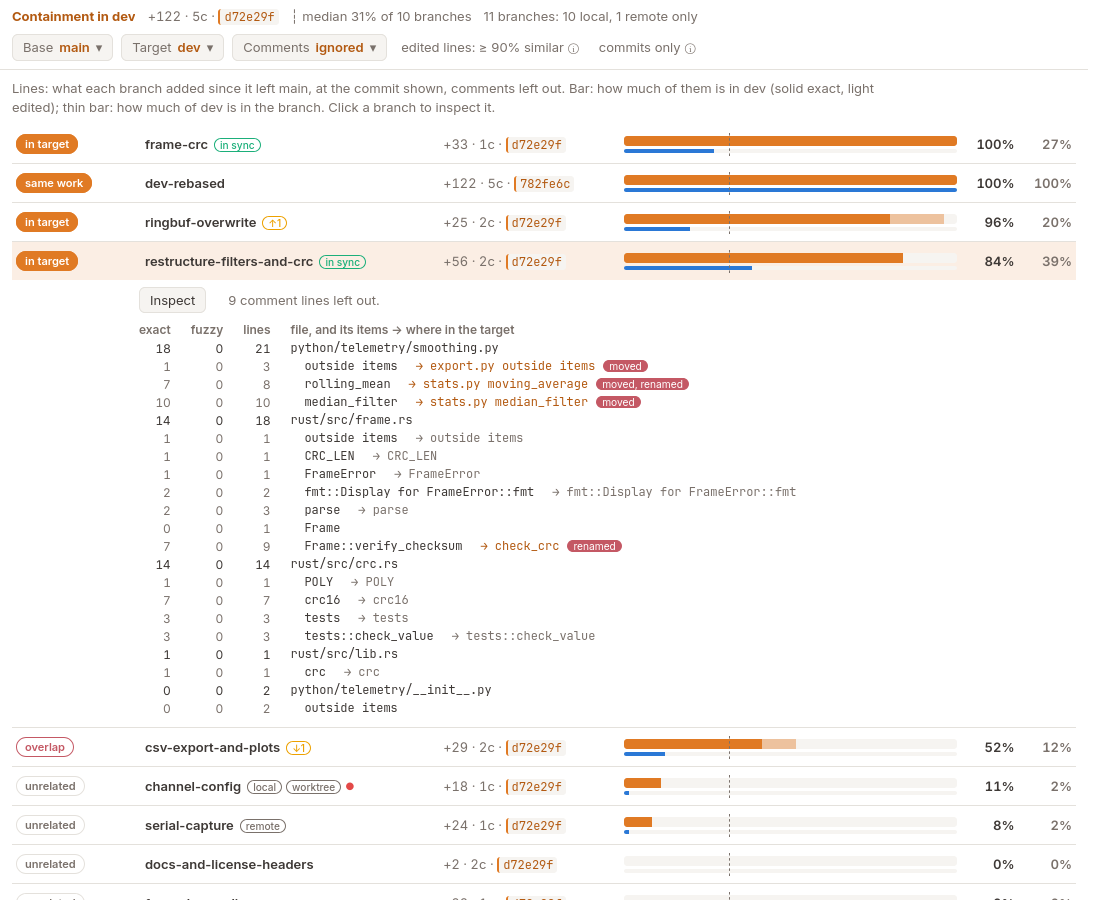
sundgren: Show Containment compares every branch with a target branch you pick: how much of each branch's work is already in the target, and how much of the target's is in it. A branch's work is what it added since it left the canonical branch (origin/HEAD, else main).

The containment panel: each branch with how much of its work is in dev

  • Each branch gets a label: in target for an extraction, same work, overlap, unrelated.
  • Edited lines count too: a line at least 90 % similar to one in the target is found.
  • Comment lines (license headers, doc comments) are left out, in Python, Rust and C; a toggle counts them.
  • In Python, Rust and C, sundgren reads the code: each function and class shows where it went in the target, tagged moved or renamed.
  • Badges show whether a branch is local or remote, in sync, ahead or behind, checked out in a worktree, and has uncommitted changes.

Inspect

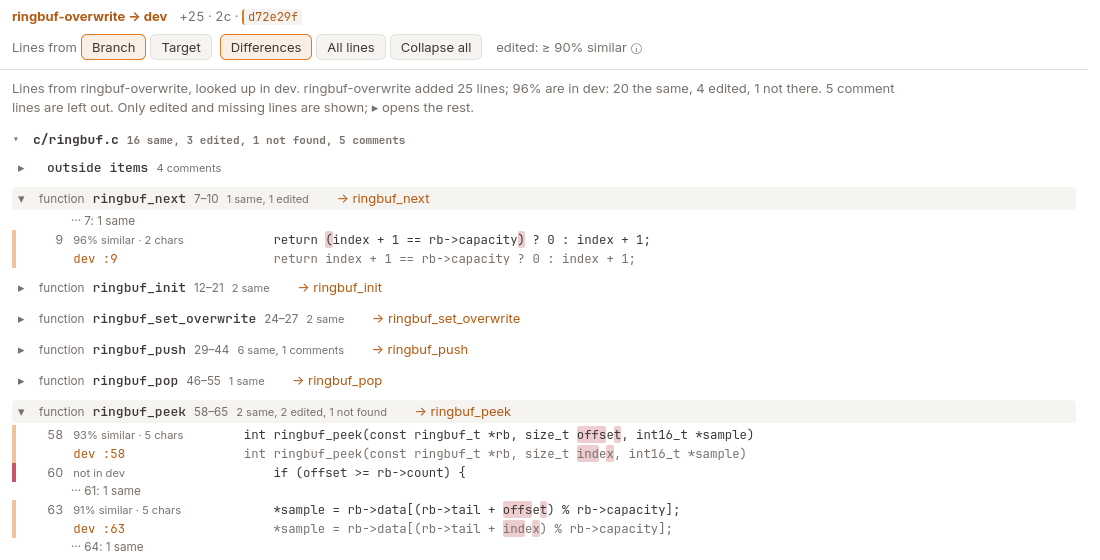
Inspect on a branch shows what is different: every line it added that the target doesn't have, or has edited, next to the target's line, with the changed characters marked. The rest is folded.

The inspect panel: a branch's edited lines next to the target's

History

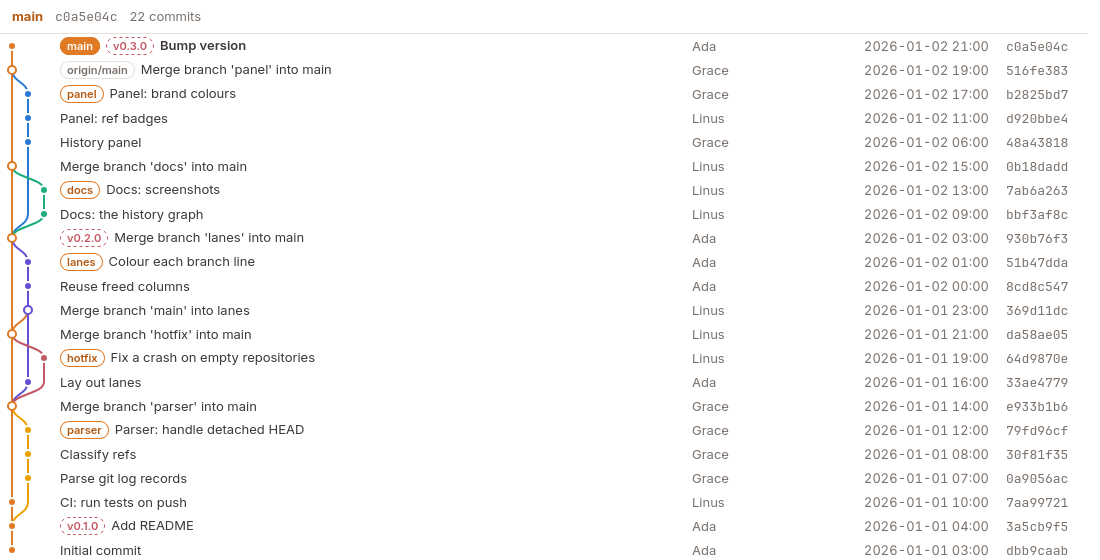
sundgren: Show History draws the branches around a base branch as a vertical map, newest on top: where each forked and merged, next to the commits in fixed columns. Show local branches first, recent activity, your own, or those most like a branch, then tick or untick any in the Branches list. Filter by author and by date (a calendar). Quiet runs of commits are folded (click ×N). History in the Containment panel opens it too.

The history panel

Outline

sundgren: Show Outline shows the file in the editor as sundgren reads it: its functions and classes, and its comments and strings.

Languages

  • Any text file is compared line by line.
  • Python (.py, .pyi), Rust (.rs) and C (.c, .h) are also read as code: containment per function, class or other item, with where each went in the other branch (tagged moved or renamed), and comment lines (license headers, doc comments) left out.
    • Python: def, class.
    • Rust: fn, struct, enum, union, trait, impl, mod, const, static, type, macro_rules!.
    • C: functions, struct, union, enum, #define.

Settings

Setting
sundgren.base The canonical branch a branch's work is counted from. Empty: the repository's default branch.
sundgren.protected Branch name patterns the history draws in the protected colour (main, master).
sundgren.historyPage Commits of the base the history reads first, and adds with each Load older (50).
sundgren.path A sundgren binary to use instead of the bundled one.

Platforms

Linux (x64, arm64) and macOS (Intel, Apple silicon); the sundgren binary is bundled. sundgren is also a command line tool: pip install sundgren.

More: documentation, with live demos · source · issues. Apache-2.0.

  • Contact us
  • Jobs
  • Privacy
  • Manage cookies
  • Terms of use
  • Trademarks
  • Your Privacy Choices
  • Consumer Health Privacy
© 2026 Microsoft