ClaudeStats


Your Claude Code usage, sitting in the VS Code status bar where you'll actually see it.
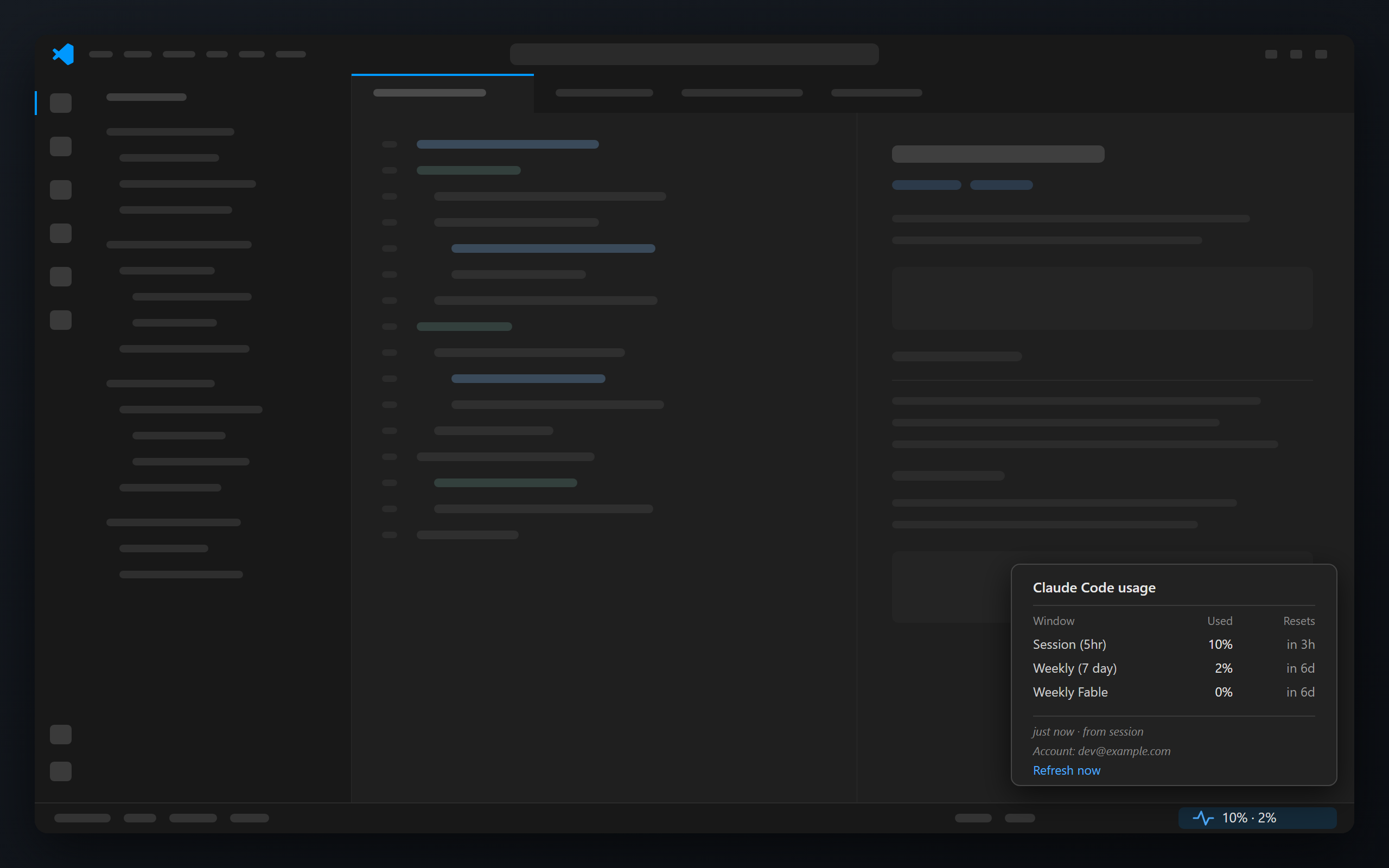
No more opening a panel to find out you're at 90%. The number is just there, it goes amber
at 80% and red at 95%, and hovering shows you every limit your plan has along with when
each one resets.
It costs you nothing. Nothing here calls a model: see tokens.
Install
You'll need Claude Code signed in on a paid plan, Node 20+ on your PATH (Claude Code runs
the hook with node), and VS Code 1.85+.
From the Marketplace
Search for ClaudeStats in the Extensions view, or:
code --install-extension awmium.claude-stats-statusbar
On first start it asks once: ClaudeStats needs to register a small status line hook with
Claude Code. Set up now? Say Set up and it copies the bridge into
~/.claude/claude-stats/, backs up your settings.json, and registers the hook. It's the
same change the install script makes. Say Not now and it won't ask again until the
next version; run ClaudeStats: Set Up Claude Code Hook from the command palette whenever
you're ready. ClaudeStats: Remove Claude Code Hook takes it back out.
You'll see — until your next Claude Code message, because that's when the first reading
arrives.
From source
git clone https://github.com/awmium/claude-stats.git
cd claude-stats
./scripts/install.sh          # macOS / Linux
.\scripts\install.ps1 # Windows
Then quit VS Code completely and reopen it. A window reload won't pick up a new
extension.
Flags, if you need them: --target insiders, --target cursor, --force. On PowerShell
it's -Target Insiders and so on.
Pick one route, not both. Before 0.2.0 a source install used the ID
claude-stats.claude-stats. If the Marketplace copy finds that old one still running, it
offers to remove it, since otherwise you'd see two status bar items. Re-running the
install script cleans it up too.
Already using a custom status line?
Claude Code only allows one. The extension and the installer both spot yours, leave it
alone, and tell you. To run both, point statusLine at a wrapper:
#!/usr/bin/env bash
input=$(cat)
printf '%s' "$input" | node ~/.claude/claude-stats/statusline-usage.js > /dev/null
printf '%s' "$input" | your-existing-statusline
Or choose Replace anyway (or re-run the installer with --force) and hand the hook
over. Your original settings.json is kept as settings.json.claude-stats-backup.
How it works
Two small pieces.
A bridge sits on Claude Code's statusLine hook. Every message, Claude Code pipes it
the live session state, which includes your usage. It caches that to a file and passes the
percentages back so your Claude Code status line still works.
The extension watches that file. When no session has reported for a while it falls back
to asking the usage endpoint directly, so the number doesn't freeze the moment you stop
working. It also keeps the bridge up to date when the extension updates, as long as the
hook is still the one it registered.
Which rows you see is up to your account, not up to ClaudeStats. The server sends the list
of windows it tracks for you, names included. So if your plan has a per-model budget it
shows up on its own, and if it doesn't, there's simply no row.
Switch accounts and it notices. Every cached reading is stamped with the account that
produced it. Sign in as someone else and ClaudeStats shows — until real data arrives,
rather than quietly showing you the last account's numbers.
Settings
| Setting |
Default |
|
claudeStats.pollWhenStale |
true |
Ask the usage endpoint when no session has reported lately. Turn it off to stay fully offline. |
claudeStats.staleAfterMinutes |
10 |
How stale a reading can get before that kicks in. |
CLAUDE_CONFIG_DIR is respected if you've moved your Claude Code config.
Does this cost me tokens?
No. Tokens get spent on inference, which means calls to /v1/messages. Nothing here makes
one.
The bridge is a Node script reading stdin and writing a file, running inside a session you
were already having. The extension watches a file. The poll hits an endpoint that reports
your limits rather than drawing against them: the same one Claude Code itself calls every
hour.
About your credentials
Worth being upfront, since it reads your Claude Code state:
- Nothing is stored. The cache file holds percentages, reset times and which account
they belong to. No token, no conversation content.
- The access token gets read into memory for one request and thrown away. Never
written, cached, logged, or put in a URL. If it's expired, no request is made at all. On
a 401 it gives up rather than refreshing, because refreshing would mean writing to your
credentials file.
- Setting up the hook never touches credentials. It writes the bridge script, one
statusLine entry in settings.json, and a one-time backup of that file. Nothing else.
- One network call, to
api.anthropic.com. No telemetry, no analytics, no
dependencies that could add any.
- Don't want even that? Set
claudeStats.pollWhenStale to false and it touches no
credentials at all.
Every path and header is documented in SECURITY.md. The whole thing
is a few hundred lines of dependency-free JavaScript. Have a read.
When it misbehaves
Nothing in the status bar. Quit VS Code fully rather than reloading. Still nothing?
Ctrl+Shift+P → Developer: Show Running Extensions and look for ClaudeStats. If you
installed from source and it's not there, check the folder exists with
ls ~/.vscode/extensions/awmium.claude-stats-statusbar-* and re-run the installer.
Two status bar items. An old source install (claude-stats.claude-stats-*) is running
next to a newer copy. Accept the offer to remove it, or re-run the install script.
Stuck on —. Send one message in Claude Code. If it stays empty, run
ClaudeStats: Set Up Claude Code Hook, then check the hook registered:
node -e "const o=require('os');console.log(require(o.homedir()+'/.claude/settings.json').statusLine)"
— right after switching accounts. That's deliberate. It clears on the next message.
HTTP 401 in the hover. Token expired; using Claude Code refreshes it.
Nothing at all on an API key, Bedrock or Vertex. Those have no plan limits, so there's
nothing to show.
Uninstall
Run ClaudeStats: Remove Claude Code Hook first, then uninstall the extension from the
Extensions view. The command takes out the statusLine entry (only if it's ours), the
bridge and the cached reading. Skip it and nothing breaks: the hook just keeps feeding your
Claude Code status line on its own.
From source:
./scripts/uninstall.sh        # macOS / Linux
.\scripts\uninstall.ps1       # Windows
Takes out the extension, the bridge, the cached reading, and the statusLine entry, but
only if that entry is ours. Your original settings.json was backed up on first install.
A Marketplace copy is left for VS Code to uninstall.
Contributing
Tests are npm test: 64 of them, no network, no dependencies, no build step. They run
against a throwaway config directory so they never touch your real Claude Code state.
Have a look at CONTRIBUTING.md first; the short version is
write the failing test before the fix, and prove it fails.
Worth knowing
/api/oauth/usage is undocumented and could change. If it does, the bridge carries on and
you just lose the idle refresh.
Organisation credit pools aren't shown. On Team plans that's billing state you often can't
control, so it isn't your usage and it doesn't belong next to your limits.
License
MIT. Not affiliated with or endorsed by Anthropic.

