Format boldly. Keep meaning intact.
Auric Formatter combines native pretty-printing, guarded structural formatting, a
live Playground, repository-wide previews and 391 options. Every result is
re-lexed and checked before it reaches your file. If the formatter cannot prove a
change is allowed, it keeps your original text.
Watch the full real walkthrough
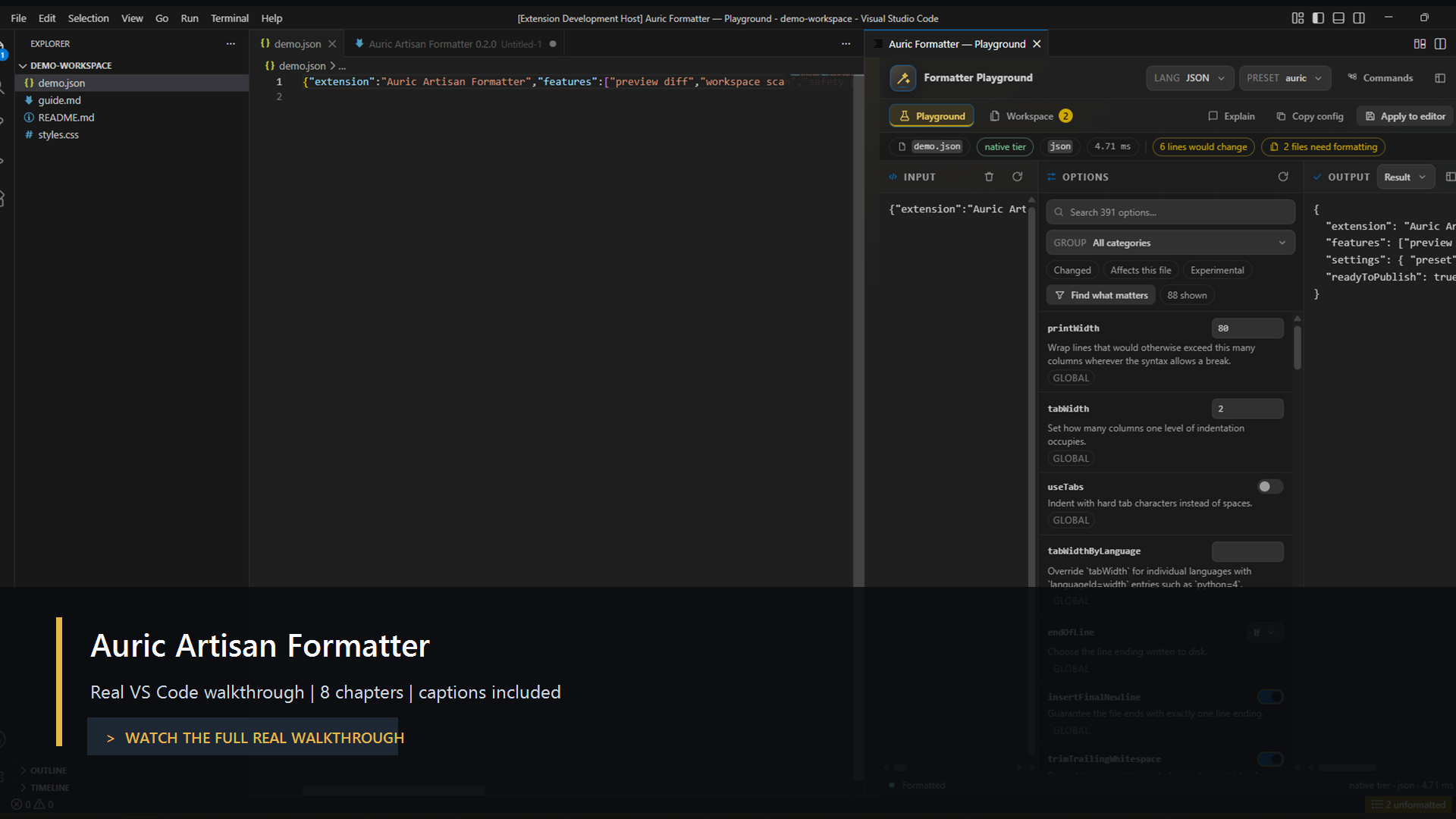
The 1 minute 54 second, 1920 × 1040 walkthrough is recorded from the running
extension in a real VS Code Extension Development Host. It shows unformatted
source, a native diff preview, decision explanations, the live Playground,
presets, generated configuration, the write-free workspace scan and the same
engine running from the CLI. Explanations are burned into the video, so it works
with sound off.
Watch or download the MP4
· Read the chapter transcript
· Download captions
· Browse every real capture
Start in 60 seconds
Open Auric Formatter: Open Formatter Studio, or expand Auric Formatter in
the Explorer sidebar. Both surfaces share the Auric gold-and-charcoal design,
searchable dropdowns, rule controls and workspace status.
- Full document / Editor selection: select code in VS Code, then load that
scope into Studio. Selection formatting may expand to a balanced syntax unit;
review the full-file diff to see exactly what will change.
- Formatting preview: turn it off to view the original; turn it on to compare
the result or diff. Previewing never writes files.
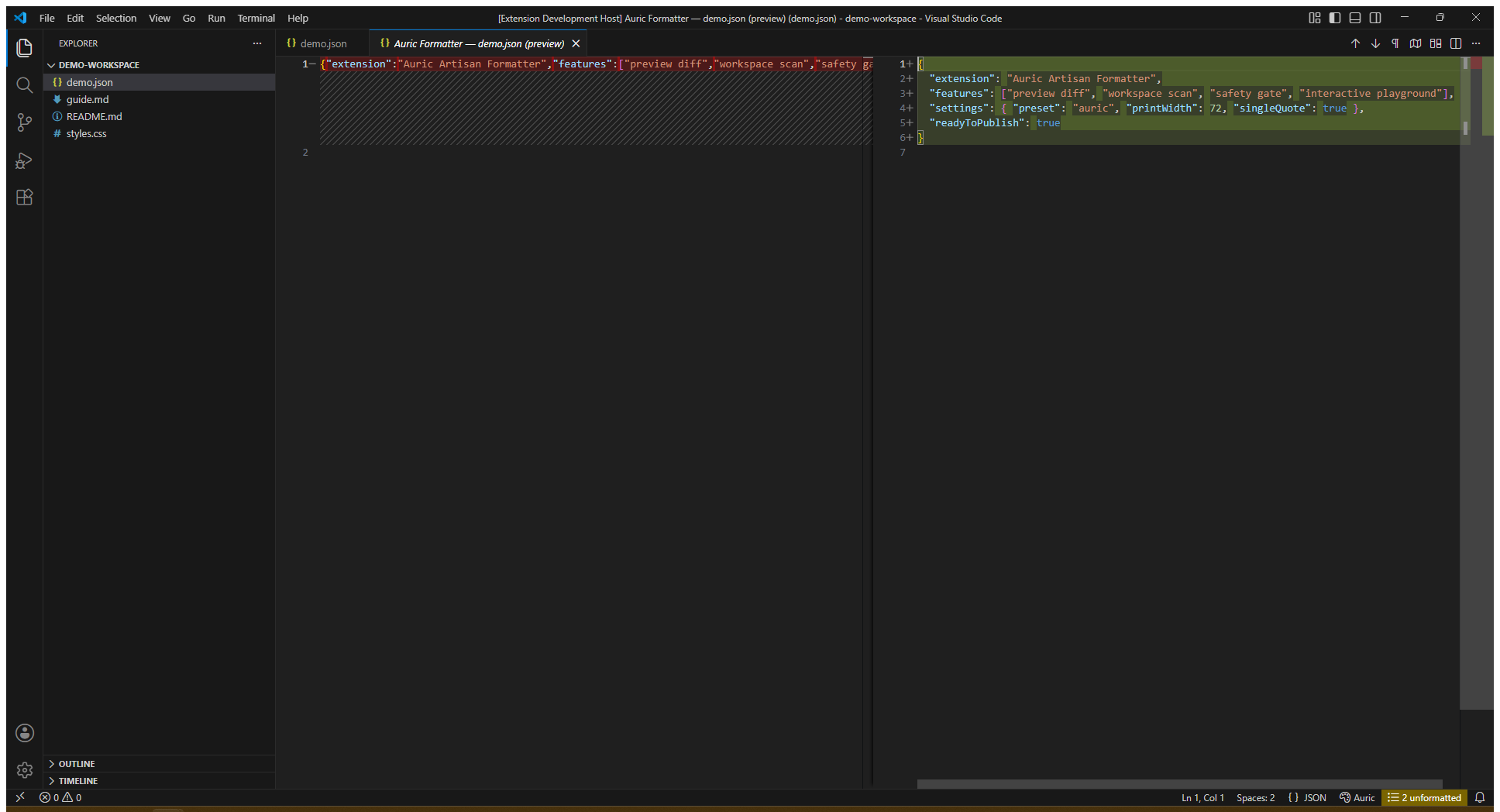
- Native editor preview: Preview Formatting as a Diff keeps your source on
the left and opens read-only formatted code beside it. Use the editor-title
actions or CodeLens links to Apply, Discard, Refresh or Compare Changes in
VS Code's native diff editor. No Studio dashboard opens for this command.
- Yes, apply / No, discard: Apply confirms the exact target, rejects stale
previews, and leaves the edited document unsaved with Undo available. Scratch
text and truncated previews are copy-only, not replacement documents.
- Custom rules: edit a JSON object of catalog options, validate it, and preview
the result. Copy config exports your options for
.auricformatrc; project
configuration also supports per-file overrides. No executable custom code runs
from the rules editor.
- Workspace tracking: after the first scan, saved, unsaved, external, created
and deleted files update the report. New files trigger a debounced rescan.
Exclusions, file-size limits and
scanMaxFiles still apply; this is not an
unlimited filesystem index. Formatting selected/all pending files is explicit
and saves those files, unlike single-document Studio Apply.
Studio previews are limited to 200,000 characters. Larger files can use the
normal editor formatter, subject to the configured engine size limit. Native
printers and the conservative universal engine are labelled separately; language
support does not imply identical syntax-aware capabilities for every language.
Install the extension.
Run Auric Formatter: Toggle Format on Save, or add:
{
  "editor.defaultFormatter": "auric-artisan.auric-artisan-formatter",
  "editor.formatOnSave": true
}
Run Auric Formatter: Preview Formatting as a Diff on a real file.
Open Auric Formatter: Open Formatter Studio to tune the result
against your own source.
Run Auric Formatter: Scan the Workspace Without Writing before adopting
the formatter across an existing repository.
Use the full power
| Goal |
Use |
Result |
| Adopt without repository churn |
Workspace scan |
Every supported file is formatted in memory; nothing is written until you choose |
| Tune a style quickly |
Playground → Find what matters |
Shows only the options that change the current file |
| Review before applying |
Preview Formatting as a Diff |
Read-only native editor beside your source, with Apply/Discard and Compare Changes |
Preserve git blame |
formatOnSaveMode: "modifications" |
Formats only lines changed since the last commit |
| Bring an existing project across |
Import Settings From Prettier |
Reads familiar config, starts from the prettier preset and annotates unmatched options |
| Explain a surprising break |
Explain Formatting Decisions |
Reports parser, tier, configuration source and the rule that produced the layout |
| Enforce the same result in CI |
auric-format --check . |
No-write check with conventional exit codes |
| Add a project language |
Formatter plugin API |
Custom parser, printer and options run through the same registry and safety gate |
At a glance
| Capability |
Included |
| Native formatting |
31 verified native modes, including JavaScript and TypeScript |
| Broad language coverage |
253-language registry; 220 use the guarded universal tier by design |
| Configuration |
391 options, 13 presets, per-language and per-glob overrides |
| Compatibility |
.editorconfig, Prettier config discovery, CLI and inline directives |
| Safety |
Token, comment, string, reparse and idempotency checks |
| Runtime footprint |
Zero runtime dependencies |
Full-size visual tour
These are full-resolution captures of the running extension, not mockups or
AI-generated interface art. Open an image in a new tab to inspect every label.
Preview every change
Review the proposed result beside the source or in VS Code's native diff before the source file is
changed.
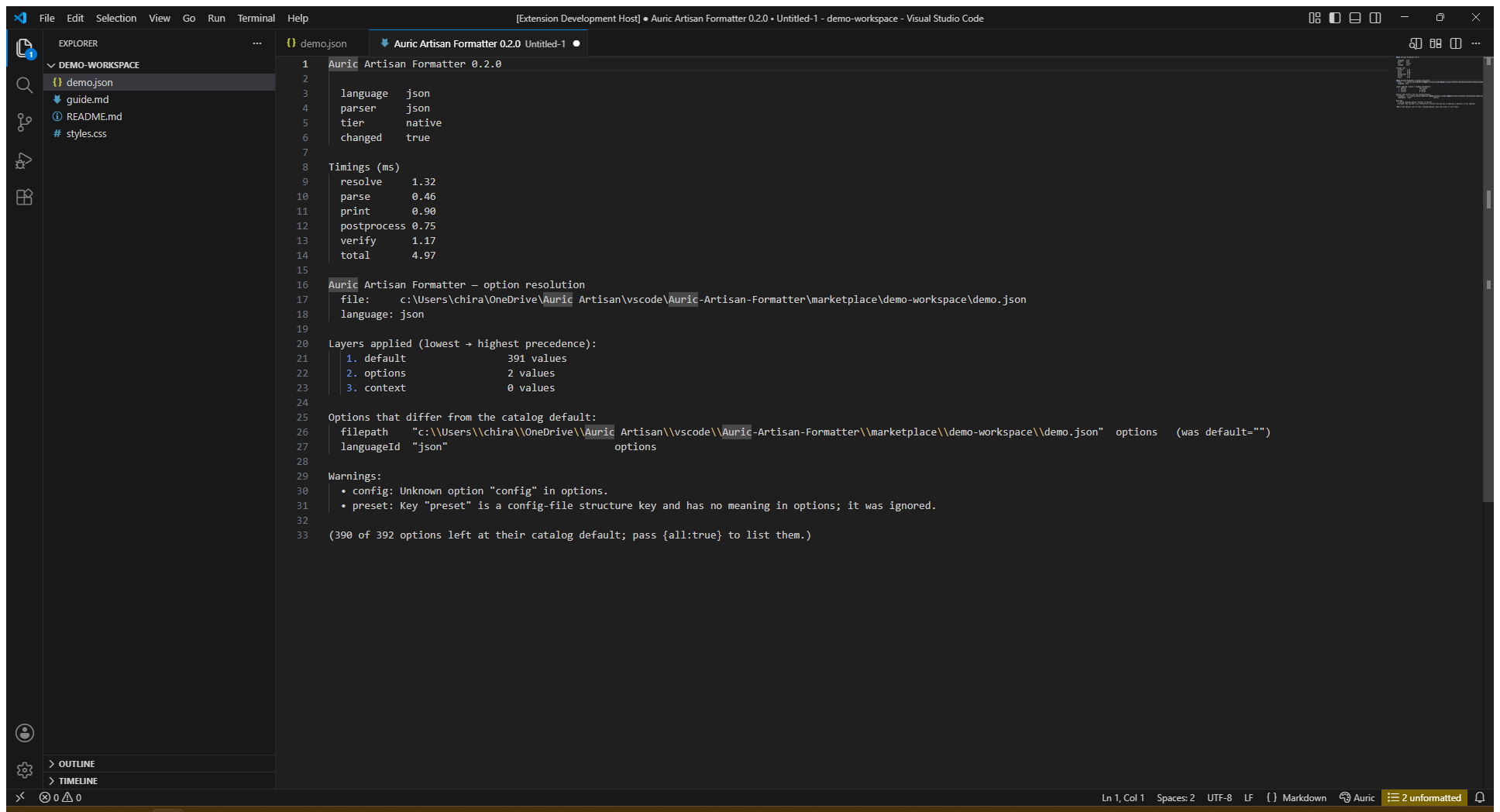
Explain the result
Inspect the language, parser, formatting tier, timing, configuration layers,
changed options and safety warnings behind the output.
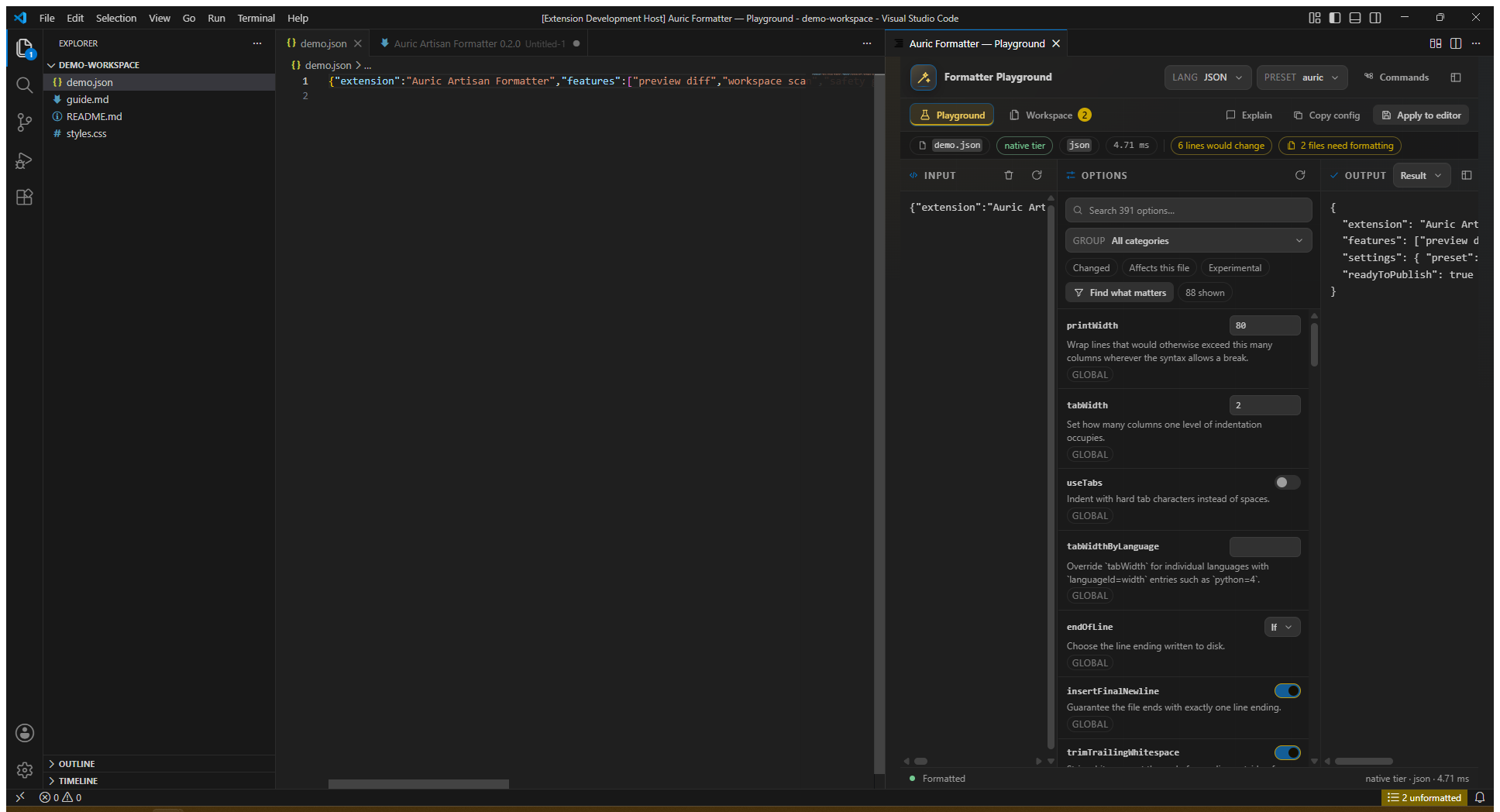
Tune the live Playground
Edit real source, search the 391-option catalogue, filter to the settings that
affect this file, compare result/diff/explanation and copy only the configuration
you changed.
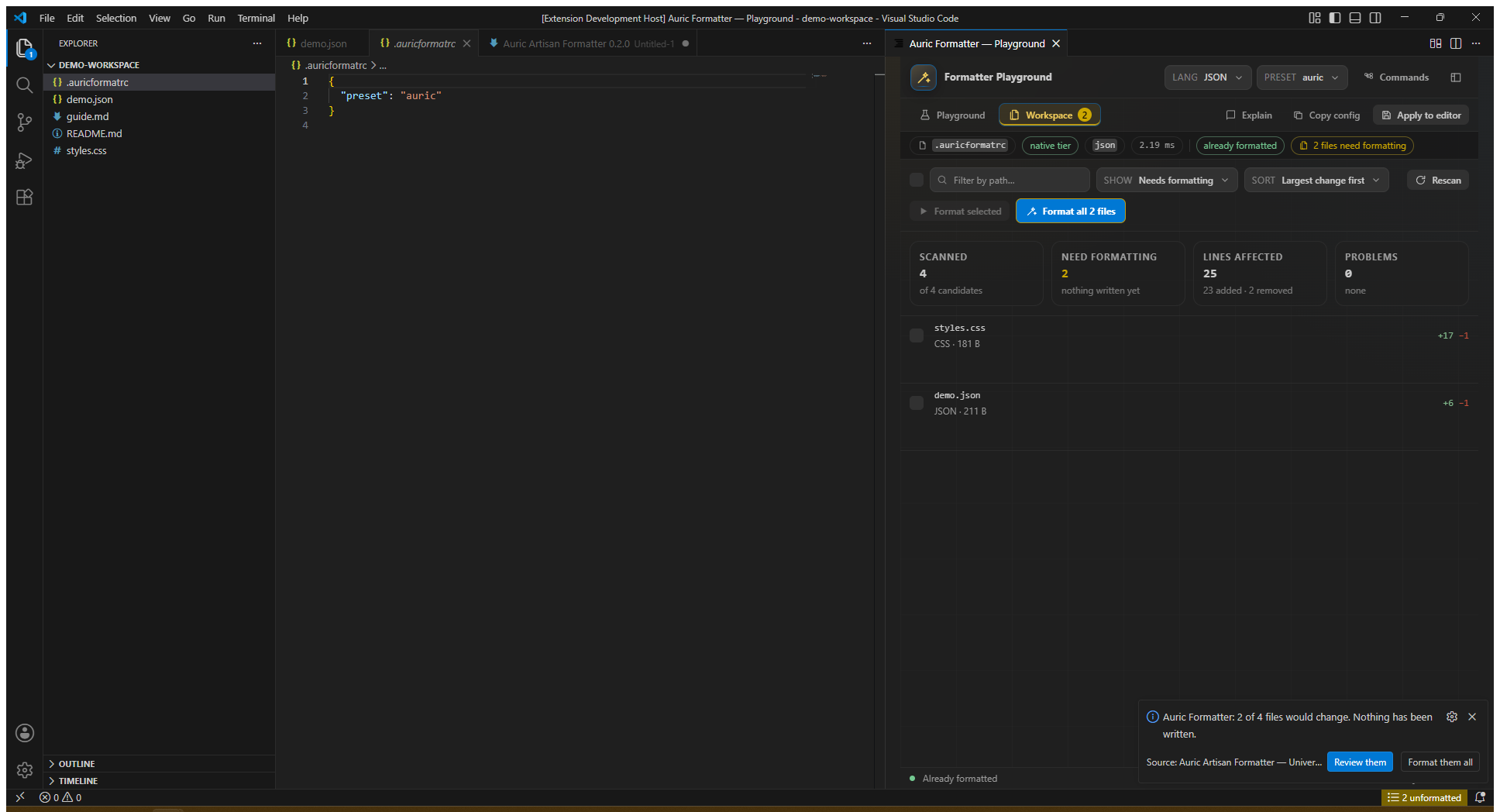
Scan without writing
Format every candidate in memory, sort the files that would change and open an
individual diff. Nothing is written until the user selects an explicit format
action.
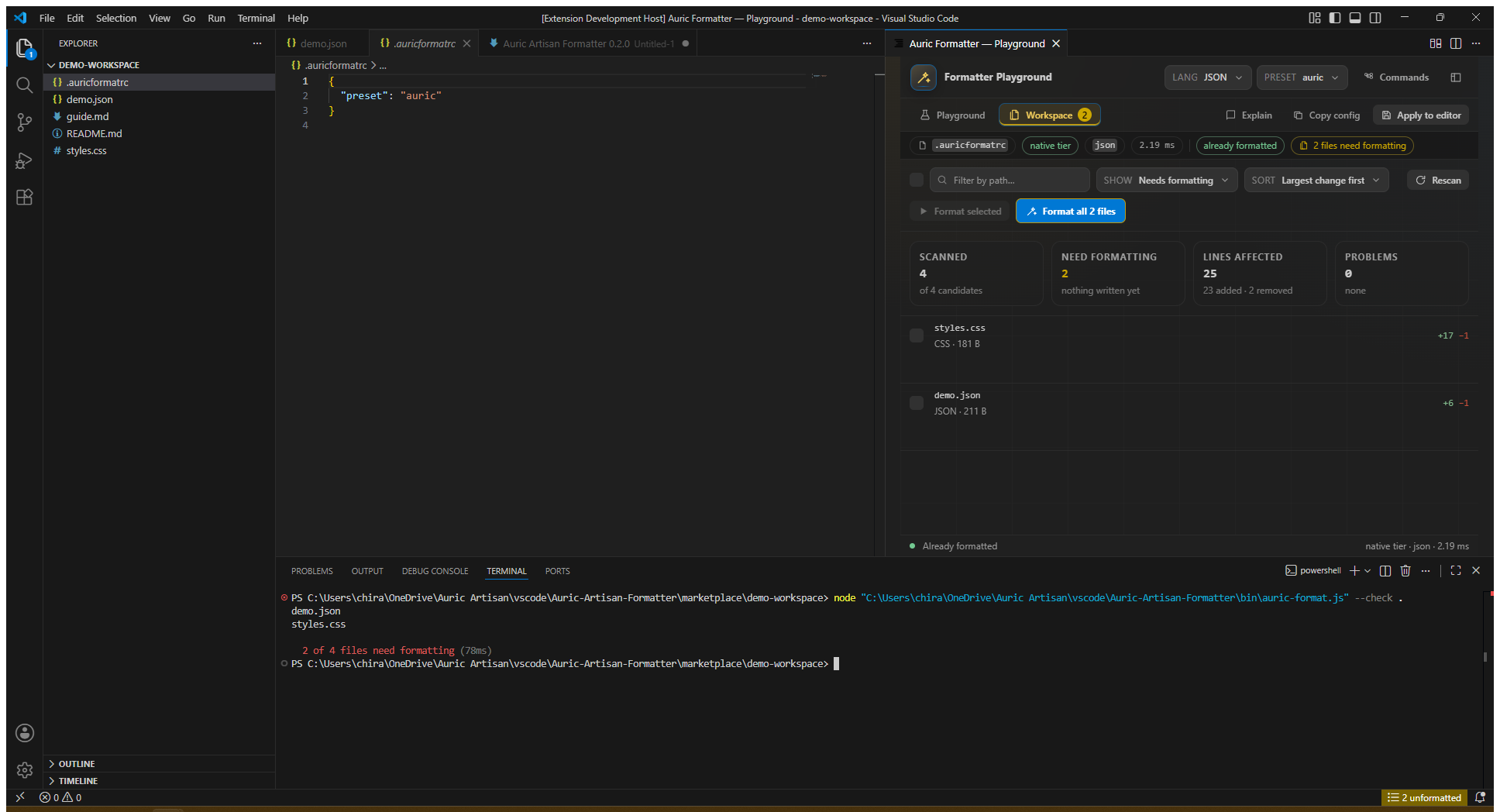
Use the same engine in CI
Run auric-format --check . in a terminal for deterministic repository checks
and conventional exit codes.
Version 0.1.0. JavaScript and TypeScript format natively. JSX and TSX
containing JSX syntax intentionally fall back to the structural tier until the
JSX front end is complete. See What is not built yet.
Native tier — a real parser and pretty-printer. The file is rebuilt from its syntax tree,
so any layout decision is available. 31 native modes, each verified by the test suite to
actually reach this tier with the safety gate clean and its output idempotent:
| Area |
Native modes |
| Code |
JavaScript · TypeScript |
| Data |
JSON · JSONC · JSON5 · JSON stringify · YAML · TOML |
| Stylesheets |
CSS · SCSS · Less · PostCSS |
| Markup |
HTML · XML · SVG · Vue · Svelte · Astro |
| Prose |
Markdown · MDX |
| Query |
GraphQL queries · GraphQL schema |
| Templates |
Handlebars / Glimmer |
| Schema formats |
OpenAPI · AsyncAPI · Swagger · RAML · Docker Compose · Pulumi · Ansible · Kubernetes |
Universal tier — 220 registry entries use a structural engine with no
language-specific parser. JSX and TSX containing JSX syntax currently fall back
to this tier too. It works from the token stream plus a grammar profile describing how
the language opens a block, and it is bound by one structural invariant: one source line in,
one source line out, rewriting only a line's leading whitespace and the gaps between tokens
already on that line. A transformation restricted that way cannot reorder, insert or delete a
token — so safety here is structural, not merely tested (though it is re-lexed and compared
before returning, too).
How much it does depends on what the language allows:
|
|
| Reindent + spacing — 104 languages |
Brace and keyword-block languages, where the block structure is in the syntax: JavaScript, TypeScript, Go, Rust, C, C++, Java, C#, Swift, Kotlin, Ruby, Lua, shell, PowerShell, Pascal, Fortran, Terraform, Nix… |
| Spacing only — 60 languages |
Indentation-defined and layout-sensitive languages, where reindenting would change meaning: Python, Haskell, OCaml, SQL, Sass, Pug, Lisp, Erlang, Prolog, TeX… |
| Whitespace only — 60 languages |
Formats where leading whitespace is data: Makefiles (a recipe line must keep its literal TAB), CSV, INI, COBOL, templates, prose markup. |
Some of what it does not normalise is deliberate. < and > are never spaced, because
nothing short of a parser can tell a > b from Vec<T>. Arithmetic spacing is enabled per
language, because shell's --flag lexes as -- followed by flag and spacing it would produce
a different command line. Brace padding — { a: 1 } versus {a: 1} — is left to the author,
since a one-sided rule is worse than none.
The engine declines rather than guesses. A file whose brackets do not balance keeps its
indentation and says so; a file the lexer cannot fully tokenise — an exotic heredoc, say — is
returned untouched, because not knowing where the strings are means not knowing which lines are
data.
Run auric-format --list-languages for the full table. The installed extension
also includes docs/LANGUAGES.md in its docs folder.
What is not built yet
JSX. The JavaScript/TypeScript front end is complete for everything else — it formats the
whole of this project's own 60,000 lines natively, verified in CI — but the parser refuses JSX
syntax rather than guessing at it. A .jsx or .tsx file containing an element therefore falls
back to the structural tier: correctly indented and spaced, not pretty-printed. Plain TypeScript
in a .tsx file is unaffected.
Refusing is deliberate. The parser never builds a tree it is unsure of, because a confidently
wrong tree is how a formatter corrupts a file; a refusal costs that file its layout and nothing
else. test/native-tier.test.js keeps jsx and tsx in a PENDING set that may only ever
shrink, and fails the build if this section stops matching it.
Check any file for yourself with Auric Formatter: Explain Formatting Decisions, or
auric-format --explain <file>.
The safety gate
Five independent checks run on every file, before any output is written:
| Check |
What it proves |
| Token stream |
The output re-lexes to the same significant tokens as the input. |
| Comments |
Every comment in the input is present in the output. |
| String literals |
Every string and template decodes to the same value. |
| Reparse |
The output parses again with the same parser. |
| Idempotency |
Formatting the output again produces identical bytes. |
When a check fails, your original text is kept — not partially applied, not best-effort —
and a warning explains which check failed and where.
The gate is not a blunt instrument. It knows which transformations your options authorise: with
singleQuote on it expects quote changes; with cssTrailingSemicolon on it knows the final
; before a } is optional in the CSS grammar. A change the options do not authorise is
corruption, and is reverted.
Configuration
391 options across 18 categories. Set them in whichever of these suits you, listed lowest to
highest precedence:
- A preset —
"preset": "prettier" and twelve others.
- A config file —
.auricformatrc (seven forms), auric.format.json, the
auricFormatter key in package.json, or an existing .prettierrc.
.editorconfig, for the options it can express.- VS Code settings under
auricFormatter.*, a CLI flag, or an inline
// @auric printWidth=120 directive in the file itself.
{
  "preset": "prettier",
  "printWidth": 100,
  "languages": {
    "markdown": { "proseWrap": "always" }
  },
  "overrides": [
    { "files": "**/*.test.ts", "options": { "printWidth": 200 } }
  ]
}
The full references are bundled with the installed extension as
docs/OPTIONS.md and docs/PRESETS.md. Studio and VS Code Settings also expose
the available options and presets; the references do not require access to the
source repository.
Coming from Prettier
Point it at your existing project and nothing changes: an existing Prettier config is found,
read, and the prettier preset is adopted automatically, so output is byte-compatible at
Prettier 3 defaults with every Auric-only enhancement off. Opt in when you want to.
Auric Formatter: Import Settings From Prettier converts the config, annotating each option
that has no Prettier equivalent.
The Playground
391 options is an unusable number to read about and a very usable number to try.
Your code on the left, the formatted result on the right, every applicable option in between,
updating as you type.
- Find what matters formats once per option and reports the handful that actually change
your file.
- Result, Diff or Explain — read the output, read only what moves, or read why.
- Copy as config emits only what you changed — not a 391-key dump.
- Explain reports which language, which parser, which configuration layer set each option,
and which rule produced the break you are looking at.
- Searchable dropdowns, a filterable option rail, a command palette on
Ctrl+K, and a surface that follows your VS Code theme in light, dark
and high contrast.
Ctrl+Alt+Shift+P, or
Auric Formatter: Open Formatter Studio.
See the whole repository before you touch it
Adopting a formatter on an existing codebase is a trust problem, not a technical one. Format
on save quietly rewrites the first file you open. "Format the workspace" rewrites four
thousand at once. Neither tells you what you are agreeing to.
So the extension does the work and then stops. A few seconds after the window opens it formats
every supported file in memory and reports what it found:
12 unformatted ← in the status bar
Nothing is written. git status is still clean. The Playground's Workspace tab lists every
file with its language, its tier, and the lines it would add and remove — sortable by largest
change, filterable down to just the parse failures, searchable by path.
Then it is your move:
- Format all files writes every pending file at once.
- Tick individual rows → Format selected takes a directory at a time, so each commit stays
reviewable.
- The diff button on any row opens that file's before-and-after.
Each of those re-reads and re-formats the file at the moment you press it, so a file you edited
since the scan is never overwritten with a stale result — and a file open with unsaved changes
is written through the editor rather than underneath it.
| Setting |
Default |
|
auricFormatter.scanOnStartup |
true |
Scan when the window opens |
auricFormatter.scanExclude |
(built-in list) |
Globs the scan skips |
auricFormatter.scanMaxFiles |
4000 |
Ceiling for very large monorepos |
auricFormatter.confirmBeforeFormattingAll |
true |
Ask before writing more than one file |
Auric Formatter: Scan the Workspace Without Writing runs it on demand;
Show Files That Need Formatting (Ctrl+Alt+Shift+U)
opens the list.
In the editor
- Format document, selection, or the whole workspace.
- Preview as a diff before applying — the feature that gets a formatter adopted on a
codebase nobody wants to churn.
- Check without writing, reporting into the Problems panel, for CI parity.
- A status bar item reporting which tier ran and whether the gate reverted anything.
- Format-on-save, optionally only the lines you changed
(
"auricFormatter.formatOnSaveMode": "modifications"), so git blame survives.
Make it your formatter:
{
  "editor.defaultFormatter": "auric-artisan.auric-artisan-formatter",
  "editor.formatOnSave": true
}
or run Auric Formatter: Toggle Format on Save, which writes both.
Command line
auric-format --write src            # rewrite in place
auric-format --check .             # exit 1 if anything is unformatted
auric-format --preset prettier -w . # start from a preset
cat a.css | auric-format --stdin-filepath a.css
auric-format --explain src/weird.scss
--check, --write, --list-different, --stdin-filepath, --config, --ignore-path and
--no-config all mean what they mean in Prettier's CLI. Every engine option is also a flag,
generated from the same catalog the editor settings come from — and a mistyped flag suggests
the right one.
Exit codes: 0 clean · 1 files need formatting, or one failed · 2 usage error.
Ignoring things
// auric-format-ignore          — the next node
// auric-format-ignore-file     — the whole file
// auric-format-ignore-start    — everything until…
// auric-format-ignore-end      — …here
// @auric printWidth=120 singleQuote   — per-file option overrides
/** @format */                  // marks a file when requirePragma is on
.auricformatignore uses gitignore syntax; .prettierignore is honoured too. Prettier's
prettier-ignore spellings work as aliases.
Extending it
const { definePlugin } = require("auric-artisan-formatter").plugins;

module.exports = definePlugin({
  name: "my-language",
  languages: [{ id: "mylang", extensions: [".ml2"], parsers: ["mylang"] }],
  printers: { mylang: { parse, print } },
  options: { myOption: { type: "boolean", default: false, description: "…" } },
});
Plugin languages go through the same registry, option resolution and safety gate as the
built-ins. A plugin that throws disables itself with a warning rather than taking the editor
down with it.
Design notes
- Zero runtime dependencies. Node built-ins only.
- The engine never imports
vscode. The same code runs in the editor, the CLI and the
tests; only lib/host/ touches the editor API.
- Deterministic. No clock, no randomness, no locale-dependent ordering.
- Nothing throws across the API.
format() returns a result object with an error field.
A formatter that can crash your save path is not one you keep installed.
- Generated where generation is right. The VS Code settings block, the config JSON schema,
the CLI flag table and the options reference all derive from one option catalog, and a
--check mode fails the build if they drift.
test/corpus/ collects constructs that have broken real formatters — regex versus division,
ASI hazards, template reindentation, heredoc terminators, off-side indentation, HTML whitespace
significance, IEEE-754 precision. Those files assert invariants rather than exact output, so
they cannot become a change-detector that fights every legitimate improvement.
Licence
See LICENSE.txt — free to use, not to redistribute.

