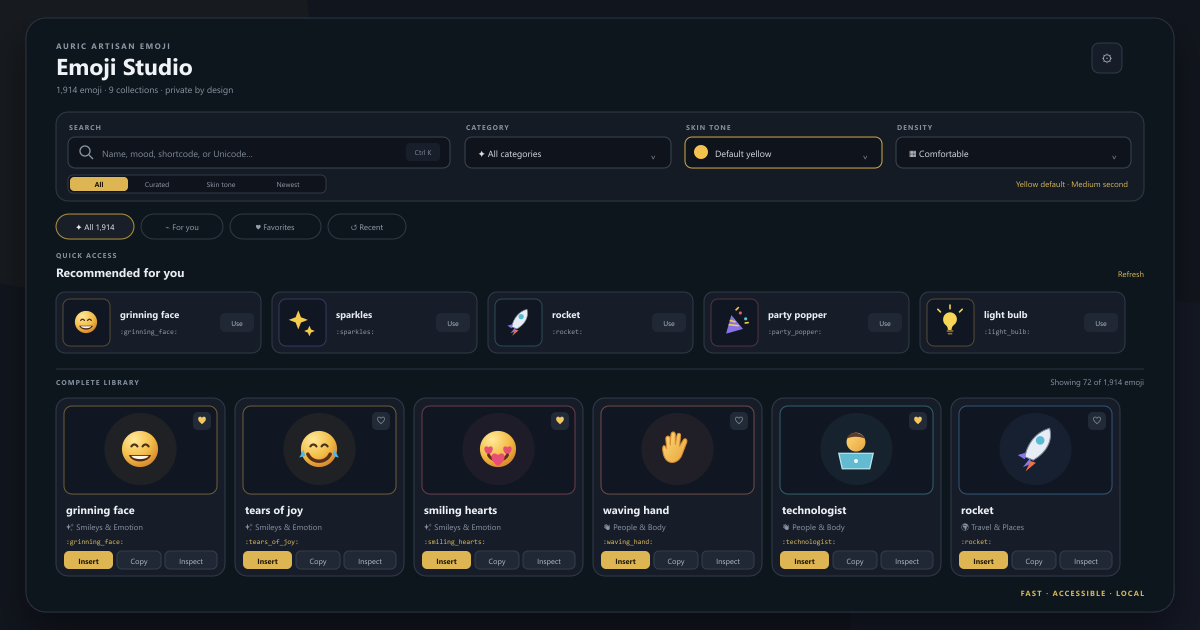
Auric Artisan EmojiA modern, searchable emoji studio for VS Code with native insertion, sequences, copy formats, favorites, recents, skin tones, keyboard navigation, shortcodes, an English or Hindi interface, and private local state. Installation Launch VS Code Quick Open ( Ctrl+P), paste the following command, and press enter.Copied to clipboard |

Auric Artisan EmojiFind the right emoji. Put it straight into your code. A local emoji workspace for Visual Studio Code: search 1,914 emoji, insert from a card or code hover, compose sequences, and choose the output your file needs. Version 0.2.0 · VS Code 1.85+ · English / हिन्दी · No account required Auric Artisan · Source · Report an issue
Watch the product preview · View the animated preview · Public media kit Get started · Insert from code · Explore the studio · Output formats · Settings · Privacy Get started
For the full workspace, select Auric Emoji in the Activity Bar or press What's new in 0.2.0
See the changelog for the complete release notes. Insert from codeHover, preview, insertWrite a complete shortcode such as Only the hovered shortcode is replaced, in one undo step. The action uses the skin tone shown in the preview and does not add quotes, change other cursors, or rewrite surrounding code. If the document changes before you click, hover again for a fresh action. This feature requires VS Code editor hovers and Shortcode completionType Accept a suggestion to insert its emoji. Disable these suggestions with Replace several shortcodesSelect text and run Auric Artisan Emoji: Replace Emoji Shortcodes in Selection. With no selection, the command processes the current line. Unknown tokens are left unchanged. Explore the StudioSearch your way. Find names, keywords, exact emoji, shortcodes, code points and common Hindi words. Try Keep useful emoji close. Library, For you, Favorites and Recent views share local state. Star a card, recall your last emoji, or use the dedicated recent/favorite Quick Picks. Inspect before inserting. Open a card's … action or focus its emoji and press Work beside your file. Studio insertion targets the active or last active editor and supports multiple selections in one undo step. The explicit Insert action inserts even when the main card-click preference is Copy. If no editor is available, Studio insertion copies the result instead. Expand Workspace overview to inspect the target file and cursor information. Choose your layout. The full Studio offers grid/list views and compact, comfortable or showcase densities. The narrow sidebar uses a compact grid with visible actions. Keyboard focus, native scrolling, forced colors and reduced motion are supported. Skin tonesChoose the standard Yellow presentation or one of five skin tones. 330 catalog entries support tone changes. The choice flows through card previews, insertion, Quick Pick, completions and shortcode replacement. The inspector lets you preview a tone and make it your default. Favorites and recents store emoji IDs, so changing tone does not create duplicate history entries. Glyph appearance depends on the emoji fonts available on your system. Compose a sequenceFocus an emoji and press Insertion uses emoji characters; copying uses your configured output format. Shortcodes, Unicode labels and CSS escapes are space-separated. Emoji, HTML entities and JavaScript escapes are joined directly. Six output formatsThe inspector previews the exact text before you copy or insert it. Choose Make default there, or change
These are text representations, not complete code snippets. Add the surrounding syntax your language requires; JavaScript code-point escapes, for example, are not JSON escapes. English and हिन्दीUse the Studio's Auto / English / हिन्दी switch, the Choose Interface Language… command, or
Keyboard and commandsStudio: Keyboard controls inside Emoji Studio
Tab to a card's action buttons to insert, copy or inspect directly. Text inputs retain normal editing behavior. All Command Palette actionsSearch Auric Artisan Emoji in the Command Palette:
Clearing history removes recents and last-emoji recall; favorites are retained. SettingsSearch For exact string contents with no extra whitespace, set Troubleshooting
PrivacyThe emoji catalog and Studio assets are bundled. The extension has no telemetry, account requirement or runtime package dependencies, and does not execute workspace code or fetch remote content for its interface. Website links open externally only when selected. Favorites, recents and preferences use VS Code state/settings; the webview also remembers interface state and sequences. Document contents are not persisted as history. Editor-hover actions temporarily retain the hovered shortcode and its document/range in a bounded in-memory cache to validate an explicit edit. The webview uses a restrictive content security policy. Hover links allow only the extension's insertion command, with single-use tickets and document/version checks. DevelopmentUse Node.js 24+ for the development toolchain used here. From this extension directory: Prepublish builds the catalog and artwork, validates assets and metadata, and runs the tests. For a browser preview, run Before publishing, install the VSIX in a clean VS Code profile and test real editor insertion and hovers. Packaging does not publish or install the extension. Support and licenseSecurity policy · Third-party attribution · Publishing checklist Copyright © 2026 Auric Artisan. Free to install and use under the Auric Artisan license; redistribution and resale of the extension are restricted. |