Skip to content
| Marketplace
Sign in
Visual Studio Code>Programming Languages>Atlarix — AI Coding Agent (Any Model, Your Own Key)New to Visual Studio Code? Get it now.
Atlarix — AI Coding Agent (Any Model, Your Own Key)

Atlarix — AI Coding Agent (Any Model, Your Own Key)

Atlarix

| (0) | Free
AI coding agent for VS Code, Cursor, Kiro and Windsurf. Use Claude, GPT, Gemini, GLM, DeepSeek or local models with your own API key, or Atlarix Auto. Plan, Build, Debug and Review modes; every edit waits for your approval.
Installation
Launch VS Code Quick Open (Ctrl+P), paste the following command, and press enter.
Copied to clipboard
More Info

Atlarix — AI coding agent for VS Code, Cursor and Kiro

Atlarix is an AI coding agent that works in your editor with any model. Use Atlarix Auto, Atlarix Core, or your own API key for OpenAI (GPT), Anthropic (Claude), Google (Gemini), Z.ai (GLM), DeepSeek, OpenRouter or a local model through Ollama — and switch between Plan, Build, Debug, Review and Explore modes from the message box. Every edit opens in the editor's own diff and waits for your yes before it is written.

It runs in VS Code, Cursor, Kiro, Windsurf, VSCodium and other editors built on VS Code. For Zed and JetBrains IDEs, see Atlarix in Zed and JetBrains through the Agent Client Protocol.

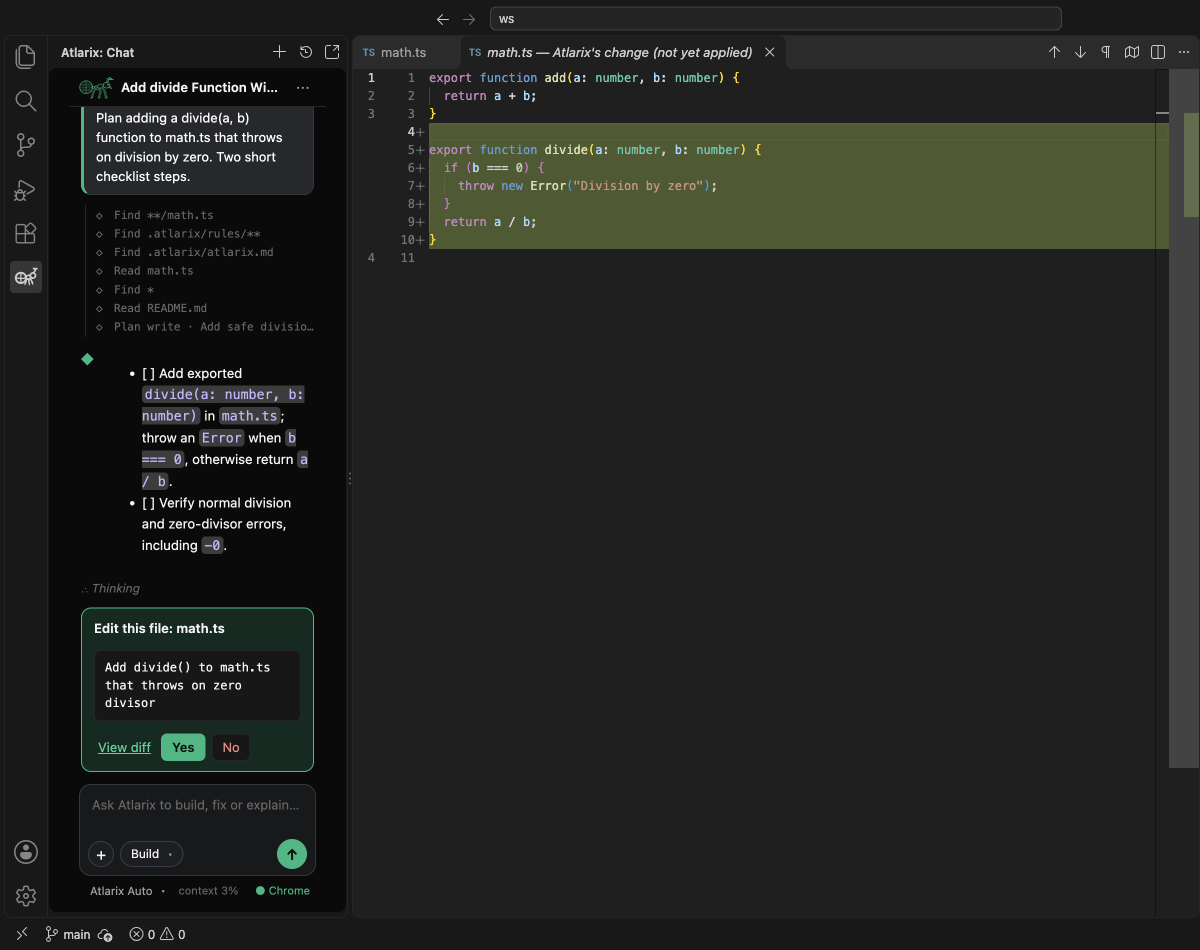
Atlarix in VS Code: an edit waiting for approval in the editor's side-by-side diff

What it does

  • Any model, your key or ours. Atlarix Auto picks a good model for each task; Atlarix Core gives you named models; or connect your own provider key. The model list is the same one you set up in the Atlarix desktop app and CLI.
  • Changes you approve. Build mode asks before every file edit and every command. Edits open in VS Code's side-by-side diff: Yes applies, No leaves the file alone.
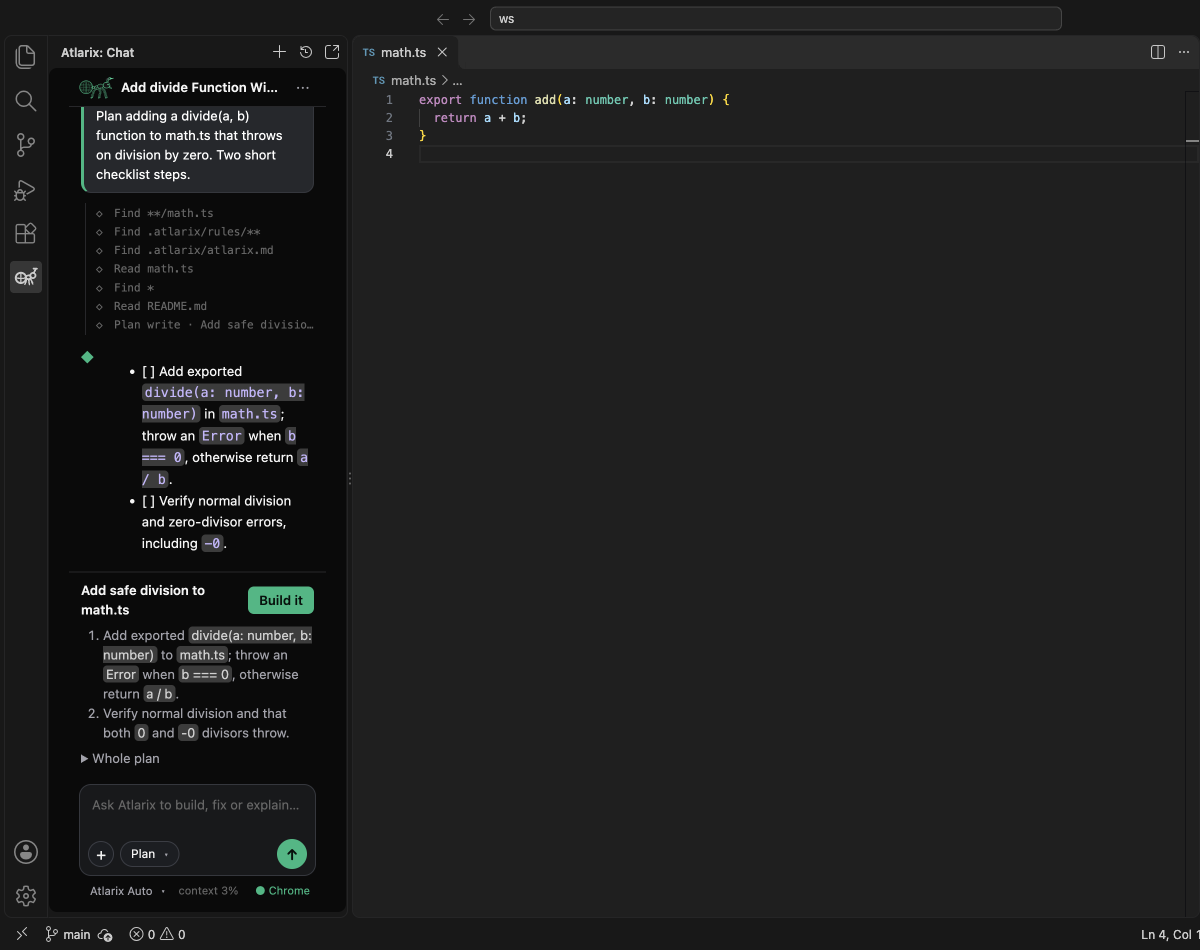
  • Plan, then build. Plan mode reads your code and writes a step-by-step plan you can review in the panel; Build it carries it out. See how Atlarix's modes work.
  • Debug and Review. Debug finds the cause before changing anything; Review reads your uncommitted changes like a careful reviewer.
  • Your browser, too. With the Atlarix Chrome extension connected, the agent can open pages, read them and test your app in your own Chrome.
  • Sessions that talk to each other. An Atlarix session in the app, the terminal, Chrome or another editor can send this one a message — it arrives as a card and is answered here.
  • Context from your editor. Select code and press ⌘⌥L (Ctrl+Alt+L), type @ to add a file, or attach an image.
  • Back where you were. Return after a few minutes away and a one-line recap says where the work stands.

Atlarix plan mode in VS Code: a step-by-step plan with a Build it button

Get started

  1. Install Atlarix and open the Atlarix view (the ant in the activity bar), or press ⌘⌥A (Ctrl+Alt+A).
  2. Sign in with your Atlarix account — free to create at atlarix.dev.
  3. Pick a mode and a model, and ask for something: "add input validation to the signup form".

The extension includes its own copy of the Atlarix CLI, so there is nothing else to install.

FAQ

Can I use my own API key? Yes. Any provider you connect in Atlarix (OpenAI, Anthropic, Google, OpenRouter, DeepSeek, Z.ai and more) appears in the model picker. Your key's requests go from your machine to that provider.

Does it work in Cursor, Kiro and Windsurf? Yes. Install Atlarix from Open VSX, which those editors use. It is the same extension.

Is my code sent anywhere? Your code stays on your machine. Only what the agent reads for a task is sent to the model you chose. See Atlarix's privacy policy.

How much does it cost? The extension is free. Atlarix Auto includes a free daily share; beyond that, Atlarix Pro or pay-as-you-go credit — or use your own key.

What about Zed, IntelliJ or PyCharm? They run Atlarix through the Agent Client Protocol — set up Atlarix in Zed and JetBrains IDEs.

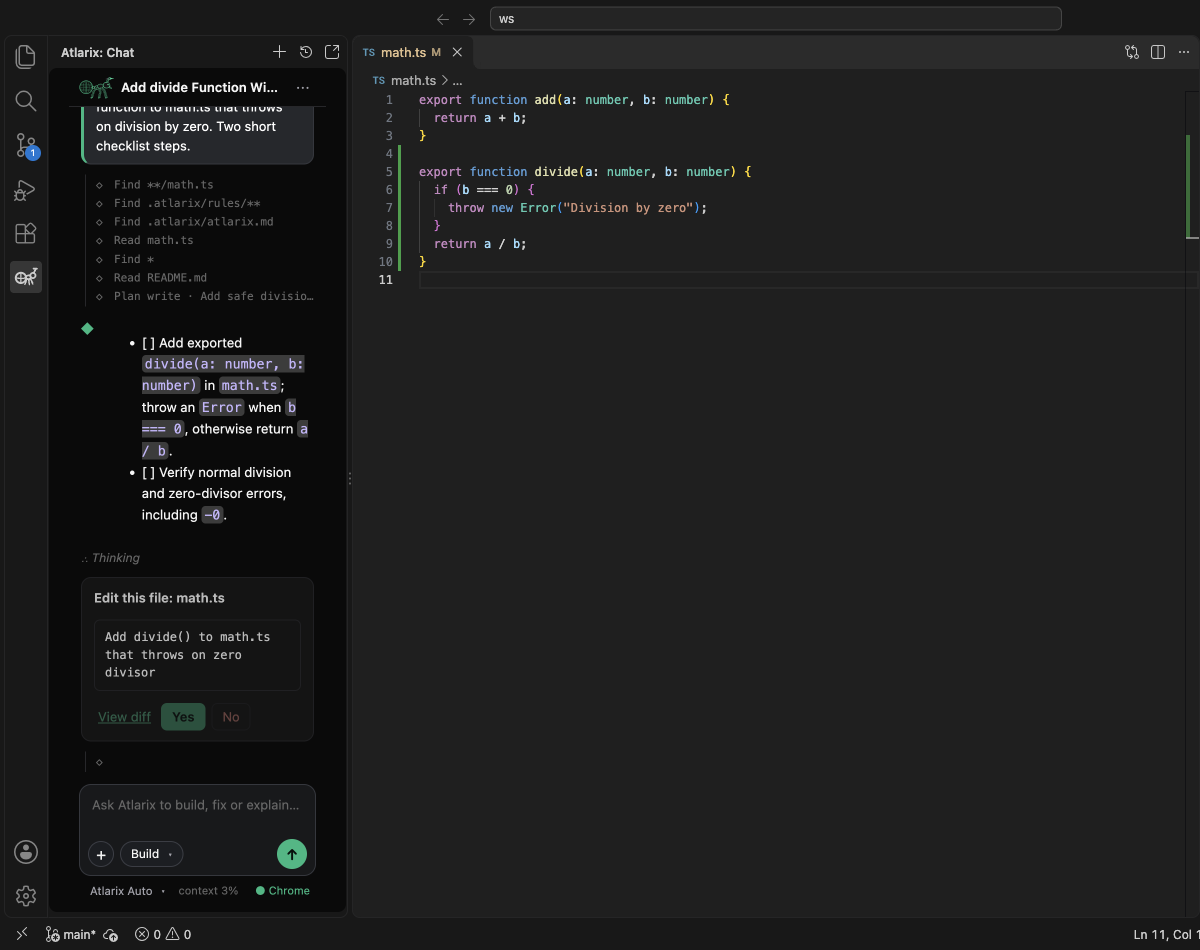
Atlarix in VS Code after building the plan: the change applied to the file


Atlarix is made by Norah Labs. Rix, the weaver ant, is our mascot: the globe is any model, the compass antenna finds the way.

  • Contact us
  • Jobs
  • Privacy
  • Manage cookies
  • Terms of use
  • Trademarks
  • Your Privacy Choices
  • Consumer Health Privacy
© 2026 Microsoft