Skip to content
| Marketplace
Sign in
Visual Studio Code>AI>KubeAstraNew to Visual Studio Code? Get it now.
KubeAstra

KubeAstra

Preview

astraverse-io

|
1 install
| (0) | Free
AI root-cause analysis for Kubernetes, inside your editor. Investigate crashing pods and manifests against your own cluster, then review and approve the fix.
Installation
Launch VS Code Quick Open (Ctrl+P), paste the following command, and press enter.
Copied to clipboard
More Info

KubeAstra for VS Code

Find out why your Kubernetes workloads are broken without leaving your editor.

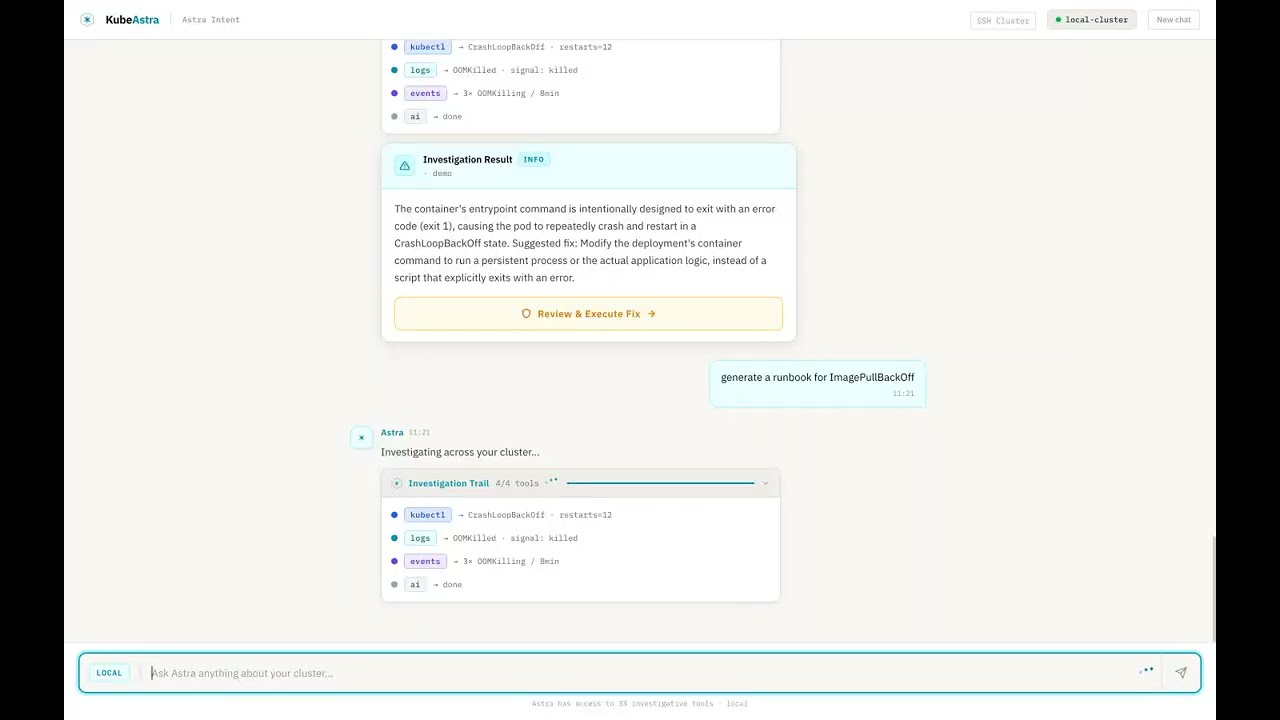
Ask "why is checkout-service crashlooping in production?" and KubeAstra runs a live investigation against your cluster: it pulls pod status, events, logs and resource specs, reasons over what it finds, and returns a root-cause diagnosis with the evidence behind it and a fix you can review and run.

KubeAstra runs on infrastructure you control. The extension connects to your own KubeAstra backend. There is no hosted service, and your cluster data never goes through a third party.

See it in action

Watch the 90-second demo

Watch the 90-second demo: the KubeAstra investigation engine, which powers this extension, works through seven real Kubernetes failures, including CrashLoopBackOff, OOMKilled, ImagePullBackOff, a stuck PVC and an unschedulable pod.

Features

Agentic investigation, streamed live

Every question starts a ReAct investigation on your backend, using 52 built-in Kubernetes tools. You watch it happen: each tool call, thought and observation streams into the investigation trail as it runs, not as a canned summary at the end.

Root-cause diagnosis, not a log dump

Investigations end in a diagnosis card: what's wrong, why, the evidence that proves it, and the commands that fix it. Common failures are covered by deterministic playbooks that answer quickly and consistently: CrashLoopBackOff, OOMKilled, ImagePullBackOff, Pending pods, stuck PVCs, stalled rollouts, DNS failures and node pressure.

Fixes you approve, never fixes that just happen

Read-only by default. Any command that changes the cluster, such as delete, scale, restart or patch, goes through an explicit approval step in the editor before it runs. Every executed command is recorded in the backend's audit log, and all commands run under your existing Kubernetes RBAC.

Investigate the manifest you're editing

  • An Investigate with KubeAstra code lens appears above every kind: in a YAML file. Click it to send the manifest into a chat.
  • Right-click any YAML, Terraform or HCL file and choose KubeAstra: Investigate current file.
  • Select any text, such as an error message, a log excerpt or part of a spec, then right-click and choose KubeAstra: Investigate selection.

Cluster status at a glance

The status bar and the chat header show which cluster the backend is connected to, refreshed every 30 seconds. Click the status bar item to sign in or jump to the chat.

Same engine as the KubeAstra web app

The chat panel is built from the same Mission Control components as the KubeAstra web UI, so what you see in the editor matches what your team sees in the browser, backed by the same investigation engine.

Getting started

1. Run a KubeAstra backend

The extension needs a KubeAstra backend in server mode. Choose one:

On your machine (Docker Compose), using your local kubeconfig:

git clone https://github.com/astraverse-io/KubeAstra.git
cd KubeAstra
cp ui/backend/.env.example ui/backend/.env   # set GEMINI_API_KEY, or LLM_PROVIDER=ollama
cd ui && docker compose up --build           # backend on http://localhost:8000

In your cluster (Helm), shared by your team:

helm upgrade --install kubeastra helm/kubeastra \
  --namespace kubeastra --create-namespace \
  --set secrets.geminiApiKey="YOUR_KEY"

See the deployment guide for ingress, secrets, and the optional features: RAG runbook cache, Alertmanager webhook and remediation plans.

2. Sign in

Open the Command Palette (Cmd+Shift+P / Ctrl+Shift+P), run KubeAstra: Sign in, and enter your backend URL and credentials. If the backend runs with AUTH_ENABLED=false, the extension detects it and skips the credentials prompt.

3. Ask

Open the KubeAstra view in the activity bar and describe the problem in plain English:

  • "What's broken in the payments namespace?"
  • "Why is api-gateway restarting?"
  • "Why is the data-postgres PVC stuck in Pending?"

Commands

Command What it does
KubeAstra: Ask a question Opens the chat panel.
KubeAstra: Investigate current file Sends the active file to the chat for investigation.
KubeAstra: Investigate selection Sends the selected text to the chat.
KubeAstra: Connect cluster Asks the backend to connect to a cluster and report its status.
KubeAstra: Sign in Configures the backend URL and signs in.
KubeAstra: Sign out Ends the session and deletes the stored credential.

Settings

Setting Default Description
kubeastra.backendUrl (empty) Base URL of your KubeAstra backend, e.g. http://localhost:8000 or https://kubeastra.example.com. If empty, you're prompted on first sign-in.
kubeastra.autoSignIn true Prompt to sign in when the extension activates and a backend URL is set.

Security and privacy

  • Your infrastructure only. The extension talks only to the backend URL you configure. The LLM that backend uses is your choice: Gemini, Anthropic, OpenAI, or a fully local model through Ollama, which keeps all data inside your network.
  • Credentials stay in the OS keychain. Your session is stored in VS Code SecretStorage, never in settings files or the workspace.
  • The chat panel never touches the network. Every request goes through the extension host, which holds the credential. The webview never sees the session cookie.
  • No telemetry. The extension collects no usage data.

Requirements

  • VS Code 1.85 or later. The extension is also available on OpenVSX for Cursor, VSCodium and other compatible editors.
  • A reachable KubeAstra backend in server mode, with access to at least one Kubernetes cluster.

Known limitations

This is a preview release.

  • Requires a self-hosted backend. The extension can't reach a cluster directly.
  • Only server mode is supported. You can't use the kubeastra open desktop app as a backend yet.
  • Investigating a file sends its contents to your backend. Avoid running it on files that contain unredacted secrets.

Feedback and support

  • Report bugs and request features in GitHub Issues.
  • Report security issues privately through GitHub Security Advisories.
  • Contributions are welcome. See CONTRIBUTING.md to build the extension from source.

License

Apache-2.0

  • Contact us
  • Jobs
  • Privacy
  • Manage cookies
  • Terms of use
  • Trademarks
  • Your Privacy Choices
  • Consumer Health Privacy
© 2026 Microsoft