Safer Version Lens
Inline dependency updates with vulnerability context — so you can upgrade with fewer surprises.
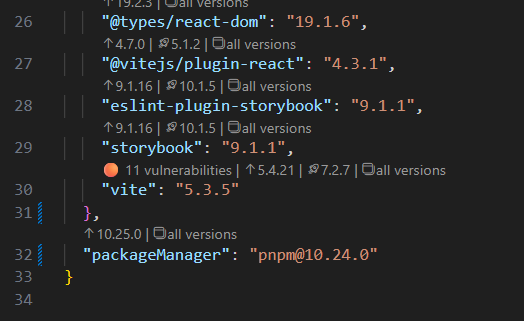
Safer Version Lens adds CodeLens to your package.json showing upgrade options with vulnerability indicators, so you can update packages without switching tabs, tools, or mental models.
It also supports time quarantine (pnpm/Yarn/npm configs) so you can avoid “published 6 minutes ago” releases when you're more of the conservative type.
By marking vulnerable versions directly in your editor — before you install them — the extension helps you stay aware of risk, for instance in the aftermath of a supply-chain attack.
It won’t make dependency management safe. But it will make it less exciting.
What you get
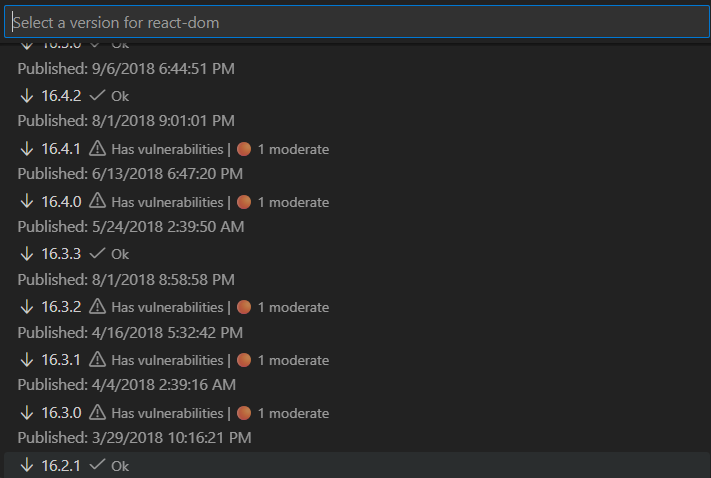
- Inline version suggestions (patch/minor/major + “all versions”)
- Security vulnerability indicators per version (using npm advisory data)
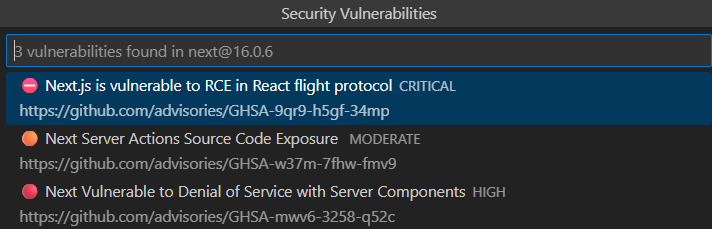
- Vulnerability drill-down for your installed version (click to list, open advisories)
- Clickable vulnerability lists — inspect all known vulnerabilities for a version and open each advisory (CVE) directly
- Quick-update filtering by max allowed vulnerability severity
- Time quarantine support (respects your package manager’s age-gate config)
- Caching + async fetching to keep the editor responsive
Inline CodeLens actions:
Browse all versions with vulnerability context:
Read up on vulnerabilities for a specific version:
Quick Start
- Install Safer Version Lens from the Marketplace
- Open any
package.json
- Look above each dependency for CodeLens update actions
- Click a version to update instantly — or browse
all versions for details
No configuration required to get started.
Features
📦 Inline Version Updates
CodeLens actions appear above each dependency:
↑ Latest in current major — patch/minor updates🚀 Latest major — major upgrades📋 all versions — browse full history with security context
🛡️ Vulnerability Context (npm advisories)
Versions show severity indicators:
⛔ Critical🔴 High🟠 Moderate🟡 Low
Clicking a version marked as vulnerable opens a detailed list of all known vulnerabilities for that version, with direct links to their advisory (CVE) pages.
Quick-update buttons will automatically exclude versions above your configured severity threshold.
This makes it easier to understand what you’re patching — and why — instead of blindly upgrading everything anything.
🔒 Time Quarantine Support (pnpm, Yarn & npm)
If you already use age gating, Safer Version Lens respects it:
pnpm (pnpm-workspace.yaml)
minimumReleaseAge: 10080 # 7 days in minutes
Yarn (.yarnrc.yml)
npmMinimalAgeGate: "7d"
npm (.npmrc)
before=2024-12-09
Time quarantine indicators
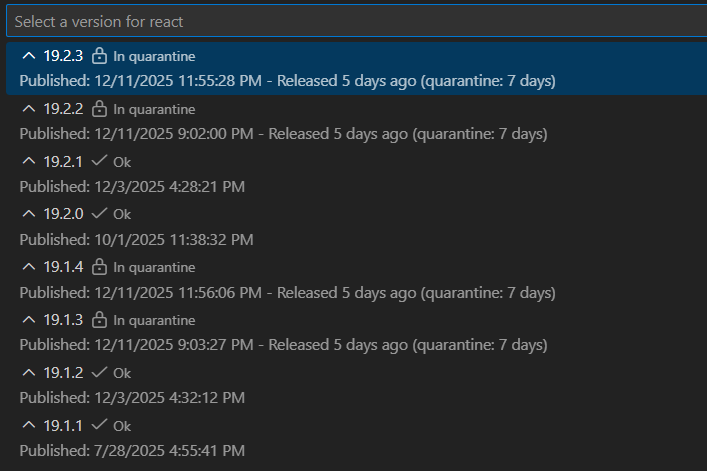
The extension will avoid suggesting versions still “too fresh”.
Configuration (Optional)
| Setting |
Default |
Description |
| saferVersionLens.enabled |
true |
Enable/disable Safer Version Lens |
| saferVersionLens.showPrerelease |
false |
Show pre-release versions |
| saferVersionLens.registry |
https://registry.npmjs.org |
Registry URL |
| saferVersionLens.auditEnabled |
true |
Enable vulnerability auditing |
| saferVersionLens.auditMaxSeverity |
low |
Max severity allowed in quick-update suggestions |
Commands
- Safer Version Lens: Toggle Enabled
- Safer Version Lens: Toggle Pre-release Versions
- Safer Version Lens: Refresh
- Safer Version Lens: Show Configuration
FAQ (Short)
No CodeLens showing?
- Check the extension is enabled by
- clicking the
Safer Version Lens button in the VSCode footer, or
- running the
Safer Version Lens: Toggle Enabled command
- Open package.json
- Ensure the file contains dependencies, devDependencies, peerDependencies, or a packageManager field
Suggestions look outdated?
Caches network results for 30 minutes. Run Safer Version Lens: Refresh.
Private registries?
Yes: configure saferVersionLens.registry.
Privacy
- Uses registry + npm advisory endpoints (read-only)
- Caches responses locally
- No telemetry
- No personal data collection
Contributing
Repo: https://github.com/asmundwien/safer-version-lens
Issues + PRs welcome
Acknowledgements
Inspired by the Version Lens extension, with an additional focus on security context and supply-chain risk awareness.
Enjoy calmer dependency updates. 🛡️

