






CiOpt-Core
The C Code Complexity & Optimization Companion for VS Code
"Analyze. Detect. Accelerate."
Developed by Asif Ahamed
CiOpt-Core is a Visual Studio Code extension that brings the CiOpt static analysis engine directly into your editor. With a single right-click it estimates Big-O complexity, detects performance bottlenecks, finds anti-patterns, and surfaces optimization suggestions for your C and C++ code — all without compiling or running it. Under the hood it shells out to a compiled, Tree-sitter-powered C engine and renders the results in a clean, color-coded Webview dashboard.
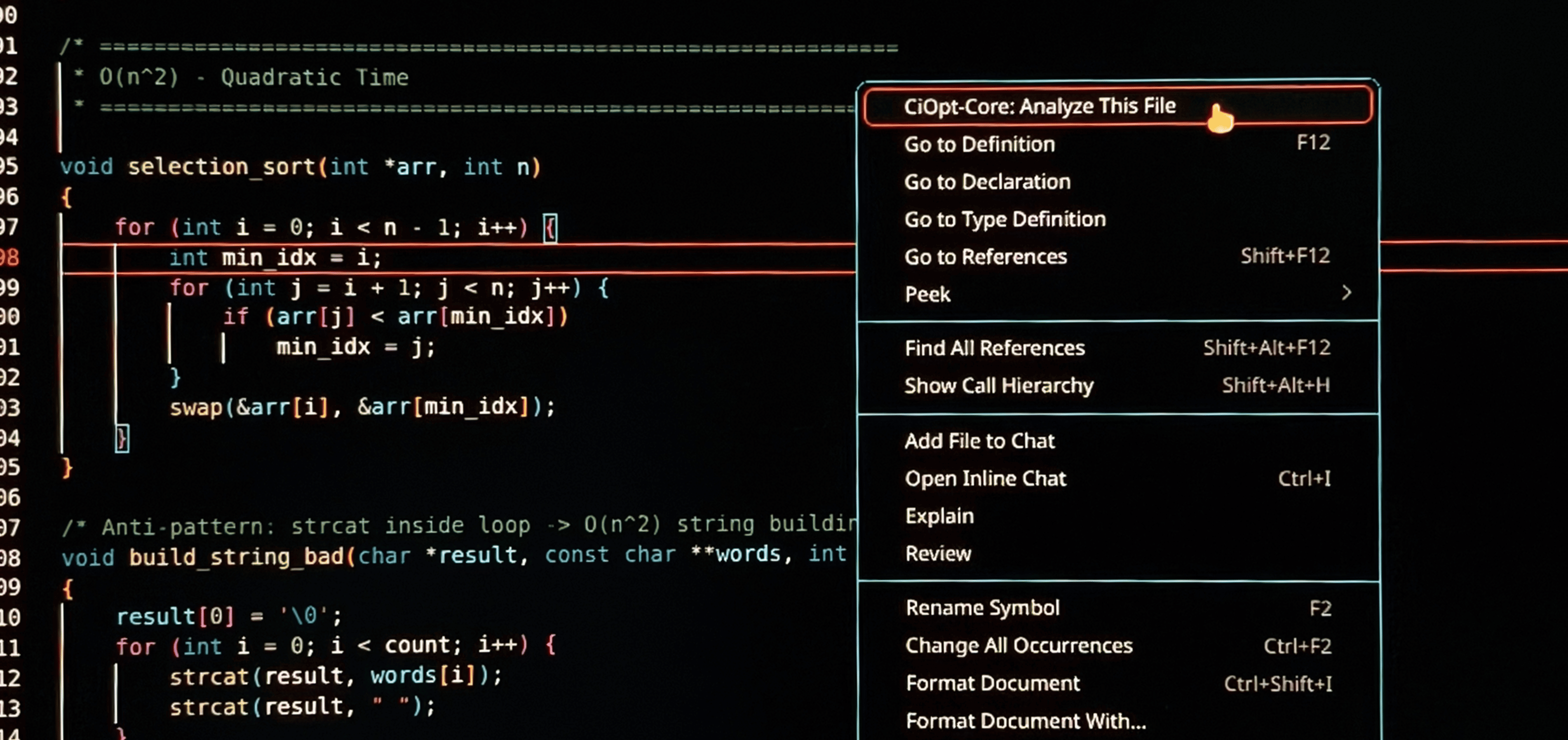
Right-click a .c file → CiOpt engine (Tree-sitter) → Beautiful Webview report
🧠 Built for Vibe Coders
CiOpt is purpose-built for the vibe coding workflow. If you use AI assistants (ChatGPT, Claude, Copilot, Gemini, Cursor, etc.) to write C code, CiOpt-Core is your quality gate inside the editor.
The Problem
When you vibe-code — letting AI generate large chunks of C code — you move fast, but you can't always tell if the generated code is performant. AI models happily produce working code that silently contains O(n²) loops, unnecessary recursion, or buffer-management bugs that will break at scale.
The Solution
CiOpt-Core analyzes the AI-generated code and produces a structured report you can feed right back to your AI assistant to fix the issues — a self-improving feedback loop, without ever leaving VS Code:
+---------------------------------------------------------+
|                   VIBE CODING LOOP                      |
|                                                         |
|   You --prompt--> AI writes C code                      |
|                      |                                  |
|                      v                                  |
|        CiOpt-Core analyzes it (right-click)             |
|                      |                                  |
|                      v                                  |
|            Report (bottlenecks,                         |
|            anti-patterns, fixes)                        |
|                      |                                  |
|                      v                                  |
|          Feed report back to AI <-- "Fix these issues"  |
|                      |                                  |
|                      v                                  |
|              AI improves code                           |
+---------------------------------------------------------+
✨ Features
| Feature |
Description |
| One-Click Analysis |
Right-click any C/C++ file and choose CiOpt-Core: Analyze This File |
| Beautiful Webview UI |
A clean, dark-mode-friendly dashboard with severity badges and complexity pills |
| Big-O Estimation |
Per-function complexity: O(1), O(log n), O(n), O(n log n), O(n²), O(n³), O(2ⁿ) |
| Anti-Pattern Detection |
Unsafe gets(), strcat in loops, missing null checks, buffer-overflow risks |
| Dead-Code Detection |
Unreachable code after return/break/goto, unused variables, uncalled functions |
| Summary Stats |
Functions analyzed, issues found, worst complexity, and analysis time at a glance |
| Zero Compilation Needed |
Pure static analysis via Tree-sitter — no build, no execution, no side effects |
How to Use
- Open any
.c or .cpp file in Visual Studio Code.
- Right-click anywhere in the editor.
- Select CiOpt-Core: Analyze This File from the context menu.
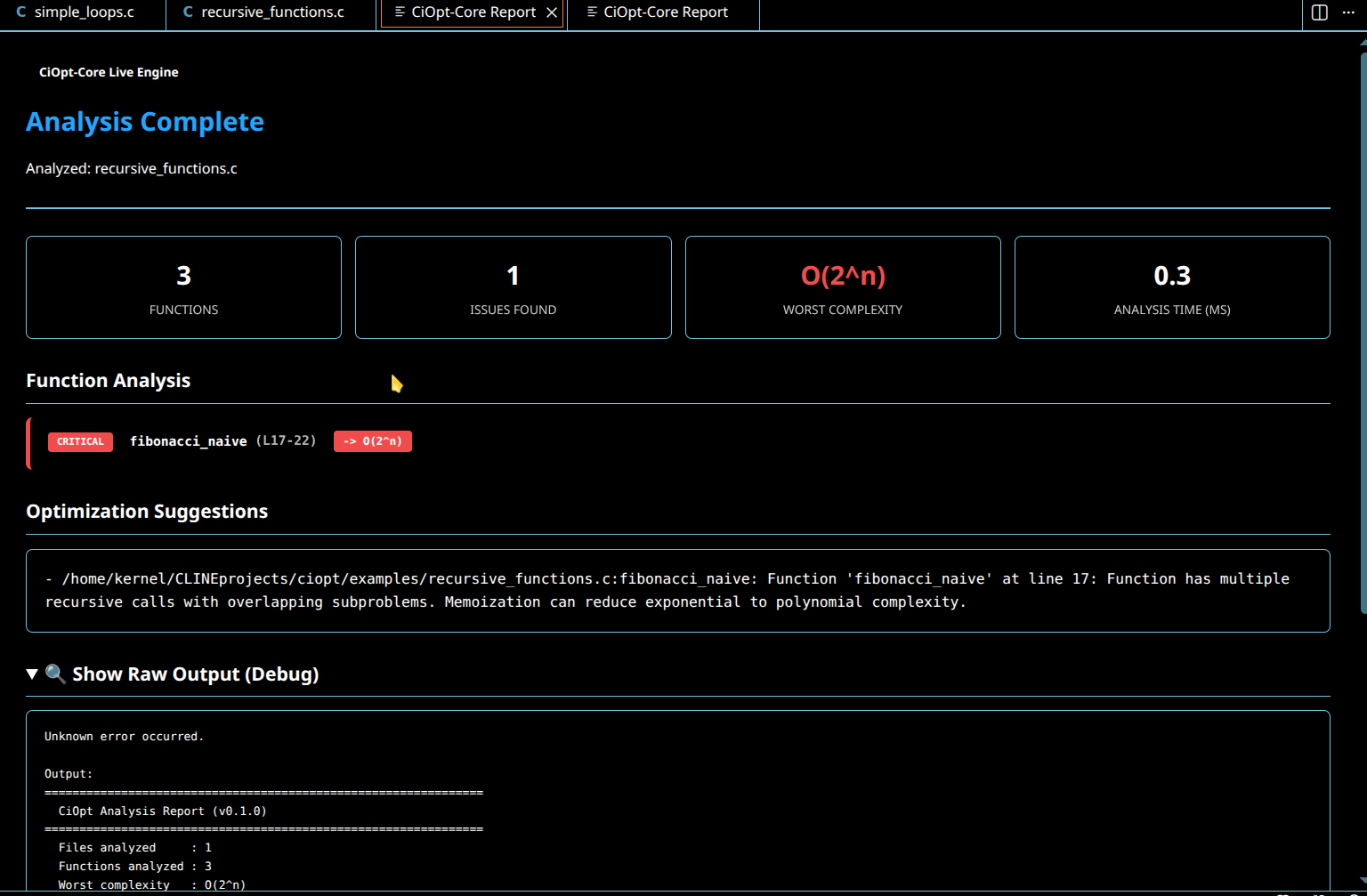
- A new panel opens with your report: a stats header, a color-coded Function Analysis list (INFO / WARNING / CRITICAL), and an Optimization Suggestions section.
The extension activates automatically whenever you open a C or C++ file.
📸 Extension Usage Preview
🛠️ Requirements
- Visual Studio Code 1.125.0 or newer.
- A C or C++ file open in the editor.
- The compiled
ciopt engine is bundled inside the extension (engine/ciopt on Linux/macOS, engine/ciopt.exe on Windows), so no extra setup is required.
🔧 Under the Hood
CiOpt-Core is a thin TypeScript wrapper around the native CiOpt engine. The flow is:
- The extension reads the active editor's file path.
- It runs the bundled binary:
ciopt analyze <file>.
- It strips ANSI color codes from the engine's stdout.
- It parses the report (stats, per-function severity, complexity, suggestions).
- It renders everything in a themed Webview that follows your VS Code color settings.
Want the full CLI, C API, architecture, and CI/CD docs? See the main repository: github.com/asifahamed-ece/ciopt.
Sample engine output (what the extension parses)
========================================
  CiOpt Analysis Report (v0.1.0)
========================================
  Files analyzed     : 1
  Functions analyzed : 9
  Worst complexity   : O(2^n)
  Total issues       : 1
  Analysis time      : 0.7 ms
----------------------------------------
[CRITICAL] fibonacci_bad (L85-89) -> O(2^n)
  [!] Anti-Pattern: multiple recursive calls with overlapping subproblems
      Suggestion: Memoization can reduce exponential to polynomial complexity.
🏗️ Building from Source
If you want to hack on the extension itself:
git clone https://github.com/asifahamed-ece/ciopt.git
cd ciopt/ciopt-core
npm install

# Build the bundled C engine first
cd engine && make && cd ..

# Launch the Extension Development Host
# (open this folder in VS Code and press F5)

# Package a .vsix
npm install -g @vscode/vsce
vsce package
🤝 Contributing
Contributions, issues, and feature requests are welcome. Open an issue or a pull request on the main repository. Please read our Code of Conduct before participating.
📄 License
This project is licensed under the MIT License — see the LICENSE file for details.
🌟 Acknowledgments
- FiOpt by Ahamed Faisal — the original Python complexity analyzer that inspired CiOpt.
- Tree-sitter — the parsing library that makes CiOpt possible.
- Vibe coders everywhere — this tool was built for you.
CiOpt-Core — Stop shipping slow code.
Built with ❤️ for the C developer community.




