DataWeave Studio for VS Code
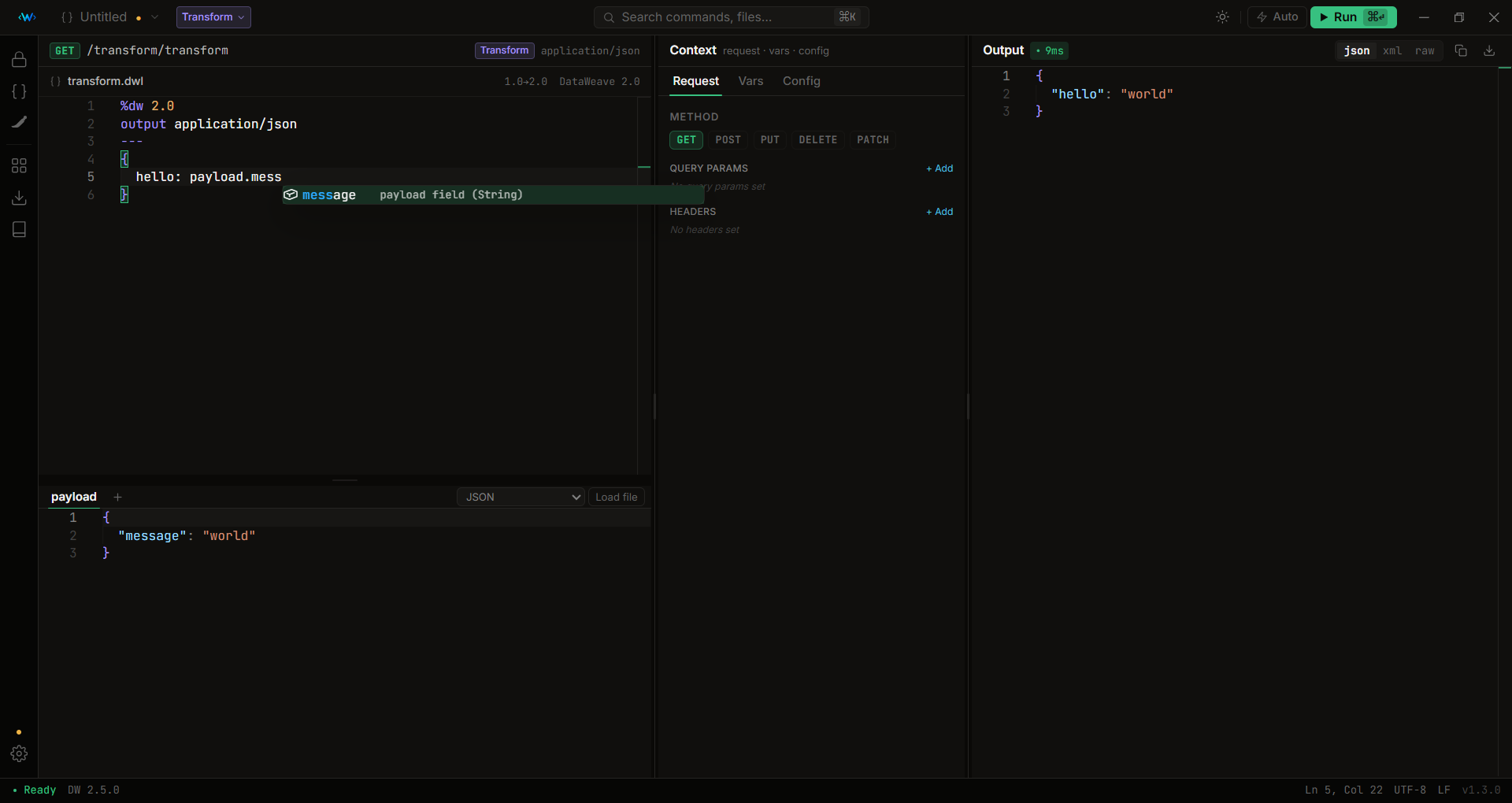
DataWeave 2.12, inside VS Code. Write a script, drop in a payload, press Run, and get the result in about 20 milliseconds. No Anypoint Studio, no Maven project, no Docker, no account. Java ships inside the extension.
Why this exists
Almost nobody opens Anypoint Studio to check a four-line transform. They open the online playground, because it's one tab and it works.
Then they hit its edges:
- No variables, no attributes. Your script reads
vars.correlationId or attributes.headers.authorization, and there's nowhere to put them. So you fake it with a var at the top, get it working, and then find out it behaves differently in the flow.
- Real payloads are too big for it. The response you're actually debugging is 4 MB of nested JSON. The answer is the command-line tool, which is a wall if you don't live in a terminal.
- No secure properties, no config. Your script uses
${http.host} and ${secure::api.key} from your Mule config, and the playground has nowhere to put either.
This is the playground with those edges removed. It installs like any extension and runs on your machine, with no account.
|
This extension |
Online playground |
DataWeave CLI |
Anypoint Studio |
| Variables, attributes, headers |
Yes, in a form |
No |
Flags |
Yes |
| Large payloads |
Yes, from a file |
Practical limit |
Yes |
Yes |
| Works offline |
Yes |
No |
Yes |
Yes |
| Step debugger with breakpoints |
Yes |
No |
No |
No |
Secure properties (![…]) |
Yes, offline |
No |
No |
Runtime only |
| Needs a project / install / account |
No |
No account |
Install |
2 GB, a Mule project |
| Beginner lessons and practice |
Yes |
Tutorials |
No |
No |
| Works with your AI assistant |
Yes, free |
No |
No |
Subscription |
What works here works in your Mule app.
What you get
Run and understand
- Instant runs. A warm, long-lived engine runs scripts in ~10-20 ms. Auto-run is on by default, so output re-renders about a second after you stop typing.
- Every expression's value, without a single
log(). The Trace panel lists what each expression in your script evaluated to, in source order. Click a row to jump to it. A map body that ran 500 times is one row with a count. A script that throws still shows everything it worked out before the throw.
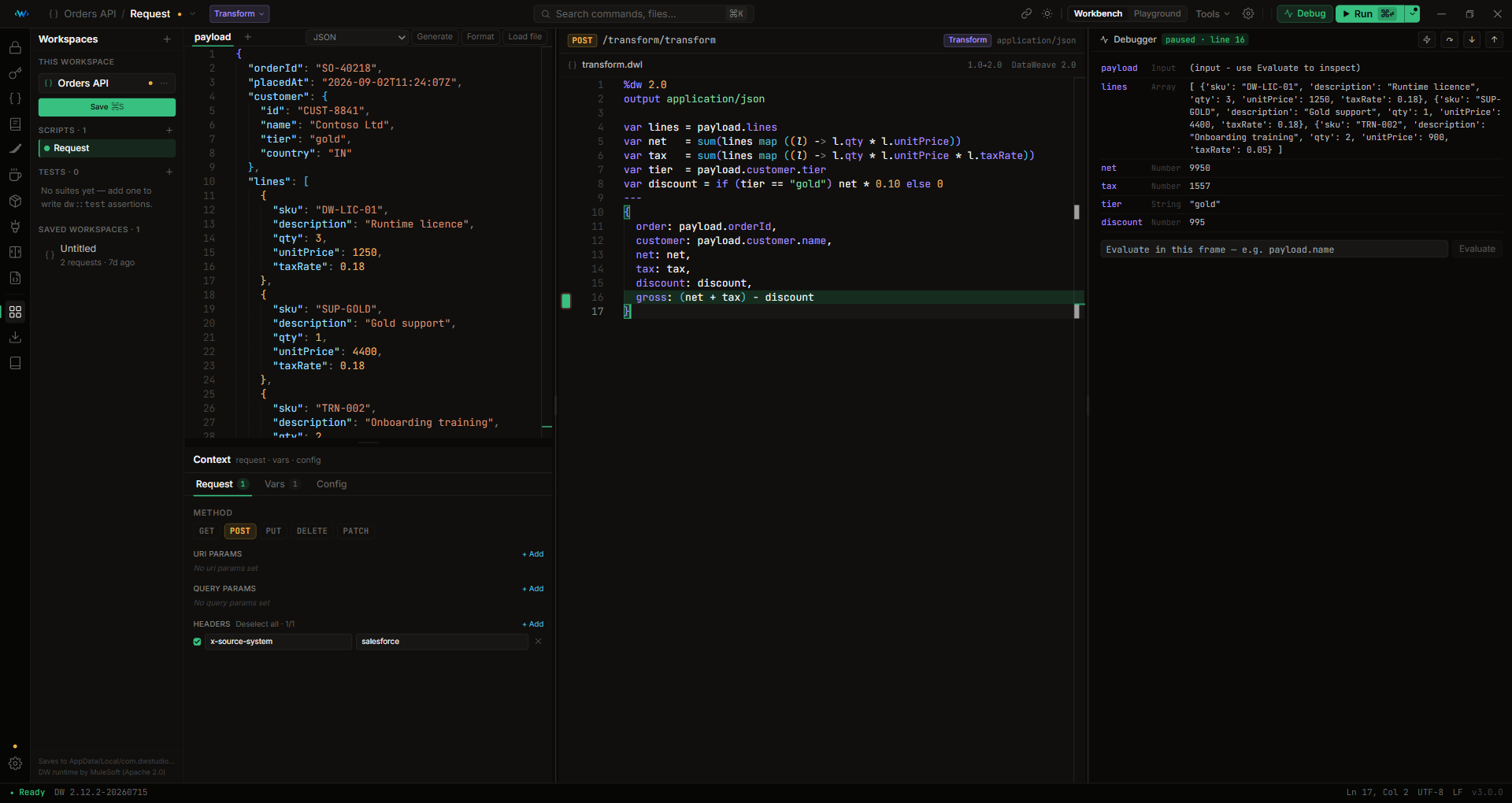
- A real step debugger. Click the gutter to set a breakpoint. The script stops there and you get the call stack, every variable in scope, step over / into / out, and a box to evaluate any expression against the paused frame.
- Check against the Mule you deploy to. Point it at Mule 4.1 through 4.12 and a 2.10 function on a 4.4 runtime fails here, in the editor, naming the version that introduced it, instead of on the server.
Feed it real inputs
- HTTP context in a form. Method, headers, query params, URI params and variables. Your script sees real
attributes and vars, not a var you invented to stand in for them.
- 14+ input formats. JSON, XML, CSV, YAML, NDJSON, Java properties, Excel, Avro, Protobuf, flat file, binary, plus extra named inputs and a visual multipart/form-data builder.
- cURL import. Paste any
curl command from Postman, browser devtools or a teammate, and the method, headers, params and body fill themselves in, with a starter script generated to match.
- OpenAPI / Swagger import. Open a spec, pick an endpoint, and its request and response shapes become a working request with realistic sample data.
Secure properties
Paste an application.yaml and a secure-config.yaml with ![encrypted] values, provide the key at runtime, and ${key} / ${secure::key} resolve before each run. There's a standalone encrypt/decrypt tool byte-compatible with MuleSoft's secure-properties-tool (AES, Blowfish, DES, DESede, RC2), and a whole-file mode that encrypts every value in a config at once, leaves anything already written as ![…] alone, and preserves your comments and layout.
Prove it, then share it
- Real
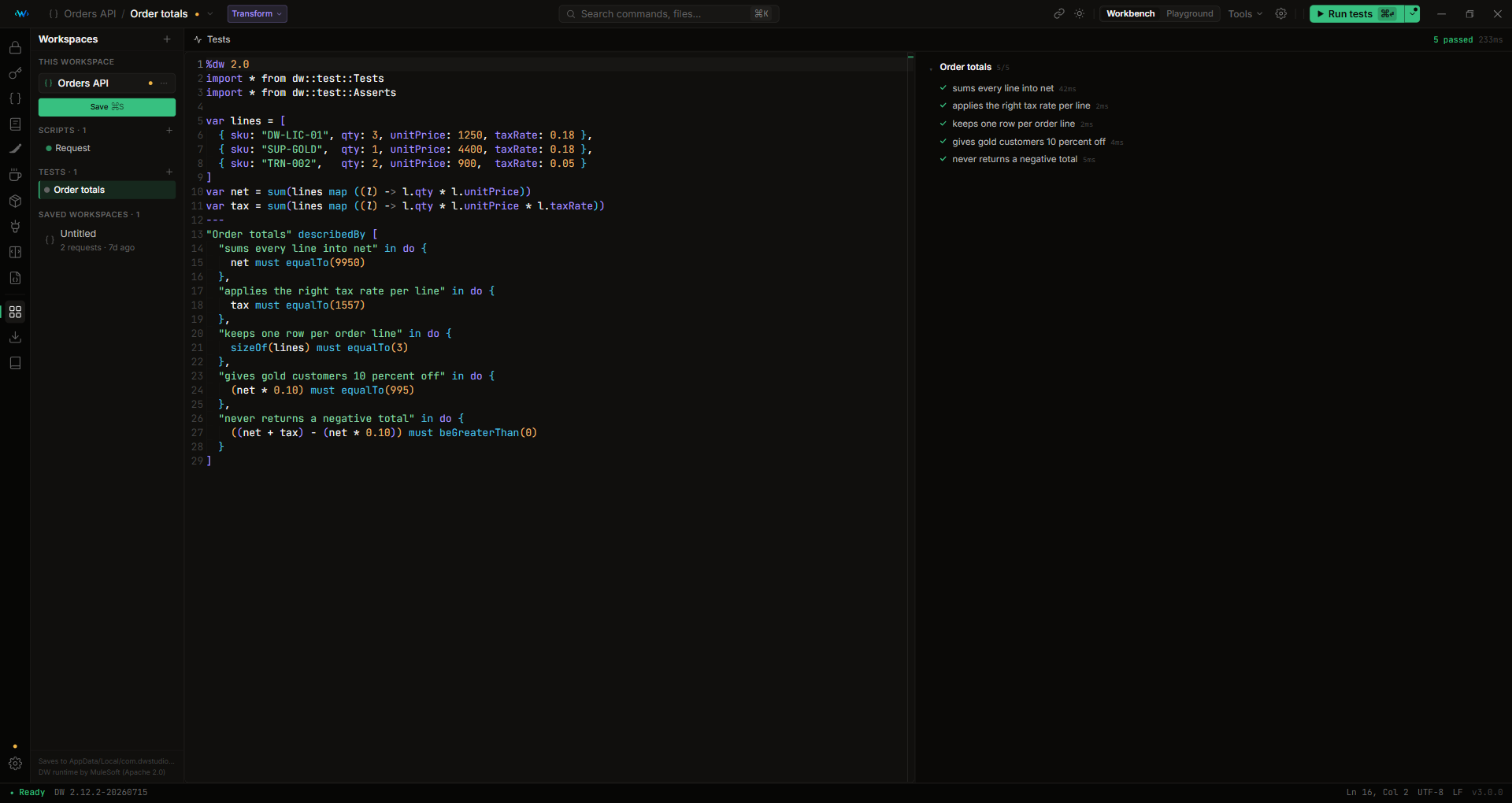
dw::test suites. Named assertions, run in-app, with clear failure messages and the line each one failed on.
- A whole setup in one link. Script, payload, variables and headers, for one request or an entire workspace. The other person opens it and presses Run. If your network blocks the site, Copy code only works with no URL at all.
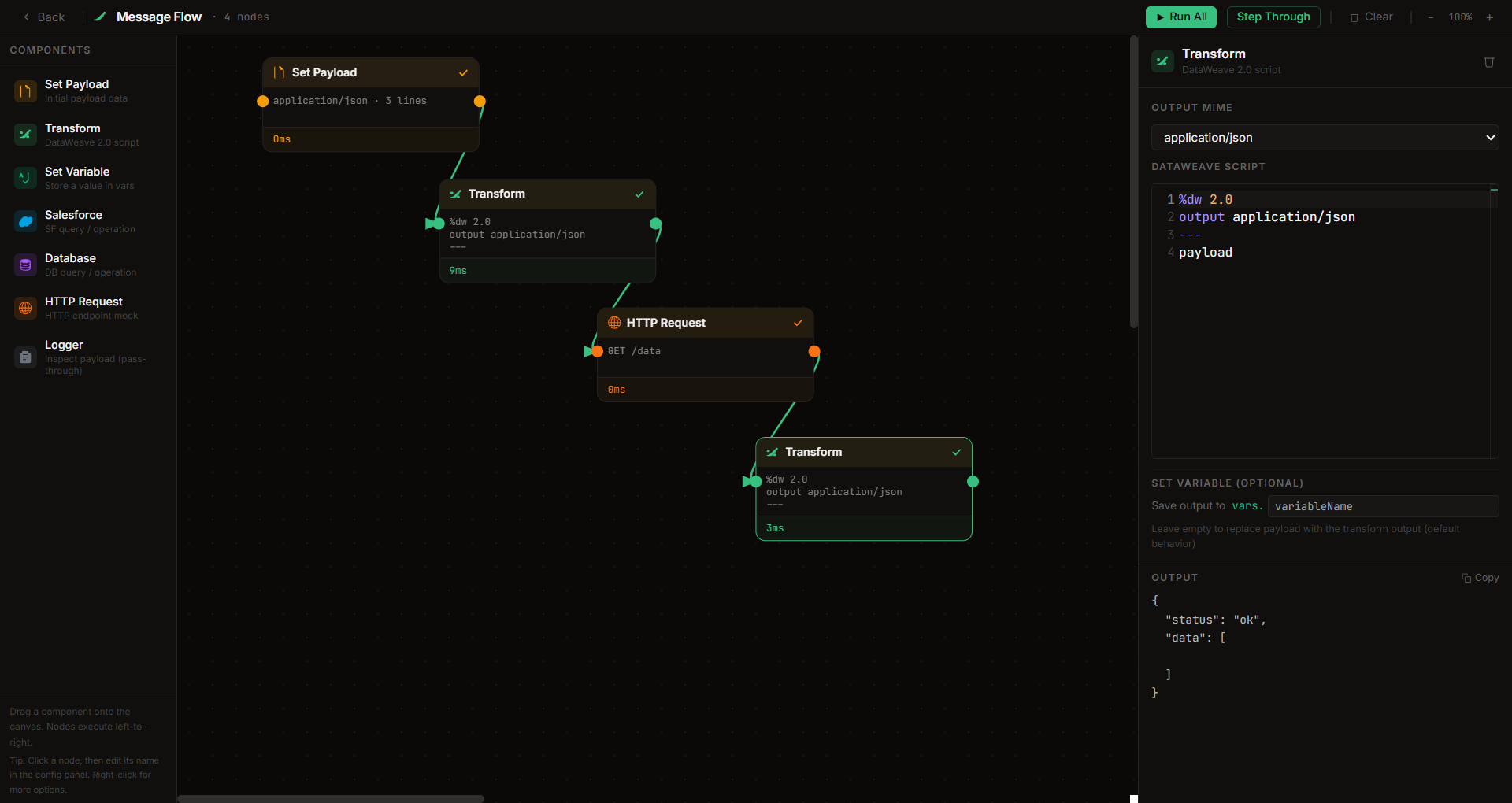
- Message Flow designer. Chain Set Payload, Transform, Set Variable, HTTP, Salesforce, Database and Logger nodes. Run the pipeline or step node by node, inspecting payload, variables and attributes at each stage. Imports real
<flow> XML from your Mule projects.
An editor that knows DataWeave
Autocomplete over all 361 functions with signature hints, typed against your actual payload's shape. Hover docs, go-to-definition, find-references, rename, outline, folding. Live diagnostics with fixes you can apply. Warnings when a script hashes with MD5 or leaves a log() behind. Formatting via the engine's own formatter, snippets, a searchable function reference, and DW 1.0 to 2.0 migration with a side-by-side diff.
DataWeave Academy and Practice
New to DataWeave? Nine short lessons start from what a payload is and what mapping means, each with something to try and a check at the end. Then LeetCode for DataWeave, offline. Build problems graded against hidden test cases, "fix this broken script" problems, and multiple choice questions written against the MuleSoft Certified Developer (Level 1) DataWeave objectives. Each topic has a short primer for newcomers, hints and a worked explanation.
Let your AI assistant run DataWeave
Ask Copilot or Claude for a DataWeave script today and you get something plausible. It has no way to check.
This extension ships an MCP server that lets the assistant run DataWeave itself. It can run a script against your payload and read the real error, type-check without running, run a dw::test suite and see which assertions passed, ask what every expression evaluated to when the output looks wrong, and look up any of the 361 functions and 172 recipes offline. So the scripts you get have been run before you see them.
It also answers plain HTTP: POST /run takes { script, payload, vars, attributes }, and a rows array runs one script over every row. That turns "test this transform against a month of production data" into a short Python loop instead of deploying an API to do it.
Both are off until you start them and listen on loopback only. Safe mode refuses Java interop and file or network access, so an agent can transform data but can't reach the rest of your machine. There's no API key or subscription: it's the assistant you already use, pointed at an engine that's already on your laptop.
Getting started
- Install the extension.
- Open the Command Palette and run DataWeave Studio: Open Playground, or click the
<W> icon in the activity bar.
- The first open takes a couple of seconds while the engine warms up. After that, every run is instant.
Requirements
None. The DataWeave 2.12 runtime and a Java 17 runtime are bundled inside the extension. It doesn't touch your system Java, JAVA_HOME or PATH, so it sits happily alongside Anypoint Studio's Java 8.
Works on Windows, macOS (Apple Silicon and Intel) and Linux. The Marketplace picks the right build for your machine.
Privacy
No telemetry, analytics or accounts. The extension only goes online when you send feedback or ask the Java tester to download a library. Details: PRIVACY.md.
Prefer a standalone app?
The same tool ships as a desktop app for Windows, macOS and Linux, with the same features.
If your workplace blocks the Store or unsigned installers, this extension is the way in. It needs no admin rights and no installer.
Feedback
Click the smiley in the top bar to rate it or leave a comment, no account needed. Bugs and ideas also go to GitHub issues. If the extension saves you time, a review on the Marketplace or a star on the repo really helps.
Embeds the DataWeave engine published by MuleSoft/Salesforce, pinned at 2.12.2-20260715 (Apache License 2.0; excel-module, which backs xlsx payloads, is under MuleSoft's Main Services Agreement). DataWeave Studio is not affiliated with, endorsed by, or sponsored by MuleSoft or Salesforce.

