Skip to content
| Marketplace
Sign in
Visual Studio Code>Visualization>AI TraceNew to Visual Studio Code? Get it now.
AI Trace

AI Trace

Arun

|
3 installs
| (0) | Free
A flight recorder for AI coding. Visualize the codebase as a graph and replay agent traversal.
Installation
Launch VS Code Quick Open (Ctrl+P), paste the following command, and press enter.
Copied to clipboard
More Info

AI Trace

A flight recorder for AI coding. Visualize the workspace as a graph and watch an agent move through it.

This is observability, not an agent. Connected tools can emit events through a provider adapter. The graph only shows files inside the open folder and skips hidden paths (.git, .idea, .gitignore, node_modules, and similar).

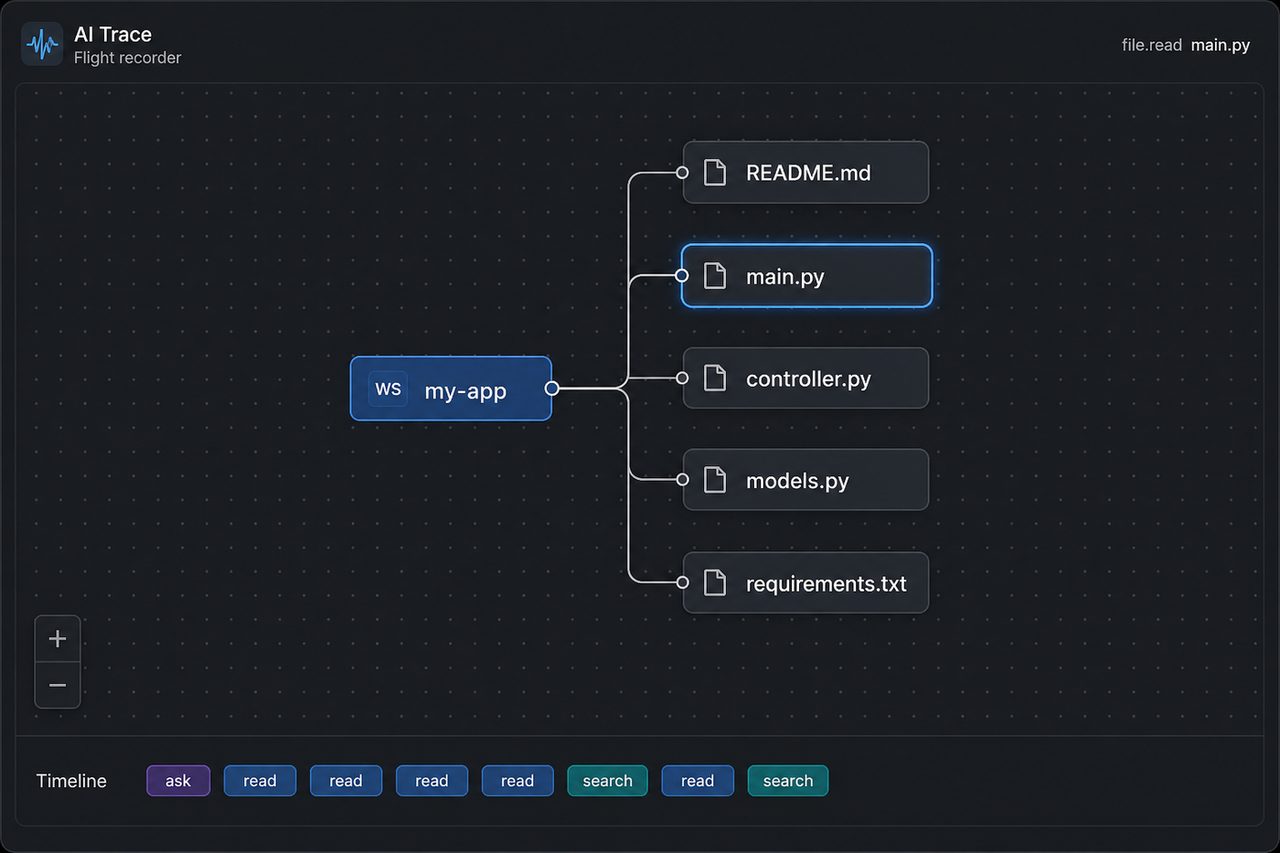
AI Trace graph

Folders expand on click. A live pulse highlights the file the agent just read or wrote, and the timeline at the bottom logs ask / read / search / write.

Usage

  1. Open a project folder.
  2. Command Palette → AI Trace: Open (or click AI Trace in the status bar).
  3. Use your coding agent. Reads and edits pulse on the graph and appear on the timeline.

Click a folder to expand it. Click a file to open it.

License

MIT.

  • Contact us
  • Jobs
  • Privacy
  • Manage cookies
  • Terms of use
  • Trademarks
  • Your Privacy Choices
  • Consumer Health Privacy
© 2026 Microsoft